no he says this "he helper class is in the navigation template by default in Beta 4. If you want to manually edit it now, you can do so by adding a span near the bottom as follows." which makes me think this was posted before beta 4 was released, i'd rather intergrate it with the system so that i have to do less edits when an update comes.
no he says this "he helper class is in the navigation template by default in Beta 4. If you want to manually edit it now, you can do so by adding a span near the bottom as follows." which makes me think this was posted before beta 4 was released, i'd rather intergrate it with the system so that i have to do less edits when an update comes.
If I understand correctly. It is there in beta4. It wasn't in previous versions. If you have a previous version, you need to add it manually.
You will still need to add the css code to EXTRA.css.
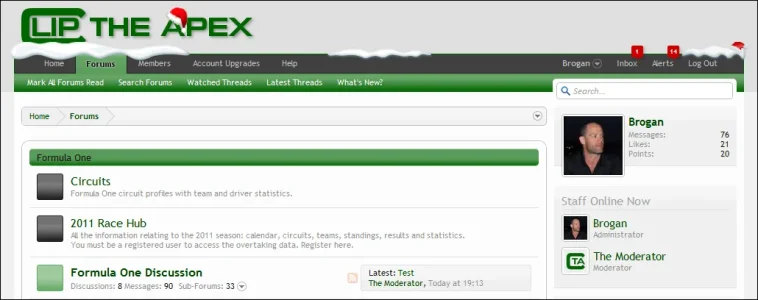
Is there a way to make sure the alerts box does not go behind the text? I have a translation and the text is smaller so it makes the alerts go to the back of the snow, meaning they get covered...
Is there a way to make sure the alerts box does not go behind the text? I have a translation and the text is smaller so it makes the alerts go to the back of the snow, meaning they get covered...
I have the code in the EXTRA.css to have the snow like it is here on xenforo.
My question is, I want to take it down and put it up when it snows (here in my city) But I dont want to have to look for the code everytime to add it, is there a syntax I can surround the code with to make it exclude it, then just remove that syntax when it snows to show the snow?
Sorry, I know this is basic html, just cant remember what it was...
is there a way to use conditionals to dictate the image used?
for example, if in node 3 4 5 or 6, use sfw.png, if in 1 or 2 use nsfw.png, if in catagory 7 use sfw, etc???