
XF 2.3 HaHa: Style the "No Prefix" Prefix - Can it be done?

MapleOne

Well-known member
Screenshot (26).webp

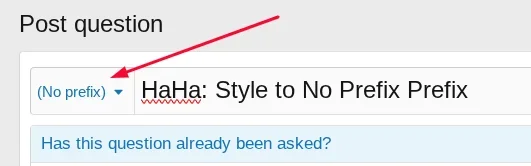
Is there any way to style the "No Prefix" Prefix?

Reason...

I will set No Prefix as default with the name "New Thread"

When the user submits the thread they get the Oops message telling them to select a prefix.

THIS IS MY DESIRED EFFECT

I am then customizing my Oops message explaining what each of my other prefixes are and which one is best to select for what thread.

The NEW site I am launching is heavily dependent on Prefixes and anyone submitting a thread needs to understand which of my 3 prefixes to select.

So for me the No Prefix has the desired effect and I know I can make it say anything I want by changing the language, but I am also looking at styling it with a New Name and the font awesome Icon BULLHORN.

Strange request, I know, but the new site I am launching is stripping down Xenforo to bare bones, no buttons, no forums, no categories, no index page, it is powered by prefixes and will be a very unique site when done.

So I know the easy answer is no but I'm really trying to find a solution to make the No Prefix look exactly like a Prefix.
(WHICH INCLUDES REMOVING THE SEPARATOR LINE ABOVE THE NO PREFIX)
 
Last edited:
  • Love
Reactions: CTS
the new site I am launching is stripping down Xenforo to bare bones, no buttons, no forums, no categories, no index page, it is powered by prefixes
I love seeing people going outside of the OEM box. Post it when its done because I want to see it!

(*sorry for no solution, was just compelled to give you a thumbs up on the project)
 
View attachment 333432

Is there any way to style the "No Prefix" Prefix?

Reason...

I will set No Prefix as default with the name "New Thread"

When the user submits the thread they get the Oops message telling them to select a prefix.

THIS IS MY DESIRED EFFECT

I am then customizing my Oops message explaining what each of my other prefixes are and which one is best to select for what thread.

The NEW site I am launching is heavily dependent on Prefixes and anyone submitting a thread needs to understand which of my 3 prefixes to select.

So for me the No Prefix has the desired effect and I know I can make it say anything I want by changing the language, but I am also looking at styling it with a New Name and the font awesome Icon BULLHORN.

Strange request, I know, but the new site I am launching is stripping down Xenforo to bare bones, no buttons, no forums, no categories, no index page, it is powered by prefixes and will be a very unique site when done.

So I know the easy answer is no but I'm really trying to find a solution to make the No Prefix look exactly like a Prefix.
(WHICH INCLUDES REMOVING THE SEPARATOR LINE ABOVE THE NO PREFIX)
Untested but you could play with it:

Code:
/* --- CUSTOM NO PREFIX STYLING --- */

/* 1. Target the 'No Prefix' text inside the Prefix Selector */
.prefixSelect .label.label--hidden {
    /* Reset the 'hidden' properties so it displays like a badge */
    display: inline-block;
    background: #3f4347; /* Dark Grey Background - Change to match your site */
    color: #ffffff;       /* Text Color */
    padding: 3px 8px;     /* Match standard prefix padding */
    border-radius: 4px;   /* Rounded corners */
    border: 1px solid transparent;
    font-size: 85%;       /* Match standard prefix font size */
    font-weight: 600;
    text-decoration: none;
    
    /* 2. Add the Bullhorn Icon (Font Awesome) */
    &:before {
        .m-faBase(); /* XenForo mixin to load FA font */
        content: "\f0a1"; /* Unicode for Bullhorn */
        padding-right: 5px; /* Space between icon and text */
    }
    
    /* Hover effect to make it feel interactive */
    &:hover {
        background: #2b2e31;
        text-decoration: none;
    }
}

/* 3. Remove the separator line in the Prefix Dropdown Menu */
.menu--prefix .menu-separator {
    display: none;
}
 
That code has no effect so I will play around with it to see if I can manipulate it a bit.

If there is something already in the theme you may need to add !important


Otherwise, try this in extra.less (you may still need to add !important before each semicolon):

Code:
.p-body-inner .inputGroup-text a
{
    background:red;
    padding:8px;
    border-radius:5px;
    color:white;
    border:1px solid black
}

.inputGroup-text a:hover
{   
     color:yellow;
}

Add icon to phrase no_prefix to

No prefix {icon::bullhorn}

I prefer with a space each side:

No prefix {icon::bullhorn}
 
Last edited:
I think this would work:

Code:
.js-activePrefix:not([data-prefix-class]), span.js-activePrefix[data-prefix-class=""]
{
    color: #FFF;
    background: green;
    // Adds default label styling
    display: inline-block;
    padding: 1px .35em;
    border: 1px solid transparent;
    border-radius: @xf-borderRadiusMedium;
    font-size: 80%;
    line-height: (@xf-lineHeightDefault * .9);
    text-decoration: none;
}
.menuPrefix.menuPrefix--none
{
    // Adds colors to popup menu
    color: #FFF;
    background: green;
}
 
Back
Top Bottom
