
You are using an out of date browser. It may not display this or other websites correctly.
You should upgrade or use an alternative browser.
You should upgrade or use an alternative browser.
Flat Awesome + - PixelExit.com [Deleted]
- Thread starter Russ
- Start date


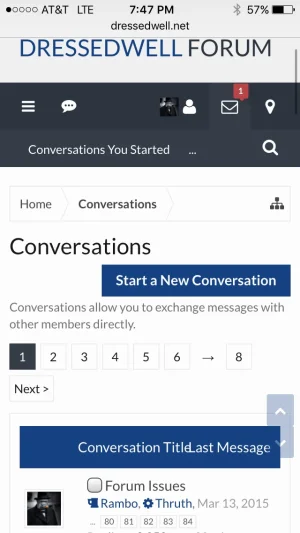

I'll apply this on a XenBase level for the next patch, for now you can paste this in extra.css:
Code:
@media (max-width:@maxResponsiveNarrowWidth) {
.conversation_list .sectionHeaders .posterAvatar { display: none; }
}worked like a charm. thanks russ.I'll apply this on a XenBase level for the next patch, for now you can paste this in extra.css:
Code:@media (max-width:@maxResponsiveNarrowWidth) { .conversation_list .sectionHeaders .posterAvatar { display: none; } }

Considering this theme. Is it possible to enable "sticky navigation" in this theme?
Ya it's just the quick search location, you can technically move the quick search into the navigation easily using the style properties.
Sorry I can't seem to figure out how to get the search bar to show up in the floating nav. Can you be more specific?
Check: Style Properties: [XB] Quick Search -> Quick Search Location -> 2
We also have an option to convert it to an icon while in float status in the same area:
Switch Quick Search while nav floats
I tried that, but it didn't seem to change anything... I think this might be bugged?
Do you want to PM me a link to your site so I can take a look.I tried that, but it didn't seem to change anything... I think this might be bugged?


That´s for me the same.
I will use the Close Button.
Sure you can use the close button, but it is not default behavior. It only happens like that with posts, it works as intended if selecting/deselecting threads.

The same happens on the default style.Sure you can use the close button, but it is not default behavior. It only happens like that with posts, it works as intended if selecting/deselecting threads.
The same happens on the default style.
Not in my experience, nor on the free Social style.

That is strange, I never really paid much attention to it but you're right. I just fired up my localhost and can see the menu closes after unchecking the box. The above image gif was made using a default style no modifications. Will look at add-ons now, Thanks.
Similar threads

- Replies
- 136
- Views
- 11K