My forum isn't open yet, as I'm still setting up nodes, permissions, emails etc. I've run into a problem where the user's registration confirmation emails seem to be going to trash or spam on most email clients. Is there a way to combat this?

You are using an out of date browser. It may not display this or other websites correctly.
You should upgrade or use an alternative browser.
You should upgrade or use an alternative browser.
XF 2.0 Emails going to spam/junk
- Thread starter owen1200003
- Start date

Unmaintained - Dealing with spam filters
Sometimes people have problems with spam filters eating their forum emails. This can be a problem when activation emails get flagged as spam. Of course one solution is to simply tell your users to check their spam folders. But many forum...
 xenforo.com

To ensure emails are sent to your members, you will want to notify the most popular email providers using their bulk email notification. This will whitelist your forum domain to ensure emails go to your members.
AOL
https://postmaster.aol.com/trouble-ticket
Google
https://support.google.com/mail/contact/bulk_send
Microsoft (hotmail and msn.com)
https://support.microsoft.com/en-us...fsmsbl3&locale=en-us&ccsid=636361241664007719
Yahoo
http://help.yahoo.com/l/us/yahoo/mail/postmaster/bulkv2.html
AOL
https://postmaster.aol.com/trouble-ticket
https://support.google.com/mail/contact/bulk_send
Microsoft (hotmail and msn.com)
https://support.microsoft.com/en-us...fsmsbl3&locale=en-us&ccsid=636361241664007719
Yahoo
http://help.yahoo.com/l/us/yahoo/mail/postmaster/bulkv2.html
Last edited:

Email services rely on a number of different signals to determine the likelihood that a message is spam or not.
One very important one is the "sending reputation" of the IP address where the emails originate from (ie where the SMTP request comes from).
If you are on shared hosting, the IP address you are sending email from will be shared amongst potentially hundreds of other users. If any of them are sending low quality (or even blatantly spam) emails, then the IP address you are sending from will have a bad reputation and many ESPs are likely to block your emails as spam.
There are two ways to combat this:
One very important one is the "sending reputation" of the IP address where the emails originate from (ie where the SMTP request comes from).
If you are on shared hosting, the IP address you are sending email from will be shared amongst potentially hundreds of other users. If any of them are sending low quality (or even blatantly spam) emails, then the IP address you are sending from will have a bad reputation and many ESPs are likely to block your emails as spam.
There are two ways to combat this:
- make sure you are not using a shared IP address, or an IP address with a poor sending history
- use an Email Service Provider (SparkPost, SendGrid, AWS SES, etc), - although again, you can still have problems if the sending IP address they use is shared and other users are sending low quality emails

Does using my Gmail as sender of my forum cause it to go to spam because it says coming from gmail but its coming directly from my server default settings for sending emails?
That's possible, although some email providers are going to send bulk emails to spam no matter what you do.
Male sure your server is set up for DKIM and SPF verification, and DMARC if you can. Then use the default PHP email to send mail.
Male sure your server is set up for DKIM and SPF verification, and DMARC if you can. Then use the default PHP email to send mail.
I take the liberty of pulling up the post because I've been struggling with this problem for two days and I've found a solution.
It's probably logical for most of you but since I don't know anything about SMTP servers, it took me a long time to understand.
So, many domain registrars allow you to create an email with your domain an provide a SMTP server access. So just use the SMTP of your registrar
Maybe that can help.
It's probably logical for most of you but since I don't know anything about SMTP servers, it took me a long time to understand.
So, many domain registrars allow you to create an email with your domain an provide a SMTP server access. So just use the SMTP of your registrar
Maybe that can help.

Thanks. Will be looking into that to get rid of the junk routing I get no matter what source address I use. Have tried my personal gmail address as a source and the one I paid for w the same url as my forum. The first produces a big ugly security warning at the top of the email. The second goes right to the junk folder. I used my wife's address and signed her up as a test member. I have to get this fixed before I start telling people about my new forum.I take the liberty of pulling up the post because I've been struggling with this problem for two days and I've found a solution.
It's probably logical for most of you but since I don't know anything about SMTP servers, it took me a long time to understand.
So, many domain registrars allow you to create an email with your domain an provide a SMTP server access. So just use the SMTP of your registrar
Maybe that can help.
You should be using an email address associated with your forum URL - if the links in the email differ from the sender / return path email address, it will be treated as more suspicious by spam filters.
Next you need to ensure that the IP address you are sending from has a good sending reputation. Most shared hosting providers have a terrible sending reputation because people do send spam or poorly managed emails from their servers.
DKIM and SPF will also help.
Sending email is really easy. Getting email delivered into inboxes reliably, takes quite a lot of effort.
Next you need to ensure that the IP address you are sending from has a good sending reputation. Most shared hosting providers have a terrible sending reputation because people do send spam or poorly managed emails from their servers.
DKIM and SPF will also help.
Sending email is really easy. Getting email delivered into inboxes reliably, takes quite a lot of effort.
For the "security warning at the top of the email", I think using your registrar SMTP with SSL (in general port 465), username and password should be good.Thanks. Will be looking into that to get rid of the junk routing I get no matter what source address I use. Have tried my personal gmail address as a source and the one I paid for w the same url as my forum. The first produces a big ugly security warning at the top of the email. The second goes right to the junk folder. I used my wife's address and signed her up as a test member. I have to get this fixed before I start telling people about my new forum.
I would like to add that it is not sufficient to use an address associated with your forum URL, you have to "register" this email.
Register? Got some specifics? Perhaps you're referring to what @AndyB was talking about above?...I would like to add that it is not sufficient to use an address associated with your forum URL, you have to "register" this email.
Last edited:
No, I just speaking about you have to go on your registrar panel an click something like "Create an email address"Register? Got some specifics? Perhaps you're referring to what @AndyB was talking about above?
@AndyB, I've used your Google link to start troubleshooting my new member emails because the link in the email back to my forum warns of a suspicious site with the following message:To ensure emails are sent to your members, you will want to notify the most popular email providers using their bulk email notification. This will whitelist your forum domain to ensure emails go to your members.
AOL
https://postmaster.aol.com/trouble-ticket
https://support.google.com/mail/contact/bulk_send
Microsoft (hotmail and msn.com)
https://support.microsoft.com/en-us...fsmsbl3&locale=en-us&ccsid=636361241664007719
Yahoo
http://help.yahoo.com/l/us/yahoo/mail/postmaster/bulkv2.html
"Suspicious link
This link leads to an untrusted site. Are you sure you want to proceed to www.foxprotocsharp.com?"
While filling out the Google form, they ask for the email header which shows:

I've worked on my DNS SPF1 record through their "Learn more" link and wonder what your SPF1 record looks like. Here's mine so far:
"v=spf1 include:spf.protection.outlook.com include:_spf.google.com -all"
I added the suggested include for google.com and did not want to remove the include for outlook that was there originally as I've purchased Outlook online from GoDaddy as my forum email service. Care to share what your SPF1 looks like? I'm assuming an include needs to be added for all the major email destinations. Seems like a big task.
The DKIM "Learn more" link was way more challenging. Made no progress. Any help there? What's the DKIM record need to look like?
Thanks for any help.
Last edited:
If you have cPanel, go to Email Deliverability for your site and set up DKIM, SPF, and Reverse DNS (PTR) there. cPanel will validate the records for you.
Normally, if you turn on DKIM, SPF, and Reverse DNS, it will populate them for your server.
But they generally don't look like what you have above. More like this:
Normally, if you turn on DKIM, SPF, and Reverse DNS, it will populate them for your server.
But they generally don't look like what you have above. More like this:
Code:
Name: default._domainkey.{your domain}.
DKIM: v=DKIM1; k=rsa; p={code specific to your domain};

Name: {your domain}.
SPF: v=spf1 +a +mx +ip4:({server IP}) +ip4:{your IP} +ip4:{your IP} ~all

Name: {server IP in reverse order}.in-addr.arpa.
Reverse DNS (PTR): {server name}.I'm not seeing "Email Deliverability" in cPanel:If you have cPanel, go to Email Deliverability for your site and set up DKIM, SPF, and Reverse DNS (PTR) there. cPanel will validate the records for you.
Normally, if you turn on DKIM, SPF, and Reverse DNS, it will populate them for your server.
But they generally don't look like what you have above. More like this:
Code:Name: default._domainkey.{your domain}. DKIM: v=DKIM1; k=rsa; p={code specific to your domain}; Name: {your domain}. SPF: v=spf1 +a +mx +ip4:({server IP}) +ip4:{your IP} +ip4:{your IP} ~all Name: {server IP in reverse order}.in-addr.arpa. Reverse DNS (PTR): {server name}.
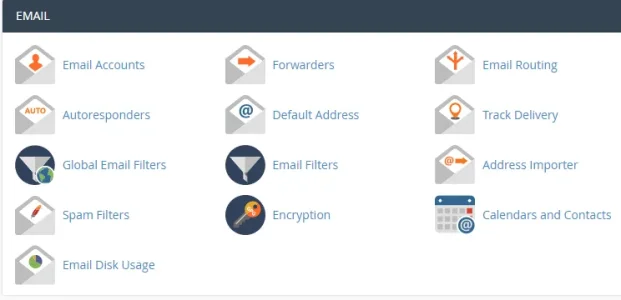
I'm starting to think I signed up for the wrong type of email service. Here's what I've got:
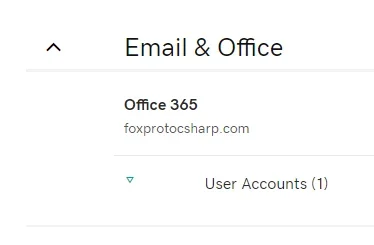
Called GoDaddy and got some very good help. He undid the change I had made to my DNS record, then I tried clearing my browser cache to fix the warning from my old test email - that didn't work and I didn't want to clear all my logins and passwords from google, so the support guy became a member of my forum and he did not get the same warning. I believe that part is fixed, er ready to go, although I cannot say what the original problem was. Onward! @djbaxter, thanks.You may have an older version of cPanel or your host may have disabled that option.
Submit a ticket to your host and ask them to check that DKIM, SPF, and Reverse DNS (PTR) are properly configured.

I just to update this post:
I had this problem with the email confirmation in Spam folder on gmail but after my hosting changed the server IP everything is fine on gmail and yahoo. Now I will have to contact aol and outlook because on this emails the confirmation email is going in spam/junk.
If someone have any sugestion please reply.
I had this problem with the email confirmation in Spam folder on gmail but after my hosting changed the server IP everything is fine on gmail and yahoo. Now I will have to contact aol and outlook because on this emails the confirmation email is going in spam/junk.
If someone have any sugestion please reply.
Similar threads
- Replies
- 11
- Views
- 885
- Replies
- 2
- Views
- 657


- Replies
- 3
- Views
- 1K

- Replies
- 1
- Views
- 341

- Replies
- 3
- Views
- 878
