It would appear I used rclone using additional paths which messed up things. Im still uploading avatars but so for everthing looks perfect. An awesome app !!!Yes I just added https:// and images appear however avatars do not.
Ill PM you the URL.

![[DigitalPoint] App for Cloudflare®](/community/data/resource_icons/8/8750.jpg?1692633961)
It would appear I used rclone using additional paths which messed up things. Im still uploading avatars but so for everthing looks perfect. An awesome app !!!Yes I just added https:// and images appear however avatars do not.
Ill PM you the URL.

Disable the presigned URL option.The image attachments from posts are showing as .r2.cloudflarestorage.com/ instead of the data.domain.com that was set.
The avatar images are but attachments from posts aren't.
Please, how do I make it show my subdomain instead of the long r2.cloudflarestorage.com URL?
Thanks.
Thanks for the reply.Disable the presigned URL option.
There is, but it requires a Pro-level Cloudflare plan (any paid tier, doesn’t work for Free).Thanks for the reply.
Seems like I will have to stick with the option since it saves bandwidth and improves performance.
Was thinking there is a way to get Cloudflare R2 to serve the subdomain I provided in the bucket settings.



You could try disabling the proxy just as a test, but if it's not working with 2.2.14, the proxy isn't going to matter.so... i just updated to patch 2. and i am noticing that unfurled links are not unfurled properly. they appeared as linked text. i haven't seen it reported as bug yet. so i was just wondering if the cloudflare proxy could be the issue. if others can confirm if this is happening at their end as well.
View attachment 297449
View attachment 297450

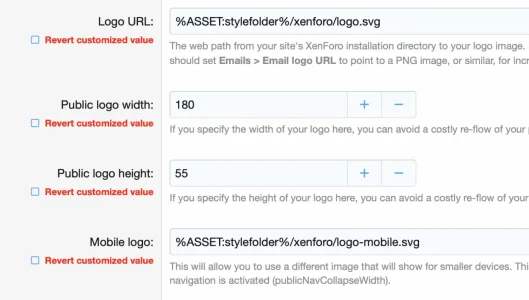
%ASSET:stylefolder%/xenforo/logo.svgHonestly I have never done anything with custom style folders. That being said, my guess is that if something was “reset” it would be a XenForo thing. There’s nothing in the addon that’s doing anything trick with URLs, it’s literally just a destination for the abstracted filesystem andI use R2 for my data folder and I just upgraded to 2.2.14 (P2).
I noticed my styles folder was reset to the old path/URL instead of the new R2 path/URL so logos weird not displayed.
The style I use, uses this weird URL for logos:
Code:%ASSET:stylefolder%/xenforo/logo.svg
As a workaround I copied the styles folder back to the old local /data folder, that works.
Not really sure if you can say anything about this @digitalpoint? Looks like the XF upgrade messed with the R2 redirection?
%ASSET.stylefder% is definitely not coming from the addon.
Just grabbed 2.2.14 to see if I can find anything obvious so if I find something I'll add it to your bug report.Thanks, I will report it as a bug.
So just skimming it, the code doesn't look particularly different in 2.2.14... it does look like it's only called when .less templates are compiled though. I assume your style property with that string is somewhere in a .less template?Just grabbed 2.2.14 to see if I can find anything obvious so if I find something I'll add it to your bug report.
Just to be certain it wouldn't be anything in the addon, do other locations work (specifically things like avatars are still coming from the public domain of the R2 bucket)?



 blog.cloudflare.com


We use essential cookies to make this site work, and optional cookies to enhance your experience.