
Ok, I've edited the previous post: https://xenforo.com/community/threads/conversation-button-under-avatar.81574/page-5#post-819022No i dont do that kind of stuff.. i messed my site up before and i been scared ever since
Now it can't go easier


![[cXF] Conversation Button under Avatar](/community/data/resource_icons/3/3531.jpg?1541884785)
Ok, I've edited the previous post: https://xenforo.com/community/threads/conversation-button-under-avatar.81574/page-5#post-819022No i dont do that kind of stuff.. i messed my site up before and i been scared ever since

Have you tested it first?To show conversation button in online staff block in [bd] Widget Framework add-on:
- download attachment, unzip and install xml file


Of course. WF installed on my test board with Conversation Button add-on. And it worked for meHave you tested it first?
I uploaded it, do I need to do anything else, its not showing at this point.Of course. WF installed on my test board with Conversation Button add-on. And it worked for me
Well, it's just a simple template modification.
WF and Conversation Button add-on should be on. That extra add-on for WF sgould be enabled too.I uploaded it, do I need to do anything else, its not showing at this point.
You can install it anytime.So first I update then install that widget?
ok - I was looking for it by my name, I will verify when one of the moderators come online.WF and Conversation Button add-on should be on. That extra add-on for WF sgould be enabled too.
And don't forget: you won't see this button by your name!

You can set this Appearance > Styel Properties > General > Link, Hover State , but it will affect all links on forum.It works, any way to get rid of the underline when hovering over button for staff? have no text decoration checked off, it still appears.
/* START - Conversation Button under Avatar */
.conversationButton a:hover {
  text-decoration: none !important;
}
/* END - Conversation Button under Avatar *//* START - Conversation Button under Avatar */
.conversationButtonInfo a:hover {
text-decoration: none !important;
}
/* END - Conversation Button under Avatar *//* START - Conversation Button under Avatar */
.convButtonInfoA a:hover {
text-decoration: none !important;
}
/* END - Conversation Button under Avatar *//* START - Conversation Button under Avatar */
.convButtonStaff a:hover {
text-decoration: none !important;
}
/* END - Conversation Button under Avatar *//* START - Conversation Button under Avatar */
.conversationButton a:hover, .conversationButtonInfo a:hover, .convButtonInfoA a:hover, .convButtonStaff a:hover {
text-decoration: none !important;
}
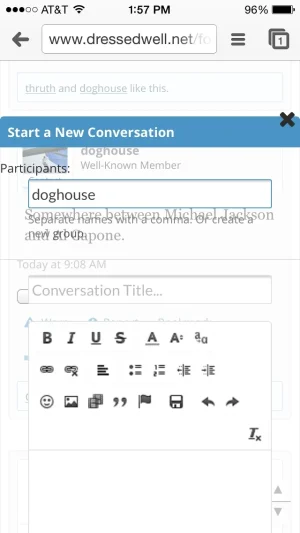
/* END - Conversation Button under Avatar */Strange. It should work, but I see you're using UI.X. I also have a copy of it and tested - works fine.Any way to change the color on the overlay? With my theme setting it's kind of translucent:
View attachment 82402
Yep, latest version. Cleared cache and logged in and out. Tried 2 browsers. Still coming up opaque like that.Strange. It should work, but I see you're using UI.X. I also have a copy of it and tested - works fine.
Are you using latest version of add-on?
Try with CTRL+F5, clear browser cache...
Anyone else has overlay like that?
Can you test on default style?Yep, latest version. Cleared cache and logged in and out. Tried 2 browsers. Still coming up opaque like that.
Showing opaque under that style as well.Can you test on default style?
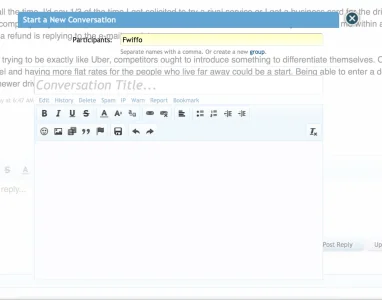
Sorry, don't know where look further. I tested on 3 different sites, 4 different browsers and no problems.
Oh, now I see the attachment. There is something wrong. Please check if you have version 1.6.0, because several versions don't use that code to show that X (to close overlay).
We use essential cookies to make this site work, and optional cookies to enhance your experience.

