Crazy amount of guests

OT:
Ukraine might have just done us all a favour. They bombed the data centres in Russia

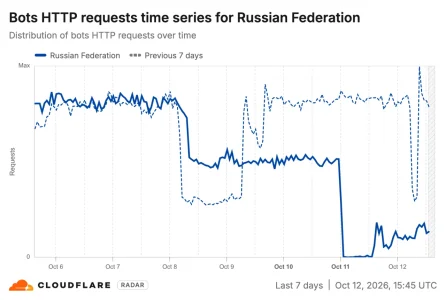
BTW: Since the attacks bot traffic from Russa has dropped massively, according to Cloudflare:

1791820299895.webp
While many of the now missing bots have been genuine Yandex bots there seem to have been legions of others: Users report that throughout basically all social media platforms all of a sudden it has become pretty peaceful. Loads of aggressive "American" Trump-/Maga-promoters have fallen silent all of a sudden as have loads of "German" rightwing-AFD-promoters as have "Polish" people speaking against Ukraine and "Ukrainian" people promoting Russia etc. etc.. Likes for remaining and new posts of this kind of content have also been fallen to close to zero. Quite impressive to see the extent of activity of Russian troll fabrics all of a sudden as well as the effects that they have on public communication and opinion (and that has vanished for the moment). What on paper created the impression of a massive movement on social media turned out to be almost completely fabricated by the Russians troll army to take influence on politics, society and elections of Western countries as it seems now basically proven. I hope, someone is saving loads of data for a proper scientific analysis.
 
Last edited:

Mine didn't! I was hoping it would when I heard about that. Mine has mostly been from the US this past week.
 
Mine didn't! I was hoping it would when I heard about that. Mine has mostly been from the US this past week.
From my experience scrapers come from the US for the most part (if you ignore the Chinese, Vietnamese, Brazilian, Argentinian an Mexican temporary waves - the US are a constant annoyance and they are the biggest one by far). There is quite some Russian involvement in the bot topic, but their scraping hosts are rather in the US, the Netherlands, Israel and a bunch of other countries as it seems based on the last two years of traffic analysis. What may possibly have been dropping now are spam registration attempts as these came from Russia quite often in the past (apart from India and Pakistan).
 
Yes in the past most of my spam registrations were from Russia and Romania - haven't had that for a long time.

Incidentally the bots (minority) not being blocked at whats new are about 60% from ASN 398781 - Oculus Networks Inc - hosting company with IP's in USA (most) and a smaller amount of IP's in Israel - these are hitting my rule 4 and don't seem to be getting past the challenge so I haven't blocked the ASN in case it blocks VPN users and the challenge is catching them.
 
If this carries on working I might change the block to a redirect to an html page that's more user friendly on the slight chance that a genuine visitor is using a desktop and clicking on Whats New. But my statistics show it's vary rare that visitors come from desktop whereas virtually all the bots do. And even then they can still browse the home page and forum.
 
Yes in the past most of my spam registrations were from Russia and Romania - haven't had that for a long time.

Incidentally the bots (minority) not being blocked at whats new are about 60% from ASN 398781 - Oculus Networks Inc - hosting company with IP's in USA (most) and a smaller amount of IP's in Israel - these are hitting my rule 4 and don't seem to be getting past the challenge so I haven't blocked the ASN in case it blocks VPN users and the challenge is catching them.
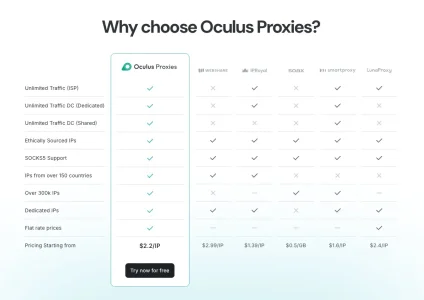
Oculus operates a worldwide network of proxies that they openly advertise. It seems to be data center proxies according to their site but they compare themselves to shady companies offering resident proxies:


Bildschirmfoto 2026-10-12 um 19.37.56.webp


According to Google's AI overview they also offer rotating residential proxies:

Oculus Networks Inc. is an Internet Service Provider (ISP) and digital infrastructure company that provides IP addresses, internet connectivity, and proxy services. [1, 2]

Key Details


    • Leadership: Headed by CEO Neil Mirchandani. [1]
    • Services & Products: Offers rotating residential proxies, static/ISP proxies, dedicated and shared datacenter proxies, and physical server access via platforms like Oculus Proxies and OOC ISP. [1, 2, 3]
    • Network & Scale: Operates hundreds of thousands of IP addresses, with primary infrastructure concentrated in the United States and global proxy pools spanning Europe, Asia, Latin America, and Africa. [1, 2]

I see no point in not blocking them. They have, along with a couple of others, popped out of nowhere last week or so with massive amounts of requests.
 
Something interesting has come out of that rule. By seeing what's left at rules 3 and 4, it's showing up specific data centres and IP ranges rather than any residential proxies. Not much from the US getting through and no referers on those. But instead, as you'd expect, a few have switched to the Uk which is whitelisted in my last rule - hence showing up a particular scraper from the Uk. Which is a company called Fastplanet - using Datacamp. The IP range scraping is all from Fastplanet, so rather than blocking Datacamp's ASN (which is more likely to affect vPN users) I can just block the IP range for Fastplanet.

All the Uk ones had fake referers so were bypassing the rule 3 challenge and would bypass rule 4 as the Uk is whitelisted. So a bit of a whackamole but numbers are really low now.
 
There seems to be some activity on the bot front: I do see loads of new, never before seen ASNs from all over Europe and the US that proxycheck reports since a couple of hours. Almost all data centers. Many smaller entities but also things like AS36351 IBM Cloud with quite a bunch of different IPs trying to access.
 
Well the ones I just found arriving (including Fastplanet/datacamp) were:
  • 30 IPs on hosting companies: Datacamp (212238), LonConnect (212286), FDCservers (30058), NEXT GLOBAL (204139), Bite Lietuva (210906), web2objects GmbH (204646), Proper Support (203346) and HostRoyale (203020).
I've set up a new rule just to challenge those separately - just as a test to see whether or not they can solve challenges. So far it looks like they can't with 0% solve rate.

But even if I ignored those getting through, my numbers are vastly reduced to just members, robots and genuine guests on the site with the odd one or two that isn't a genuine guest, and server cpu is 0%.
 
Guest numbers down to 20 - just Robots and members. Even if I just do this temporarily it is giving a lot of satisfaction 😂
Real user... and I get that. You lost me the moment I hit it, because I can't see whats new on your site. JMO, you're doing a lot of reputational damage to your website. People have choices today... lots of choices, and you are pushing them away.

Screenshot 2026-10-13 073019.webp
 
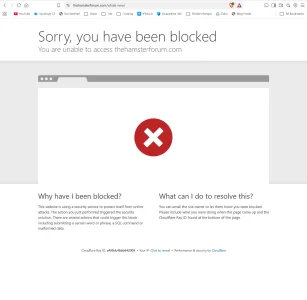
So you're using a desktop and you clicked on Whats New - Instead of the home page or the forum page - try those - no google links or other links on other sites would lead to whats new! They would lead to threads or the home page. Hardly any genuine guest hitting my site uses a desktop. You'll get challenged as well if you go on the site as I haven't changed country challenges yet until I monitor a bit more. Also as mentioned above, if it stays stable by tomorrow I'll replace that with an html page and a redirect. It's a low risk as a guest would need to be a) using a desktop and b) click on whats new. Most guests from analysis don't click on whats new and virtually none use a desktop. There is also the option of adding a referer which I'm considering as none have a referer that were going for whats new. But am still thinking about that.

So so far the desktop block rule is blocking the residential proxies - or the vast majority of them. None on the site so far. This may depend on different forums though as virtually all my residential proxies were desktops hitting whats new. So only whats new is blocked for desktops and guests can access the rest of the site.
 
Last edited:
There are elegant ways to hide What's New menu link for guests. You have disabled Search for guests anyway, and that disappeared from the interface for someone who is not logged in. Makes sense to do the same for the other menu link - it's not a permission setting but a small customization of the navigation menu. And then if any guest still hits that URL which should no longer be visible for guests in any way, that's definitely a bot probing URLs that don't exist on the page...

AdminCP > Setup > Public navigation > What's new > Display condition: $xf.visitor.user_id > 0 > Save

And to hide the bolt button for mobile users:

AdminCP > Appearance > Styles & Templates > Templates > find extra.less in the list of the style visible for guests and paste this at the bottom:

CSS:
/* Hide What's New lightning bolt icon from guests */
[data-logged-in="false"] {
    .p-navgroup-link--whatsnew,
    .button--icon--bolt {
        display: none !important;
    }
}

then Save and exit.

And if you really, really, really want XF to deliver a nice "no permission" page for guests reaching the What's New page:

AdminCP > Appearance > Styles & Templates > Templates > find whats_new template in the list of the style visible for guests and paste this at the very top:

HTML:
<xf:if is="!$xf.visitor.user_id">
    <xf:macro template="error_macros" name="no_permission" />
<xf:else />

and then at the very end of the template paste this to close the else branch of the if condition:

HTML:
</xf:if>

then Save and exit.

Repeat for all themes visible for your guests, if needed.

And that would make the CF rule unnecesary for this path, but the changes in the template files will need to be checked if merged successfully on every theme update.
 
There are elegant ways to hide What's New menu link for guests. You have disabled Search for guests anyway, and that disappeared from the interface for someone who is not logged in. Makes sense to do the same for the other menu link - it's not a permission setting but a small customization of the navigation menu. And then if any guest still hits that URL which should no longer be visible for guests in any way, that's definitely a bot probing URLs that don't exist on the page...

AdminCP > Setup > Public navigation > What's new > Display condition: $xf.visitor.user_id > 0 > Save

And to hide the bolt button for mobile users:

AdminCP > Appearance > Styles & Templates > Templates > find extra.less in the list of the style visible for guests and paste this at the bottom:

CSS:
/* Hide What's New lightning bolt icon from guests */
[data-logged-in="false"] {
    .p-navgroup-link--whatsnew,
    .button--icon--bolt {
        display: none !important;
    }
}

then Save and exit.

And if you really, really, really want XF to deliver a nice "no permission" page for guests reaching the What's New page:

AdminCP > Appearance > Styles & Templates > Templates > find whats_new template in the list of the style visible for guests and paste this at the very top:

HTML:
<xf:if is="!$xf.visitor.user_id">
    <xf:macro template="error_macros" name="no_permission" />
<xf:else />

and then at the very end of the template paste this to close the else branch of the if condition:

HTML:
</xf:if>

then Save and exit.

Repeat for all themes visible for your guests, if needed.

And that would make the CF rule unnecesary for this path, but the changes in the template files will need to be checked if merged successfully on every theme update.
Thank you. The code is much appreciated and I see the point. However, just to be clear, I am not blocking all guests - hopefully none but a very rare chance it might block a genuine guest. The bolt icon is only on mobile view and the Cloudflare rule doesn't block mobile users anywhere of which almost all the genuine guests coming to my forum are and hardly any of them click on whats new (from analysis) - although I appreciate that could change.

The Cloudflare rule is only blocking guests on desktop computers. Not mobiles. And only if they click on whats new after arriving on the site. Hence I was thinking of a user friendly html page redirect to replace the "blocked" page, via a redirect, as mentioned earlier.

So it needs a combination of desktop user and clicking on whats new. Which is a very slim chance of blocking any genuine guest but it is blocking all the residential proxies right now. While statistics can change, the analysis shows most genuine guests never click on Whats New anyway and almost all of them are on mobiles. Literally all I have on my site now are: Members, Verified Robots, real guests - and one or two unknowns (one of which turned out to be a verified bot). Very low numbers.

It's a bit of a test for now and I'm still working out the redirect rule for an html page. As I'm on the free plan I can't just add one instead of the standard block page, so I'm thinking of a redirect rule. I hadn't actually expected this block rule to work as long as it has, but it is doing. No residential proxies on my site. So at the moment, I am monitoring for a day or two to see what happens next. And the chances of blocking a genuine guest are very slim.

I was looking at this to replace the block page. But as I said - it would be very unlikely to block any genuine guests. And they wouldn't be blocked from the entire site either.

I had only just set this rule up and mentioned it might be temporary and I was monitoring and working on the option of an html page - which looks like this at the moment. :-) Bearing in mind virtually no genuine guest will ever see it.
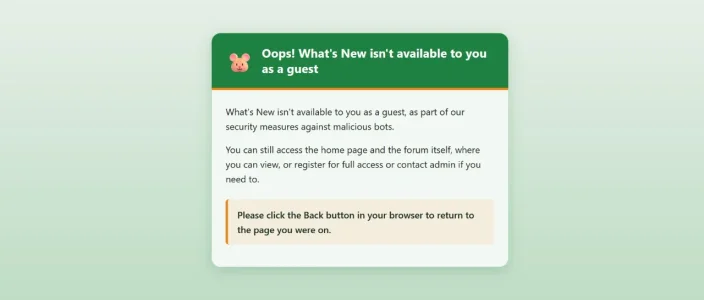
Or - as also mentioned earlier - I could add a referer so no desktop guest gets blocked. Currently none of the residential proxies trying to hit whats new (99.9% of them) has a referer - but that could change.

Plus this might be site dependent. My particular bot swarm is 99.9% going to whats-new and 25 to 30% of them can solve challenges. That might not be the same for everyone.

Of course some people on here might use computer rather than mobile and if testing it then yes you'll get a block page.

html notice.webp
 
Last edited:
Of course in a couple of days the residential proxies might evolve and decide not to hit whats new any more and then I wouldn't need that rule. So it's a test really. But right now it's blocking all of them for absolute minimal risk.

I see the point about why not just turn off whats new for guests - but that wouldn't block the bots. They go direct.
 
Last edited:
Is you site locked to CF IP's only? Like, brute force tested and approved? No way to bypass?
Sorry not sure I understand. But yes it's Cloudflare IP's only. I have the Cloudflare secret header rule in .htaccess which would block anything going direct to the origin IP and nothing has done that to date. Why do you ask please? Is there something I should be concerned about?

I've added a referer for now for the desktop rule so no chance of a guest on a desktop being blocked at whats new until I can look at sorting out the html redirect.
 
Then this rule should stop residential proxies hitting your server, not CF, your server.

Code:
(http.user_agent contains "Chrome/120." or http.user_agent contains "Chrome/145." or http.user_agent contains "Chrome/131." or http.user_agent contains "Chrome/133." or http.user_agent contains "Chrome/146." or http.user_agent contains "Firefox/135." or http.user_agent contains "Firefox/133." or http.user_agent contains "Chrome/116." or http.user_agent contains "Chrome/124." or http.user_agent contains "Chrome/110." or http.user_agent contains "Chrome/107." or http.user_agent contains "Chrome/104." or http.user_agent contains "Chrome/136." or http.user_agent contains "Chrome/99." or http.user_agent contains "Chrome/123." or http.user_agent contains "Chrome/119." or http.user_agent contains "Chrome/101." or http.user_agent contains "Chrome/100." or http.user_agent contains "Chrome/142." or http.user_agent contains "Chrome/108." or http.user_agent contains "Chrome/112." or http.user_agent contains "Chrome/109." or http.user_agent contains "Chrome/117." or http.user_agent contains "Chrome/106." or http.user_agent contains "Chrome/103." or http.user_agent contains "Chrome/105." or http.user_agent contains "Chrome/111." or http.user_agent contains "Chrome/65.") and http.referer eq "" and (not cf.client.bot) and (not http.cookie contains "xf_user")

And the previously shared browser impersonator, combined, they're hard to get past for the majority of bot traffic.

If you want to get really aggressive, this single rule should do it, covering a whole lot more older browsers, which bots tend to use.

Code:
(
  (
    http.user_agent contains "Chrome/65."
    or http.user_agent contains "Chrome/99."
    or http.user_agent contains "Chrome/100."
    or http.user_agent contains "Chrome/101."
    or http.user_agent contains "Chrome/103."
    or http.user_agent contains "Chrome/104."
    or http.user_agent contains "Chrome/105."
    or http.user_agent contains "Chrome/106."
    or http.user_agent contains "Chrome/107."
    or http.user_agent contains "Chrome/108."
    or http.user_agent contains "Chrome/109."
    or http.user_agent contains "Chrome/110."
    or http.user_agent contains "Chrome/111."
    or http.user_agent contains "Chrome/112."
    or http.user_agent contains "Chrome/116."
    or http.user_agent contains "Chrome/117."
    or http.user_agent contains "Chrome/119."
    or http.user_agent contains "Chrome/120."
    or http.user_agent contains "Chrome/123."
    or http.user_agent contains "Chrome/124."
    or http.user_agent contains "Chrome/131."
    or http.user_agent contains "Chrome/133."
    or http.user_agent contains "Chrome/136."
    or http.user_agent contains "Chrome/142."
    or http.user_agent contains "Chrome/145."
    or http.user_agent contains "Chrome/146."
  )
  or
  (
    http.user_agent contains "Firefox/133."
    or http.user_agent contains "Firefox/135."
  )
  or
  (
    http.user_agent contains "Safari/"
    and not http.user_agent contains "Chrome/"
    and not http.user_agent contains "CriOS/"
    and not http.user_agent contains "FxiOS/"
    and
    (
      http.user_agent contains "Version/13."
      or http.user_agent contains "Version/14."
      or http.user_agent contains "Version/15."
      or http.user_agent contains "Version/16."
      or http.user_agent contains "Version/17."
    )
  )
  or
  (
    http.user_agent contains "CriOS/99."
    or http.user_agent contains "CriOS/100."
    or http.user_agent contains "CriOS/101."
    or http.user_agent contains "CriOS/103."
    or http.user_agent contains "CriOS/104."
    or http.user_agent contains "CriOS/105."
    or http.user_agent contains "CriOS/106."
    or http.user_agent contains "CriOS/107."
    or http.user_agent contains "CriOS/108."
    or http.user_agent contains "CriOS/109."
    or http.user_agent contains "CriOS/110."
    or http.user_agent contains "CriOS/111."
    or http.user_agent contains "CriOS/112."
    or http.user_agent contains "CriOS/116."
    or http.user_agent contains "CriOS/117."
    or http.user_agent contains "CriOS/119."
    or http.user_agent contains "CriOS/120."
    or http.user_agent contains "CriOS/123."
    or http.user_agent contains "CriOS/124."
    or http.user_agent contains "CriOS/131."
    or http.user_agent contains "CriOS/133."
    or http.user_agent contains "CriOS/136."
    or http.user_agent contains "CriOS/142."
    or http.user_agent contains "CriOS/145."
    or http.user_agent contains "CriOS/146."
  )
  or
  (
    http.user_agent contains "FxiOS/133."
    or http.user_agent contains "FxiOS/135."
  )
)
and http.referer eq ""
and not cf.client.bot
and not http.cookie contains "xf_user"
 
I'm finding the whole cloudflared option interesting.


Bypasses the entire system of firewalling and allowing CF IP's, you just delete all ports from your firewall, add cloudflared to your server, then enable the services you need in CF, https, ssh, etc. Free tunnel, daemon, connectors, free workers vpc at present for direct DB connection. Looking at CF load balancing... like damn, $5 a month for 500k DNS queries on using their load balancer with 2 origins. That is cheap as for load balancing.

CF are coming up with some pretty cool tools, affordably for most.
 
I'm finding the whole cloudflared option interesting.


Bypasses the entire system of firewalling and allowing CF IP's, you just delete all ports from your firewall, add cloudflared to your server, then enable the services you need in CF, https, ssh, etc. Free tunnel, daemon, connectors, free workers vpc at present for direct DB connection. Looking at CF load balancing... like damn, $5 a month for 500k DNS queries on using their load balancer with 2 origins. That is cheap as for load balancing.

CF are coming up with some pretty cool tools, affordably for most.
That sounds excellent. I think I can't use it on shared hosting though - and it might need a vps?
 
Sorry I'm just still stupidly excited that I have no residential proxies on my site 😂 Although that desktop block whats new rule might not work so well by tomorrow now I've added a referer.
 
Back
Top Bottom