
That's interesting...
I dealt with the search issue by disabling search for guests; they can go to Bing or Google. That means one less CF rule to deal with. Didn't realize they were also hammering /misc/cookies.

That's interesting...

/cookies has always been a top path on my forum. First path I put a managed challenge on. Now it's normal but the swarm that came in last night hammered it again.That's interesting...
I dealt with the search issue by disabling search for guests; they can go to Bing or Google. That means one less CF rule to deal with. Didn't realize they were also hammering /misc/cookies.
Very interesting. That seems an odd thing for the AI bots to be training on. Unless they are somehow "threading" all of a user's posts together somehow. I've had guest viewing of member profiles turned off, but I am probably going to make a template edit so the usernames in the postbit do not display the "membercard." Or, aren't linked at all. I could probably do the same with member @ mentions also, as that really has no functional purpose except for logged-in members. I don't know if bots can access those or not (seeing that they're triggered by a tap or mouse click) but better safe than sorry. And like you say, I err towards member privacy over the guests on the Internet getting access.And then saw that these bots, with no access to member profiles were searching on member names within threads.

That's what it looked like to me. The same user names were searched in different threads. Again and again. I too have guest viewing of member profiles turned off but there's still the user window. I have the location in the tooltip but I wish I could make that tooltip non accessible for guests. I looked but couldn't find a way.Very interesting. That seems an odd thing for the AI bots to be training on. Unless they are somehow "threading" all of a user's posts together somehow. I've had guest viewing of member profiles turned off, but I am probably going to make a template edit so the usernames in the postbit do not display the "membercard." Or, aren't linked at all. I could probably do the same with member @ mentions also, as that really has no functional purpose except for logged-in members. I don't know if bots can access those or not (seeing that they're triggered by a tap or mouse click) but better safe than sorry. And like you say, I err towards member privacy over the guests on the Internet getting access.
Yeah? Not seeing that. Maybe 2000 requests in 24 hours or so.I know some bots also follow the path to the style chooser; that's another feature I'm going to make a template edit for, so it will not appear unless a member is logged in. I doubt it will upset anyone who's a guest. And if they want that control, it's enticement for them to join.
But isn't Cloudflare the better option? Everything stopped there at least won't reach the server.I had thought of displaying on a first page of posts, but so many of our threads are dozens of pages deep and a lot of useful information is contained therein. So that isn't an option.
Overall I think that some of these features are better handled by making template edits to remove functionality for guests, rather than making rules. That means we have fewer holes we have to patch using CF's security rules.
They're still targeting it. 13k hits in the last hour.When I get time tomorrow, I'm going to look into /misc/cookies, even if they're not hammering it now. That's why lurking here and absorbing these tips helps all of us in the long run.
I don't think so. A bot doesn't see a page like a human being does. It sees the source code, the html.I might be wrong but they hit the cookie banner to get rid of it, so they can "see" the full page clearly to index? They probably don't get a referer cookie, being bots, so get the cookie banner on every page they want to scrape and have to get rid of it.
I had managed challenge on one rule for a while. I just changed it to interactive to see if it stopped more bots - which it did slightly. Regular users and members wouldn't have been challenged in that rule so it didn't matter.I too think that a non-interactive challenge yields false negatives. And not only do visitors not have to checkmark anything, they can't. So genuine visitors can't prove they are in fact human. I use a managed challenge for paths that members, known bots and genuine visitors need to have access to. Works well. I had a swarm come in last night around 10pm and they stayed the entire night: 271.83k requests. An awful lot hitting /cookies. But look how nicely my managed challenge is dealing with those: 202.92k requests and a CSR of 0.03%. And visitors on my forum are normal. I'm happy.
View attachment 344808
When I find out something, I can let you know. I've been too busy with multiple sites, dealing with all the bot traffic. Two of the forums are also long overdue for an upgrade to 2.3, and I haven't been able to put aside the time to do it thanks to all this messing around.I have the location in the tooltip but I wish I could make that tooltip non accessible for guests. I looked but couldn't find a way.
I don't see many accesses, certainly not enough to worry about, but I know some bots will wander in there.Yeah? Not seeing that. Maybe 2000 requests in 24 hours or so.
True, it's better to stop everything long before it hits the server, and that is my preference. But at least for those who aren't stopped by Cloudflare, they can try to access search but won't be able to find it, so that's less of a load for serving a dead end vs. letting them get in and actually trigger the search. I'm pretty sure the What's New tab is powered by search, and it's so tempting to ditch that also...but I know it's also a very popular feature, and I'm sure the CF verified bots know to look there for the latest content to index.But isn't Cloudflare the better option? Everything stopped there at least won't reach the server.
Oof. I don't know what's up but today we've gotten slammed twice, and this is after my latest round of rules tweaking. I'm so over this.They're still targeting it. 13k hits in the last hour.

Why turn off guest searching for that? Put a rule on search. Every action you take because of bots that negatively affects people using your forum, just turns people away from your community, elsewhere, bots win.It looked as though they were actually harvesting member data that way. So I immediately turned off Search for guests.
Yeah, I've been thinking about it. I panicked when I saw what was happening and immediately disabled guest search in the ACP. Later as I became more familiar with Cloudflare I created a managed challenge for paths I couldn't block and added /search to it. So yeah, I could enable it again.Why turn off guest searching for that? Put a rule on search. Every action you take because of bots that negatively affects people using your forum, just turns people away from your community, elsewhere, bots win.
I don't get rounds - I get 24/7 hammering! Although admittedly the hammering is a bit less during the day than at night. It's quite satisfying to see how many Cloudflare prevented getting to the site when there are 500,000 or so IP's - but it would be nicer if more of them didn't get through.When I find out something, I can let you know. I've been too busy with multiple sites, dealing with all the bot traffic. Two of the forums are also long overdue for an upgrade to 2.3, and I haven't been able to put aside the time to do it thanks to all this messing around.
I don't see many accesses, certainly not enough to worry about, but I know some bots will wander in there.
True, it's better to stop everything long before it hits the server, and that is my preference. But at least for those who aren't stopped by Cloudflare, they can try to access search but won't be able to find it, so that's less of a load for serving a dead end vs. letting them get in and actually trigger the search. I'm pretty sure the What's New tab is powered by search, and it's so tempting to ditch that also...but I know it's also a very popular feature, and I'm sure the CF verified bots know to look there for the latest content to index.
Oof. I don't know what's up but today we've gotten slammed twice, and this is after my latest round of rules tweaking. I'm so over this.
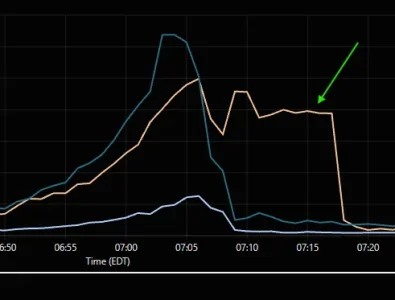
Yet if we look at the bigger picture...like early this morning, when we had yet another round of bots hit us. In the course of an hour, there were 957k requests. 487k were mitigated by Cloudflare. 392k were served by our Cloudflare cache. 79k were served by origin (our server). So of all that traffic, our server only saw 8.2% of it. And we still got slowed down for about 5 minutes. Not even that severely, to be honest. One interesting spot I saw was around 7:09am, when our origin traffic dropped back to normal, as did the Cloudflare cache...but the mitigation continued for another nine minutes. This is part of the graph for the hour.
View attachment 344870
Normally, all three plots in the graph are concurrent, but this shows that CF was kickin' butt and takin' names as our origin traffic eased back to normal.
Tomorrow it's back to slaving over the rules yet again, as I'm now getting a warning from Google that they're seeing a lot of "403 Forbidden" results due to blocked access...and I have Google whitelisted, so no idea what's going on there.
As they say...back to the drawing board.


This is an UK-based international forum with English being the commonly used language to ensure that communication across language borders is possible. If you want that anyone is able to read and understand what you are saying you should post in English too, as everyone else does it.Sırf bu botlardan dolayı adsense trafik uyarısı aldım. Elimden geldiğince burayı botlara kapatmak için uğraşıyorum. Özellikle yeni mesajlar sekmesini kullanıyorlar. Artık oraya daha sert önlemler alacağım. Yoksa adsense uyarısı hala kalkmadı.
Translation:Sırf bu botlardan dolayı adsense trafik uyarısı aldım. Elimden geldiğince burayı botlara kapatmak için uğraşıyorum. Özellikle yeni mesajlar sekmesini kullanıyorlar. Artık oraya daha sert önlemler alacağım. Yoksa adsense uyarısı hala kalkmadı.
I feel better leaving it off, vs. hoping a CF rule might catch it. (I still can't trust CF rules 100%.) Visitors can use Google if they want to search the forums. When I do our upgrade, Google search will be in the search drop-down, so that will be available to everyone. Nobody has complained (and with this forum, they'll complain to the owner immediately if they don't like something), so I'm not worried about it.Yeah, I've been thinking about it. I panicked when I saw what was happening and immediately disabled guest search in the ACP. Later as I became more familiar with Cloudflare I created a managed challenge for paths I couldn't block and added /search to it. So yeah, I could enable it again.


We use essential cookies to make this site work, and optional cookies to enhance your experience.
