Content Blur Pro - Boost Registrations and Upgrades

Content Blur Pro - Boost Registrations and Upgrades [Paid] v2.5.10

No permission to buy ($40.00)
Yeah, I think that should be possible. So if there's 20 posts per page, they'd get to see the first 2 pages and then that's it for all threads?
yes, with some sort of reset at start of month (or week or year if you want to add more flexibility... monthly would be good for my forum).

My goal is: have a limit for unregistered members per month, then blur (maybe 100 posts for my forum). a different limit for registered but unpaid (maybe like 250) and of course unlimited for paid members.
 
We are using this to blur thread content for users in a particular user group

The add-on is currently configured so that the first two posts in a thread remain visible, and the blur begins from the third post onwards.
The blur itself is working working correctly.

On the third post, the notice displays as expected: “Only subscribers can read this thread”

However, the same notice is also appearing incorrectly on the first post, even though the first post is not blurred and should remain fully visible.

Expected behaviour:
The notice should only appear where the blur starts, in this case on the third post.

Actual behaviour:
The notice appears correctly on the third post, but also incorrectly appears on the first post.

Could you please advise whether this is a bug, or a setting I need to adjust?

Cheers
 
We are using this to blur thread content for users in a particular user group

The add-on is currently configured so that the first two posts in a thread remain visible, and the blur begins from the third post onwards.
The blur itself is working working correctly.

On the third post, the notice displays as expected: “Only subscribers can read this thread”

However, the same notice is also appearing incorrectly on the first post, even though the first post is not blurred and should remain fully visible.

Expected behaviour:
The notice should only appear where the blur starts, in this case on the third post.

Actual behaviour:
The notice appears correctly on the third post, but also incorrectly appears on the first post.

Could you please advise whether this is a bug, or a setting I need to adjust?

Cheers

Hi @Wutime did you find time to look at this? Cheers.
 
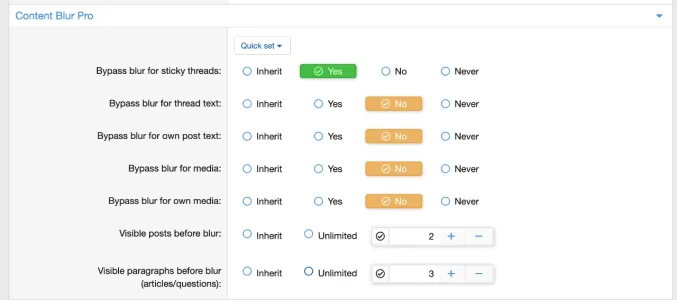
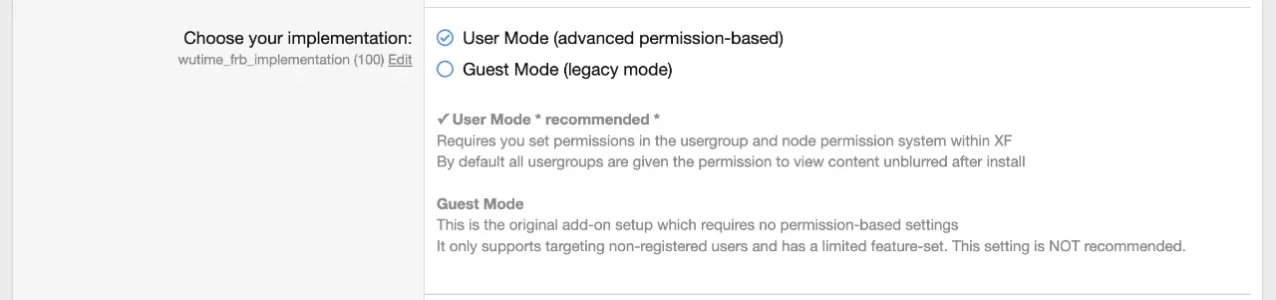
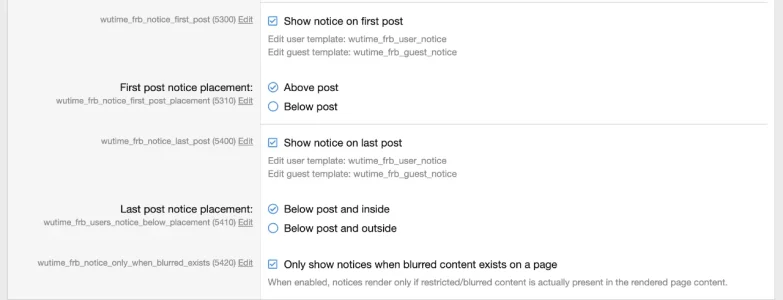
@JamesBrown I just did a quick test and things worked as expected with the following settings (and no underlying overriding permissions from other usergroups). If your settings differ please let me know.

User Permission Settings​

Screenshot 2026-05-24 at 11.00.26 PM.webp


Options > General Options​

Screenshot 2026-05-24 at 11.01.49 PM.webp


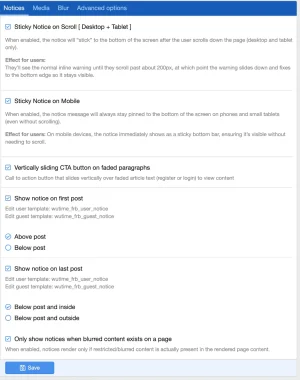
Options > Notices​

Screenshot 2026-05-24 at 11.01.34 PM.webp


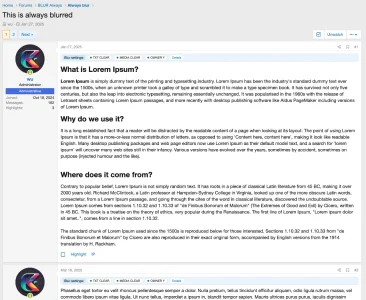
Results (correct in dev):​

Screenshot 2026-05-24 at 11.05.48 PM.webpScreenshot 2026-05-24 at 11.05.57 PM.webp​

​

 
Give it a try, or let me know how your setup differs and I'll try to replicate.
 
Yeah, I think it's that option, enable it, and it should fix your issue. I'm going to update the wording for that option to be more accurate and less confusing.
 
Is it possible to make this have limits per time period? as in, unregistered can see X posts per month, then it's blurred until next month? and registered but non-pyaing level can get a higher limit say Y posts per month?
Wasn't clear to me reading this if it's capped forever when a user hits the limit or if there's an option to reset the limits automatically in a week or month or year. Thanks!
@joshg just a heads up this is still being considered and tested in development.
 
Wutime updated Content Blur Pro - Boost Registrations and Upgrades with a new update entry:

v2.5.4

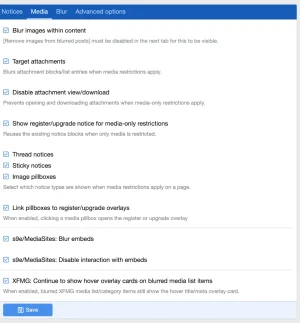
  • ADD: New "Visible media before blur" permission to allow the first N media items on a page to remain visible, independent of visible post count
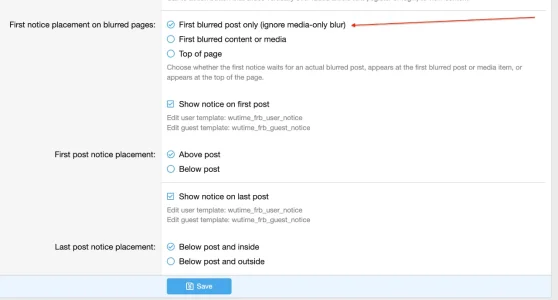
  • ADD: New "First blurred post only" notice placement option for pages where only media may be blurred; this is now the default for new installs
  • FIX: Prevent duplicate top/first blurred notices when using "First blurred post only"
  • FIX: Lightbox media attachment labels now say view instead of download
  • FIX: Admin home stats now show...

Read the rest of this update entry...
 
Latest version adds new options for the notice display. For anyone using media blur I strongly recommend change your notice display to the new notice display option of: First blurred post only (ignore media-only blur)

Screenshot 2026-05-27 at 7.06.45 PM.webp
 
Wutime updated Content Blur Pro - Boost Registrations and Upgrades with a new update entry:

v2.5.5

  • FIX: Allowed media items now open in the normal XenForo lightbox instead of the raw attachment page
  • FIX: Prevent gated media from appearing unblurred inside the lightbox gallery for allowed media
  • FIX: Allowed full-size inline attachments now display the full image instead of a stretched thumbnail
  • FIX: Media pillbox placement is centered correctly after gated items are removed from the lightbox set

Read the rest of this update entry...
 
Installed but have many errors. Here is just one of the many.
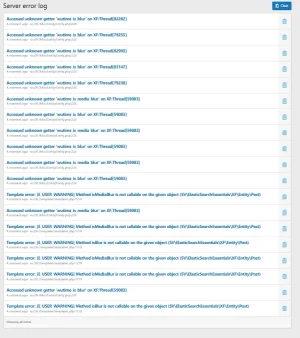
Screenshot 2026-05-30 204657.webp

Server error log
  • InvalidArgumentException: Accessed unknown getter 'wutime_is_blur' on XF:Thread[82282]
  • src/XF/Mvc/Entity/Entity.php:228
  • Generated by: Unknown account
  • May 30, 2026 at 8:45 PM

Stack trace​

#0 src/XF/Mvc/Entity/Entity.php(140): XF\Mvc\Entity\Entity->get('wutime_is_blur')
#1 internal_data/code_cache/templates/l1/s4/public/thread_list_macros.php(568): XF\Mvc\Entity\Entity->offsetGet('wutime_is_blur')
#2 src/XF/Template/Templater.php(922): XF\Template\Templater->{closure:internal_data/code_cache/templates/l1/s4/public/thread_list_macros.php:558}(Object(SV\LazyImageLoader\XF\Template\Templater), Array, Object(XF\Template\ExtensionSet))
#3 internal_data/code_cache/templates/l1/s4/public/xfes_widget_similar_threads.php(22): XF\Template\Templater->callMacro('thread_list_mac...', 'item', Array, Array)
#4 src/XF/Template/Templater.php(1800): XF\Template\Templater->{closure:internal_data/code_cache/templates/l1/s4/public/xfes_widget_similar_threads.php:4}(Object(SV\LazyImageLoader\XF\Template\Templater), Array, NULL)
#5 src/addons/MaZ/AUN/XF/Template/Templater.php(39): XF\Template\Templater->renderTemplate('xfes_widget_sim...', Array, true, NULL)
#6 src/XF/Widget/WidgetRenderer.php(62): MaZ\AUN\XF\Template\Templater->renderTemplate('public:xfes_wid...', Array)
#7 src/XF/Widget/WidgetRenderer.php(67): XF\Widget\WidgetRenderer->render()
#8 src/XF/Template/Templater.php(2145): XF\Widget\WidgetRenderer->__toString()
#9 internal_data/code_cache/templates/l1/s4/public/thread_view.php(1283): XF\Template\Templater->widgetPosition('thread_view_bel...', Array)
#10 src/XF/Template/Templater.php(1800): XF\Template\Templater->{closure:internal_data/code_cache/templates/l1/s4/public/thread_view.php:696}(Object(SV\LazyImageLoader\XF\Template\Templater), Array, Object(XF\Template\ExtensionSet))
#11 src/addons/MaZ/AUN/XF/Template/Templater.php(39): XF\Template\Templater->renderTemplate('thread_view', Array, true, NULL)
#12 src/XF/Template/Template.php(24): MaZ\AUN\XF\Template\Templater->renderTemplate('public:thread_v...', Array)
#13 src/XF/Mvc/Renderer/Html.php(50): XF\Template\Template->render()
#14 src/XF/Mvc/Dispatcher.php(471): XF\Mvc\Renderer\Html->renderView('XF:Thread\\View', 'public:thread_v...', Array)
#15 src/XF/Mvc/Dispatcher.php(453): XF\Mvc\Dispatcher->renderView(Object(XF\Mvc\Renderer\Html), Object(XF\Mvc\Reply\View))
#16 src/XF/Mvc/Dispatcher.php(412): XF\Mvc\Dispatcher->renderReply(Object(XF\Mvc\Renderer\Html), Object(XF\Mvc\Reply\View))
#17 src/XF/Mvc/Dispatcher.php(66): XF\Mvc\Dispatcher->render(Object(XF\Mvc\Reply\View), 'html')
#18 src/XF/App.php(2826): XF\Mvc\Dispatcher->run()
#19 src/XF.php(806): XF\App->run()
#20 index.php(23): XF::runApp('XF\\Pub\\App')
#21 {main}

Request state​

array(4) {
["url"] => string(47) "/community/threads/gears-and-axles.59083/page-4"
["referrer"] => string(71) "https://jeep-cj.com/community/threads/gears-and-axles.59083/post-531848"
["_GET"] => array(0) {
}
["_POST"] => array(0) {
}
}

 
Installed but have many errors. Here is just one of the many.
Believe it or not, that's completely normal if you're applying upgrades to your website while it's live and you didn't put your board "inactive" during the upgrade.

I'd also hazard a guess that you're getting absolutely hammered by crawlers/bots unless your forum is a super busy forum. If it's the former let me know, I've got my forums locked down tighter than a nun's ******. :)
 
Believe it or not, that's completely normal if you're applying upgrades to your website while it's live and you didn't put your board "inactive" during the upgrade.

I'd also hazard a guess that you're getting absolutely hammered by crawlers/bots unless your forum is a super busy forum. If it's the former let me know, I've got my forums locked down tighter than a nun's ******. :)
Yea, I'm always chasing the bots. I had cleared the errors because I thought that is why the errors occurred and the have been none since.
 
On the point of Crawlers/Bots/AI, I'm seriously thinking of releasing a proper CF backed addon for free to deal with things. I recently hardened some of my forums because they were getting 800,000+ bad bots per 24 hours. In the past 6-12 months I've seen the abuse steadily climb and I know I'm not alone. It's just pure abuse and a complete waste of server resources, and with a bit of study, extremely easy to prevent with the right setup and tools.

Thankfully I'm on the other side of it now and the only drawback is the fact my servers CPU's sit idle with not much to do now that they're only serving real bots, beneficial crawlers, and actual guests and members.
 
Back
Top Bottom