Content Blur Pro - Boost Registrations and Upgrades

Content Blur Pro - Boost Registrations and Upgrades [Paid] v2.4.8

No permission to buy ($40.00)
hello today i purchased this addon but mistakely i think i purchased wrong addon i need addon to hide post and need to reply to see the post so this addon is different ?? am i right ??

 
There's a Release Candidate v2.5.0 available for download to customers in the "Downloads" section as follows:

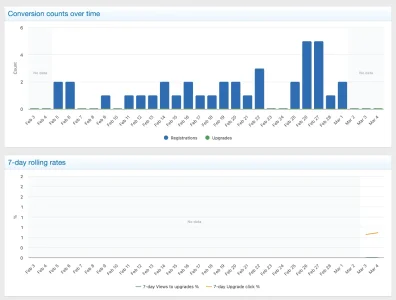
Screenshot 2026-03-03 at 11.53.28 PM.webp

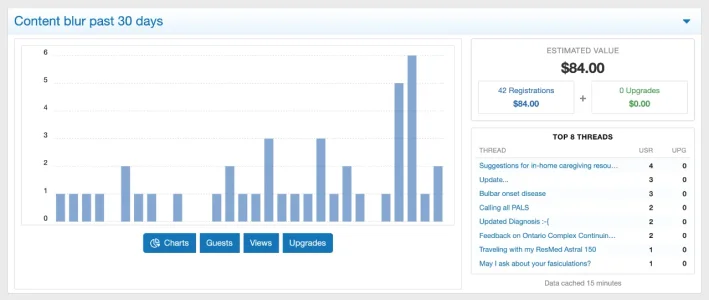
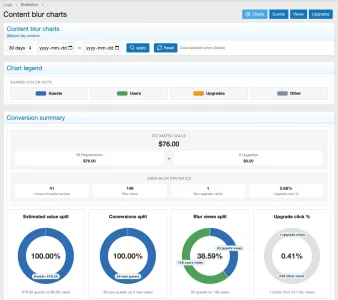
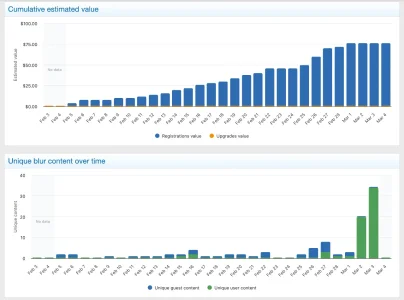
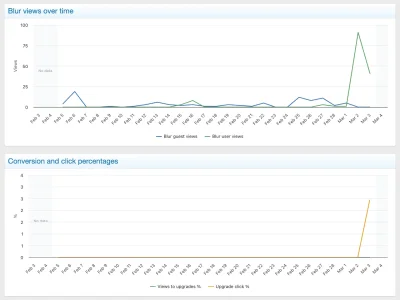
This release includes major improvements to blur/fade behavior, media controls, and admin charts/statistics. It has been stable in extended testing, but because of the scope of changes I’m publishing it as a beta first for broader real-world validation before final stable release.

Supported integrations:
  • XFMG
  • XFRM
  • XenAddons AMS (Article Management System)
  • XenAddons UBS (User Blogs System)
  • XenAddons Showcase
  • XenAddons CAS (Classified Ads System)
Permission model:

Most integrations use a 3-permission model:
  1. Bypass blur for [content]
  2. Bypass blur for own [content]
  3. Bypass blur for media
How this works:
  • Content and media permissions are independent in supported integrations, so media-only blur is supported.
  • Example media-only setup: allow content bypass, deny media bypass.
    Result: text stays visible, media is blurred/locked.
  • “Own” bypass permissions allow users to view their own authored items unblurred (integration-specific behavior).
Important default behavior:

For newly added integration permissions, Unregistered + Registered are seeded to Allow so existing community memberes are not suddenly blur-blocked after upgrade.

Admins can then tighten permissions by group/category as needed.

Analytics note:

“Estimated value” is intentionally conservative by default.
  • FRB-attributed registrations default to $2.00 each (adjustable in options).
  • Upgrades currently reflect initial attributed upgrade events.
  • Recurring subscription revenue is not yet included; that may be added in a future update.
 

Attachments

  • Screenshot 2026-03-04 at 12.09.43 AM.webp
    Screenshot 2026-03-04 at 12.09.43 AM.webp
    33.3 KB · Views: 3
  • Screenshot 2026-03-04 at 12.12.52 AM.webp
    Screenshot 2026-03-04 at 12.12.52 AM.webp
    58.6 KB · Views: 3
  • Screenshot 2026-03-04 at 12.13.01 AM.webp
    Screenshot 2026-03-04 at 12.13.01 AM.webp
    45 KB · Views: 4
  • Screenshot 2026-03-04 at 12.13.14 AM.webp
    Screenshot 2026-03-04 at 12.13.14 AM.webp
    39.3 KB · Views: 3
  • Screenshot 2026-03-04 at 12.13.24 AM.webp
    Screenshot 2026-03-04 at 12.13.24 AM.webp
    36.5 KB · Views: 3
Last edited:
  • Love
Reactions: Bob
Hi Wutime,

thanks for this awesome add on, you did a great job.

Is it possible to block blurred content for a specific registered user group, independent from guests, on selected thread IDs?
In other words, I would like to restrict access to specific threads by ID for one particular registered user group, even though they are logged in.

Best regards
 
Hi Wutime,

thanks for this awesome add on, you did a great job.

Is it possible to block blurred content for a specific registered user group, independent from guests, on selected thread IDs?
In other words, I would like to restrict access to specific threads by ID for one particular registered user group, even though they are logged in.

Best regards
Yeah, 100%, just do it with "Node permissions", that's actually the entire reason for the permissions being permissions.

If you have questions, shoot.
 
If you have questions, shoot.
Hi Wutime,

thanks for getting back to me.

I found the node permissions now and I understand how to restrict complete forums.
What I still can’t figure out is how to apply the blur to single threads only.

My goal is:

  • registered members in a specific user group should be blocked (blurred) on selected thread IDs
  • without moving those threads into a separate forum if possible

Am I missing a setting in Content Blur Pro for “thread ID based” restrictions, or is the add on designed to work only via node permissions?

If it’s node only, would you recommend any clean workaround for single threads (besides creating a dedicated node and moving the threads)?

Best regards
 
without moving those threads into a separate forum if possible

There's no "per individual thread" system available to mark something blurred. I think it would get messy trying to fight XenForo to implement it.

Instead, it uses the built-in permission system of XenForo. So yes, in keeping with XF, threads that require special handling need to be in a specific forum. Similarly, media need to be in categories.
 
Hi Wutime,

thanks, that makes sense and I understand the design choice.

I think I confused myself because I tried to enter thread IDs in the Content Blur Pro admin, and then got results like “everything is blurred” or “nothing is blurred”. So just to confirm, there is no supported way in Content Blur Pro (or in XenForo permissions) to blur or block only specific thread IDs inside the same forum. Correct?
 
@Wutime (y)
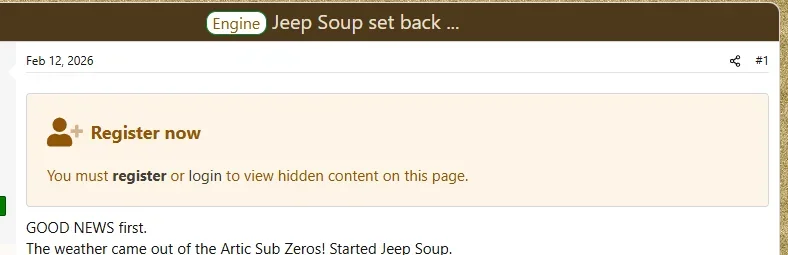
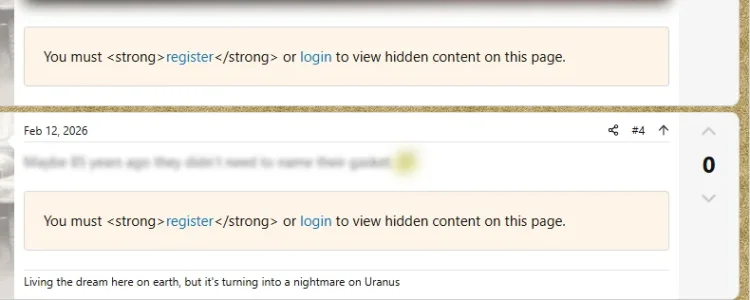
The only thing I have found is the register or login message after the first message shows html. I can't find the phrase or template that I should edit. Is it hard coded?

1st message:
Screenshot 2026-03-06 203756.webp

Subsequent messages:
Screenshot 2026-03-06 203831.webp
 
I think I confused myself because I tried to enter thread IDs in the Content Blur Pro admin, and then got results like “everything is blurred” or “nothing is blurred”. So just to confirm, there is no supported way in Content Blur Pro (or in XenForo permissions) to blur or block only specific thread IDs inside the same forum. Correct?
Oh, you're using the antiquated "Choose your implementation = Guests mode (legacy mode)". Yes, under that mode you can specify NODE ID targeting. But it's not recommended to use that mode, nor is it well tested recently.
 
Back
Top Bottom