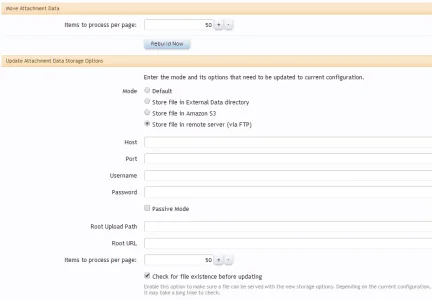
To move, you only need "Move Attachment Data". The other tool is for changing configuration data for old attachments (which you don't need now).Also can you explain in more detail the following:
We have 62GB of attachments we would like to move to S3. Right now we are uploading attachments directly to S3 and would like it to stay that way.
I notice at the bottom of the cache rebuild page there are the following:
Move Attachment Data
and
Update Attachment Data Storage Options
I am not sure which one I need or do I need both?
If you want to move back from S3 to default, select default in the add-on option page then use the "Move Attachment Data" tool.
I will need to look at the site to understand the problem. Can you send me your site via conversation?So, I changed my attachment store options from using s3 + cloudfront to just s3 (no cloudfront). All of my attachments look ok in the forums, but in @Chris D Xen Media Gallery, thumbnails for all NEW media uploads are broken... until I rebuild them, then they're fine again. Old media (pre-change) are all ok. Is there something I can do?