
Sorry it failed for you. I will see if i can fix this for future.This just doesn't work. i'm going to un-install.
View attachment 338326
even the stats don't line up on the same page
View attachment 338327


Sorry it failed for you. I will see if i can fix this for future.This just doesn't work. i'm going to un-install.
View attachment 338326
even the stats don't line up on the same page
View attachment 338327
What's new:
Bulk delete attachments by filename pattern with dry-run preview before committing
Background scans now start properly instead of silently completing with no results
Stale scans stuck running for 2+ hours are automatically marked as failed
Email alerts for critical issues now report the correct issue count
Fixed file health check showing false "missing" results due to incorrect hash format
All XML data files updated to XF 2.3 format for clean installs on any site
If you run into...

Brad P updated Attachment Integrity with a new update entry:
Attachment Integrity 5.5.2 Released
Read the rest of this update entry...
What's fixed in v5.5.3:
- New "Bulk actions" section added to the ACP page with:
- Filename pattern search field (searches ALL attachments, not just scan results)
- Dry run checkbox (on by default) — previews what would be deleted
- Confirmation checkbox required for live deletion
- "Search and process" button
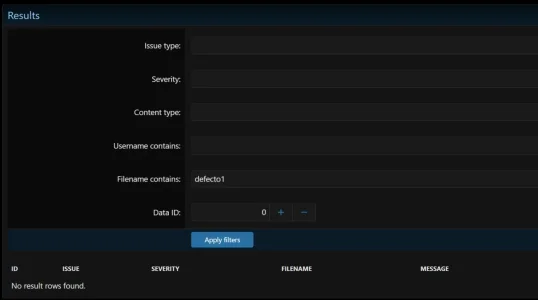
- Clarifying note added to the Results filter: "Filters below search scan results only. Run a scan first to populate this table...
Hey mate, that was my fault the filter you were using only searches scan results, not all attachments. The actual bulk delete feature was buried in the code with no way to get to it from the page. Pretty useless without a button to press.I tried filtering by attachment name but I'm not getting any results. Am I doing something wrong?
View attachment 338386
Hey mate, that was my fault the filter you were using only searches scan results, not all attachments. The actual bulk delete feature was buried in the code with no way to get to it from the page. Pretty useless without a button to press.
v5.5.3 fixes that. There's now a Bulk actions section on the page where you can search by filename across everything. Dry run is on by default so you can see what it finds before anything gets removed.
Give it a go and let me know how you get on.
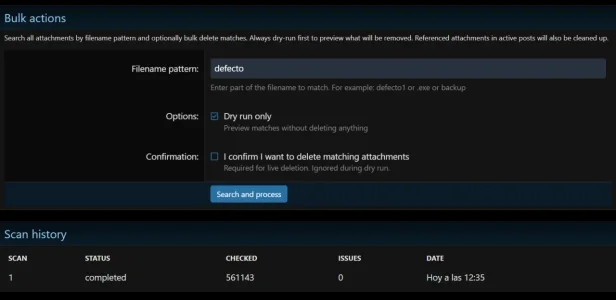
turns out the bulk action form wasn’t actually submitting correctly in certain situations, which is why nothing appeared to happen when pressing “Search and process”.
I’ve corrected it properly for v5.5.4 and reworked the form handling through XenForo’s normal framework flow rather than relying on the previous implementation.
Hopefully this is now sorted. Sorry...
Turns out the bulk action form wasn’t actually submitting correctly in certain situations, which is why nothing appeared to happen when pressing “Search and process”.
I’ve corrected it properly for v5.5.4 and reworked the form handling through XenForo’s normal framework flow rather than relying on the previous implementation.
When I click the "Search and process" button nothing happens.
What was fixed in v5.5.5:
- Root cause: The "Search and process" button in Bulk Actions did nothing because actionBulkDeleteByFilename() redirected back to actionIndex(), discarding all search results
- Fix: Bulk filename search now runs inline inside actionIndex() on POST - results render on the same page load without any redirect
- Template: Form uses ajax="false" for a clean full-page POST; result message shows below the button

This is possible. Ill look into this.Is it possible to enable searching for attachments ? From the native xenforo search ?
Images are important and Xenforo never has done well with them.
Quick update to sort out an issue affecting fresh installs.
## What's Fixed
v5.6.2 and earlier had a bug where several database columns were only created during the upgrade path, not on a clean install. If you installed the addon fresh (rather than upgrading from an older version), the scan tables would be missing columns and you'd get errors when running scans.
This affected three tables:
- Scan table was missing mode, priority, and remote-aware columns
- Repair queue was...
What's New (if you're coming from an older version)Ideally attachments could easily be renamed from the front end or given multiple names so people can find the attachments they want.
What's new:
Bookmark attachments -- You can now bookmark any attachment across the forum. Little bookmark icon sits on every attachment in posts. Click it, done. All your bookmarked attachments show up in a personal gallery under your account so you can find them again without digging through old threads.
User aliases -- Once you've bookmarked something, you can give it your own name. Call it whatever makes sense to you. Search by alias from your gallery page. Handy if you've got dozens of...

 nozomi.nl
Thanks mate. I will release fix shortly.bug report:
XenForo 2.3.10
PHP 8.5.6
Chrome freezes on thread pages only for logged-in users
Guests load fine
$config['enableListeners'] = false fixes it
Disabling Attachment Integrity 5.7.4 fixes it
Thread examples:
SHOP - Beep-shop
Beep is een van de bekendste retro winkels in Akihabara, Tokyo. Ze zijn in mei 2026 verhuist naar hun nieuwe locatie. Ze hebben nu ook een 'trek-muur' om games uit de muur te halen 🤪 https://www.akihabara-beep.com/ https://channel.beep-shop.com/ (online shop) Address: 15-1 Sotokanda...
When I load either of the 2 mentioned pages: Chrome shows the “Exit page / Wait” dialog. That suggests a JavaScript or DOM loop, not a normal server timeout.

We use essential cookies to make this site work, and optional cookies to enhance your experience.
