
You are using an out of date browser. It may not display this or other websites correctly.
You should upgrade or use an alternative browser.
You should upgrade or use an alternative browser.

Ads Manager 2 by Siropu [Paid] 2.8.1
No permission to buy (€50.00)
- Thread starter Siropu
- Start date


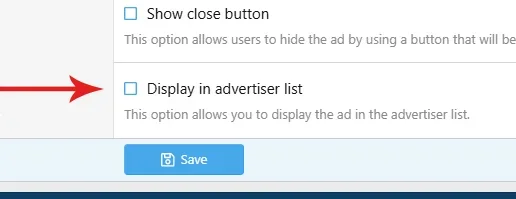
Under settings tab of each ad you can find the option to display them there.
... you just have to scroll all the way down the page to find it.
Thank you.
Under settings tab of each ad you can find the option to display them there.
That is promising, but what about the display? Is there a setting I'm missing to display them normally? 10 banners selected,,,

That is promising, but what about the display? Is there a setting I'm missing to display them normally? 10 banners selected,,,
View attachment 348845
OK, so a solution for now! AWESOME FEATURE!
TO DISPLAY THE BANNERS THEIR NORMAL SIZE:
1- Templates - extra.less
2- Paste this at the very bottom and save. Refresh the page and check everything works, it is not touching the other banners.
CODE EDITED TO ALLOW SIDE BY SIDE SMALLER ADS
▼
Code:
/* Ads Manager - Advertisers responsive mosaic */

.samBannerUnit[data-position="advertisers"] {
    display: flex !important;
    flex-wrap: wrap !important;
    justify-content: center !important;
    align-items: flex-start !important;
    align-content: flex-start !important;
    gap: 20px !important;
}

/* Each advertisement takes only the space it needs */
.samBannerUnit[data-position="advertisers"] > .samItem {
    display: flex !important;
    flex: 0 0 auto !important;
    width: auto !important;
    max-width: 100% !important;
    height: auto !important;
    justify-content: center !important;
    margin: 0 !important;
}

/* Preserve original image proportions */
.samBannerUnit[data-position="advertisers"] .samItem img {
    display: block !important;
    width: auto !important;
    max-width: 100% !important;
    height: auto !important;
    margin: 0 auto !important;
}

/* Prevent overflow on smaller screens */
@media (max-width: 650px) {
    .samBannerUnit[data-position="advertisers"] {
        flex-direction: column !important;
        align-items: center !important;
    }

    .samBannerUnit[data-position="advertisers"] > .samItem {
        width: 100% !important;
    }
}
Ideally we could limit the number of ads displayed like 20 per page, with pagination, maybe in a future update.
 ...
...I see an issue with sizes, 300x250 don't fit side by side so it becomes a bit chaotic...
EDIT: I updating the code, and now smaller ads can display side by side if they are clustered. Replace the previous code with the one I updated above.
Last edited:
Yes, that makes sense, each time a page opens, ALL the banners on it register as viewed. So is this borderline messing up the stats?I would hope they are counted as it is technically a page with their advertisement. However I would mention, "Your ad is also displayed here" in the package.
I wrote him to ask if there's something I'm missing in the admin panel.

It wasa bit confusing because I found that the ads are not inheriting the package settings re: alignemnt and size so have tried both auto and dimensions (1000 x 150). But I found with only one ad active it was centered, bit with two or more tin the carousel they show to the right. As it is now on my site.What happens if you do not set a custom size?
Last edited:
It wasa bit confusing because I found that the ads are not inheriting the package settings re: alignemnt and size so have tried both auto and dimensions (1000 x 150). But I found with only one ad active it was ceneterd, bit with two or more tin the carousel they show to the right.
I was able to code a simple "sorting display filter" so that most of the ads would display somewhat grouped by dimensions, in order to avoid having too many holes and chaotic presentation. A bit like a "mosaic" gallery. We have a few different ads sizes so this is helpful for us. Is this the kind of situation you encountered?




Last edited:
No. Just two ads rotating but aligned right instead of centered. As soon as I disable all but 1 it is centeredIs this the kind of situation you encountered?

You are utilizing this setting, correct?

I also had an issue with banners.
And:
I also had an issue with banners.
That is with the site logo on the left and space to the right of it. The Left setting should bring it to the right of the logo but it is right aligned, all the way over.Bug: Banner, Header position
Unit alignment: Left
(Left does not work, it stays on the right.)
And:
I don't think these are fixed yet.Bug:
Text Ad with Unit Content. The unit content (text) is appearing to the right of the description in a new column, not under it, unless I choose Flexbox, then it is under the description.
Last edited:
Sorted now. Previous;y while trying to fix it I had put aNo. Just two ads rotating but aligned right instead of centered. As soon as I disable all but 1 it is centered
margin:auto; in the CSS. Once I took that out again it was fine.
Last edited:
Similar threads

- Replies
- 6
- Views
- 438


