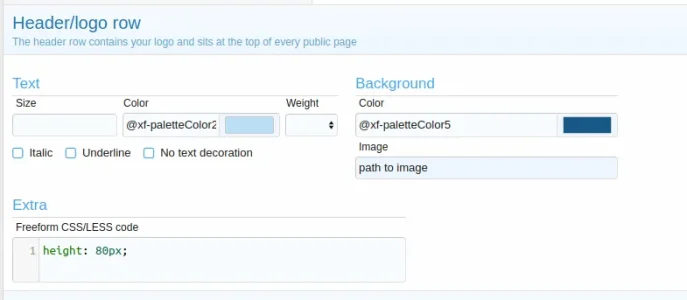
DL6 Well-known member Licensed customer Nov 7, 2017 #2 ACP > Appearance > Styles > Your style > Style properties > Header and navigation > Header/logo row Upvote 1 Downvote
Diesan Romero Member Licensed customer Nov 7, 2017 #3 DL6 said: ACP > Appearance > Styles > Your style > Style properties > Header and navigation > Header/logo row Click to expand... ¿Cómo hago para que el header haga margen y se pueda ver la imagen completa? / How do I make the header margin and the whole image can be seen? así se ve, la imagen no está completa. Upvote 1 Downvote
DL6 said: ACP > Appearance > Styles > Your style > Style properties > Header and navigation > Header/logo row Click to expand... ¿Cómo hago para que el header haga margen y se pueda ver la imagen completa? / How do I make the header margin and the whole image can be seen? así se ve, la imagen no está completa.
DL6 Well-known member Licensed customer Nov 7, 2017 #4 Diesan Romero said: ¿Cómo hago para que el header haga margen y se pueda ver la imagen completa? / How do I make the header margin and the whole image can be seen? View attachment 161353 así se ve, la imagen no está completa. Click to expand... Change the height to your needs in extra.less template with something like this CSS: .p-header-content {height: 200px;} Upvote 1 Downvote
Diesan Romero said: ¿Cómo hago para que el header haga margen y se pueda ver la imagen completa? / How do I make the header margin and the whole image can be seen? View attachment 161353 así se ve, la imagen no está completa. Click to expand... Change the height to your needs in extra.less template with something like this CSS: .p-header-content {height: 200px;}
Diesan Romero Member Licensed customer Nov 7, 2017 #5 @DL6 Esa es buena, porque ahora yo puedo ajustar mi imagen al tamaño del alto que seleccioné para la cabecera. Saludos. Upvote 1 Downvote
@DL6 Esa es buena, porque ahora yo puedo ajustar mi imagen al tamaño del alto que seleccioné para la cabecera. Saludos.
Mike XenForo developer Staff member Licensed customer Nov 7, 2017 #6 Please only post in English. Upvote 1 Downvote
Diesan Romero Member Licensed customer Nov 7, 2017 #7 Mike said: Please only post in English. Click to expand... I will continue trying to do the best I can, since my English is not so good. Sorry for the inconvenience. Upvote 1 Downvote
Mike said: Please only post in English. Click to expand... I will continue trying to do the best I can, since my English is not so good. Sorry for the inconvenience.
Mr Lucky Well-known member Licensed customer Nov 7, 2017 #8 Diesan Romero said: I will continue trying to do the best I can, since my English is not so good. Sorry for the inconvenience. Click to expand... That seems better than many native English speaker's. Upvote 1 Downvote
Diesan Romero said: I will continue trying to do the best I can, since my English is not so good. Sorry for the inconvenience. Click to expand... That seems better than many native English speaker's.
Diesan Romero Member Licensed customer Nov 7, 2017 #9 Mr Lucky said: That seems better than many native English speaker's. Click to expand... Thank you Upvote 1 Downvote
jr777 Active member Licensed customer Nov 8, 2017 #10 Diesan Romero said: ¿Cómo hago para que el header haga margen y se pueda ver la imagen completa? / How do I make the header margin and the whole image can be seen? View attachment 161353 así se ve, la imagen no está completa. Click to expand... Appearance - Style properties - Header and navigation - Header/logo row Just remember not to enter the CSS tag or brackets or it will not work. That drove me crazy for hours. Upvote 2 Downvote
Diesan Romero said: ¿Cómo hago para que el header haga margen y se pueda ver la imagen completa? / How do I make the header margin and the whole image can be seen? View attachment 161353 así se ve, la imagen no está completa. Click to expand... Appearance - Style properties - Header and navigation - Header/logo row Just remember not to enter the CSS tag or brackets or it will not work. That drove me crazy for hours.
CFMack Active member Licensed customer Jan 5, 2018 #11 This is happening with my header image; it starts to repeat toward the right. Is there a way to have the complete image span that entire area? This is what I want: Last edited: Jan 5, 2018 Upvote 1 Downvote
This is happening with my header image; it starts to repeat toward the right. Is there a way to have the complete image span that entire area? This is what I want:
CFMack Active member Licensed customer Jan 5, 2018 #12 ^ I solved this. I added: Code: background-repeat: no-repeat; background-size: cover; to that Extra section in Style Properties. Upvote 1 Downvote
^ I solved this. I added: Code: background-repeat: no-repeat; background-size: cover; to that Extra section in Style Properties.
B Bart23Sept Member Licensed customer Apr 3, 2018 #13 How much of the file location/name needs to be spelled out in the image location box? Upvote 1 Downvote
B Bart23Sept Member Licensed customer Apr 3, 2018 #15 I tried everything and found if I start at Styles I was able to get it to work. I'd like it to place to the right of the logo, at the moment it's repeating across the top. still working on it....have to find the owner's manual. lol Upvote 1 Downvote
I tried everything and found if I start at Styles I was able to get it to work. I'd like it to place to the right of the logo, at the moment it's repeating across the top. still working on it....have to find the owner's manual. lol
B Bart23Sept Member Licensed customer Apr 3, 2018 #16 Added the image to the logo image which is working for now, made it 1200x200 to match the max width setting. time for bed, it looks ok for now. Thanks for the replies. Upvote 1 Downvote
Added the image to the logo image which is working for now, made it 1200x200 to match the max width setting. time for bed, it looks ok for now. Thanks for the replies.
K khal Member Licensed customer Oct 15, 2018 #17 jr777 said: Appearance - Style properties - Header and navigation - Header/logo row Just remember not to enter the CSS tag or brackets or it will not work. That drove me crazy for hours. Click to expand... Thanks!! You saved me. I could never make it work until I saw this. Upvote 1 Downvote
jr777 said: Appearance - Style properties - Header and navigation - Header/logo row Just remember not to enter the CSS tag or brackets or it will not work. That drove me crazy for hours. Click to expand... Thanks!! You saved me. I could never make it work until I saw this.