
You are using an out of date browser. It may not display this or other websites correctly.
You should upgrade or use an alternative browser.
You should upgrade or use an alternative browser.

XF Bot Guard 1.4.1
No permission to download
- Author zeeb0t
- Creation date
XF Bot Guard 1.3.1
Important upgrade notes for existing customers:
Direct upgrades to XF Bot Guard 1.3.1 require XF Bot Guard 1.2.9 (1020970) or newer to already be installed. If your site is running an older XF Bot Guard version, upgrade through a bridge release that still contains the older legacy migrations first, confirm that upgrade completes successfully, then install 1.3.1. Customers already on 1.2.9, 1.3.0 or newer can upgrade normally.
Release type: minor
XF Bot Guard 1.3.1 focuses on safer upgrades, clearer dashboard reporting, more reliable contextual link canaries, better localisation support, privacy-safe diagnostics and lower database overhead. Most changes apply automatically after upgrading, with no new settings required.
Safer direct upgrades from supported versions
XF Bot Guard now clearly enforces the supported direct-upgrade baseline of 1.2.9 or newer. This prevents very old installs from attempting a direct jump into a newer schema without the legacy migration steps they still need. If your install is already on 1.2.9 or newer, just upgrade as normal; if it is older, upgrade through the required bridge release first.
Clearer dashboard snapshot coverage warnings
The dashboard now warns when the selected time range does not yet have complete trusted snapshot coverage. This helps avoid mistaking incomplete charts for “no bot activity” when the issue is actually missing, delayed or not-yet-built dashboard snapshots. Open the dashboard as normal; if a warning appears, check the selected range, snapshot retention, the hourly snapshot cron and health/status.
More accurate Observe-only dashboard reporting
Observe-only dashboard reporting now better matches the live enforcement dashboard while still keeping would-action data separate from real enforcement data. Route pressure and route outcome metrics now use the correct observe-only snapshot groups, so admins can more confidently test settings before enabling active enforcement. Enable Observe-only as usual, then review the dashboard’s would-challenge, would-deny and route-pressure sections.
More reliable contextual link canaries
Contextual link canary instrumentation has been rebuilt to modify eligible anchor tags without reserialising the whole HTML document. This makes canaries safer around scripts, styles, comments, templates, titles, textarea content, uppercase tags, unquoted attributes and more complex page markup. If contextual link canaries are already enabled, the fix applies automatically; otherwise enable them from XF Bot Guard’s settings when you want this extra bot-detection layer.
Faster database checks on busy forums
Several high-frequency queries have been tightened up to reduce unnecessary database work. This includes more index-friendly controller checks, deduplicated event-count queries, faster existence checks and request-level schema caching. There is nothing to enable; after upgrading, the improved query paths are used automatically.
Fully phrased admin and dashboard text
More XF Bot Guard admin, dashboard, health, Cloudflare, setup and JavaScript-facing text now uses XenForo phrases. This makes the add-on easier to translate, customise and keep consistent with your forum’s language setup. Use XenForo’s normal phrase/language tools to adjust wording where needed.
Privacy-safe browser support diagnostics
The browser debug buffer is now off by default and only activates when debug mode is explicitly set to true. When enabled for support troubleshooting, it keeps a small, sanitised recent log and avoids exposing sensitive values such as visitor IDs, tokens, CSRF values, return URLs, request paths, query strings, script URLs, localStorage values and raw browser signals. Leave it off for normal use; only enable it temporarily if support asks you to.
Cleaner supported upgrade path
Old legacy migration and compatibility-only paths that are no longer part of the supported direct-upgrade range have been retired. This reduces upgrade complexity and keeps the current code focused on supported installations instead of carrying old transitional storage, hash and option-repair logic forever. No setting is required; the only thing to remember is that installs older than 1.2.9 must upgrade through the required bridge release first.

XF Bot Guard 1.3.0
Release type: minor
- Sets the X-Robots-Tag: noindex, nofollow, noarchive header on bot-guard/ routes, making a stronger effort to ensure well-behaved bots ignore Bot Guard routes instead of attempting to crawl AJAX endpoints and challenge pages.
- Introduces a new option, Preserve inactive XenForo CAPTCHA keys. When enabled, which is off by default, this adjusts the standard XenForo CAPTCHA options area so inactive CAPTCHA configurations are preserved instead of being removed. This allows multiple CAPTCHA configurations to be entered and retained, so one can be used for XenForo generally while another can be selected specifically for Bot Guard. Without this option, XenForo only retains the active CAPTCHA configuration and silently deletes the others.
- Data pruning now handles much larger data clean-up volumes on a far more frequent cycle. This should better support very large sites and datasets. If your forum is currently behind on data pruning, it should now become more proactive in keeping table sizes within the configured retention periods. Initial pruning may still take some time, as it still does not execute everything at once to avoid unnecessary server load, but it will now be far more aggressive about keeping retained data under control.
- Fixes a bug where nginx rewrite configurations could cause Bot Guard to miscalculate its collector nonce paths. This caused a nonce mismatch for every visitor, resulting in Bot Guard challenging every single visitor. nginx rewrite configurations are now specifically accounted for, and Bot Guard should now operate cleanly on those installation configurations.
XF Bot Guard 1.2.9
Release type: bug fix
Fixed an issue where XF Bot Guard incorrectly fell back to XenForo’s default CAPTCHA provider when correctly configured custom CAPTCHA providers were used. XenForo-compliant custom CAPTCHA providers now operate correctly.
XF Bot Guard 1.2.8
Release type: minor
XF Bot Guard 1.2.8 is a protection, crawler-control, and operations release. It adds stronger bot-detection signals, safer AI crawler handling, configurable CAPTCHA and Edge behaviour, emergency origin protection, better investigation tools, and a broad documentation, performance, and hardening pass.
Contextual link canaries
XF Bot Guard can now place temporary canary aliases on a very small number of eligible public internal links. Real visitors are safely resolved back to the normal XenForo URL before navigation, while bots that scrape and fetch the canary URL directly create high-quality risk evidence. This helps catch crawlers that behave differently from real users without punishing verified crawlers or excluded traffic. This is enabled by default and can be controlled from the XF Bot Guard options.
Verified AI crawler and AI fetcher controls
AI crawler handling is now available with precise verification controls. XF Bot Guard can separately allow selected verified AI search crawlers and user-triggered AI fetchers, such as supported OpenAI and Anthropic sources, only when the official IP range and expected user-agent evidence both match. AI user-fetchers are human-aided services that retrieve content because a real user has requested it (for example, asking an AI assistant to summarise or analyse a page), which is different from AI crawlers that systematically collect content for model training or dataset building. This helps keep legitimate user-requested AI fetch behaviour working without blindly trusting every AI-looking bot, while still allowing you to control broader AI crawling activity separately. Use the verified AI crawler and AI user-fetcher options, with the main verified crawler option enabled.
Choose a Bot Guard CAPTCHA provider
Bot Guard challenges can now use their own CAPTCHA provider instead of always inheriting XenForo’s global CAPTCHA setting. Leave the setting blank to keep using the XenForo default, or select a supported XenForo-compatible provider specifically for Bot Guard challenges. This is useful if you want registration, contact forms, and bot challenges to use different CAPTCHA setups. Configure it under the XF Bot Guard CAPTCHA provider option.
Origin survival mode
Origin survival mode is a new emergency load-shedding option for bot storms or origin pressure. When enabled, it does not immediately start blocking visitors. Instead, XF Bot Guard continuously monitors a range of server health signals, such as CPU load, memory pressure, PHP worker availability, and request queue pressure, to determine when the origin is genuinely under strain. Only when those conditions are detected does it intelligently begin taking preventative action, temporarily returning lightweight 503 Retry-After responses to unknown, low-trust public page requests before they consume additional origin resources. This helps preserve availability for known users, trusted visitors, and verified bots during severe spikes, while temporarily shedding traffic that cannot be confidently identified. Because it can affect real unknown visitors during emergency conditions, it is disabled by default. Enable it from Quick Settings or the advanced Origin Survival options when needed.
Updated recommended presets
The recommended Quick Settings presets have been refreshed to account for newer protections, including canaries, light responses, verified AI crawler choices, crawler discovery paths, event detail handling, and origin survival mode. This makes the Cautious, Balanced, Active Bot Storm, and SEO-sensitive overlays safer and more complete. Use Quick Settings to preview and apply the posture that best matches your forum’s current risk level.
Remote CIDR JSON sources
You can now connect trusted remote HTTPS CIDR JSON sources for additional excluded networks or forced-challenge networks. XF Bot Guard refreshes these lists on a schedule, stores a local cache, and uses the local cache at request time. This is helpful for admins who maintain network ranges externally or want to sync trusted/challenged ranges without manually pasting CIDRs into XenForo. Add one trusted source per line in the remote CIDR source options.
Flag suspicious visitors from the Online page
Admins can now flag a suspicious visitor directly from XenForo’s Online page. A confirmed report records Bot Guard evidence and can add a configurable risk score for that visitor/session identity for the next 24 hours. This gives staff a practical way to turn live observations into protection signals without needing raw IP access. Use the Flag Visitor action on eligible online visitors, and adjust the report score in the XF Bot Guard options.
Sharper Event Log filtering and CSV export
The Event Log now has stronger filtering, including “not this” filters, below-threshold score searches, outside-date-range searches, guest/member/user filters, cohort filters, and filtered CSV export. This makes it much easier to investigate what happened, find patterns, and share a focused export without dumping the full log. Use the Event Log filters as normal, then export the currently filtered results when needed.
Faster dashboard snapshot reads
Dashboard snapshot reads have been optimised so XF Bot Guard now queries and aggregates only the metrics needed for the dashboard view. On busier forums, this should reduce unnecessary database work, lower PHP memory usage, and make dashboard views feel lighter. There is nothing to enable; the improvement is automatic after upgrade.
Configurable Cloudflare Edge thresholds
Cloudflare Edge candidate scoring is now configurable instead of being locked to fixed internal thresholds. This gives advanced admins more control over how strong local Bot Guard evidence must be before an IP becomes an Edge candidate, and how forgiving behaviour should be after a successful CAPTCHA pass. Most sites should keep the defaults. Advanced sites can adjust the Cloudflare Edge minimum score and Edge forgiveness priority cutoff options.
XenForo-to-XenForo unfurl support
The default URL unfurl light-response handling now recognises XenForo/2.* user agents. This helps XenForo forum link previews receive safe metadata-only responses without exposing protected page body content. Existing default pattern lists are updated automatically; customised lists can add XenForo/2.* manually if required.
Clearer request gate fail-open reporting
XF Bot Guard’s request gate is designed to fail open rather than risk taking your forum offline if an internal protection branch hits an unexpected error. In 1.2.8, those fail-open events are now recorded in a bounded, privacy-conscious way and surfaced through health checks and event logging. There is nothing to enable; if the health check warns about request gate fail-open evidence, review the related event log entries.
Documentation, code efficiency, and hardening
This release also includes a broad documentation and hardening pass covering cache/CDN behaviour, CAPTCHA provider behaviour, AI crawler handling, contextual canaries, origin survival mode, privacy notes, troubleshooting, and release checks. Under the hood, 1.2.8 also improves request safety, event export handling, origin pressure checks, test coverage, and general code efficiency. Nothing needs to be enabled here; it makes the add-on easier to operate and more resilient in edge cases.
XF Bot Guard 1.2.7
Important upgrade notes for existing customers:
- Social media URL previews: This release adds optional, default-off metadata-only URL preview handling for selected social media and messaging preview agents, including WhatsApp. If link previews for protected public pages matter on your site, review the new light valid response options after upgrading.
- Expanded network controls: IP/CIDR exclusions now support decimal ASNs, and a new forced challenge network list has been added. Use decimal ASN syntax such as 32934, not AS32934.
Release type: Minor feature and hardening release
This release focuses on practical controls for existing installations: safer social media unfurling, broader IP/CIDR/ASN handling, an observe-only rollout mode, clearer reporting for fake crawler claims, more accurate dashboard counts, and safer diagnostic output for support.
Added
- Added optional light valid responses for selected URL unfurl user agents.
- Added a configurable user-agent pattern list for metadata-only URL preview handling, with included patterns for Facebook/Meta, X/Twitter Cards, LinkedIn, Slack, Discord, Telegram, Yahoo Mail, Bluesky, WhatsApp and Skype previews.
- Added ASN support to Bot Guard network-list matching.
- Added a new Forced challenge IPs/CIDRs/ASNs option for deliberately challenging selected IP addresses, CIDR ranges or decimal ASNs.
- Added a local ASN range cache, refreshed by the scheduled crawler/network refresh process, so request-time matching can use local CIDR ranges instead of live lookups.
- Added an optional Observe-only overlay for testing what Bot Guard would have done without taking visitor-altering actions.
- Added observe-only event types for would-have-challenged, would-have-denied, would-have-shown browser validation, would-have-served a light response, and would-have-synced to Cloudflare outcomes.
- Added privacy-safe reporting for requests that claim to be known crawlers or bots but still reach CAPTCHA or feed deny handling.
- Added dashboard reporting for claimed crawler/bot challenge activity.
- Added dashboard reporting for URL unfurl light-response activity.
- Added a redacted support bundle workflow for admins with the sensitive Bot Guard permission.
- Added support bundle access from Health/status, filtered raw event log views, and individual event detail views.
Improved
- Improved dashboard accuracy for retained risk, route, outcome and timing metrics.
- Improved dashboard timing panels with recent decision timing metadata and nearest-rank 95th percentile calculations.
- Improved event log filtering so the new light-response, observe-only and crawler-claim events are easier to investigate.
- Improved Cloudflare Edge Enforcement status reporting, including clearer saved dry-run versus effective dry-run state.
- Improved Cloudflare sync logs and failure handling around lock checks, rate limits, pending states, deleted candidates, suppressed candidates and retry states.
- Improved Health/status reporting for ASN range cache state, secure random generator availability, Cloudflare diagnostics and dashboard snapshot health.
- Improved compatibility coverage for supported XenForo 2.1, 2.2 and 2.3 installations.
- Improved continued PHP 7.2+ compatibility checks.
Changed
- Changed Cloudflare Edge Enforcement to use effective dry-run while Observe-only is active, without changing the saved Cloudflare dry-run option.
- Changed the deprecated strict no-proof challenge option out of the active option set.
Security and privacy
- Hardened Cloudflare API, sync log, health-check and support-output redaction for API tokens, credentials, cookies, CSRF tokens, URL credentials and private-key style values.
- Hardened browser validation replay protection with short-lived, one-use, session-backed collector tokens.
- Hardened event audit text handling so malformed request-derived encoding is cleaned before storage.
- Hardened Cloudflare token diagnostics so undecryptable stored token material is handled more clearly after local key-material changes.
Upgrade notes
- Minimum XenForo and PHP requirements are unchanged.
- Observe-only is off by default.
- Light valid responses for selected URL unfurl user agents are off by default.
- If URL previews are important for your forum, review and test the new light valid response options after upgrading.
- If you use IP/CIDR exclusions, review the renamed Excluded IPs/CIDRs/ASNs option after upgrading.
- If you add ASN entries, use plain decimal ASN syntax such as 32934, not AS32934.
- ASN entries depend on the scheduled refresh process. If an ASN has no active cached ranges yet, it cannot match request IPs until the cache has been populated.
- If you use Cloudflare Edge Enforcement, note that enabling Observe-only forces Cloudflare sync into effective dry-run until Observe-only is disabled.
- After upgrading, review Health/status, especially if you use Cloudflare Edge Enforcement, ASN-based network controls, URL unfurl handling, or trusted proxy signals.
XF Bot Guard 1.2.6
Important upgrade notice for Cloudflare / trusted proxy customers: Before upgrading, please review the upgrade notes and ensure the existing Origin lockdown acknowledged for trusted proxy signals option is correctly set where applicable.
Release type: Minor feature release
This release adds a new Quick settings workflow to make XF Bot Guard easier to configure safely, especially for first rollout, normal production use, active bot attacks, and SEO-sensitive sites. The new workflow previews what will change before applying settings, highlights blockers and warnings, and preserves sensitive or site-specific configuration that should not be overwritten by a preset.
The release also includes bundled documentation, improved Admin Control Panel navigation, better event log filtering, safer trusted proxy signal handling, dashboard/UI polish, and Cloudflare Edge Enforcement reliability improvements.
Added
- Added a new Quick settings page in the XF Bot Guard Admin Control Panel section.
- Added guided configuration profiles for cautious first rollout, balanced production use, active bot storm protection, and SEO-sensitive overlay protection.
- Added a settings preview before applying recommended profiles, making it easier to see exactly what will change.
- Added checks for blockers, warnings, and preserved settings before recommended settings are applied.
- Added bundled local documentation covering installation, upgrading, setup, protected areas, exclusions, crawler handling, cache/CDN behaviour, dashboard use, event logs, Cloudflare Edge Enforcement, privacy, retention, troubleshooting, and testing.
- Added improved reason-code lookup support for event log filtering and reporting.
Improved
- Improved the Admin Control Panel navigation by organising Bot Guard pages into clearer sections for Quick settings, Dashboard, Advanced tools, and Cloudflare Edge Enforcement.
- Improved recommended-settings safety by preserving sensitive and site-specific options such as Cloudflare Edge settings, raw IP storage, custom exclusions, protected routes, content types, user groups, IP exclusions, and custom trusted crawler domains.
- Improved setup readiness checks around cache behaviour, CAPTCHA availability, Bot Guard assets, template modifications, crawler data, and required Bot Guard data stores.
- Improved raw event log filtering with clearer selectable filters for decisions, event types, and reason codes.
- Improved event log investigation tools with better support for reason-code filtering and guarded route/path searches.
- Improved dashboard presentation and admin styling, including better dark-mode-friendly chart behaviour and more consistent XenForo theme integration.
- Improved table and admin page usability with better scrolling, layout, and action-link handling.
- Improved Cloudflare Edge Enforcement sync handling, including clearer handling of in-progress operations, rate limits, deleted candidates, suppressed candidates, pending states, and retry states.
- Improved Cloudflare Edge sync logs so progress and failure states are easier to understand.
- Improved trusted proxy safeguards for Cloudflare and other trusted proxy setups.
Changed
- Changed the Bot Guard add-on links to focus on built-in documentation and support, rather than listing multiple direct admin URLs.
- Changed the options layout to make related settings easier to find and understand.
Upgrade notes
- Cloudflare and trusted proxy customers should review the important upgrade notice above before upgrading.
- Minimum XenForo and PHP requirements are unchanged.
- Default option values are unchanged.
- Existing retained event data may be backfilled for improved reason-code filtering during the upgrade process.
XF Bot Guard 1.2.5
Release type: bug fix
This patch resolves a dashboard snapshot cron issue introduced with event-detail buffering in XF Bot Guard 1.2.4.
In some cases, when buffered event details were still pending, the dashboard snapshot cron could attempt to write an internal status value that was too long for the snapshot status column. This could trigger a MySQL “Data too long for column 'status'” server error.
This patch also improves dashboard snapshot timing so snapshots are generated only for completed reporting hours, with the existing buffer grace period applied.
Fixed
- Fixed a dashboard snapshot cron error that could occur when recent event-detail buffer files were still pending import.
- Fixed an internal snapshot status value that could exceed the expected database column length.
- Fixed dashboard snapshot eligibility so the current in-progress hour is not processed too early.
XF Bot Guard 1.2.4
Release type: Minor, with major reliability improvements
This release introduces intelligent event-detail buffering to help protect database performance during periods of heavy traffic or bot activity. XF Bot Guard can now automatically detect database pressure and temporarily shift write-heavy event-detail storage to disk, importing data back into the database smoothly over time without affecting protection decisions, telemetry, detection signals, suspicion scoring, or reporting.
The release also adds a dedicated Admin Control Panel section, granular admin permissions, improved Cloudflare Edge safeguards, and a range of reliability and maintenance improvements.
Added
- Added a dedicated XF Bot Guard section in the Admin Control Panel, with direct links for the dashboard, event log, health/status, Cloudflare Edge tools, Edge candidates, and sync logs.
- Added dedicated XF Bot Guard admin permissions, making it easier to control who can view logs, manage Bot Guard, manage Cloudflare Edge, and access sensitive investigation details.
- Added safer separation between general Bot Guard visibility and sensitive investigation data such as request paths, hashes, raw IP storage state, crawler diagnostics, Edge candidate detail, and sync diagnostics.
- Added event-detail buffering to reduce database pressure during high-traffic or bot-heavy periods.
- Added automatic database pressure detection so Bot Guard can buffer supplementary event details when needed, while keeping important protection decisions immediate.
- Added health/status visibility for event-detail buffering, database pressure state, and pending buffer activity.
- Added clearer admin messages when recent event detail is still being processed.
- Added documentation covering the new admin permission model, event-detail buffering, health checks, cron flushing, and troubleshooting.
Improved
- Improved Admin Control Panel permission checks so Bot Guard pages and actions are protected directly, rather than relying on menu visibility or broad XenForo permissions.
- Improved Cloudflare Edge safety by limiting setup, credentials, repair, sync, disable/remove, and candidate changes to admins with the dedicated Edge management permission.
- Improved health/status and dashboard behaviour so normal page loads no longer perform Cloudflare diagnostics, create Cloudflare configuration rows, or mutate compatibility state.
- Improved dashboard snapshot reliability by waiting for pending buffered event details before processing affected hours.
- Improved reason-code filtering with clearer warnings when very recent buffered details may not yet be searchable.
XF Bot Guard 1.2.3
Release type: Major update
Important: please read before upgrading
XF Bot Guard 1.2.3 is a major database, retention, reporting, and cleanup update.
This is not an update that very large forums should blindly apply without first choosing the right upgrade path.
For most small and medium forums, the normal XenForo add-on upgrade process should be fine.
For very large forums, this release may take considerably longer to upgrade because existing Bot Guard data needs to be migrated into the new structure, including internal hash storage changes and event-detail storage changes.
Before upgrading, decide which path makes sense:
- Normal upgrade: preserves existing Bot Guard history, events, counters, sessions, visitors, and telemetry, but may take longer on large forums.
- Clean install: write down your Bot Guard configuration, uninstall/delete Bot Guard, install 1.2.3 fresh, then re-enter your configuration. This avoids migrating old Bot Guard telemetry, but historical Bot Guard data will be lost.
If you want to keep historical Bot Guard data, use the normal upgrade path.
If you run a very large forum and do not care about old Bot Guard telemetry, the clean uninstall/delete/install path may be the better option.
Review your retention settings after upgrading
XF Bot Guard 1.2.3 changes the retention model.
Some retention settings have moved from day-based retention to hour-based retention, and new defaults have been introduced.
After upgrading, review the new retention options and consider whether your previous settings still make sense.
The recommended starting point is to try the new defaults first.
New retention defaults
Data type Default Plain English Raw event data 336 hours 14 days Visitor data 336 hours 14 days Session data 336 hours 14 days Counter data 336 hours 14 days Dashboard snapshots 17,520 hours 2 years Zero-signal IP data 2,160 hours 90 days
Raw event, visitor, session, and counter retention is capped at:
Code:720 hours = 30 days
The new model is designed around:
Code:shorter raw data retention + longer dashboard snapshot retention = useful long-term visibility without unnecessary raw database growth
If you previously increased raw retention mainly for dashboard visibility, you may no longer need to keep raw Bot Guard data for as long.
Similarly, if you previously decreased raw retention mainly to control database growth, you may wish to revise it now that cleanup and snapshot reporting have changed.
Thank you to @eva2000
A quick thank you to @eva2000 for an extensive and very useful data-growth and storage report, which helped inform the nature of this update.
That report highlighted the practical reality that very active forums can generate a large amount of Bot Guard telemetry, and included several actionable points around retention, cleanup, database growth, and long-term reporting.
XF Bot Guard 1.2.3 is largely about addressing that properly.
What this release does
This release makes the dashboard more practical long-term, especially on busy forums where keeping every raw Bot Guard event forever is not realistic.
It adds hourly dashboard snapshots, new retention options, safer cleanup behaviour, and internal database storage improvements designed to reduce database pressure over time.
In plain terms:
- the dashboard now has its own long-term snapshot data;
- raw event/session/visitor/counter data can be retained for a shorter period;
- longer-term dashboard reporting can still remain available;
- cleanup now works in safer batches;
- several internal hash fields are migrated to more compact binary storage;
- large forums get a more sustainable path forward, but should choose their upgrade path carefully.

XF Bot Guard 1.2.2
Release type: Major update
This release adds the new XF Bot Guard Dashboard, a visual single-page overview designed to show what Bot Guard is doing, why traffic is being challenged, where suspicious activity is coming from, and whether the system is healthy.
This is not just a prettier log page.
The dashboard is designed to tell the full Bot Guard story:
- what protected traffic Bot Guard saw;
- what was handled before CAPTCHA;
- what reached the CAPTCHA;
- what passed, failed, or never completed the challenge;
- why sessions were considered suspicious;
- which routes are under pressure;
- what crawlers and edge systems are doing;
- whether the underlying telemetry and cleanup systems look healthy.
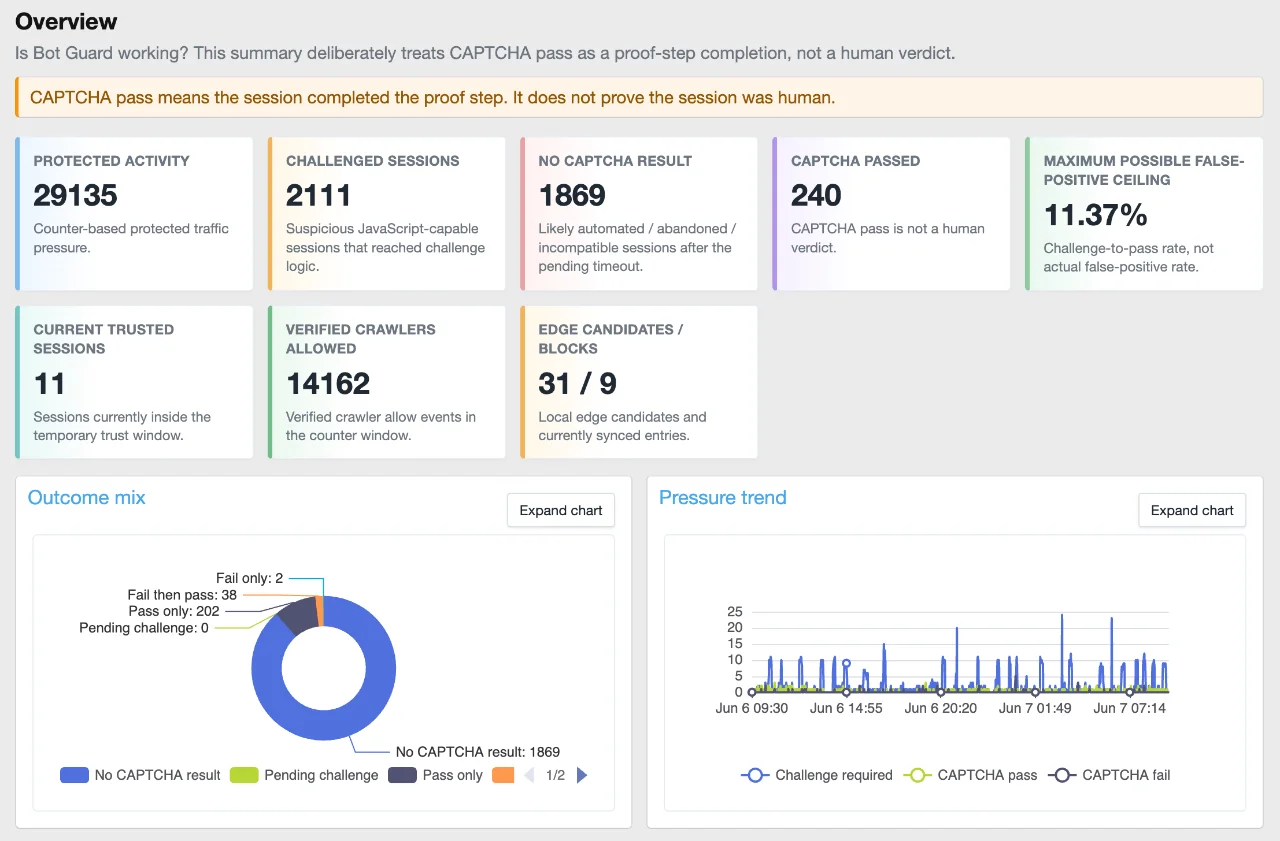
The screenshot above only shows part of it. There is quite a bit more further down the page, including traffic journey charts, challenge outcomes, interstitial/browser proof activity, risk signals, route pressure, CAPTCHA trust-window behaviour, crawler health, Cloudflare Edge Enforcement status, system health, and raw drill-down links.
After upgrading, go to:
Admin Control Panel -> Add-ons -> XF Bot Guard -> Dashboard
And enjoy.
Changes
- Added a new single-page visual Dashboard for XF Bot Guard.
- Added dashboard charts using locally bundled Apache ECharts.
- Added a clear overview section showing protected activity, challenged sessions, no CAPTCHA result sessions, CAPTCHA passes, current trusted sessions, crawler activity, and edge candidate/block counts.
- Added a traffic journey funnel showing the path from protected request through browser proof, risk checks, CAPTCHA challenge, CAPTCHA outcome, temporary trust, and rechallenge behaviour.
- Added challenge outcome reporting, including pass-only, fail-only, fail-then-pass, pending challenge, and no CAPTCHA result sessions.
- Added counter-based pressure trend charts for challenge/pass/fail activity.
- Added interstitial and browser validation reporting so site owners can see what is being handled before CAPTCHA.
- Added risk signal reporting, including top reason codes and risk score distribution.
- Added route pressure reporting to show which areas of the forum are attracting the most suspicious challenge activity.
- Added CAPTCHA trust-window reporting, including current trusted sessions and rechallenge behaviour after trust expiry.
- Added crawler health visibility, including known and verified crawler activity.
- Added Cloudflare Edge Enforcement visibility to the dashboard where the edge feature is available.
- Added system health and telemetry availability reporting.
- Added raw drill-down links from the dashboard back into the existing event log.
- Added configurable counter retention via the new Counter retention hours option.
- Changed counter cleanup so it now respects the configured counter retention option instead of always pruning after 48 hours.
- Improved handling of malformed requests with no User-Agent header so collector-token unavailability is handled cleanly without noisy server error logging.
- Improved dashboard table scrolling, chart spacing, chart expansion, and admin-page usability.
Why this matters
Before this release, XF Bot Guard already recorded a lot of useful information, but most of it lived in logs, counters, health pages, and specialised admin screens.
That was useful for debugging, but not ideal for quickly answering the big question:
Is Bot Guard working?
The new dashboard is intended to answer that quickly.
Instead of making you dig through raw events first, XF Bot Guard now gives you a visual summary of what it is seeing and how traffic is moving through the protection layers.
In plain terms, the dashboard helps show:
- how much protected traffic is being seen;
- how much suspicious traffic is reaching challenge logic;
- how much is failing or disappearing before completing CAPTCHA;
- which requests are likely automated, abandoned, or incompatible;
- which routes are attracting suspicious activity;
- which risk signals are causing challenges;
- whether crawlers and Cloudflare Edge Enforcement are behaving as expected;
- whether your telemetry is complete enough for each report.
Important: CAPTCHA pass is not treated as a human verdict
One important part of this dashboard is the wording.
XF Bot Guard does not present a CAPTCHA pass as proof that a visitor is human.
A CAPTCHA pass means the session completed the proof step. It does not prove the session was human.
That distinction matters.
The dashboard deliberately uses wording such as:
- No CAPTCHA result
- Pending challenge
- Temporary trust window
- Maximum possible false-positive ceiling
- CAPTCHA pass is not a human verdict
This is more accurate than simply saying “humans passed” or “bots failed”.
Bot Guard is a layered system. Some weak bots are handled before CAPTCHA. Some suspicious JavaScript-capable sessions reach CAPTCHA. Some complete the proof step. Some fail. Some vanish. Some are temporarily trusted and later re-evaluated.
The new dashboard is built around that model.
The traffic journey is now much clearer
The new funnel chart is one of the most useful parts of the dashboard.
It shows the broad journey:
Code:Protected activity -> JS/browser interstitial -> Browser proof collected -> Risk checks triggered -> CAPTCHA challenge shown -> CAPTCHA passed / failed / no result -> Temporary trust window -> Rechallenged after trust expiry
This helps make clear that XF Bot Guard is not just a CAPTCHA wall.
The CAPTCHA layer only sees sessions that make it past the browser / JavaScript interstitial layer. Basic clients that cannot run JavaScript correctly may be removed earlier or may never produce a useful browser proof.
That is why the dashboard separates browser/interstitial activity from CAPTCHA challenge outcomes.
Data availability is now visible
The dashboard is telemetry-aware.
That means it does not silently pretend all reports are equally complete.
Some reports are based on counters. Some require retained event logs. Some use session state. Some use visitor/fingerprint state. Some depend on optional logging settings.
The dashboard now shows what data is available and how far back each source can reasonably report.
For example:
- counter-based reports are available up to the configured counter retention window;
- event-log reports depend on event logging and event retention;
- session-state reports depend on session retention;
- visitor/fingerprint reports depend on visitor retention;
- some drill-down reports may be partial if low-value allow events or browser validation allow events are not fully retained.
This matters because an empty chart is not always the same thing as “nothing happened”.
Sometimes it means the relevant telemetry was not retained, was sampled, or is outside the selected range.
The dashboard now makes that much clearer.
New configurable counter retention
Previous versions pruned counter data after 48 hours.
That worked, but it also meant counter-based charts were limited to a short window.
XF Bot Guard 1.2.2 adds a new configurable counter retention option.
You can now control how long counter data is retained, from 1 hour up to 720 hours.
This allows site owners to keep the previous lightweight short window, or extend counter retention for better dashboard trends.
No User-Agent collector-token log noise fixed
This release also cleans up an issue reported by Dragonfruit.
Some malformed bot requests were arriving with no User-Agent header at all. In that situation, XF Bot Guard could not generate the lightweight collector token because the token is intentionally bound to request characteristics, including the user agent.
The important part: normal visitors were not seeing a server error.
When this happened, Bot Guard already fell back to the normal challenge flow and sent the request to the CAPTCHA challenge page.
So this was not really a user-facing bug. It was an overly noisy server log entry for a malformed or obviously bot-like request.
XF Bot Guard now handles that condition cleanly.
No User-Agent still means no collector token, and the request still continues to the normal challenge path, but it no longer needs to be logged as a server error.
A quick note on the dashboard
This is the first major version of the new dashboard.
It is already much more useful than digging through raw logs for normal review work, but there will still be further improvements over time.
The goal is for the dashboard to become the main place you start when checking Bot Guard activity.
The raw event log is still there, and it still matters. But the normal workflow should now be:
Code:Dashboard first -> identify what looks interesting -> drill down into logs only when needed
That should make day-to-day review much easier, especially on heavily botted forums.
Recommended after upgrading
After upgrading to XF Bot Guard 1.2.2:
- Go to Admin Control Panel -> Add-ons.
- Open XF Bot Guard -> Dashboard.
- Review the overview cards.
- Check the data availability section near the top.
- Scroll through the full dashboard, not just the screenshot area.
- Review the traffic journey funnel and challenge outcome charts.
- Check risk signals and routes under pressure.
- If you use Cloudflare Edge Enforcement, review the edge section as well.
- Adjust the new counter retention option if you want longer counter-based dashboard history.
Important notes
The dashboard is only as complete as the telemetry available to it.
If event logging is disabled, detailed event-log reports will not be available, but counter-based volume reports can still work.
If low-value allow events are sampled or not retained, ordinary allow-event drill-down may be incomplete.
If browser validation allow logging is disabled, volume charts may still be available from counters, but per-session browser-validation drill-down will be limited.
This is expected behaviour. The dashboard is designed to show these limitations rather than hide them.
Final note
This release is a significant admin visibility improvement for XF Bot Guard.
The protection has always been the important part, but visibility matters too. Site owners should be able to see what Bot Guard is doing, understand why it is happening, and follow the flow from protected traffic through to challenge outcomes and system health.
Upgrade, open the new Dashboard link, scroll through the full page, and enjoy.
