
You are using an out of date browser. It may not display this or other websites correctly.
You should upgrade or use an alternative browser.
You should upgrade or use an alternative browser.
![[XenCustomize] Events Manager](/community/data/resource_icons/9/9299.jpg?1758046603)
[XenCustomize] Events Manager 2.3.9.2
No permission to buy ($65.00)
- Author Veer
- Creation date
This maintenance update addresses a visibility issue where single (non-repeating) events would disappear from grid and list views as soon as they started when sorted by "Event start date", even while still ongoing. We have refined the sorting logic to ensure these events remain visible until their end date is reached.
Events Manager v2.3.9.2 is released!
Bug Fixes
- Resolved an issue where single (non-repeating) events would disappear from the grid/list view as soon as their start time was reached, even if the event was still ongoing. (Reported by @AussieKev)
This is a maintenance update that improves event filtering logic and resolves several reported bugs. It modernizes the "Future" event filter to better support recurring occurrences and fixes issues with Google Maps rendering, widget translations, and missing phrases.
Thanks to @Chris59 and @smallwheels for the reports!
Modernized the "Future" event filter to use the next occurrence date, ensuring better compatibility for recurring events in grid and list views.
Improvements
- Resolved an issue where event locations containing special characters caused the embedded Google Map to fail to load. (Reported by @smallwheels)
- Resolved an issue in the Upcoming Events widget where month names were not being translated into the user's selected language. (Reported by @Chris59)
- Added missing phrases related to email templates. (Reported by @Chris59)
- Added a couple of missing phrases related to reviews. (Reported by @Chris59)
We are thrilled to kick off the new year with one of our most significant updates yet! Version 2.3.9 is a major milestone, featuring a complete overhaul of our repeating engine combined with a stunning visual refresh designed to make your community events truly stand out.
This release brings long-requested support for Relative Monthly Repeats (e.g., “First Monday” or “Last Friday”). Creating and managing complex repeating schedules is now clearer, more accurate, and easier than ever.
To make repeats even more user-friendly, we’ve added an interactive Repeat Timeline with Natural-language repeat summaries, and Smart status badges. Users can now instantly understand past, current, and upcoming occurrences at a glance.
On top of that, the event view has received a fresh 2026 visual refresh, featuring new color schemes and iconography, improved Light & Dark mode styling, and new style properties for easy customization. Your events now look cleaner, clearer, and more polished across all themes.
Behind the scenes, v2.3.9 includes a large refactor of the repeating engine and calendar logic, fixing long-standing edge cases and significantly improving performance and accuracy — especially for ongoing and never-ending events.
Important Upgrade Note: Due to the extensive code refactor in this version, we strongly recommend upgrading with caution. Please test the update on a staging or development site before applying it to your live community to ensure a smooth transition.
We’ve poured a lot of hard work into this big update! If you enjoy these new features, please consider rating the add-on. Your support and feedback are what keep XenCustomize growing. As always, thank you for being part of our journey!
New Features & Enhancements
Relative Monthly Repeats:
- Added support for flexible monthly repeating, allowing events to be set on relative days (e.g., “First Monday,” “Third Wednesday,” or “Last Friday”). (Suggested by @foiovitor)
- Introduced a new Monthly Repeat Type selector to easily switch between fixed calendar dates and relative day-based patterns. (Suggested by @foiovitor)
Interactive Event Timeline:
- Introduced a high-precision timeline interface for repeating events, providing full transparency for past and future occurrences.
Natural Language Summaries:
- Added a dedicated section that translates complex repeat patterns into plain English (e.g., "Every 3 months on Last Friday"). (Suggested by @stromb0li)
Occurrence Overlay:
- Added a "View All Dates" button that opens a detailed Repeat Timeline overlay of the entire event series schedule.
Smart Status Badges:
- Timeline items feature visual indicators to distinguish between "Completed," "Ongoing," "Next Up," and "Scheduled" dates.
Visual Refresh 2026:
- Completely redesigned event detail blocks with a modern, "beauty-focused" aesthetic to welcome the new year.
- Added subtle, large-scale background icons to informational blocks (Start, End, Repeat, Notes, RSVP) for a more professional, premium feel.
- Enhanced the RSVP "Attendees" badge with improved color contrast and high-fidelity rendering.
Style Variations & New Style Properties:
- Full support for XenForo 2.3 Style Variations, ensuring all event colors adapt seamlessly between Light and Dark modes.
- Expanded Style Properties for granular control over background and text colors for all major event blocks and RSVP details. (Suggested by @Chris59)
- Start/End/Notes/RSVP Blocks: Separate properties for Body Background, Title Background, and Title Text.
- Repeat Block: New properties for dedicated Repeat styling (Body, Title, and Text).
- RSVP Details: New property for the Attendee circle background.
RSVP Data Tracking:
- Added RSVP date tracking to record exactly when a user submits or updates their RSVP.
- Existing RSVP records are automatically backfilled to ensure consistent history across your community.
- XenCustomize Year in Review (v2.0.7) will use this data to deliver more accurate yearly RSVP statistics.
UI & Navigation Consistency:
- Standardized the display mode switcher (List, Grid, Calendar) into the native XenForo page header for a more integrated browsing experience. (Suggested by @stromb0li)
- Cleaned up the Calendar interface by removing redundant navigation buttons, adhering to standard-compliant design. (Suggested by @stromb0li)
Reaction Permissions:
- Added a new user group permission "Can react to event."
- Refined logic to prevent event creators from reacting to their own content (standardizing with XenForo behavior).
- (Tip: Use XenCustomize React to Own Content if you want to allow this.)
Server Stability:
- Fixed a
InvalidArgumentExceptionerror that occurred when viewing search results for specific event ratings. (Reported by @Chris59)
- Corrected the display order logic for "Default Event List Order" option to accurately sequence repeating events by their next occurrence date when sorting by "Start date".
Localization:
- Resolved an issue where short month names in Grid View were hardcoded in English; they now correctly respect the user's selected language. (Reported by @Chris59)
Visibility Fix:
- Resolved an issue where "Never Ending" repeating events were occasionally hidden from the Ongoing Events widget.
System & Performance Improvements
Enhanced Range Detection:
- Optimized the event discovery engine to ensure events overlapping with the current view window are always captured, specifically improving "Never Ending" series visibility.
- Corrected a legacy calculation issue where repeating events could appear in calendar views before their actual start date.
Standardized Date Scopes:
- Refined the logic for range-based queries to prevent events from disappearing during month-to-month transitions or year-end crossovers.
- Refactored the repeating engine to support high-precision date range boundaries, significantly improving performance when browsing the Calendar.
See documentation & implemented suggestion threads for more screenshots.
Screenshots

Flexible Monthly Repeating


This is a small but important maintenance update. It fixes an issue affecting the tabbed admin options interface and adds missing phrases for event rating notification preferences. Thanks to @Stardust and @stromb0li for the reports!
- Fixed an issue with the tabbed admin options interface. (Reported by @Stardust)
- Added missing phrases for event rating notification preferences. (Reported by @stromb0li)
This update introduces a new “Rating options” control, allowing administrators to fully manage how ratings and reviews work across the site — including the ability to completely disable them if desired.
It also brings a range of visual and functional enhancements, including new Ended labels and ribbons, improved event status logic, and a refreshed default event image for better consistency with look and feel.
Thanks for valuable feedback and suggestions that inspired several improvements in this release! For full details, please check the changelog and documentation threads.
Global Rating Control
- Added a new admin option: Rating options → Allow event ratings.
- When enabled, users with the appropriate permissions can submit ratings and reviews.
- When disabled, the rating feature is completely turned off, including hiding rating-related options in event create/edit forms and preventing rating submissions globally.
- Note: the global Allow event ratings option works together with user-group permissions — to fully disable ratings and reviews you must also set all rating/review permissions for relevant user groups to No.
- Require a review when rating events – Users must submit a review when rating an event.
- Prevent ratings before event starts – Users cannot rate or review events before they begin.
- These options are not new but are now nested under the Rating options toggle to simplify configuration.
- Ratings open and Require RSVP for Rating options now only appear when Allow event ratings is enabled.
- If Allow event ratings is unchecked, these options are removed for a cleaner form and to prevent accidental ratings.
- The
canRate()method now respects the global Allow event ratings setting.- Users cannot rate events if ratings are disabled, and an appropriate error message is returned:
xcu_evm_event_ratings_disabled.
Tabbed Admin Options Interface:
- Reorganized all admin options into tabbed sections for easier navigation:
- General options
- Event options
- Calendar options
- Location options
- RSVP options
- Reviews options
- Extra. options
- Improved logic for event status indicators — Active status now only displays if the event is active and not in the past.
- Added a new “Ended” label on event list display mode for completed events.
- Added a “Ended” meta part on event grid display mode (shown alongside attendees count, active, repeating, private, rating, and review info).
- Added a “Ended” folded corner ribbon with overlay effect on the event card grid display mode.
- Added a “Ended” label on event page header area (where Ongoing, Featured, and other labels appear).
- Updated and recolored the default event image for better consistency with the addon’s branding.
Default Event Image Usage:
- Enhanced default image handling — now automatically used wherever an event image is missing, including:
- Event card grid display mode
- Event list display mode
- Event page header area
- Updated controller and templates to reflect the new nested rating option structure.
- Simplified the logic for preventing ratings before event start by checking the dependent option under new Rating options.
- Minor code refactoring for consistency.


This maintenance release focuses on improving the installation experience for new users. It resolves a few critical issues that prevented a smooth and complete setup of the new rating and review features introduced in v2.3.7. We strongly recommend all new and existing users update to this version for the best performance and stability.
- Improved the installation process to ensure all required tables for the new rating and review system are correctly created.
- Ensured the review count column is properly added to the user table during new installations.
Please re-download Events Manager v2.3.7 — A bug was reported within minutes of release and has now been fixed. Download v2.3.7 again and overwrite all files to apply the patch.
Beyond user-facing features, this release provides administrators with powerful new tools for moderation and control. Reviews are fully integrated with XenForo's moderation queue and support a wide range of permissions, from controlling who can rate an event to managing review content. With new options to require RSVPs or limit submissions until an event has started, 2.3.7 not only boosts community engagement and interaction but also gives you a more informative and trustworthy platform for your events.
Please see the changelog below and visit the provided links for detailed documentation, including screenshots of each new feature.
- Introduced a full-fledged rating and review system, allowing users to submit 5-star ratings and detailed text reviews.
- Reviews are fully integrated with core XenForo features, including Approval Queue, Alerts, Warnings, Inline Moderation, Search Results, Attachments, Content Voting, Edit History, Embed Resolver, Moderator Log, News Feed & Latest Activity, Reports, and the Reactions System.
- New Admin Options:
- Reviews per page: Controls the number of reviews displayed per page.
- Review title options: Controls whether users can add titles to reviews, and if a title is required.
- Require a review when rating events: Forces users to write a text review with their star rating.
- Minimum event review length: Sets the minimum character count for reviews.
- Maximum review length: Defines the maximum character limit for reviews.
- New User Group Permissions:
- View reviews: Allows viewing event ratings and reviews.
- Rate/Review events: Allows submitting new ratings and reviews.
- Rate/Review own events: Allows rating/reviewing self-organized events.
- Submit reviews without approval: Allows bypassing moderation queues.
- Review events multiple times: Allows submitting more than one review per event.
Review Titles
- Introduced the ability for users to add a title to each rating and review, providing greater context and readability. Titles are displayed with the review on event pages.
- Added a new Review title options admin setting that provides three choices:
- Optional: The title field is displayed but not required.
- Title required: The title field is mandatory for all reviews.
- Disable review titles: The title field is completely hidden from the review form.
- Added a new custom field system specifically for event reviews, enabling you to create additional fields to collect specific information.
- Supports all standard XenForo custom field features, including different field types (text, radio, checkboxes, etc.), and advanced display options.
- Custom fields can be configured to appear in one of two display locations: "Above review" or "Below review."
- Fields can be associated with specific event categories, allowing for unique review fields per category.
- Added a new public navigation link, "Latest reviews", leading to a dedicated page (/events/latest-reviews). This page displays all latest reviews and allows users to quickly upvote/downvote.
- Integrated event rating averages and review counts on the Events Index page for both List and Card Grid display modes, showing (stars with avg numbers e.g., 4.75) and (reviews count e.g., 6 Reviews) linked to the event's reviews tab.
Review Voting
- Introduced configurable voting (upvoting/downvoting) for event reviews, controlled via admin options and user group permissions.
- New Admin Option:
- Allow review voting: Determines if upvoting/downvoting, upvoting only, or no voting are enabled.
- New User Group Permissions:
- Vote on event reviews: Allows upvoting/downvoting reviews.
Review Reactions
- Introduced standard XenForo reactions for event reviews, controlled via user group permission.
- New User Group Permission:
- React to reviews: Allows using standard XenForo reactions.
Review Attachments
- Enabled attachments for event reviews, allowing users to upload images and videos.
- New Admin Options:
- Allowed review attachment file extensions: Defines acceptable file types.
- Maximum review attachment file size (KB): Sets the size limit for attachments.
- New User Group Permissions:
- View review attachments: Allows viewing attachments in reviews.
- Upload attachments to reviews: Allows uploading general files.
- Upload videos to reviews: Allows uploading video files.
Event Recommendations
- Added the ability for users to mark events as "recommended" when submitting a review.
- Implemented a public recommendation statistic displayed on event pages (e.g., "X% of reviewers recommend this event").
- Introduced a visual summary of the most recent recommenders, displaying up to 5 user avatars.
- Added an overlay that shows the full list of all members who recommended the event, accessible by clicking the "and X others" link.
- New Admin Option:
- Enable event recommendations: Controls visibility of the recommendation option and statistic.
- New User Group Permission:
- Include recommendation with reviews: Allows users to use the recommendation option.
Event Rating Timing Control
- Added an admin option ("Prevent ratings before event starts") to restrict event rating and review submissions for events that have not yet begun, ensuring feedback is based on actual participation.
- New Admin Option:
- Prevent ratings before event starts: Prevents reviews for future events (defaults to enabled).
Event-Level Rating Control
- Implemented an event-level option ("Ratings open") to individually enable or disable new rating and review submissions for any specific event. This option defaults to enabled for existing events upon upgrade.
- Added an event-level option ("Require RSVP for Rating") to restrict rating and review submissions exclusively to users who have RSVP'd as 'Attending' or 'Maybe' for that event. This option defaults to disabled for existing events upon upgrade.
- Introduced user-level capabilities for editing and deleting their own submitted reviews, with a configurable time limit.
- New Admin Option:
- Time limit on editing/deleting own reviews (minutes): Sets the duration users can edit/delete their reviews.
- New User Group Permissions:
- Edit own review: Allows editing personal reviews.
- Delete own review: Allows deleting personal reviews.
- Added extensive moderator tools for comprehensive review control, including inline moderation, dedicated approval and deletion queues, and the ability to approve/unapprove, edit, delete, undelete, hard delete, and issue warnings on any review.
- New Admin Option:
- Recent event reviews count: Controls the number of recent reviews displayed (e.g., in widgets).
- New User Group Permissions:
- Use inline moderation on reviews: Grants access to inline moderation.
- View unapproved reviews: Allows viewing reviews in the approval queue.
- View deleted reviews: Allows viewing soft-deleted reviews.
- Approve / unapprove reviews: Allows changing review approval status.
- Edit any review: Allows editing any review.
- Delete any review: Allows soft-deleting any review.
- Undelete reviews: Allows restoring soft-deleted reviews.
- Hard delete any review: Allows permanent deletion of reviews.
- Give warnings on reviews: Allows issuing warnings from reviews.
- Minor code refactoring and adjustments for better structure and maintainability. More extensive refactoring is planned for future updates.
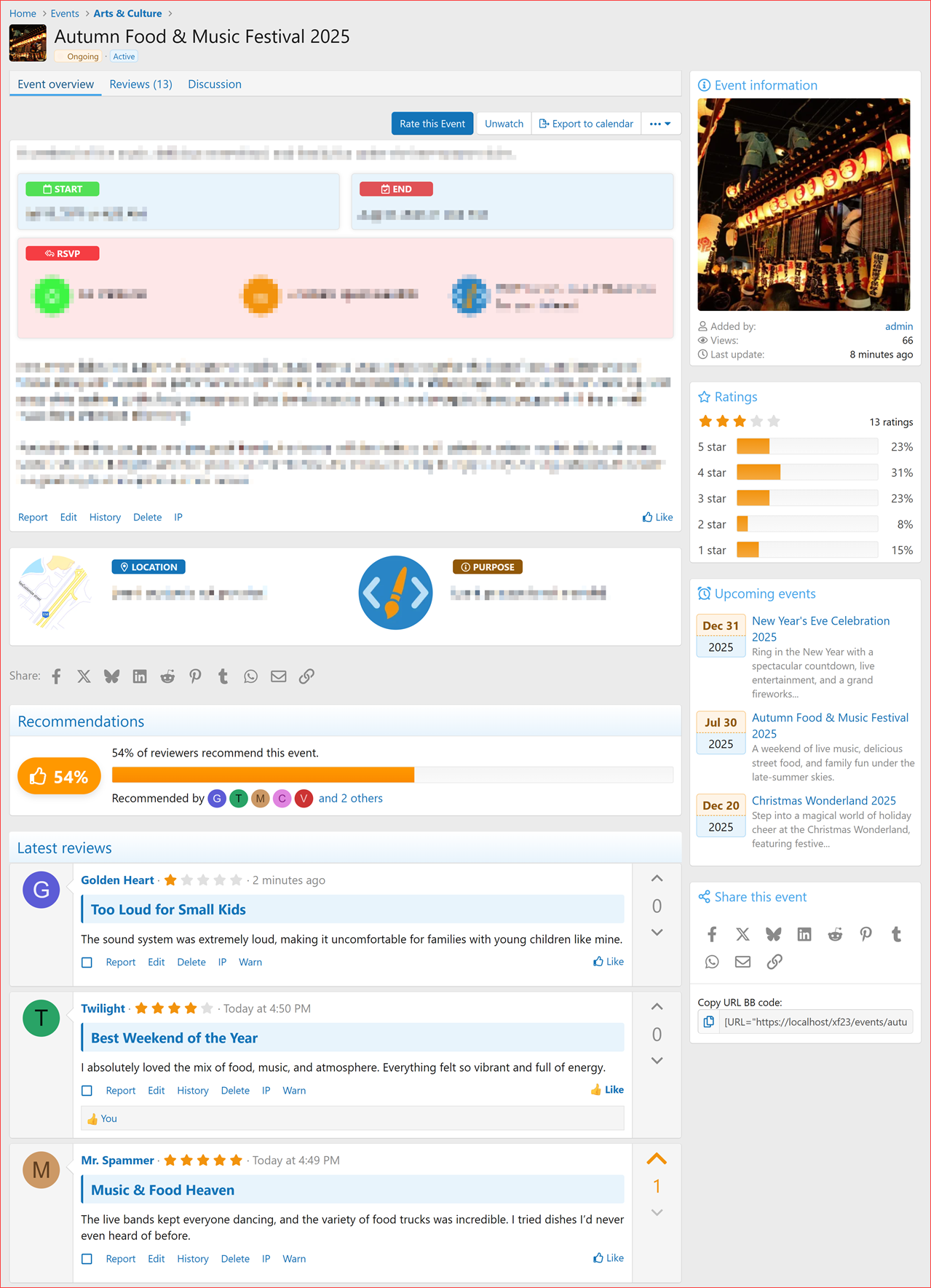
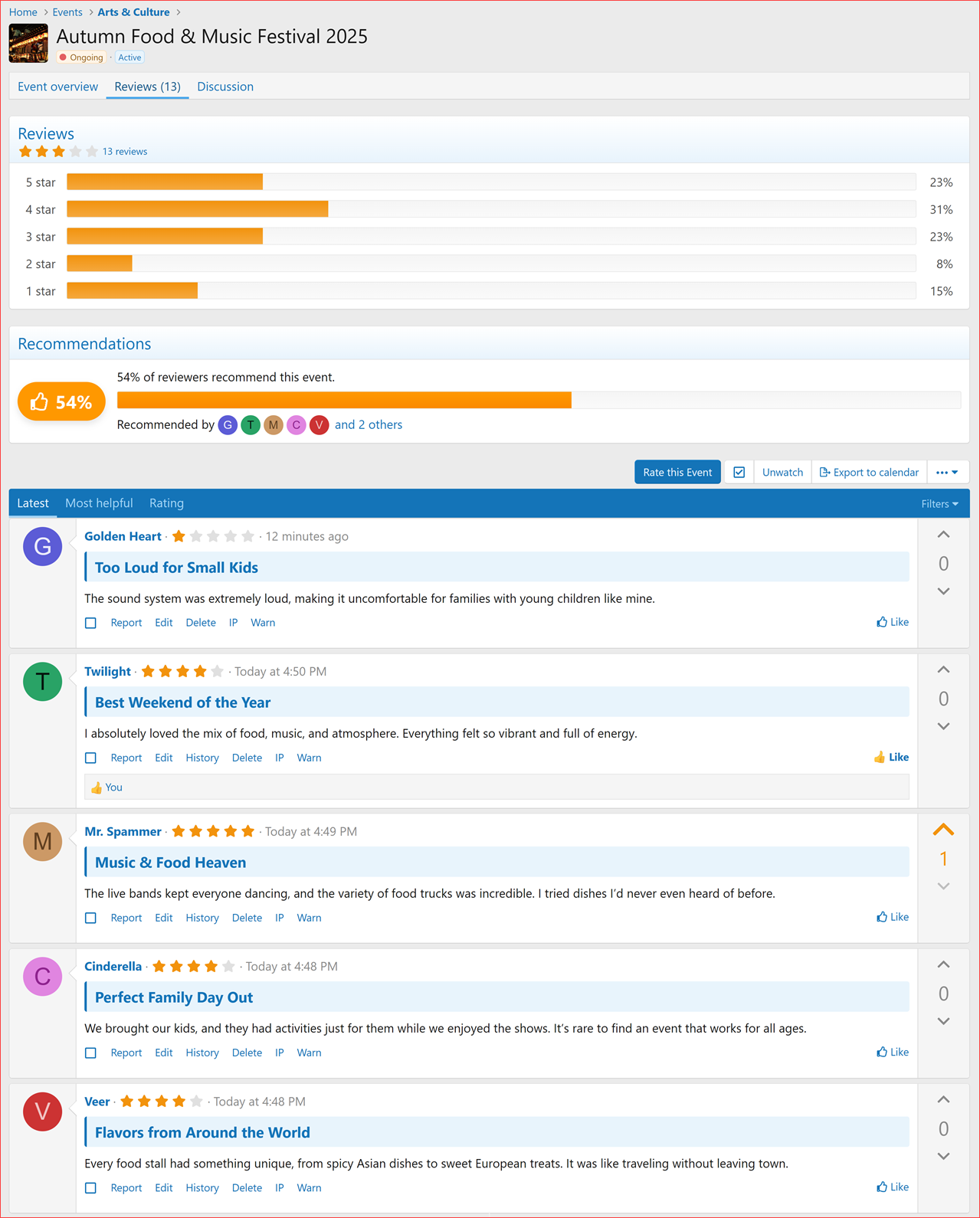


Dive deeper into the specific features of our new Event Ratings & Reviews system with these dedicated documentation threads:
Explore More Details & Screenshots
- Event Ratings & Reviews System!
- Event Recommendations
- Event Review Attachments
- Event Review Voting
- Event Review Reactions
- Event Review Custom Fields
- Event Rating Timing Control
- Event-Level Rating Control
- Require RSVP for Event Rating
- Advanced Review Management & Moderation
Liked this update?Please leave us a Rating on XenForo! or XenCustomize.
This update brings a smoother event creation experience with auto-filled start and end date fields, saving you time when creating new events.
We've also improved the RSVP participants tab order, ensuring a consistent and predictable display: Attending > Maybe > Not Attending.
Plus, a couple of minor bugs have been fixed, including a console error and a map link issue.
This is hopefully the final maintenance release before v2.3.7. Update now and enjoy the improvements!
- Prefilled Event Start and End Dates & Times:
- The event creation form now pre-fills the start and end date fields with the current date and time.
- Ensures a smoother event creation experience by setting default values before user input.
- Code refinements and minor fixes.
- RSVP Participants Tabs Display Order:
- Ensured the RSVP participant list always display in a fixed order:
- Attending > Maybe > Not Attending.
- Addresses inconsistencies where the order of RSVP participant tabs would change based on participant responses.
- Improves user experience by providing a predictable, clear display order regardless of RSVP changes.
- Removed unnecessary
data-xf-init="ajax-submit"from "Quick Active" link in the event view, preventing a console error in Chrome. (Reported by @ichpen)- The "Map" button on the event view page now correctly links to Google Maps when "Display map in own tab" option is not selected. (Reported by @ichpen)
XenCustomize Events Manager 2.3.6.2 is here!
This quick update addresses a category permission issue where classes weren’t matching the correct formatter pattern.
Our next feature update (v2.3.7) is still in development. Since it includes new features, we want to ensure a stable release instead of rushing an update with incomplete or buggy functionality. That’s why we prioritized this patch update (v2.3.6.2) to deliver important fix as soon as possible.
Stay tuned for exciting new features in the future!
- Fixed category permission classes not matching the correct formatter pattern.
