
![[XenCustomize] Auto Lock Threads](/community/data/resource_icons/10/10183.jpg?1766229280)
- Compatible XF 2.x versions
- 2.2
- 2.3
- Additional requirements
- XenCustomize Core Library 1.0.4+
- License
- Single-use License (1 License, 1 website) https://xencustomize.com/about/license-agreement/
- Updates duration
- 6 Month / $15 Renewal
- Visible branding
- Yes, but removable without payment
 XenCustomize Auto Lock Threads for XenForo 2
Automatically lock threads using per-thread, per-forum, or global rules.XenCustomize Auto Lock Threads helps keep discussions organized by automatically locking threads when your chosen conditions are met.
Set a custom rule on an individual thread, give specific forums their own automatic rules, or use one global rule across selected forums.
Threads stay visible and readable while new replies are prevented automatically.
 Key Features
 Per-thread lock rules
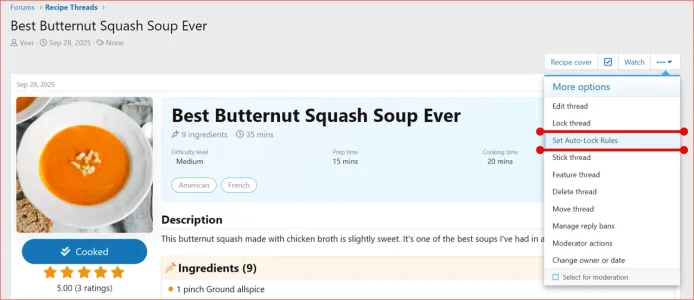
Set a rule directly from the Thread Tools menu for an individual thread.
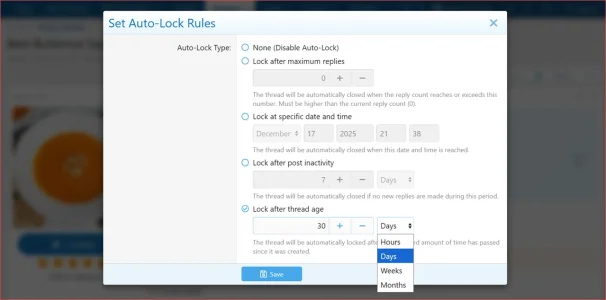
 Lock after reply count
Automatically lock a thread when it reaches the configured number of replies.
 Lock at a specific date & time
Schedule an individual thread to lock at a specific date and time.
 Lock after inactivity
Automatically lock threads after they have received no new replies for the configured period.
 Lock after thread age
Lock threads once they reach the configured age, regardless of recent activity.
 Per-forum lock rules
Give individual forums their own reply-count, inactivity, or thread-age rule.
Forums can also inherit the global rule or disable automatic locking entirely.
 Global lock rules
Apply one automatic lock rule across selected forums that do not have their own override.
 Clear rule priority
Thread-specific rules take priority over per-forum rules, while per-forum rules take priority over the global rule.
 Automatic background processing
Due rules are handled automatically in the background, so scheduled, inactive, or old threads do not need to be opened before locking occurs.
 Thread rule indicator
When a thread-specific rule is active, a notice on the thread shows when or why it will be locked.
 Moderator logging
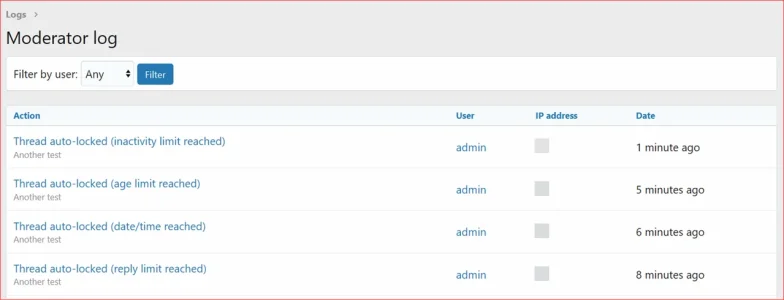
Automatic lock actions are recorded in XenForo's Moderator Log with the reason for the action.
 Permission-based control
Use the dedicated forum moderator permission to control who can set per-thread auto-lock rules.
 Administrator Options
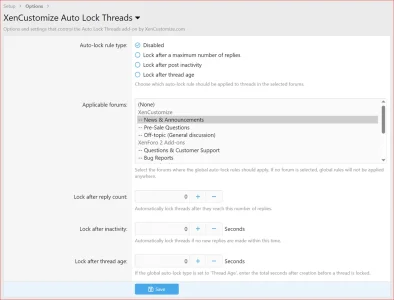
- Per-Forum Lock Rules: Set a forum-specific rule, inherit the global rule, or disable automatic locking for that forum.
- Global Lock Rules: Choose the automatic rule and the forums where it should apply.
- Reply count: Set the reply threshold used by reply-count rules.
- Inactivity: Set how long a thread can remain without a new reply.
- Thread age: Set how old a thread can become before automatic locking.
Useful For
- Closing support discussions after a set period.
- Reducing necroposting in older discussions.
- Limiting threads after a chosen reply count.
- Locking event, sale, or announcement threads on schedule.
- Keeping old content readable without allowing new replies.
 Compatibility & Requirements
- XenForo 2.2.x
- XenForo 2.3.x
- XenCustomize Core Library 1.0.4+
 License Setup
After installation, go to the add-on options and open the License options tab to enter your license key. Footer branding is optional and may be removed from the same License options tab.License verification may use XenCustomize.com with local caching. Normal installation and uninstallation do not depend on our server being available. An expired license does not disable normal use of the add-on, but an active valid license is required for official support and access to new downloads or updates released after the license expires.
 Screenshots
Thread Tools → “Set Auto-Lock Rules”
Auto-Lock Rules overlay
Thread notices for active auto-lock rules
Administrator options for per-forum and global lock rules
Moderator Log entry for an automatic lock action
Permission for setting per-thread auto-lock rules
Auto Lock Threads cron entry
-
 XenCustomize-Auto-Lock-Threads-200-Thread-Tools-Set-Auto-Lock-Rules.webp
 -
 XenCustomize-Auto-Lock-Threads-200-Thread-Set-Auto-Lock-Rules-Overlay.webp
 -
 XenCustomize-Auto-Lock-Threads-200-Info-Bar-Lock-After-Maximum-Replies.webp
 -
 XenCustomize-Auto-Lock-Threads-200-Info-Bar-Lock-After-Post-Inactivity.webp
 -
 XenCustomize-Auto-Lock-Threads-200-Info-Bar-Lock-After-Thread-Age.webp
 -
 XenCustomize-Auto-Lock-Threads-200-Info-Bar-Lock-At-Specific-Date-Time.webp
 -
 XenCustomize-Auto-Lock-Threads-200-Admin-Options.webp
 -
 XenCustomize-Auto-Lock-Threads-200-Moderator-Log.webp
 -
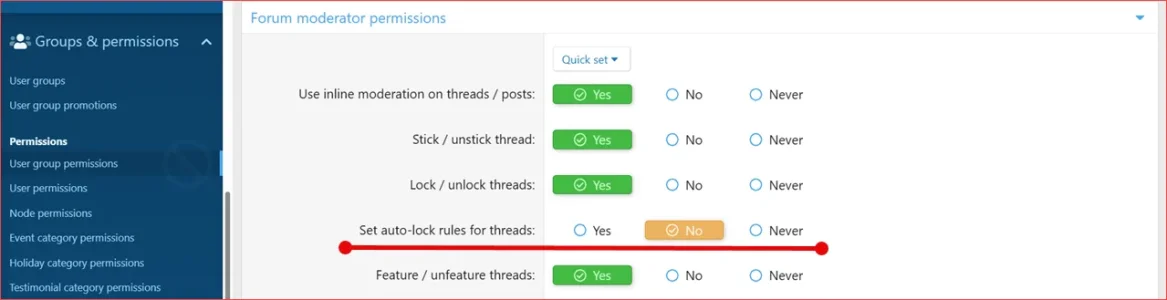 XenCustomize-Auto-Lock-Threads-200-User-Group-Permissions.webp
 -
 XenCustomize-Auto-Lock-Threads-200-Cron.webp

![[XenCustomize] User Content Export](/community/data/resource_icons/10/10960.jpg?1793245399)
![[XenCustomize] This or That: Voting Games, Streaks & Leaderboards](/community/data/resource_icons/10/10954.jpg?1793050205)
![[XenCustomize] Member Mood Tracker](/community/data/resource_icons/10/10731.jpg?1788574285)
![[XenCustomize] Profile Views & Visitors](/community/data/resource_icons/10/10754.jpg?1792929730)
![[XenCustomize] On This Day in History](/community/data/resource_icons/10/10369.jpg?1774463827)