You are using an out of date browser. It may not display this or other websites correctly.
You should upgrade or use an alternative browser.
You should upgrade or use an alternative browser.

Watch Party: synced movie nights with live chat and replays 2.0.3
No permission to buy (€39.00)
- Author SenseiXS
- Creation date
No more credit in your footer
This update removes the "XenForo add-ons by ©XenSupport" line that Watch Party added to your forum footer, separator included. Nothing to configure: install the archive over the previous version from Admin CP > Add-ons and the line is gone once the upgrade has run.
The resource page now says so too: Visible branding: No.
Also in this update (2.0.2)
Install the archive over 2.0.1 or 2.0.2 from the Admin CP, then reload open room pages once.
- Live HLS streams play reliably in Chrome and Edge. Streams from services such as Boomstream or Zoom now play through the bundled hls.js in every browser that supports it, instead of the native player that could stay black.
- Viewers join at the live edge. Opening or refreshing a room during a live stream no longer jumps to the room's last position.
- Automatic reconnection. When a live stream drops, the player says "The stream dropped. Reconnecting..." and tries again on its own, without reloading the page.
This update brings Watch Party from 1.4.0 to 2.0.1. What each release added:
2.0.1. A home page that features the next party when nothing is live, replays that never open on an empty chat, and a round of wording and layout fixes.
2.0.0. Replays with their chat, moments, live polls, crews, private parties, a queue and a complete chat: the biggest update since the first version.
1.4.1. A wording fix: ten Admin CP lines showed a placeholder where a plural belonged.
See it running before you update: live demo, log in as demo / demo2026.
The full changelog, release by release, is on the version history.
A rebuilt Admin CP and calendar reminders for scheduled watch parties.
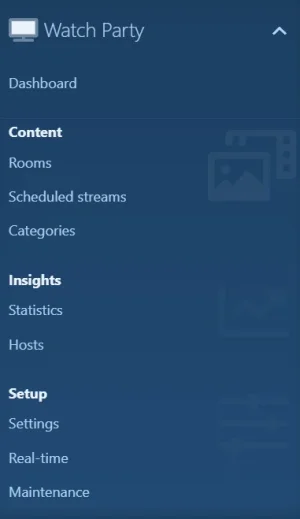
- Added An Insights page in the Admin CP: rooms and viewers over time, which categories actually get used, the split between YouTube, Twitch and VK, your busiest rooms, your most active hosts and how members are rating what they watch.
- Added A Realtime page that shows whether Pusher is configured and lets you test the connection from the Admin CP, instead of finding out it was wrong when a watch party goes quiet.
- Added A Maintenance page with six one-click cleanups: orphaned messages and members, ratings left behind by deleted rooms, stale viewer records, abandoned schedules and old chat.
- Added A Hosts page listing every member who has run a watch party, what they hosted, and a purge action for when someone leaves.
- Added Scheduled watch parties can be added to a calendar. Every schedule now offers an .ics download, so a reminder lands in Google Calendar, Outlook or Apple Calendar rather than only on the forum.
- Changed The Admin CP is reorganised into categories: Setup, Settings, Content, Hosts and Insights, instead of one long list. Finding the room list no longer means reading every entry.
- Changed The reminder bell on an upcoming watch party subscribes without reloading the page.
Attachments
Watch Party 1.3.1 — Admin Control Panel
Managing your watch parties just got a proper home. This release adds a complete admin control panel under its own Watch Party tab — no more editing categories in a tiny text box.
What's new
- Dedicated "Watch Party" admin tab — a real control panel with its own top‑level section.
- Dashboard — at‑a‑glance stats (live rooms, live viewers, upcoming streams, total rooms, categories), your busiest categories, and one‑click shortcuts to every section.
- Category manager — categories are now managed in a clean add / edit / reorder screen: pick a FontAwesome icon and an accent colour, and see how many rooms use each one.
- Room moderation — browse every room (filter by Live / Ended), force‑end a live room, or delete one. Deleting a room now cleans up its chat, viewers, reactions and ratings automatically.
- Scheduled streams — review upcoming streams and cancel any that shouldn't run.
Upgrading from 1.3.0
- Your existing categories are migrated automatically into the new manager — nothing to redo.
- The old "Room categories" option is removed; manage them in Watch Party → Categories instead.
- Existing rooms keep their category (the internal key is preserved), so nothing breaks.
Also in this release
- Custom category icons are baked into the FontAwesome sprite, so they render correctly in production (not just in dev mode).
- Fixed the default "Other" category icon (was a FontAwesome 6 name unavailable on FA5 installs).
Drop‑in upgrade — overwrite the files and run the add‑on upgrade. The migration is idempotent.

1.3.0 — Live reactions, native theming & a full front-end refresh
This is the biggest update Watch Party has had. The entire front end was rebuilt to feel like a real live-streaming room, it now blends into your forum's style on its own, and viewers can finally react to what's playing as it happens.
It adapts to your theme now
Watch Party used to force its own dark look onto every board. That's gone. Backgrounds, text, borders and the accent colour are all pulled from your active XenForo style, so the pages sit naturally on a light theme, a dark theme, or anything in between — and they pick up your style's accent automatically. The only thing that stays dark is the video stage itself, because that's where video looks its best. There's nothing to set up: install it and it already looks like part of your board.
Floating live reactions
A reaction bar sits under the player. Tap an emoji and it floats up over the video with your name attached, for everyone in the room to see. They're delivered instantly when Pusher is configured, with an AJAX fallback so it works straight away with no setup.
Room categories
Hosts can now tag a party as Movies, Gaming, Music, Talk, Sports or Other. The category shows up as a chip on the cards, in the room header and on the listing, so members know what kind of stream they're walking into.
A room that feels alive
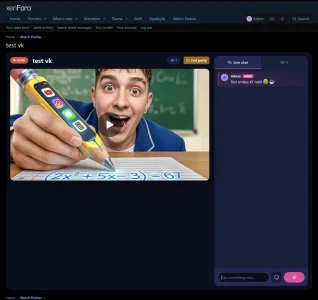
- A "now playing" bar with the platform, the category and a live sync indicator
- A loading poster (thumbnail + spinner) while the player boots up
- Theatre mode — the player goes full width with the chat floating over the side
- System lines in chat when the host plays, pauses or skips ahead
- Hover timestamps on messages, a "new messages" pill, and a viewer avatar row
A listing that sells the stream
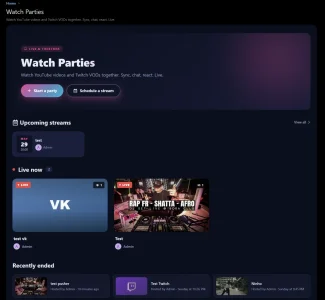
Live cards carry a platform badge, a category chip and an animated live bar. Scheduled streams show a live countdown and a reminder bell. Ended streams get a "watch again" prompt on hover.
Faster room creation
Paste a link and you get an instant preview — the thumbnail and the detected platform show up before you submit. Pick a category in a single click.
Fixed
- Viewer avatars in the room sidebar now render properly instead of a placeholder
Upgrade: standard — upload the files and run the add-on upgrade. New tables and columns are created automatically.
Requires: XenForo 2.3+ · PHP 8.0+
See it live: https://forum.xen-support.com

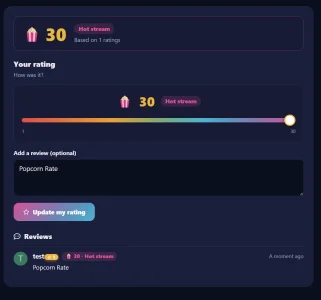
Streams can now be rated once they end. Instead of boring stars, members give Popcorn.
What's new
Admin options
- Rate any ended stream with a Popcorn slider (1 up to your configured max), with the live verdict updating as you drag:
- 1-5 Bad stream
- 6-10 Okay stream
- 11-20 Cool stream
- 21+ Hot stream
- Optional short review alongside the rating
- Ended stream page shows the average score, its tier, and all reviews
- Popcorn badge on the recent streams list (average + colour)
- New "Best rated streams" widget, with configurable row count, minimum votes to qualify, and an optional recency window
Notes
- Enable or disable Popcorn ratings
- Maximum Popcorn per rating (default 30)
- Allow or hide written reviews
- New permission: "Can rate ended streams"
- One rating per member. Re-rating updates your existing vote, it does not stack.
- Hosts cannot rate their own stream.
- If XenLevel is installed, members earn a little XP the first time they rate a stream.
- Safe upgrade from 1.1.x: the new table and columns are added automatically.

Attachments
Fixed
- "Notify Me" alerts were showing up blank. They now display the stream title, start time (in your timezone) and a direct link to the watch room
- VK Video now syncs play, pause and seek to viewers correctly (switched to VK's official player SDK)
- Scheduled streams now show the correct time in your timezone instead of the server's
New
- Optional setting to also send subscribers a private message (with title, time and link) when a scheduled stream is about to start
XenWatchparty 1.1.0
Big update built around scheduled streams, VK Video support, and native XF smileys in chat.
Scheduled streams
Members can now announce a watchparty for a future date and time. The room is created automatically when the time comes, no host action required.
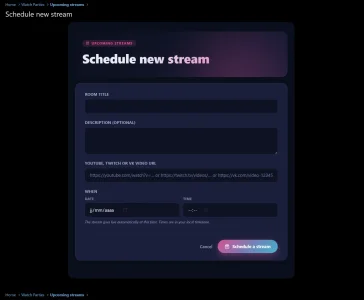
- Schedule a stream button on the index for users with the new permission
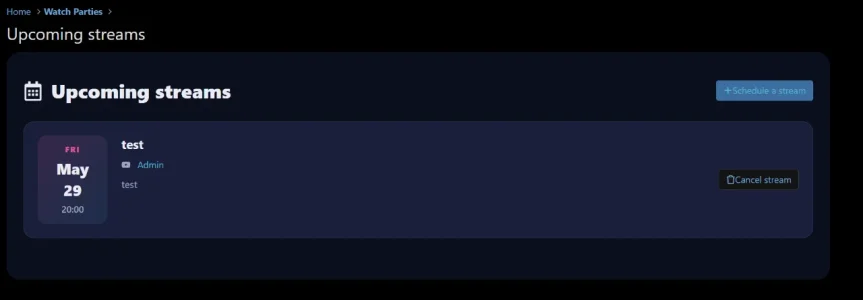
- Dedicated /watchparty/upcoming/ page listing every upcoming + past stream
- Notify me button so members can subscribe to a scheduled stream
- Automated reminder alert fires ~10 minutes before launch
- At the scheduled time, a cron auto-creates the room, alerts the host, and notifies every subscriber with a one-click "Join now" link
- Host (or admin) can cancel a scheduled stream from the listing before it goes live
VK Video provider
VK Video joins YouTube and Twitch VODs as a supported source.
- Recognises vk.com/video, vk.com/clip, vkvideo.ru, vk.ru, m.vk.com, and even raw video_ext.php?oid=… embed URLs
- Same play / pause / seek sync as the other providers via the VK postMessage player API
- No external SDK to load, the embedded iframe handles itself
Native XF smileys in chat
The chat now speaks your forum's smiley dialect.
- Every smiley defined in your ACP works in chat (
,
, custom ones, sprite-based, all of them)
- Smileys are rendered server-side so they're consistent across page loads, real-time Pusher delivery, and AJAX polling
- New smiley picker button next to the send button: click → grid of all smileys → click one to insert at the caret
Other improvements
- Schedule form rebuilt in the same theatre look as the rest of the addon (dark surface, magenta accent), no more clash with the default XF block style
- Date and time are now two separate native pickers instead of datetime-local, so every browser gets a proper confirmation button
- Index page shows an Upcoming streams banner under the live rooms
- Provider icons in listings now include the VK badge
- Description, title, and URL placeholders updated to mention VK Video
Upgrade notes
- 2 new tables created automatically on upgrade (xf_xs_watchparty_schedule + xf_xs_watchparty_schedule_sub)
- The video_provider enum is extended on existing tables to add vk (idempotent migration)
- 1 new cron entry (xenWatchpartyScheduleTick) runs every minute to pick up due streams and reminders
- 1 new permission xenWatchparty.scheduleStream, defaults to off, set it per usergroup before users will see the Schedule button
- 20+ new phrases (all prefixed xen_watchparty_*)
Requirements
Unchanged: XenForo 2.3.0+ and PHP 8.0+.