

- Compatible XF 2.x versions
- 2.3
- Additional requirements
- XenForo 2.3.13 or later,
XenForo Resource Manager 2.3.13 or later,
and PHP 8.0 or later.
- Updates duration
- $9.95 - 1 year ($4.95 yearly renewal)
- Visible branding
- No
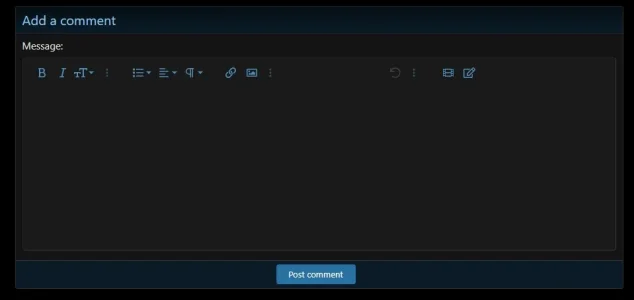
Add a comment section directly to XenForo Resource Manager description pages. Members can start a conversation without leaving the resource.
1. In the Admin control panel, go to Add-ons → Install/upgrade from archive and select the release ZIP.
2. If archive installation is unavailable, extract the ZIP, copy the contents of the
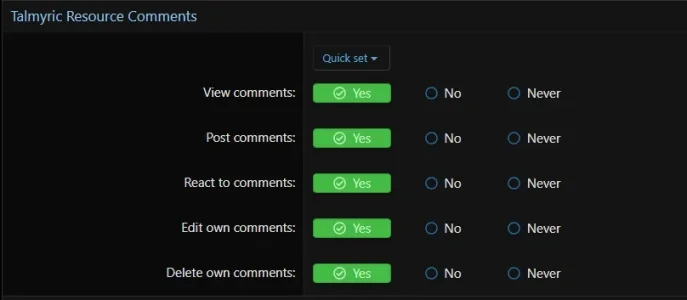
3. Go to Groups & permissions → User group permissions. Under Talmyric Resource Comments, grant View comments to groups that should see the section and Post comments to groups that should participate. Grant React to comments, Edit own comments, and Delete own comments as appropriate.
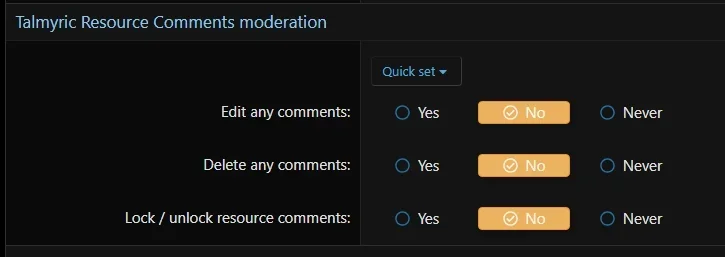
4. Under Talmyric Resource Comments moderation, grant Edit any comments, Delete any comments, or Lock / unlock resource comments to the appropriate staff. XenForo moderators who can edit or delete any resource in a category can also lock or unlock comments there.
5. Open a resource's description page and look for Comments. No widget setup is needed.
Add-on permissions default to unset. Administrators still need the relevant permissions. Comment access also follows Resource Manager's category, resource, and full-description permissions.
## Upgrade
Install the new ZIP over the existing add-on. Do not uninstall first. Upgrading from 1.2.0 keeps comments, reactions, permissions, and resource locks. Version 1.2.1 updates the documentation only.
## Uninstall
Uninstalling removes the add-on's comments, reactions, alerts, and lock settings. Back up the database first if you need to retain them.
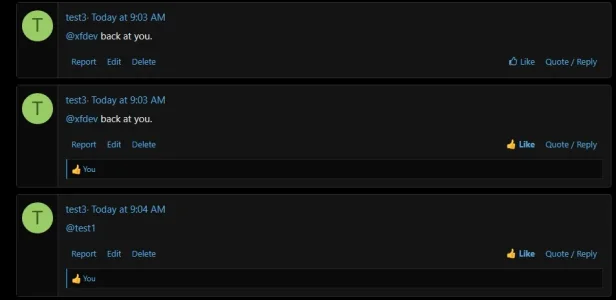
- Individual comment cards with avatars, timestamps, and a visible comment count.
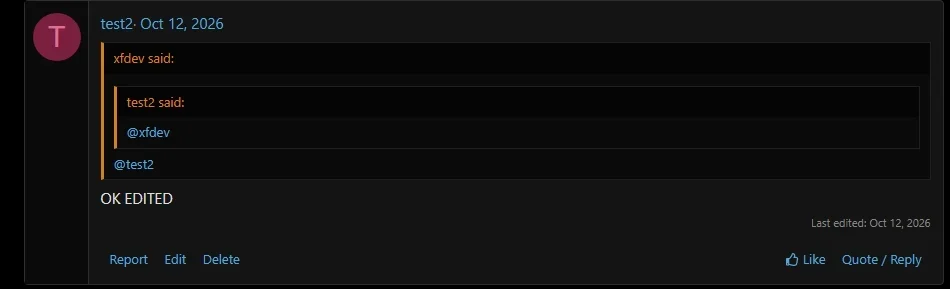
- A rich text editor, single-comment Quote / Reply, and native reactions.
- Alerts for new comments on your resources, quotes, mentions, and reactions.
- Permission-based editing and deletion, native reporting, and per-resource comment locks.
1. In the Admin control panel, go to Add-ons → Install/upgrade from archive and select the release ZIP.
2. If archive installation is unavailable, extract the ZIP, copy the contents of the
upload/ folder into your forum root, then install or upgrade Talmyric Resource Comments from Add-ons.3. Go to Groups & permissions → User group permissions. Under Talmyric Resource Comments, grant View comments to groups that should see the section and Post comments to groups that should participate. Grant React to comments, Edit own comments, and Delete own comments as appropriate.
4. Under Talmyric Resource Comments moderation, grant Edit any comments, Delete any comments, or Lock / unlock resource comments to the appropriate staff. XenForo moderators who can edit or delete any resource in a category can also lock or unlock comments there.
5. Open a resource's description page and look for Comments. No widget setup is needed.
Add-on permissions default to unset. Administrators still need the relevant permissions. Comment access also follows Resource Manager's category, resource, and full-description permissions.
## Upgrade
Install the new ZIP over the existing add-on. Do not uninstall first. Upgrading from 1.2.0 keeps comments, reactions, permissions, and resource locks. Version 1.2.1 updates the documentation only.
## Uninstall
Uninstalling removes the add-on's comments, reactions, alerts, and lock settings. Back up the database first if you need to retain them.


