- Compatible XF 2.x versions
- 2.3
- Visible branding
- No
StreamWave Slots Pro — Premium Slot Machine Arcade for XenForo 2.3
Bring the ultimate slot machine arcade experience to your community!
Transform your XenForo community into an immersive virtual gaming destination with StreamWave Slots Pro, a comprehensive slot machine arcade featuring six individually themed machines, realistic cabinet artwork, fully animated spinning reels, mechanical sound effects, progressive jackpots and automatic virtual-credit settlements.Unlike basic slot machine scripts that simply display randomly selected symbols, StreamWave Slots Pro delivers a genuine animated machine experience, complete with independently spinning reels, gradual deceleration, illuminated controls and graphical winning combinations.
Designed specifically for XenForo 2.3, Slots Pro integrates directly into your community and can operate independently or alongside an existing Central Bank Pro economy.
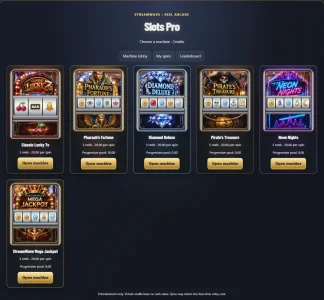
Six premium slot machines
Each machine features its own visual identity, cabinet artwork, graphical symbols and gaming experience.Classic Lucky 7s
Experience the traditional three-reel fruit machine with a classic red and chrome cabinet, lucky sevens, cherries, bells and traditional slot symbols.Pharaoh's Fortune
Discover an ancient Egyptian-themed five-reel machine featuring ornate golden cabinet artwork, Egyptian treasures and mystical symbols.Diamond Deluxe
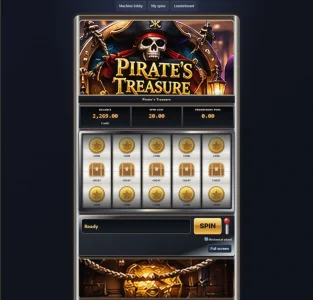
A luxury five-reel machine featuring illuminated crystal artwork, precious gemstones, crowns and a sophisticated metallic cabinet.Pirate's Treasure
Explore a pirate-themed five-reel machine featuring treasure, nautical symbols, golden coins and antique cabinet styling.Neon Nights
Enter a futuristic gaming experience with vibrant neon lighting, electronic graphics and a cyberpunk-inspired five-reel cabinet.StreamWave Mega Jackpot
The flagship five-reel machine features premium black-and-gold cabinet artwork and progressive virtual-credit jackpot functionality.Each machine can be individually enabled or disabled through the XenForo Admin Control Panel.
Realistic animated slot machine experience
StreamWave Slots Pro has been designed to provide a visually immersive gaming experience rather than a simple random-number interface.Features include:
- Photographic-style slot machine cabinet artwork.
- Individually themed graphical reel symbols.
- Continuously moving reel strips.
- Independent reel stopping animations.
- Gradual reel acceleration and deceleration.
- Motion blur during reel movement.
- Curved reel shading.
- Glass-effect reel windows.
- Metallic cabinet surrounds.
- Mechanical spin lever.
- Illuminated spin controls.
- Digital information displays.
- Optional mechanical sound effects.
- Highlighted winning symbols.
- Full-screen gaming mode.
- Responsive desktop and mobile layouts.
Advanced slot machine gameplay
StreamWave Slots Pro includes a range of traditional and modern slot machine features:- Three-reel and five-reel machines.
- Multiple paylines.
- Wild symbols.
- Scatter-based bonuses.
- Machine-specific prize combinations.
- Progressive jackpots on supported machines.
- Interactive payout tables.
- Automatic winning combination detection.
- Automatic virtual-credit settlements.
- Personal spin history.
- Member leaderboards.
- Configurable participation and spending limits.
Progressive jackpot system
Supported slot machines include a progressive prize pool that accumulates according to the machine's configured financial rules.The progressive jackpot system is integrated with the selected virtual economy and includes accounting controls designed to prevent unfunded payouts.
Administrators can monitor prize pools, financial activity and outstanding funds through the administration center.
Flexible economy integration
One of the major advantages of StreamWave Slots Pro is that an external banking add-on is not mandatory.The system supports three economy modes.
Built-in standalone virtual credits
Operate an independent slot arcade without installing any additional banking or credit add-ons.The built-in economy includes:
- Individual member credit wallets.
- Central virtual-credit treasury.
- Administrator-controlled credit allocations.
- Username-based credit distribution.
- Automatic spin-cost deductions.
- Automatic prize payments.
- Progressive prize pool accounting.
- Transaction history.
- Financial reconciliation.
- Insufficient balance protection.
Central Bank Pro integration
Communities using StreamWave Central Bank Pro can connect Slots Pro directly to their established virtual economy.Members can use their existing supported virtual currency without maintaining a separate Slots Pro wallet.
Integration includes:
- Existing member credit balances.
- Configured Central Bank currencies.
- Centralized treasury accounting.
- Automatic spin-cost deductions.
- Automatic prize settlement.
- Financial transaction records.
- Financial reconciliation.
Direct DragonByte or XENTR integration without Central Bank Pro is not currently included.
Free-to-play mode
Communities that do not wish to operate a credit-funded arcade can enable free-to-play mode.Members can experience the animated slot machines without paying virtual credits.
Free-play results are intended for entertainment and do not award spendable currency.
| Economy provider | Supported |
|---|---|
| Standalone virtual credits | Yes |
| StreamWave Central Bank Pro | Yes |
| Free-to-play | Yes |
| DragonByte Credits through Central Bank | Yes |
| XENTR Credits through Central Bank | Yes |
| Real-money gambling | No |
Premium slot arcade lobby
Members can browse the available machines through a dedicated gaming lobby featuring individually themed cabinet previews.The lobby provides access to:
- Available slot machines.
- Machine-specific artwork.
- Entry cost information.
- Reel counts.
- Progressive prize pools where applicable.
- Personal spin history.
- Member leaderboards.
- Direct machine access.
Four premium XenForo widgets
StreamWave Slots Pro includes four native XenForo widget definitions that can be positioned throughout your community.Slots Pro: Game Spotlight
A premium sidebar widget featuring:- Photographic-style cabinet artwork.
- Glass-effect miniature reels.
- Metallic gold and midnight-blue styling.
- Current machine information.
- Entry fee.
- Reel count and paylines.
- Personalized member credit balance.
- Progressive jackpot information where applicable.
- Direct machine access.
- Arcade, My Spins and Leaderboard buttons.
- Automatic free-play mode detection.
- Responsive sidebar layout.
Slots Pro: Progressive Jackpot
Display the current progressive prize pool and associated machine information directly on your forum.Slots Pro: Recent Results
Display recent slot machine results and community gaming activity.Slots Pro: Leaderboard
Display member rankings based on recorded slot machine results.All four widgets include native ACP configuration templates and can be managed using XenForo's existing widget system.
Member statistics and history
Members can review their recorded gaming activity through their personal spin history.Recorded information includes:
- Slot machine played.
- Spin date.
- Entry cost.
- Winning combinations.
- Awarded virtual credits.
- Game results.
StreamWave Gaming Hub integration
Slots Pro integrates with the separately available StreamWave Gaming Hub add-on.When the compatible Gaming Hub integration is installed, members can access Slots Pro alongside other StreamWave gaming products, including:
- Lottery Pro.
- Deal or No Deal.
- Arcade Pro.
- Fantasy Sportsbook Pro.
- Other compatible community games.
Comprehensive XenForo administration
Slots Pro includes a dedicated administration section within the XenForo Admin Control Panel.Administrators can manage:
- Machine availability.
- Economy provider selection.
- Machine financial settings.
- Spin costs.
- Participation limits.
- Progressive jackpot accounting.
- Member credit allocations.
- Gaming activity.
- Spin history.
- Financial reconciliation.
- User group permissions.
Server-side security and financial protection
The system includes safeguards designed to protect the integrity of the virtual community economy.These include:
- Server-side random outcome generation.
- Server-side winning combination calculations.
- Transaction-scoped financial settlements.
- Insufficient balance checks.
- Duplicate-submission protection.
- Prize funding checks.
- Dedicated jackpot accounting.
- Financial reconciliation.
- Persistent transaction records.
- User group permission enforcement.
Installation and Operational Instructions
1. System requirements
- XenForo 2.3.
- A compatible PHP and MySQL/MariaDB environment meeting XenForo's requirements.
- JavaScript-enabled modern web browser.
- StreamWave Central Bank Pro — optional.
- StreamWave Gaming Hub — optional.
2. Installing StreamWave Slots Pro
- Back up your XenForo files and database.
- Log into your XenForo Admin Control Panel.
- Navigate to Add-ons.
- Select Install/upgrade from archive.
- Upload the StreamWave Slots Pro installation ZIP.
- Complete the installation.
- Locate Slots Pro within the ACP navigation.
Free play is the initial default economy mode.
3. Configuring user group permissions
Navigate to:ACP → Groups & permissions → User group permissions
Select the appropriate member group and locate the Slots Pro permissions.
View Slots Pro
Allows eligible members to access the slot arcade and its supported member-facing pages.Play Slots Pro
Allows eligible members to start spins on enabled machines.You can restrict participation to selected member groups, including registered members, VIP members or other custom groups.
Ensure that guests and unauthorized member groups do not have permission to participate in credit-funded games.
Administrators must also have the relevant Slots Pro administration permission to manage the system.
4. Selecting your economy provider
Navigate to:ACP → Slots Pro
Locate the economy and currency configuration.
Choose your preferred operating mode.
Option A: Standalone credits
Select the built-in standalone currency.Confirm that the currency is exclusively virtual, cannot be purchased with money and cannot be redeemed for anything of monetary value.
Save your settings.
Members will need sufficient standalone credits before participating in credit-funded spins.
Option B: Central Bank Pro
Ensure Central Bank Pro is installed and configured.Select the appropriate initialized Central Bank currency within Slots Pro.
Verify that sufficient treasury funds are available for the configured machines.
Save the settings.
Members will use their existing supported Central Bank currency when playing.
Option C: Free-to-play
Select free play and save the settings.Members will not require a funded credit wallet to use free-play machines.
This is also the recommended mode for initial installation testing.
5. Allocating standalone credits
When using the standalone economy, navigate to the credit allocation controls within the Slots Pro administration section.Enter:
- The member's exact username.
- The amount of virtual credits to allocate.
The system transfers the approved credits from the standalone treasury into the member's wallet.
Administrators should review treasury balances before allocating credits.
The standalone Slots Pro economy is independent of the standalone economies included in Lottery Pro and Deal Pro.
Use Central Bank Pro if you require a shared supported virtual currency across those products.
6. Configuring slot machines
Navigate to the Slots Pro machine management section.Locate the machine you wish to configure.
Review its available settings, including:
- Machine name.
- Availability.
- Entry cost.
- Economy configuration.
- Applicable prize settings.
- Progressive jackpot settings where supported.
Enable the machine when you are satisfied with its configuration.
Repeat this process for any additional machines you wish to make available.
7. Configuring progressive jackpots
For machines supporting progressive jackpots, review the associated prize pool and available financial settings.Before enabling credit-funded jackpot games:
- Verify that the selected economy is operational.
- Review the available treasury and jackpot funds.
- Confirm that the prize configuration is appropriate for your community's economy.
- Enable the machine.
- Review the financial audit after initial testing.
8. Installing the premium sidebar widget
Navigate to:ACP → Appearance → Widgets
Select Add widget.
From the available widget definitions, choose:
Slots Pro: game spotlight
Configure the following:
| Setting | Example |
|---|---|
| Widget key | slots_pro_spotlight |
| Title | StreamWave Slots Arcade |
| Position | Forum list: Sidebar |
The premium Slots Pro sidebar panel will now appear in the selected widget position for eligible visitors.
Existing Spotlight widget placements automatically inherit the updated premium styling when upgrading to v1.0.4.
9. Installing the additional widgets
Repeat the widget installation process for:| Widget definition | Suggested position |
|---|---|
| Slots Pro: progressive jackpot | Forum sidebar |
| Slots Pro: recent results | Forum sidebar or suitable homepage position |
| Slots Pro: leaderboard | Forum sidebar or gaming page |
Widget availability and content depend on the associated machine configuration and visitor permissions.
10. Integrating with StreamWave Gaming Hub
If you have StreamWave Gaming Hub installed, use Gaming Hub v1.2.8 or a compatible subsequent version containing the Slots Pro integration.Install or upgrade Gaming Hub through:
ACP → Add-ons → Install/upgrade from archive
The Slots Pro catalog entry provides access to the arcade using its registered XenForo route.
On Gaming Hub installations, the relocated Slots navigation entry is associated with Gaming Hub.
If operating without Gaming Hub, verify that the public Slots route is accessible and configure a suitable navigation link through XenForo's public navigation manager if necessary.
Member Operating Instructions
1. Accessing the slot arcade
Members can access Slots Pro through the available community navigation, Gaming Hub or a Slots Pro sidebar widget.The default public route is:
/slots/
2. Selecting a slot machine
Browse the available machines and select the one you wish to play.Each machine has its own graphical theme, reel configuration and prize combinations.
3. Reviewing the machine
Before starting a spin, review:- Entry cost.
- Available credit balance.
- Payout table.
- Available paylines.
- Progressive prize pool, where applicable.
- Machine-specific symbols.
4. Starting a spin
Select the illuminated spin button or mechanical lever.The machine's reels begin moving through their graphical symbols.
Each reel stops independently until the server-generated result has been displayed.
5. Viewing the result
After the reels stop, the machine displays the result and highlights applicable winning combinations.In credit-funded mode, eligible virtual-credit prizes are automatically settled into the member's configured wallet.
6. Sound and full-screen controls
Members can use the available sound controls to enable or disable mechanical machine audio.Full-screen mode provides an expanded machine view on compatible browsers.
7. Viewing personal spin history
Select My Spins to review previously recorded results.Members can review their gaming history and associated virtual-credit activity.
8. Viewing leaderboards
Select Leaderboard to view available community gaming rankings.Financial Management and Maintenance
Administrators should regularly review the Slots Pro financial audit, particularly after changing machine costs, economy providers or jackpot configurations.Monitor:
- Total recorded spins.
- Collected spin costs.
- Awarded prizes.
- Progressive jackpot funds.
- Available treasury funds.
- Standalone member balances.
- Financial reconciliation differences.
Before changing currency providers, disabling an economy integration or uninstalling the add-on, ensure that any associated jackpot funds and financial obligations have been reconciled.
Do not manually modify economy balances or jackpot tables without understanding their associated accounting records.
Troubleshooting
Slot machines are not appearing
Check that the machines are enabled and that the member has the View Slots Pro permission.Members cannot spin
Check the Play Slots Pro permission, machine availability, configured participation limits and the member's available credit balance.Credit balance is unavailable
Verify that the selected economy provider is installed, initialized and operational.For standalone mode, ensure that the member has been allocated credits.
Jackpot displays zero
A zero jackpot may indicate that the progressive prize pool has not yet accumulated funds or that the machine does not have an active funded jackpot.Review the applicable machine and financial configuration.
Cabinet graphics or animations are not displaying correctly
Refresh the browser using Ctrl + F5, verify that JavaScript is enabled and confirm that all add-on assets were uploaded successfully.Slots Pro is missing from Gaming Hub
Verify that the compatible Gaming Hub upgrade is installed and that the member has the appropriate Slots Pro permissions.Current Release Information
Product: StreamWave Slots ProVersion: 1.0.4 — Premium Sidebar Edition
Platform: XenForo 2.3
Included machines: 6
Included widgets: 4
Central Bank Pro required: No
Gaming Hub required: No, except for the optional Gaming Hub navigation integration.
Mobile responsive: Yes
Standalone virtual economy: Yes
Real-money support: No
Responsible use and compatibility
StreamWave Slots Pro is designed exclusively for recreational community entertainment using non-purchasable, non-redeemable virtual credits.The system does not support real-money wagering, cash withdrawals or payment processing. Random outcomes do not guarantee winnings.
The current release includes photographic-style cabinet artwork and animated graphical reel symbols. It is not a fully rendered 3D casino simulator.
Advanced bonus games, separate free-spin rounds, custom symbol uploads, editable reel strips, fully customizable payout tables and achievements are planned enhancements and are not included in the current release.
Developed by StreamWave
Premium community entertainment and development solutions for XenForo.
Visit us at https://streamwaveforums.net/