- Compatible XF 2.x versions
- 2.3
- Visible branding
- No
Fantasy Sportsbook Pro – XenForo 2.3
The Ultimate Community Sports Prediction Experience
Transform your XenForo community into an interactive sports prediction destination with Fantasy Sportsbook Pro, a dedicated virtual points-based sportsbook system designed to increase member engagement, encourage friendly competition and give sports fans a reason to return to your community every day.Fantasy Sportsbook Pro combines real-world sporting fixtures, bookmaker odds, virtual points, automated result processing and competitive leaderboards into one integrated XenForo add-on.
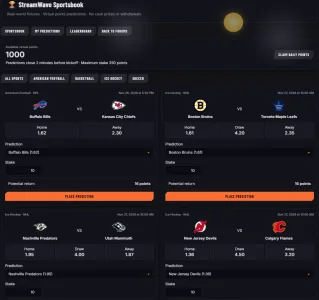
Members can browse upcoming sporting events, examine odds, make predictions, manage their virtual points balance and compete against other community members for bragging rights.
Unlike a traditional sportsbook, Fantasy Sportsbook Pro operates using virtual community points rather than real-money wagering.
Main Features
Automated Sporting Fixtures
Keep your community supplied with upcoming sporting events through automated fixture imports powered by TheSportsDB.- Automatic fixture importing.
- Configurable sports leagues.
- Upcoming match schedules.
- Home and away team information.
- Team and club badges where available.
- Scheduled fixture synchronization.
- Duplicate fixture protection.
- Automatic result synchronization.
- Automatic prediction locking at kickoff.
Real-World Bookmaker Odds
Fantasy Sportsbook Pro integrates with The Odds API to retrieve real-world bookmaker odds for supported sporting events.- Automated bookmaker odds importing.
- Decimal odds display.
- Multiple supported sporting competitions.
- Configurable bookmaker regions.
- Improved team-name matching between providers.
- Scheduled odds refreshes.
- API error reporting.
- API rate-limit protection.
- Prevention of predictions on fixtures without valid odds.
Virtual Points Wallet
Every participating member receives a dedicated sportsbook points wallet.- Default starting balance of 1,000 virtual points.
- Daily 100-point rewards.
- Points-based predictions.
- Automatic deduction of prediction stakes.
- Automatic winning payouts.
- Transaction history.
- Cancelled fixture refunds.
- Daily stake limits.
- Persistent member balances.
Interactive Sports Predictions
Members can select upcoming fixtures and make predictions based on the available outcomes.Depending on the sport and available markets, predictions can include:
- Home team victory.
- Away team victory.
- Draw.
For example, a successful 100-point prediction at decimal odds of 2.50 returns 250 points, including the original stake, resulting in a net profit of 150 points.
Automated Settlement and Payouts
Fantasy Sportsbook Pro is designed to reduce the administrative workload associated with running a sports prediction community.When supported results are imported, the settlement engine processes outstanding predictions and distributes virtual points accordingly.
- Automatic winning prediction processing.
- Losing prediction settlement.
- Winning points credited to member wallets.
- Cancelled fixture refunds.
- Duplicate prediction protection.
- Database transaction protection.
Member Prediction History
Members can review their previous predictions through the My Predictions section.This allows participants to monitor their selections, review outcomes and track their sportsbook activity over time.
Competitive Leaderboards
Encourage friendly competition with a community sportsbook leaderboard.Members can compete to become the community's most successful sports predictors, with rankings based on prediction profitability.
The leaderboard provides an additional incentive for members to participate regularly and improve their prediction strategies.
Multi-Sport Support
Fantasy Sportsbook Pro supports multiple sporting competitions, subject to availability through the configured data providers.Examples include:
- English Premier League.
- Scottish Premiership.
- Spanish La Liga.
- NFL American Football.
- NBA Basketball.
- American college sports.
Native XenForo Integration
Fantasy Sportsbook Pro is developed as a native XenForo 2.3 add-on rather than a standalone external application.Features include:
- Native XenForo member accounts.
- Integrated public navigation.
- Dedicated Admin Control Panel navigation.
- Native XenForo templates.
- MySQL database integration.
- Native scheduled cron jobs.
- Administrator access controls.
- Responsive desktop and mobile layouts.
- Styling designed to inherit the active XenForo theme.
- Standard XenForo archive installation and upgrades.
Full Installation and Operational Guide
1. System Requirements
Before installing Fantasy Sportsbook Pro, ensure you have:- A working XenForo 2.3 installation.
- Administrator access to the XenForo Admin Control Panel.
- A compatible PHP and MySQL environment for XenForo.
- Outbound HTTPS connectivity to the sports data providers.
- A TheSportsDB API key appropriate for your intended usage.
- A The Odds API account and API key.
- A functioning XenForo scheduled task system.
2. Installing Fantasy Sportsbook Pro
- Log in to your XenForo Admin Control Panel.
- Navigate to Add-ons.
- Select Install/upgrade from archive.
- Upload the Fantasy Sportsbook Pro installation ZIP.
- Follow the XenForo installation prompts.
- Allow XenForo to complete installation and template rebuilding.
- Confirm that Fantasy Sportsbook Pro appears in your installed add-ons list and is enabled.
No separate external sportsbook installation is required.
3. Accessing the Administration Panel
After installation, locate Fantasy Sportsbook within the XenForo Admin Control Panel navigation.The direct administration route is:
admin.php?sportsbook/
For example:
The native options group can also be accessed through:
admin.php?options/groups/mspSportsbook/
Ensure that the administrator account has the appropriate permissions to access and manage the sportsbook.
4. Obtaining a TheSportsDB API Key
TheSportsDB provides sporting fixtures, team information and results.- Visit https://www.thesportsdb.com/
- Review the available API access plans.
- Obtain an API key appropriate for your community.
- Open the Fantasy Sportsbook administration dashboard.
- Enter your TheSportsDB API key in the corresponding configuration field.
- Configure the leagues you wish to import.
- Save your settings.
5. Obtaining an Odds API Key
The Odds API provides bookmaker odds for supported sporting events.- Visit https://the-odds-api.com/
- Register an account.
- Select an appropriate API subscription.
- Obtain your API key from your account dashboard.
- Return to the Fantasy Sportsbook administration dashboard.
- Enter the API key in the Odds API configuration field.
- Select your preferred bookmaker region.
- Save your configuration.
| Region | API value |
|---|---|
| United States | us |
| United Kingdom | uk |
| Europe | eu |
| Australia | au |
6. Configuring Sporting Leagues
Configure the leagues you want your community to participate in through the sportsbook administration interface.Common TheSportsDB league IDs include:
| Competition | League ID |
|---|---|
| English Premier League | 4328 |
| Scottish Premiership | 4330 |
| Spanish La Liga | 4335 |
| NFL | 4391 |
| NBA | 4387 |
| NHL | 4380 |
| Major League Baseball | 4424 |
Start with a small selection of leagues to confirm that fixtures, odds and results are being imported successfully before expanding your sportsbook.
7. Performing the First Synchronization
Once your API credentials and leagues have been configured:- Open the Fantasy Sportsbook administration dashboard.
- Confirm that your API settings have been saved.
- Select the manual synchronization option.
- Allow the fixture import and odds refresh to complete.
- Review the synchronization report.
- Confirm that fixtures have been imported.
- Confirm that bookmaker odds have been matched to those fixtures.
- Visit the public sportsbook page to verify the imported events.
8. Enabling Automatic Updates
Enable the sportsbook automation setting through the administration interface.Fantasy Sportsbook Pro uses XenForo's native scheduled task system to perform background operations.
The automation engine is designed to handle:
- Fixture synchronization.
- Bookmaker odds refreshes.
- Result synchronization.
- Prediction settlement.
- Winning payouts.
- Cancelled fixture refunds.
You can inspect scheduled tasks through ACP → Tools → Cron entries.
A separate sportsbook-specific cPanel cron job is not required. However, XenForo's own job execution system must be functioning correctly.
9. Understanding Synchronization Reports
The administration dashboard provides synchronization information to help administrators monitor the sportsbook.Reports may include:
- Matched: Imported bookmaker odds successfully associated with existing fixtures.
- Unmatched: Provider events that could not be associated with an existing fixture.
- Unsupported: Fixtures or competitions without an appropriate odds-provider mapping.
- Requests: The number of odds API requests performed during synchronization.
- HTTP errors: Requests rejected by an external provider.
- Cooldowns: Temporary restrictions applied following API rate-limit responses.
Member Operational Guide
10. Accessing the Sportsbook
Members can access Fantasy Sportsbook Pro through the Sportsbook navigation tab.The direct public route is:
index.php?sportsbook/
Members must be logged into their XenForo account to participate.
The sportsbook dashboard provides access to upcoming fixtures, available odds, virtual points balances, prediction controls and other sportsbook sections.
11. Understanding Your Points Balance
Each member receives a dedicated virtual sportsbook wallet.The default starting balance is 1,000 points, with a daily reward of 100 points.
These points are intended exclusively for fantasy sportsbook participation and have no real-world monetary value.
12. Browsing Sporting Events
Members can browse upcoming sporting fixtures and use the available sport filters to locate events they are interested in.Fixture cards can display:
- Sporting competition.
- Home team.
- Away team.
- Team badges.
- Scheduled kickoff.
- Available prediction outcomes.
- Decimal odds.
- Prediction stake controls.
13. Placing a Prediction
- Open the Sportsbook page.
- Locate an upcoming sporting event.
- Review the available odds.
- Select your preferred outcome.
- Enter the number of virtual points you wish to stake.
- Review the potential return.
- Submit your prediction.
Predictions cannot be submitted after the applicable fixture locking time.
14. Understanding Decimal Odds
Decimal odds represent the total potential return from a successful prediction, including the original stake.| Stake | Decimal odds | Total return | Net profit |
|---|---|---|---|
| 100 points | 1.50 | 150 | 50 |
| 100 points | 2.00 | 200 | 100 |
| 100 points | 2.50 | 250 | 150 |
| 100 points | 3.00 | 300 | 200 |
| 100 points | 5.00 | 500 | 400 |
A refunded prediction returns the original stake without additional profit.
15. Reviewing Your Predictions
Select My Predictions from the sportsbook navigation.Members can review their previous selections and monitor the outcome of their predictions.
Predictions may be awaiting settlement, completed or refunded, depending on the status of the associated sporting fixture.
16. Competing on the Leaderboard
Open the Leaderboard section to view the community's leading sports predictors.Members can compete against one another through successful predictions and accumulated prediction profits.
This creates an ongoing community competition without requiring real-money prizes.
Administrator Operational Guide
17. Managing Fixtures
Administrators can use the sportsbook management interface to oversee sporting fixtures.Manual fixture management is useful when:
- An external provider does not cover a particular event.
- A sporting result requires correction.
- An event has been cancelled.
- An administrator wishes to provide a manually managed sporting competition.
18. Monitoring Member Activity
The sportsbook maintains records of member predictions, virtual points balances and wallet transactions.These records support oversight of sportsbook activity and help administrators investigate balance discrepancies, settlement problems and unusual prediction activity.
19. Managing API Usage
External sports data providers may impose monthly or daily request limits.To manage API usage effectively:
- Configure only the leagues your community actively follows.
- Monitor your provider account's remaining request allowance.
- Avoid repeatedly running manual synchronization.
- Allow the scheduled automation to perform routine updates.
- Investigate persistent API errors rather than repeatedly retrying failed requests.
- Upgrade your external API subscription if additional coverage or request capacity is required.
20. Troubleshooting
The Sportsbook navigation tab is missingConfirm that the add-on is enabled and that XenForo has completed installation or rebuilding. Check the public navigation configuration and test the direct sportsbook route while logged in.
The administration menu is missing
Confirm the add-on is enabled, verify administrator permissions and test admin.php?sportsbook/.
No fixtures are appearing
Check your TheSportsDB API key, configured league IDs, provider coverage and synchronization logs.
Fixtures appear without odds
Check your Odds API key, bookmaker region, supported competition mappings and remaining API request allowance. Review matched and unmatched event counts.
HTTP 401 or 403
Check your API credentials, account permissions and provider subscription status.
HTTP 422
Review the provider's returned error message. This can indicate invalid request parameters, unsupported regions, markets or other request validation problems.
HTTP 429
The provider has applied a rate limit. Allow the cooldown period to expire and check your account's request allowance.
Predictions are not settling
Check that the associated fixture has a completed result, verify that automatic synchronization is enabled and confirm that XenForo's scheduled tasks are running.
The sportsbook is not matching the forum theme
Confirm that the latest Fantasy Sportsbook Pro release is installed and that XenForo has rebuilt its templates and styles. The add-on is designed to inherit the active XenForo style rather than enforce a fixed color scheme.
21. Upgrading Fantasy Sportsbook Pro
- Back up your XenForo database and website files.
- Obtain the latest Fantasy Sportsbook Pro release ZIP.
- Navigate to ACP → Add-ons → Install/upgrade from archive.
- Upload the new release.
- Complete the XenForo upgrade process.
- Review your API configuration and automation settings.
- Verify the public sportsbook and administration dashboard.
Why Choose Fantasy Sportsbook Pro?
Fantasy Sportsbook Pro gives forum owners an additional way to build an active, competitive and entertaining sports community.- Encourage daily member visits.
- Increase community participation.
- Create discussion around real-world sporting events.
- Reward successful sports predictions.
- Build friendly competition between members.
- Reduce repetitive administration through scheduled automation.
- Offer an interactive experience beyond traditional forum discussions.
- Provide sports entertainment without requiring real-money wagering.
Compatibility and Product Information
Product: Fantasy Sportsbook ProPlatform: XenForo 2.3
Current release: v2.1.5
Installation: Native XenForo add-on archive
Database: MySQL through XenForo
Sports data provider: TheSportsDB
Bookmaker odds provider: The Odds API
Currency: Virtual sportsbook points
Automation: Native XenForo scheduled tasks
Mobile support: Responsive browser interface
Fantasy Sportsbook Pro is intended for entertainment and fantasy sports prediction purposes. Virtual points are not real currency and should not be redeemable for cash.
Predict. Compete. Climb the leaderboard.
Bring the excitement of the sporting world directly into your XenForo community with Fantasy Sportsbook Pro.