- Compatible XF 2.x versions
- 2.3
- Visible branding
- No
Current Mood Pro – XenForo 2.3
Express Yourself. Share Your Feelings. Bring Your Community to Life!Current Mood Pro is a feature-rich member personalization and social engagement add-on developed by StreamWave Development for XenForo 2.3.
Give your members an exciting new way to express their emotions, personalities, activities and current feelings through an extensive collection of colorful mood icons, personalized status messages and integrated profile displays.
Featuring an impressive collection of 314 selectable moods, Current Mood Pro transforms ordinary forum profiles and conversations into a more expressive, engaging and personalized community experience.
Whether your members are feeling happy, excited, relaxed, adventurous, romantic, tired, frustrated or simply enjoying their favorite activities, there is a mood to match almost every occasion.
Main Features
Extensive Collection of 314 Moods
Current Mood Pro includes a comprehensive selection of moods covering emotions, activities, personalities, hobbies, entertainment and everyday life.The collection includes:
- 124 original illustrated mood icons.
- 190 additional emoji-based moods.
- Positive and negative emotions.
- Romantic and friendship moods.
- Gaming and entertainment moods.
- Work and productivity moods.
- Food and beverage moods.
- Music and broadcasting moods.
- Seasonal and celebration moods.
- Relaxation and lifestyle moods.
- Humorous and personality-based moods.
Happiness and Positive Emotions
Celebrate life's positive moments with expressive moods such as: Happy
 Cheerful
 Excited
 Celebrating
 Optimistic
 Blessed
 Content
 Confident
Love and Friendship
Express affection, friendship and appreciation with a selection of romantic and caring moods. Loved
 Adoring
 Romantic
 Caring
 In Love
 Affectionate
Gaming and Entertainment
Give gaming enthusiasts, music lovers and entertainment fans moods that reflect their favorite activities. Gaming
 DJ Mode
 Listening to Music
 Movie Time
 Winning
 Party Time
Everyday Activities
Let members share what they are currently doing. Need Coffee
 Coding
 Reading
 Working
 Hungry
 Shopping
 Traveling
 Sleeping
Emotional Expression
Not every day is a happy day. Current Mood Pro provides members with additional ways to express their feelings. Sad
 Angry
 Stressed
 Lonely
 Confused
 Tired
 Frustrated
Relaxation and Lifestyle
Share relaxing moments and lifestyle activities.- Chilling
 Zen
 Beach Mode
 On Vacation
 Night Owl
 Enjoying Life
Fun and Personality Moods
Add humor and personality to your community with creative mood choices. Spooky
 Ninja Mode
 Royal
 Robot Mode
 Alien
 Magical
 Superhero
Beautiful Mood Selection Interface
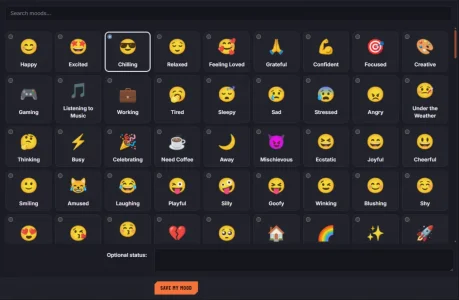
Current Mood Pro features a dedicated, visually engaging mood selection page.Members can browse colorful mood cards and select the expression that best represents their current feelings.
The selection interface includes:
- Colorful mood icons.
- Illustrated and emoji-based moods.
- Responsive mood selection grid.
- Searchable mood collection.
- Clearly displayed mood names.
- Current mood selection.
- Personalized status message field.
- Options to change or clear the selected mood.
Personalized Status Messages
Give members even more freedom to express themselves with optional personalized mood messages.Members can accompany their selected mood with a custom status message of up to 80 characters.
Example combinations include:
- Need Coffee – Don't talk to me until I've had my morning coffee!
- Gaming – Currently exploring a new virtual world.
- DJ Mode – Live on air and playing your favorite tunes!
- Coding – Working on something exciting.
- Celebrating – It's my birthday today!
- Chilling – Enjoying a relaxing weekend.
- Winning – Another achievement unlocked!
- Traveling – Off on another adventure.
Integrated Forum Postbit Moods
Bring additional personality to forum conversations with integrated mood displays.Current Mood Pro displays a member's selected mood within their forum postbit, allowing other members to see how they are feeling while participating in discussions.
Mood displays are designed to complement existing member information, including avatars, usernames, user titles and other profile details.
Benefits include:
- More expressive forum discussions.
- Additional member personalization.
- Increased visual engagement.
- Easy recognition of member moods.
- More colorful conversation pages.
- Opportunities for members to connect through shared feelings and interests.
Member Profile Integration
Current Mood Pro integrates mood information into XenForo member profiles.Visitors can discover a member's selected mood when viewing their profile, providing an additional layer of social interaction and personalization.
Members can maintain a mood that reflects their current activities, personality or emotional state.
Change or Clear Your Mood
Members remain in control of their personal mood settings.They can:
- Select a new mood.
- Replace their existing mood.
- Update their personalized status message.
- Remove their current mood.
- Clear their personalized status.
Dedicated Admin Control Panel
Current Mood Pro includes a dedicated administration interface integrated into the XenForo Admin Control Panel.Administrators can manage the mood system without manually editing database records, templates or image files.
Dedicated ACP Navigation
The add-on includes its own administration navigation section:Current Mood Pro → Manage moods and statuses
This provides centralized access to the available mood management and moderation tools.
Mood Management
Administrators can manage the extensive mood collection by enabling or disabling individual moods.This allows community owners to customize the available selection according to their community's audience, purpose and content guidelines.
For example:
- Gaming communities can emphasize gaming-related moods.
- Professional communities can disable unsuitable humorous moods.
- Music communities can retain entertainment and broadcasting moods.
- Family-friendly communities can select appropriate expressions.
- General discussion communities can offer the entire mood collection.
Member Mood Moderation
Administrators can manage inappropriate member moods and personalized status messages.The administration interface allows staff to identify members by username and clear their mood or status information when necessary.
This helps community owners maintain appropriate content standards without requiring direct database access.
Mood Usage Statistics
Monitor participation through the integrated administration statistics.Administrators can view the number of members currently using the mood system, providing a useful indication of community adoption and engagement.
Native XenForo Usergroup Permissions
Current Mood Pro integrates with XenForo's existing usergroup permission system.Administrators can determine which members are permitted to set and manage their current mood.
The mood system can be offered as:
- A standard registered-member feature.
- A premium membership benefit.
- An exclusive VIP feature.
- A reward for selected usergroups.
- A staff personalization feature.
- A community-wide social enhancement.
Theme-Responsive Design
Current Mood Pro is designed to complement your existing XenForo theme.The interface includes:
- Responsive mood cards.
- Theme-compatible content panels.
- Colorful illustrated mood assets.
- Coordinated buttons and forms.
- Searchable selection interface.
- Compact postbit mood displays.
- Member profile integration.
- Mobile-friendly layouts.
Installation Instructions
Installing Current Mood Pro
- Download the Current Mood Pro installation ZIP.
- Log in to your XenForo Admin Control Panel.
- Navigate to Add-ons.
- Select Install/upgrade from archive.
- Upload the supplied ZIP archive.
- Follow the XenForo installation prompts.
- Configure your usergroup permissions.
- Open the Current Mood Pro administration section.
- Review the available moods.
Upgrading an Existing Installation
- Back up your XenForo database and website files.
- Download the latest Current Mood Pro upgrade.
- Navigate to Admin CP → Add-ons → Install/upgrade from archive.
- Upload the new ZIP.
- Complete the upgrade process.
Administrator Operating Instructions
Step 1 – Access the Administration Center
Log in to your XenForo Admin Control Panel.Locate Current Mood Pro in the main administration sidebar and select Manage moods and statuses.
The administration interface can also be accessed directly at:
Replace yourdomain.com with your XenForo installation address.
Step 2 – Configure Usergroup Permissions
Navigate to:Admin CP → Groups & permissions → User group permissions
Select the usergroup you wish to configure.
Locate the Current Mood Pro permission section and configure:
Set current mood
Recommended Permission Configuration
| Usergroup | Set current mood |
|---|---|
| Guests | No |
| Registered members | Yes |
| Premium members | Yes |
| VIP members | Yes |
| Moderators | Yes |
| Administrators | Yes |
Save your changes and repeat the process for other applicable usergroups.
Step 3 – Manage Available Moods
Open the Current Mood Pro administration center.Review the available collection of 314 moods.
Use the individual mood management controls to enable or disable moods according to your community's requirements.
Save your changes using the available administration controls.
Step 4 – Review Member Participation
Open the administration dashboard and review the number of members currently using the mood system.Encourage members to personalize their profiles and participate in community discussions using their favorite moods.
Step 5 – Moderate Inappropriate Status Messages
If a member displays an inappropriate mood or personalized status:- Open the Current Mood Pro administration center.
- Locate the member mood moderation controls.
- Enter the member's username.
- Use the available clear-mood or status moderation action.
- Confirm the change.
Step 6 – Promote the Mood System
Introduce Current Mood Pro to your members through a community announcement.Explain how to select moods, create personalized status messages and display their feelings throughout the community.
Suggested promotional activities include:
- Mood of the Day discussions.
- Weekend Mood challenges.
- Holiday-themed mood celebrations.
- Gaming Night mood events.
- Music and DJ mood celebrations.
- Community appreciation days.
- Seasonal mood activities.
Member Operating Instructions
Step 1 – Access Current Mood Pro
Select Current Mood from the community navigation menu.The mood selection page can also be accessed directly at:
You must be logged in and have the appropriate usergroup permission to set your mood.
Step 2 – Browse Available Moods
Explore the available collection of illustrated and emoji-based moods.Choose an expression that reflects your current feelings, personality or activity.
Step 3 – Search for a Mood
Use the integrated search field to find a specific mood.For example, search for:
- Happy
- Gaming
- Coffee
- Music
- Love
- Tired
- Working
- Relaxed
Step 4 – Select Your Mood
Choose your preferred mood from the available selection.Your chosen mood will be associated with your member account after saving.
Step 5 – Add a Personalized Status
If desired, enter a personalized status message of up to 80 characters.Your message can explain your selected mood, describe your current activity or share a short thought with the community.
Personalized messages are optional.
Step 6 – Save Your Mood
Save your selection using the available mood form.Your current mood will then be available for display in supported forum postbits and member profiles.
Step 7 – Change Your Mood
Whenever your feelings or activities change:- Return to the Current Mood page.
- Select a different mood.
- Update your personalized status if desired.
- Save your changes.
Step 8 – Clear Your Mood
If you no longer wish to display a mood, return to the mood selection page and use the available clear-mood option.This removes your selected mood and associated status information.
Troubleshooting Guide
Members Cannot Set Their Mood
Check the member's XenForo usergroup permissions.Ensure that Current Mood Pro → Set current mood has been granted to an appropriate usergroup.
Current Mood Administration Menu Is Missing
Confirm that Current Mood Pro v1.0.1 or later is installed.The administration center can also be accessed directly using:
admin.php?current-mood/
Mood Icons Are Missing
Confirm that the add-on's image assets were successfully installed.Check whether the website is preventing access to the installed mood images and clear applicable browser or CDN caching.
Moods Are Not Appearing Beside Forum Posts
Confirm that the member has selected and saved a mood.Check whether your XenForo style contains customized postbit templates that prevent the add-on's template modifications from applying.
Review the relevant template modifications in the Admin CP.
Personalized Status Messages Are Too Long
Current Mood Pro supports personalized messages of up to 80 characters.Shorten the message before saving.
A Particular Mood Is Unavailable
The mood may have been disabled by a community administrator.Review the available mood settings in the administration center.
Emoji Appearance Differs Between Devices
The additional emoji-based moods use the emoji rendering capabilities of the member's browser, operating system or device.Consequently, their appearance may differ between Windows, Android, iOS and other platforms.
The original illustrated mood icons use supplied image assets for more consistent visual presentation.
Ideal Communities
Current Mood Pro is ideal for:- General discussion forums.
- Gaming communities.
- Social networking communities.
- Music and radio communities.
- Entertainment forums.
- Technology communities.
- Lifestyle forums.
- Friendship communities.
- Hobby and interest forums.
- Sports fan communities.
- Roleplaying communities.
- Premium membership communities.
- Community support forums.
- Developer communities.
Benefits for Community Owners
- Increase member personalization.
- Encourage social interaction.
- Make forum discussions more expressive.
- Introduce additional visual interest.
- Encourage recurring member engagement.
- Provide additional premium membership benefits.
- Help members share their interests and activities.
- Strengthen community identity.
- Offer a fun alternative to ordinary text-based status messages.
Technical Requirements
- XenForo 2.3.
- A compatible PHP environment.
- MySQL or MariaDB supported by XenForo.
- Appropriate XenForo administrative permissions.
No external mood service, paid API subscription or separate community software installation is required.
Product Information
Product: Current Mood ProCurrent Version: 1.0.1
Developer: StreamWave Development
Platform: XenForo 2.3
Installation: Standard XenForo add-on archive
Total Available Moods: 314
Original Illustrated Mood Icons: 124
Additional Emoji-Based Moods: 190
Personalized Status Messages: Yes
Maximum Status Length: 80 characters
Searchable Mood Collection: Yes
Forum Postbit Integration: Yes
Member Profile Integration: Yes
Individual Mood Management: Yes
Member Mood Moderation: Yes
Mood Usage Statistics: Yes
Dedicated ACP Navigation: Yes
Native Usergroup Permissions: Yes
Theme Responsive: Yes
Mobile Responsive: Yes
External API Required: No
More Than a Mood. It's Your Personality!
Current Mood Pro brings an entirely new level of expression and personality to your XenForo community.With 314 available moods, colorful illustrations, personalized status messages and integrated profile displays, your members can express themselves in countless ways.
From celebrating achievements and sharing exciting moments to relaxing with friends or simply letting everyone know they need another cup of coffee, Current Mood Pro makes every member's experience a little more personal.
Give your community the freedom to express itself.
314 Moods. Endless Personalities. One Incredible Community.
Express Yourself. Connect With Others. Share Your Mood.
Developed by StreamWave Development as part of our growing collection of professional community enhancement products.
Official Website: https://streamwaveforums.net
Discover the StreamWave Community Suite: https://streamwaveforums.com
StreamWave Hosting & Digital Media Services: https://streamwavehosting.com