- Compatible XF 2.x versions
- 2.3
- Visible branding
- No
Petverse Pro – XenForo 2.3
Adopt. Nurture. Explore. Evolve. Welcome to the Wonderful World of Petverse!Petverse Pro is an expansive virtual pet simulation, adventure and social gaming add-on developed by StreamWave Development for XenForo 2.3.
Transform your online community into an exciting fantasy world where members can adopt magical creatures, raise and care for their pets, explore mysterious regions, discover treasures, compete in battles, customize habitats and develop their own collection of extraordinary companions.
Combining virtual pet ownership, roleplaying, adventure, genetics, evolution, competitive gameplay and an independent virtual economy, Petverse Pro offers an engaging experience designed to encourage long-term community participation.
From adorable fantasy companions to powerful mythical creatures, every pet has the potential to become something extraordinary.
Main Features
27 Unique Pet Species
Discover an extensive collection of 27 virtual pet species, each featuring its own identity and visual appearance.The Petverse world includes magical creatures, fantasy animals, robotic companions and mythical beasts.
Featured creatures include:
- Lunafluff – A mystical fox companion.
- ByteBot – A futuristic robotic pet.
- Voltwing – An electrifying dragon companion.
- Emberwing – A fiery mythical bird.
- Nebulynx – A mysterious celestial feline.
- Glimmerhoof – A magical unicorn companion.
Enhanced Pet Artwork
Petverse Pro features 27 individually styled, 512 × 512 pixel pet graphics.The artwork includes:
- Fantasy-inspired creature designs.
- Magical glowing auras.
- Decorative particle effects.
- Species-specific color schemes.
- Individual pet appearances.
- Coordinated fantasy-themed pet cards.
- Evolution-related visual styling.
Virtual Pet Adoption Center
Begin your adventure by adopting your first virtual companion.Every eligible player can adopt their first pet for free, allowing new members to begin exploring Petverse without spending their starting currency.
Players can:
- Browse available pet species.
- Choose their preferred companion.
- Name their adopted pets.
- Adopt additional pets.
- Build a collection of different species.
- Raise multiple companions.
Interactive Pet Care System
Owning a pet is about more than collecting creatures.Players must actively care for their companions and help them develop through regular interaction.
Available care activities include:
- Feeding.
- Playing.
- Resting.
- Grooming.
- Monitoring pet condition.
- Managing pet needs.
- Developing pet experience.
Pet Experience and Leveling
Help your companions grow through an integrated experience and progression system.Pets can develop through eligible gameplay activities, adventures and interactions.
As pets gain experience, they can increase their levels and progress through the Petverse world.
The progression system provides long-term objectives for members who want to develop powerful and successful companions.
Pet Evolution
Discover the excitement of raising your companion toward its next evolutionary stage.Pet evolution introduces an additional progression system, rewarding members who invest time and effort into developing their pets.
Evolution adds another dimension to pet ownership, encouraging players to continue caring for and developing their favorite creatures.
Breeding and Genetics
Create new generations of virtual companions through the Petverse breeding system.The breeding system introduces genetic inheritance and inherited pet characteristics.
Players can:
- Select eligible pets for breeding.
- Discover inherited characteristics.
- Produce eggs.
- Manage their egg collection.
- Hatch new companions.
- Develop their pet family over multiple generations.
Independent PawCoins Economy
Petverse Pro includes its own independent virtual currency called PawCoins.There is no requirement to install an additional XenForo currency add-on.
Default economy settings include:
| Economy setting | Default value |
|---|---|
| Starting PawCoins | 500 |
| Daily login reward | 75 |
| First pet adoption | Free |
| Additional pet adoption | 300 PawCoins |
| Maximum pets per member | 12 |
PawCoins can be used throughout the Petverse world to purchase supplies, adopt additional companions and participate in eligible gameplay activities.
An integrated transaction ledger records virtual currency activity.
Pet Shop
Visit the Petverse shop to purchase supplies for your virtual companions.The shop includes a selection of gameplay items such as:
- Pet food.
- Toys.
- Accessories.
- Pet care supplies.
- Habitat-related items.
- Other available gameplay supplies.
Players must manage their PawCoins carefully to support their growing pet collection.
Personal Inventory
Manage your collection of purchased, discovered and earned items through the integrated inventory system.Players can collect supplies, use eligible items, manage their possessions and participate in the wider Petverse economy.
Member Marketplace
Trade with other members through the integrated Petverse marketplace.Players can list eligible inventory items for sale, browse available offers and purchase items from other community members.
The marketplace introduces a social economic system where players can support one another, exchange resources and develop their collections.
Member Gifting
Share the excitement of Petverse with friends through the integrated gifting system.Players can send eligible inventory items to other community members, encouraging friendship, cooperation and social interaction.
Gifting can also be used to welcome new players, celebrate achievements and support fellow pet owners.
Explore the Petverse Adventure World
Five Adventure Regions
Take your companions beyond their habitats and explore five available adventure regions.The adventure system introduces opportunities to discover rewards, collect treasures and develop your pets through exploration.
Players can participate in available adventures and work toward completing their exploration objectives.
Adventure Rewards
Eligible adventures provide opportunities to discover rewards and collect valuable gameplay resources.Adventure activities can contribute to the development of your companions and help expand your inventory.
Treasure Collection
Discover treasures throughout the Petverse world.Collect available rewards, build your inventory and uncover new opportunities as you explore with your virtual companions.
Daily Quests
Daily quests provide additional objectives and encourage regular community participation.Players can complete available challenges and work toward earning eligible gameplay rewards.
Community Events
Petverse includes support for community events, providing opportunities to introduce additional activities and encourage participation across the virtual pet world.Event administration capabilities depend on the available controls in the installed release.
Competitive Pet Gameplay
Pet Battle Arena
Put your companions to the test through the Petverse battle system.Players can participate in available automated battles and develop their pets through competitive activities.
The battle system introduces an additional purpose for pet care, experience and progression.
Multiplayer Pet Duels
Challenge other community members through the turn-based pet duel system.Develop your companions, participate in competitive encounters and discover how your pets perform against other players.
Multiplayer duels encourage friendly rivalry and direct member-to-member interaction.
Pet Racing
Take part in competitive pet racing activities.Players can enter eligible pets into races and compete through the available racing system.
Racing provides another exciting activity beyond traditional pet care and adventure gameplay.
Community Leaderboards
Compete against other Petverse players through integrated rankings.Leaderboards encourage members to develop their companions, improve their performance and work toward becoming successful Petverse players.
Achievements and Progression
Work toward gameplay milestones and develop your collection over time.Petverse combines multiple progression systems, giving members opportunities to pursue different objectives depending on their preferred gameplay style.
Customizable Pet Habitats
Create a Home for Your Companions
Give your virtual pets their own personalized living environment.The habitat system allows members to develop spaces for their companions and introduce an additional creative element to pet ownership.
Interactive Room Editor
Customize available habitat environments through the integrated room editing system.Players can manage eligible furniture and decorative items, arranging their virtual spaces to reflect their preferences.
The habitat system encourages creativity, collection and personalization alongside traditional pet care.
Dedicated XenForo Administration Center
Petverse Pro includes a dedicated administration interface within the XenForo Admin Control Panel.Administrators can configure important gameplay settings, monitor player activity and manage the virtual shop.
ACP Navigation
The add-on includes dedicated administration navigation:Petverse Pro
- World settings.
- Shop management.
World Settings
Administrators can configure:- Starting PawCoins.
- Daily login reward.
- Additional pet adoption cost.
- Maximum pets per member.
- Adventure world availability.
Shop Management
Manage the Petverse shop directly through the administration interface.Available controls include:
- View existing shop items.
- Configure individual item prices.
- Enable individual shop items.
- Disable individual shop items.
- Manage the availability of gameplay supplies.
Community Statistics
Monitor the growth and activity of your Petverse community.The administration dashboard includes statistics covering:
- Registered pets.
- Player wallets.
- Marketplace listings.
- Battles.
- Eggs.
- Racing activity.
Native XenForo Usergroup Permissions
Petverse Pro integrates with XenForo's native usergroup permission system.Administrators can determine which members are permitted to participate in the virtual pet world.
Petverse can be offered as:
- A standard registered-member feature.
- A premium membership benefit.
- An exclusive VIP feature.
- A reward for selected usergroups.
- A community-wide social gaming experience.
Immersive Fantasy Interface
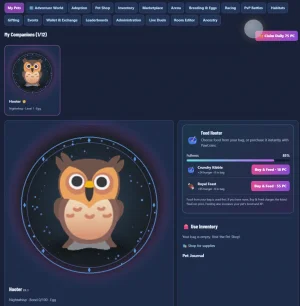
Petverse Pro features a dedicated fantasy-inspired interface designed to create a distinctive virtual pet gaming experience.Visual features include:
- Dark blue and purple fantasy styling.
- Individual illustrated pet graphics.
- Magical aura effects.
- Responsive pet cards.
- Coordinated gameplay panels.
- Pet progression displays.
- Adoption center layouts.
- Adventure interfaces.
- Marketplace presentation.
- Mobile-responsive layouts.
Installation Instructions
Installing Petverse Pro
- Download the Petverse Pro installation ZIP.
- Log in to your XenForo Admin Control Panel.
- Navigate to Add-ons.
- Select Install/upgrade from archive.
- Upload the supplied ZIP archive.
- Follow the XenForo installation prompts.
- Configure your usergroup permissions.
- Open the Petverse administration center.
- Configure your world and economy settings.
- Review the available shop items.
- Announce the launch of Petverse to your community.
Upgrading an Existing Installation
- Back up your XenForo database and website files.
- Download the latest Petverse Pro upgrade.
- Navigate to Admin CP → Add-ons → Install/upgrade from archive.
- Upload the new version.
- Complete the upgrade process.
Administrator Operating Instructions
Step 1 – Access the Administration Center
Log in to your XenForo Admin Control Panel.Locate Petverse Pro in the main administration sidebar.
The administration center can also be accessed directly at:
Replace yourdomain.com with your XenForo installation address.
Step 2 – Configure Usergroup Permissions
Navigate to:Admin CP → Groups & permissions → User group permissions
Select the usergroup you wish to configure and locate the Petverse Pro permission section.
Enable:
Play Petverse
Recommended Permission Configuration
| Usergroup | Play Petverse |
|---|---|
| Guests | No |
| Registered members | Yes |
| Premium members | Yes |
| VIP members | Yes |
| Moderators | Yes |
| Administrators | Yes |
Step 3 – Configure Starting PawCoins
Open Petverse Pro → World settings.Locate the starting PawCoins setting and enter the amount new players should receive.
The default starting balance is 500 PawCoins.
Suggested configurations include:
| Gameplay difficulty | Starting PawCoins |
|---|---|
| Challenging | 250 |
| Standard | 500 |
| Casual | 1,000 |
| Generous | 2,500 |
Choose an amount that allows new players to purchase essential supplies without removing the challenge of developing their virtual economy.
Step 4 – Configure Daily Login Rewards
Locate the daily login reward setting.The default reward is 75 PawCoins.
Adjust this value to encourage regular participation while maintaining a balanced virtual economy.
Excessively generous rewards may reduce the importance of earning PawCoins through other gameplay activities.
Step 5 – Configure Adoption Costs
The first pet is free under the default gameplay configuration.Additional pet adoptions cost 300 PawCoins by default.
Administrators can adjust the additional adoption cost through the world settings.
A lower cost encourages pet collecting, while a higher cost makes additional companions a more significant gameplay achievement.
Step 6 – Configure Maximum Pet Ownership
Set the maximum number of pets each member can own.The default limit is 12 pets.
Suggested configurations include:
- 3 pets for a focused companion experience.
- 6 pets for moderate collection gameplay.
- 12 pets for the standard Petverse experience.
- Higher limits where supported and appropriate for your community.
Step 7 – Configure Adventure Availability
Locate the adventure world setting.Enable adventures if you want members to participate in exploration and adventure-related gameplay.
The adventure world can be disabled when necessary, such as during maintenance or when investigating gameplay issues.
Step 8 – Manage the Pet Shop
Open Petverse Pro → Shop management.Review the available items and their current prices.
Administrators can adjust individual prices and enable or disable items.
Consider the relationship between:
- Starting PawCoins.
- Daily login rewards.
- Food and supply costs.
- Additional pet adoption costs.
- Marketplace activity.
Step 9 – Monitor Community Activity
Regularly review the administration dashboard.Monitor pet ownership, wallets, marketplace activity, battles, eggs and racing participation.
These statistics can help identify popular gameplay features and areas where additional community promotion may be beneficial.
Step 10 – Organize Community Activities
Use your existing forum announcement and discussion features to promote Petverse activities.Suggested community events include:
- Pet of the Month.
- Grand Adoption Weekend.
- Legendary Pet Showcase.
- Petverse Racing Championship.
- Battle Arena Tournament.
- Fantasy Habitat Competition.
- Rare Creature Collection Challenge.
- Breeding and Genetics Showcase.
- Community Treasure Hunt.
- Seasonal Pet Celebration.
Player Operating Instructions
Getting Started
Members can access Petverse through the community navigation menu, subject to their usergroup permissions.The Petverse world can also be accessed directly at:
Upon joining, eligible players receive their configured starting PawCoins balance.
Step 1 – Adopt Your First Pet
- Open Petverse.
- Visit the adoption center.
- Browse the available pet species.
- Choose your favorite creature.
- Enter your pet's name.
- Complete the adoption process.
Choose a pet you would enjoy developing throughout your Petverse adventure.
Step 2 – Visit Your Pet Collection
Open your pet management area to view your adopted companions.Review their available information, condition, experience and progression.
As your collection grows, you can manage multiple pets from the same gameplay environment.
Step 3 – Care for Your Pets
Use the available care actions to maintain your companions.Feeding
Provide appropriate food and supplies to your pets.Playing
Interact with your companions through available play activities.Resting
Allow your pets to rest when necessary.Grooming
Use available grooming and care activities to maintain your companions.Regular care helps you develop a stronger connection with your pets and encourages continued gameplay progression.
Step 4 – Visit the Pet Shop
Open the Petverse shop to purchase supplies.Browse the available food, toys, accessories and other items.
Check your PawCoins balance before completing purchases.
Purchased items can be managed through your personal inventory.
Step 5 – Collect Daily Rewards
Visit Petverse regularly and claim eligible daily rewards through the available reward system.Use your earned PawCoins to purchase supplies, develop your collection and support your companions.
Daily reward amounts depend on the administrator's configured settings.
Step 6 – Explore Adventure Regions
Open the adventure world.- Select an available region.
- Choose an eligible companion where required.
- Begin the adventure.
- Complete the available exploration activities.
- Collect eligible rewards.
Step 7 – Complete Daily Quests
Review the available daily quests and their objectives.Participate in the required activities and complete eligible quests to receive available rewards.
Daily quests provide additional goals beyond regular pet care.
Step 8 – Develop Your Pets
Continue participating in eligible activities to help your companions earn experience.Monitor their levels and progression.
As pets meet the applicable requirements, additional progression and evolution opportunities may become available.
Step 9 – Evolve Your Companions
Review your pet's evolution eligibility.When the necessary requirements are met, use the available evolution controls to develop your companion further.
Evolution requirements depend on the applicable pet and gameplay rules.
Step 10 – Breed Your Pets
Open the breeding area and review eligible companions.- Select suitable pets.
- Review the breeding requirements.
- Complete the breeding action.
- Monitor any resulting eggs.
- Hatch eggs when eligible.
- Discover the characteristics of your new companions.
Ensure that you have sufficient space within your pet ownership limit before expanding your collection.
Step 11 – Customize Your Habitat
Open the habitat management area.Review your available habitat items and furniture.
Use the room editing controls to arrange eligible decorations and create a personalized environment for your companions.
Additional items can be collected through the available shop and gameplay systems.
Step 12 – Enter the Battle Arena
Visit the battle area to explore available competitive activities.Select an eligible companion and participate in the available battle system.
Developing your pets through care and progression can help prepare them for competitive gameplay.
Step 13 – Challenge Other Players
Use the multiplayer duel system to participate in turn-based competitive encounters.Select an eligible opponent and companion through the available challenge controls.
Complete the duel using the supported gameplay actions.
Friendly competition is encouraged throughout the Petverse community.
Step 14 – Participate in Pet Racing
Visit the racing area and review available racing activities.Select an eligible pet and participate in the race.
Review the results and continue developing your companions for future competitions.
Step 15 – Trade in the Marketplace
Open the Petverse marketplace to browse items offered by other players.To purchase an item:
- Find an available listing.
- Review its price.
- Confirm that you have sufficient PawCoins.
- Complete the purchase.
Always review your selling price before publishing a listing.
Step 16 – Send Gifts to Friends
Use the gifting system to send eligible inventory items to other community members.Choose the recipient and item through the available gifting controls.
Gifting is a great way to welcome new players, celebrate achievements and support friends.
Step 17 – Adopt Additional Pets
Once you have sufficient PawCoins, return to the adoption center to expand your collection.Additional adoption costs and ownership limits are determined by your community's administrator.
Build a diverse collection of companions and explore different gameplay opportunities.
Step 18 – Climb the Leaderboards
Visit the Petverse leaderboards to compare available rankings and gameplay performance.Continue developing your companions, exploring the world and participating in competitive activities.
Set your own objectives and work toward becoming one of your community's leading Petverse players.
Example Player Journey
A new player joins Petverse and receives 500 PawCoins.They adopt their first companion for free, choosing a Lunafluff from the adoption center.
The player purchases essential food and supplies, begins caring for their companion and explores available adventure activities.
Over time, the player collects rewards, earns additional PawCoins and develops their pet's experience.
After saving enough currency, they adopt a second companion and begin expanding their collection.
They customize their habitat, participate in races, explore breeding opportunities and trade useful items with other community members.
Eventually, their small collection develops into a thriving collection of virtual companions, each with its own progression and gameplay history.
Petverse gives every player the freedom to develop their own adventure.
Troubleshooting Guide
Members Cannot Access Petverse
Review their XenForo usergroup permissions.Ensure the appropriate usergroup has been granted Petverse Pro → Play Petverse.
The Administration Menu Is Missing
Confirm that the latest Petverse Pro version is installed.The administration interface can also be accessed directly using:
admin.php?petverse/
Pet Images Are Not Displaying
Ensure Petverse Pro v1.2.0 or later is installed.The current release includes replacement PNG pet graphics integrated into the add-on.
Check browser caching and applicable website content security policies if images remain unavailable.
Players Cannot Adopt Additional Pets
Check:- Their available PawCoins balance.
- The configured additional adoption cost.
- Their current pet ownership count.
- The administrator's maximum pet ownership setting.
Players Cannot Purchase Shop Items
Confirm that the item is enabled and that the player has sufficient PawCoins.Administrators can review item availability and prices through shop management.
Adventures Are Unavailable
Check whether the adventure world is enabled in the administration settings.Also review any applicable pet eligibility requirements.
Pets Cannot Breed or Evolve
Review the relevant gameplay requirements, pet eligibility and available ownership capacity.Not every pet will necessarily qualify for every progression activity immediately.
Marketplace Transactions Cannot Be Completed
Confirm that the listing is still available, the item is eligible for trading and the buyer has sufficient PawCoins.Daily Rewards Are Unavailable
Check whether the player has already received the applicable reward and review the configured daily reward settings.Gameplay Appears Incorrect After an Upgrade
Confirm that the latest version is registered in the XenForo Add-ons section.Review the XenForo server error log for any reported exceptions.
Avoid uninstalling Petverse as a troubleshooting measure, since this may remove existing gameplay data.
Ideal Communities
Petverse Pro is ideal for:- General discussion forums.
- Gaming communities.
- Fantasy communities.
- Roleplaying forums.
- Virtual pet communities.
- Social networking communities.
- Entertainment forums.
- Anime and creative communities.
- Virtual economy communities.
- Friendship communities.
- Premium membership communities.
- Family-friendly gaming communities.
- Community engagement websites.
Benefits for Community Owners
- Encourage regular member participation.
- Introduce long-term gameplay progression.
- Increase member-to-member interaction.
- Create friendly competitive opportunities.
- Encourage creativity and personalization.
- Introduce an independent virtual economy.
- Provide additional premium membership benefits.
- Create opportunities for community events.
- Encourage collecting and exploration.
- Give members additional reasons to return to the forum.
Technical Requirements
- XenForo 2.3.
- Compatible PHP environment.
- MySQL or MariaDB supported by XenForo.
- Appropriate XenForo administrative permissions.
- A modern web browser.
Pet artwork is included within the add-on.
No external payment service, paid image-generation subscription or separate virtual currency add-on is required.
Integration with external community currencies is not included in the current XenForo release.
Virtual Economy Disclaimer
Petverse Pro is designed exclusively for entertainment and community engagement.PawCoins, virtual pets, eggs, inventory items, habitats and gameplay rewards are fictional digital gameplay assets.
They have no real-world monetary value and cannot be exchanged for real money through the add-on.
Product Information
Product: Petverse ProCurrent Version: 1.2.0
Developer: StreamWave Development
Platform: XenForo 2.3
Installation: Standard XenForo add-on archive
Database: MySQL
Pet Species: 27
Individual Pet Graphics: 27
Pet Artwork Resolution: 512 × 512 pixels
Adventure Regions: 5
Independent Virtual Currency: PawCoins
Default Starting Balance: 500 PawCoins
Default Daily Reward: 75 PawCoins
First Pet Adoption: Free
Additional Adoption Cost: Configurable
Maximum Pet Ownership: Configurable
Pet Care System: Yes
Pet Leveling: Yes
Pet Evolution: Yes
Breeding and Genetics: Yes
Egg Hatching: Yes
Pet Shop: Yes
Personal Inventory: Yes
Member Marketplace: Yes
Member Gifting: Yes
Adventure World: Yes
Daily Quests: Yes
Battle Arena: Yes
Multiplayer Duels: Yes
Pet Racing: Yes
Customizable Habitats: Yes
Room Editor: Yes
Leaderboards: Yes
Transaction Ledger: Yes
Dedicated Administration Center: Yes
Configurable Economy: Yes
Native XenForo Permissions: Yes
Mobile Responsive Design: Yes
Real-Money Transactions: No
An Entire World of Adventure Awaits!
Petverse Pro is more than a virtual pet add-on. It is an interactive fantasy world where members can create their own stories, develop extraordinary companions, discover new adventures and build lasting connections with other community members.From adopting your first adorable companion to raising powerful creatures, discovering treasures, creating beautiful habitats and competing in exciting challenges, every day brings another opportunity to explore the Petverse world.
Give your members a community experience that goes beyond traditional forum discussions.
27 Species. Five Adventure Regions. Endless Possibilities.
Adopt Your Companion. Discover Your World. Create Your Legend.
Welcome to Petverse Pro!
Developed by StreamWave Development as part of our growing collection of professional community enhancement and interactive entertainment products.
Official Website: https://streamwaveforums.net
Discover the StreamWave Community Suite: https://streamwaveforums.com
StreamWave Hosting & Digital Media Services: https://streamwavehosting.com