- Compatible XF 2.x versions
- 2.3
- Visible branding
- No
StreamWave Poker Pro — Premium Multiplayer Poker System for XenForo 2.3
Bring the excitement of a private poker club to your community!
Transform your XenForo community into an immersive virtual poker destination with StreamWave Poker Pro, an advanced poker entertainment system featuring multiplayer poker rooms, computer-controlled opponents, multiple poker variants, beautifully styled tables, animated playing cards and a complete independent poker-chip economy.Whether your members want to enjoy a quick solo game against a computer opponent or participate in a multiplayer poker session with other community members, StreamWave Poker Pro delivers a comprehensive and engaging poker experience directly within your forums.
Built specifically for XenForo 2.3, Poker Pro includes native administration, user group permissions, configurable poker rooms, a premium forum sidebar widget and optional integration with StreamWave Central Bank Pro and Gaming Hub.
Main Features
- Premium interactive poker lobby.
- Four fully playable poker variants.
- Real-time multiplayer poker tables.
- Solo gameplay against computer-controlled opponents.
- Configurable tables supporting up to nine players.
- Six preconfigured poker rooms.
- Dimensional poker table designs.
- Animated playing cards.
- Graphical poker chips and chip stacks.
- Automatic card dealing.
- Automatic dealer rotation.
- Small and big blinds.
- Check, call, raise, fold and all-in actions.
- Side-pot and split-pot support.
- Automatic hand ranking.
- Prominent winner announcements.
- Illuminated winning player seats.
- Dedicated poker-chip economy.
- 100,000 starting poker chips per member.
- Configurable poker-chip exchange rate.
- Poker-chip shop.
- Optional Central Bank Pro integration.
- Personal game history.
- Chip transaction history.
- Premium forum sidebar widget.
- Comprehensive administration center.
- Financial auditing.
- Native XenForo permissions.
- Responsive desktop and mobile interfaces.
- StreamWave Gaming Hub integration.
Four Fully Playable Poker Variants
StreamWave Poker Pro offers four different poker formats, allowing administrators to create a varied selection of poker rooms to suit their communities.No-Limit Texas Hold’em
One of the world's most popular poker formats.Each player receives two private cards and uses those cards together with five community cards to construct the strongest possible five-card poker hand.
Features include:
- Two private cards per player.
- Flop, turn and river community cards.
- Multiple betting rounds.
- No-limit betting.
- All-in gameplay.
- Side pots.
- Split pots.
- Automatic showdown.
- Support for up to nine players.
Pot-Limit Omaha
An exciting alternative to traditional Texas Hold’em, offering additional private cards and more possible hand combinations.Each player receives four private cards and must use exactly two of those cards together with exactly three community cards to create their final poker hand.
Features include:
- Four private cards.
- Five community cards.
- Pot-limit betting.
- Automatic hand evaluation.
- Multiple betting rounds.
- Side-pot support.
- Multiplayer and solo gameplay.
- Support for up to nine players.
Five-Card Draw
Experience one of the classic traditional poker formats.Each player receives five private cards and participates in an opening betting round.
Players can then select cards to discard and receive replacements before participating in the final betting round.
Features include:
- Five private cards.
- Interactive card replacement.
- Stand pat option.
- Opening and final betting rounds.
- Computer-controlled card replacement decisions.
- Automatic winner calculation.
- Support for up to six players.
Seven-Card Draw
An expanded draw poker experience offering additional private cards and more possible hand combinations.Players receive seven private cards and participate in an opening betting round before optionally replacing up to three cards.
The strongest five-card combination determines the winning hand.
Features include:
- Seven private cards.
- Replacement of up to three selected cards.
- Interactive card selection.
- Stand pat option.
- Opening and final betting rounds.
- Computer opponents.
- Automatic hand evaluation.
- Support for up to five players.
Premium Poker Club Lobby
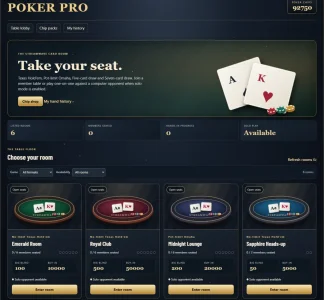
The Poker Pro lobby provides a central location where members can explore available poker rooms and join games.Designed to resemble a private poker club entrance, the lobby features individual room previews, premium styling and information about each available table.
Lobby features include:
- Graphical poker room previews.
- Poker variant identification.
- Table availability.
- Current player occupancy.
- Maximum player capacity.
- Current game status.
- Buy-in requirements.
- Blind information.
- Solo-play availability.
- Poker format filters.
- Room availability filters.
- Return to Table buttons.
- Poker-chip shop access.
- Personal chip balance.
- Personal game history.
Six Included Poker Rooms
Poker Pro includes six preconfigured poker rooms.| Poker room | Poker variant | Seats | Default buy-in |
|---|---|---|---|
| Emerald Room | Texas Hold’em | 6 | 10,000 chips |
| Royal Club | Texas Hold’em | 6 | 50,000 chips |
| Midnight Lounge | Pot-Limit Omaha | 6 | 20,000 chips |
| Sapphire Heads-up | Texas Hold’em | 2 | 5,000 chips |
| Golden Draw Club | Five-Card Draw | 6 | 10,000 chips |
| Seven Card Lounge | Seven-Card Draw | 5 | 20,000 chips |
Premium Poker Table Designs
StreamWave Poker Pro features distinctive poker table styling designed to provide a more immersive experience than conventional flat browser-based poker games.Visual features include:
- Dimensional poker table designs.
- Textured felt playing surfaces.
- Padded leather-style rails.
- Decorative wooden surrounds.
- Metallic gold trim.
- Atmospheric room lighting.
- Graphical playing cards.
- Decorative card backs.
- Three-dimensional chip stacks.
- Player seating arranged around the table.
- Active-player lighting.
- Winner seat illumination.
- Animated card dealing.
- Responsive table layouts.
The current release uses layered graphical and CSS-based table designs rather than requiring an external 3D rendering engine.
Multiplayer Poker
Members can join shared poker rooms and compete against other community members.The system maintains a persistent server-side representation of each poker table, ensuring that participants receive consistent game information.
Multiplayer functionality includes:
- Multiple human players.
- Shared table state.
- Persistent table balances.
- Automatic dealer rotation.
- Automatic blind deductions.
- Current player identification.
- Turn-based betting.
- Configurable action countdowns.
- Automatic timeout handling.
- Private player cards.
- Community card reveals.
- All-in gameplay.
- Side-pot calculations.
- Split-pot settlements.
- Automatic hand completion.
- Automatic winner announcements.
Members do not need to manually refresh the entire page after every action.
Solo Poker Against Computer Opponents
One of the major advantages of StreamWave Poker Pro is that members do not need to wait for other players to join a poker room.When solo gameplay is enabled, a member can enter an available table alone and begin a game against a computer-controlled opponent.
Computer opponents support:
- Texas Hold’em.
- Pot-Limit Omaha.
- Five-Card Draw.
- Seven-Card Draw.
- Automatic seating.
- Independent betting decisions.
- Check, call, raise and fold actions.
- Card replacement decisions in draw poker.
- Automatic hand completion.
- Automatic chip settlement.
Solo gameplay can be enabled or disabled through the administration center.
Automatic Poker Hand Evaluation
StreamWave Poker Pro automatically determines the strength of completed poker hands.Supported hand rankings include:
| Rank | Poker hand |
|---|---|
| 1 | Royal Flush |
| 2 | Straight Flush |
| 3 | Four of a Kind |
| 4 | Full House |
| 5 | Flush |
| 6 | Straight |
| 7 | Three of a Kind |
| 8 | Two Pair |
| 9 | One Pair |
| 10 | High Card |
Omaha applies its specific two-private-card and three-community-card requirement.
Where multiple players hold equally ranked winning hands, the eligible pot is divided according to the settlement rules.
Prominent Winner Announcements
Every completed poker hand displays a prominent winner announcement, making the outcome immediately clear to all participants.Winner announcement features include:
- Large animated winner banner.
- Gold-bordered result presentation.
- Winning member's username.
- Winning hand ranking.
- Number of poker chips awarded.
- Illuminated winning player seats.
- WINNER labels.
- Computer opponent victory announcements.
- Multiple-winner announcements.
- Split-pot results.
- Separate identification of returned unmatched bets.
- Previous winner information when a new hand begins.
Independent Poker-Chip Economy
StreamWave Poker Pro includes its own dedicated poker-chip economy, independent of the main forum currency.Every eligible member receives an initial allocation of:
100,000 Poker Chips
This starting balance allows new players to participate immediately after their poker wallet is initialized.The starting allocation is separate from their normal forum-credit balance.
Poker-chip economy features include:
- Independent member wallets.
- Initial member chip allocation.
- Poker table buy-ins.
- Persistent table chip balances.
- Automatic betting deductions.
- Automatic pot settlements.
- Poker-chip transaction records.
- Administrator chip allocations.
- Financial reconciliation.
- Poker-chip purchase limits.
- Configurable forum-credit exchange rate.
Integrated Poker-Chip Shop
Members can exchange eligible forum credits for additional poker chips when the compatible Central Bank Pro integration is configured.The default exchange rate is:
1 forum credit = 100 poker chips
Default chip packs
| Forum-credit cost | Poker chips received |
|---|---|
| 10 credits | 1,000 chips |
| 50 credits | 5,000 chips |
| 100 credits | 10,000 chips |
| 500 credits | 50,000 chips |
The chip shop includes:
- Clearly displayed exchange rates.
- Predefined poker-chip packs.
- Automatic forum-credit deductions.
- Automatic poker-chip allocations.
- Insufficient balance protection.
- Configurable daily purchase limits.
- Transaction history.
- Financial accounting.
Poker chips cannot be exchanged back into forum credits, withdrawn as cash or redeemed for anything of monetary value.
Optional Central Bank Pro Integration
Central Bank Pro is not required for normal poker gameplay.Communities without Central Bank Pro can still operate the poker lobby, solo games, multiplayer games and independent poker-chip wallets.
| Feature | Without Central Bank | With Central Bank |
|---|---|---|
| Starting poker chips | Yes | Yes |
| Solo poker | Yes | Yes |
| Multiplayer poker | Yes | Yes |
| Poker-chip wallets | Yes | Yes |
| Administrator chip allocations | Yes | Yes |
| Poker tables | Yes | Yes |
| Winner announcements | Yes | Yes |
| Premium sidebar widget | Yes | Yes |
| Forum-credit chip exchanges | No | Yes |
Compatible third-party currencies configured through Central Bank Pro may be used where supported by the banking integration.
Direct integration with independent third-party credit add-ons is not included in the current release.
Premium Forum Sidebar Widget
StreamWave Poker Pro includes a premium native XenForo widget designed to bring the appearance of a luxury poker club directly to your forum homepage.The widget features:
- Emerald-green and midnight-black styling.
- Metallic gold decorative elements.
- Dimensional miniature poker table.
- Graphical playing cards.
- Poker-chip stacks.
- Personalized poker-chip balance.
- Available poker room count.
- Number of members seated.
- Current hands in progress.
- Poker room occupancy.
- Room availability indicators.
- Solo-play availability.
- Direct room access.
- Return to Table button.
- Poker lobby navigation.
- Personal game history navigation.
- Responsive sidebar design.
It does not create member wallets, allocate chips or modify active game states simply by being displayed.
The widget can be installed and positioned through XenForo's native widget management system.
Comprehensive Administration Center
StreamWave Poker Pro includes a dedicated administration section within the XenForo Admin Control Panel.Administrators have access to a comprehensive range of configuration and management controls.
General Settings
- Enable or disable poker gameplay.
- Enable or disable solo gameplay.
- Enable or disable the poker-chip exchange shop.
- Configure the initial poker-chip allocation.
- Configure general poker system settings.
- Manage participation controls.
Economy Management
- Select the supported forum currency.
- Configure the poker-chip exchange rate.
- Configure daily chip purchase limits.
- Review issued poker chips.
- Review member wallet balances.
- Review chips held at poker tables.
- Review economy reconciliation.
Poker Table Management
- Create additional poker tables.
- Edit existing table configurations.
- Enable or disable individual tables.
- Configure poker room names.
- Select poker variants.
- Configure seating capacity.
- Configure small and big blinds.
- Configure buy-in amounts.
- Configure table appearance.
- Configure player action timeouts.
Member Chip Management
Administrators can allocate poker chips directly to members using their usernames.Numeric member IDs are not required for normal administrator chip allocation.
Transaction Ledger
Administrators can review poker-chip transaction records and search for activity associated with specific members.Financial Audit
The financial audit provides information about poker-chip issuance, wallet balances, table balances and accounting differences.This allows administrators to monitor the integrity of the independent poker economy.
Installation and Operational Instructions
1. System Requirements
- XenForo 2.3.
- Compatible PHP environment meeting XenForo's requirements.
- MySQL or MariaDB database.
- JavaScript-enabled modern web browser.
- StreamWave Central Bank Pro — optional, required for forum-credit chip exchanges.
- StreamWave Gaming Hub — optional.
2. Installing Poker Pro
- Back up your XenForo files and database.
- Log into your XenForo Admin Control Panel.
- Navigate to Add-ons.
- Select Install/upgrade from archive.
- Upload the StreamWave Poker Pro installation ZIP.
- Complete the installation.
- Locate Poker Pro within the ACP navigation.
3. Configuring User Group Permissions
Navigate to:ACP → Groups & permissions → User group permissions
Select the user group you wish to configure.
Locate the Poker Pro permissions.
View Poker Pro
Allows members to access the poker lobby and associated member-facing pages.Play Poker Pro
Allows eligible members to join poker tables and participate in games.Enable both permissions for the registered member groups you wish to participate.
You can restrict poker access to specific groups, such as registered members, VIP members or other custom user groups.
Administrators must also have the relevant Poker Pro administrator permission.
4. Configuring General Settings
Navigate to:ACP → Poker Pro
Review the general configuration options.
Configure the initial poker-chip allocation, solo gameplay availability, chip exchange settings and other participation controls.
The recommended initial configuration is:
| Setting | Suggested value |
|---|---|
| Enable poker gameplay | Yes |
| Allow solo play | Yes |
| Starting poker chips | 100,000 |
| Exchange rate | 100 chips per forum credit |
| Enable credit exchange | Only if configured |
| Poker tables | Enable desired rooms |
5. Enabling Solo Gameplay
Within the Poker Pro administration center, locate:Allow solo play against a computer opponent
Enable this option and save your settings.
Members can now join an available poker table alone and select the solo-play or deal-hand option.
The system automatically introduces a computer-controlled opponent when the applicable conditions are met.
6. Configuring the Poker-Chip Shop
If you wish to allow members to exchange forum credits for poker chips, ensure Central Bank Pro is installed and operational.Navigate to:
ACP → Poker Pro → Economy settings
Configure:
- Supported forum currency.
- Poker-chip exchange rate.
- Daily chip purchase limit.
- Chip exchange availability.
Save the configuration and verify the exchange using a controlled test account before enabling it for the wider community.
Only use forum credits that have no real-money value.
7. Creating a New Poker Room
Navigate to the Poker Pro table management section.Locate Create table.
Configure the following:
Table name
Enter the name members will see in the poker lobby.Examples include:
- The Diamond Club.
- Emerald Poker Lounge.
- Midnight Draw Room.
- Royal Card Club.
Poker format
Choose one of the available formats:- No-Limit Texas Hold’em.
- Pot-Limit Omaha.
- Five-Card Draw.
- Seven-Card Draw.
Seating capacity
Set the maximum number of players permitted at the table.The allowed seating capacity depends on the selected poker variant.
Buy-in
Set the number of poker chips required to take a seat at the table.Small and big blinds
Configure the mandatory opening bets.Turn timeout
Set the amount of time players have to complete an action before automatic timeout handling applies.Table appearance
Choose the available poker table design that best suits the room.Availability
Enable the table when its configuration is complete.Select Create table.
The new poker room will become available through the poker lobby when enabled.
8. Editing Existing Poker Tables
Within table management, select the existing poker table you wish to modify.Adjust the available settings and select Save table settings.
Avoid changing a table's poker format or financial configuration during an active hand.
Where possible, make configuration changes when the table is unoccupied.
9. Allocating Poker Chips to Members
Administrators can manually award additional poker chips through the ACP.Locate the chip allocation section.
Enter:
- The member's exact username.
- The number of poker chips to allocate.
The allocation is recorded within the poker economy's transaction history.
10. Installing the Premium Forum Widget
Navigate to:ACP → Appearance → Widgets
Select Add widget.
Choose the widget definition:
Poker Pro: club spotlight
Configure the widget using the following example:
| Widget setting | Suggested value |
|---|---|
| Widget key | poker_pro_spotlight |
| Title | StreamWave Poker Club |
| Display position | Forum list: Sidebar |
The premium poker club widget will appear in the selected forum position for eligible members.
Additional placements can be configured using unique widget keys.
11. Integrating with StreamWave Gaming Hub
Poker Pro integrates with StreamWave Gaming Hub v1.2.9 and compatible later versions containing the Poker Pro catalog entry.Install or upgrade Gaming Hub through:
ACP → Add-ons → Install/upgrade from archive
Poker Pro will be available through the Gaming Hub alongside other compatible community entertainment systems.
The standalone public route is:
/poker/
Gaming Hub is not required for normal Poker Pro operation.
Member Operating Instructions
1. Entering the Poker Club
Select Poker Pro from the available forum navigation, Gaming Hub or premium sidebar widget.The poker lobby displays available rooms, poker formats, table occupancy and buy-in requirements.
2. Receiving Starting Poker Chips
When your poker wallet is initialized, you receive the configured starting allocation.By default, this is 100,000 poker chips.
Your poker-chip balance is independent of your normal forum-credit balance.
3. Choosing a Poker Room
Browse the available poker rooms.Review:
- Poker variant.
- Number of available seats.
- Current room occupancy.
- Required buy-in.
- Blind amounts.
- Current game status.
4. Taking a Seat
Join an available seat at the poker table.The required buy-in is transferred from your poker wallet to your table balance.
Your table balance represents the chips available to you during the poker session.
5. Starting a Multiplayer Game
When sufficient funded players are seated, a poker hand can begin.The system automatically deals cards, assigns the dealer and processes the applicable blinds.
Follow the current-player indicator and take your turn when prompted.
6. Starting a Solo Game
If solo gameplay is enabled, you can play without another human member.Join an available table and select the solo-play or deal-hand option.
A clearly identified computer opponent will participate in the game.
7. Understanding Betting Actions
Check
Pass your turn without making an additional bet when the current betting situation permits it.Call
Match the current outstanding bet.Raise
Increase the current bet within the limits of the selected poker variant.Fold
Withdraw from the current hand and surrender eligibility for its remaining pots.All-in
Commit your remaining available table chips, subject to applicable betting rules.The available actions depend on the current state of the game.
8. Playing Texas Hold’em
You receive two private cards.Community cards are revealed during the flop, turn and river stages.
Participate in each applicable betting round.
At showdown, your strongest five-card combination is evaluated automatically.
9. Playing Omaha
You receive four private cards.You must use exactly two private cards and three community cards to construct your final poker hand.
The system automatically applies this requirement during hand evaluation.
10. Playing Five-Card or Seven-Card Draw
You receive the appropriate number of private cards for the selected game.After the opening betting round, eligible players enter the card replacement stage.
Select the cards you wish to replace and confirm your selection.
Alternatively, select Stand pat to keep your existing cards.
The final betting round follows before the hand is evaluated.
11. Viewing the Winner
When the hand concludes, a large winner announcement appears above the poker table.The announcement identifies the winning player or players, their applicable hand ranking and the chips awarded.
Winning player seats are also visually highlighted.
12. Leaving a Poker Table
Use the available table controls to leave when permitted.Your remaining eligible table chips are returned to your poker wallet.
You cannot withdraw chips that have already been committed to an unresolved poker pot.
13. Obtaining Additional Poker Chips
If the chip exchange shop is enabled, visit the poker-chip shop.Review the exchange rate and available chip packs.
Select the desired pack and confirm the transaction.
The required forum credits are deducted and the corresponding poker chips are added to your poker wallet.
If the exchange shop is unavailable, administrators may allocate additional chips through the ACP.
14. Reviewing Your History
Visit your personal poker history to review previous hands and recorded chip activity.Financial Security and Administration
StreamWave Poker Pro includes controls designed to maintain accurate accounting within the independent poker-chip economy.These include:
- Server-side card shuffling.
- Server-side hand evaluation.
- Private opponent card information.
- Persistent game state.
- Controlled betting actions.
- Insufficient balance protection.
- Automatic pot settlement.
- Side-pot accounting.
- Split-pot accounting.
- Poker-chip transaction records.
- Configurable purchase limits.
- Financial reconciliation.
Accounting differences should remain at zero.
Before disabling an economy integration, removing tables or uninstalling Poker Pro, ensure that outstanding games and related financial obligations have been resolved.
Troubleshooting
Poker Pro is not appearing in the forum
Verify that the add-on is enabled and that the member has the View Poker Pro permission.If using Gaming Hub, verify that the compatible Gaming Hub integration is installed.
Members cannot join a poker room
Check that the table is enabled, seats are available and the member has sufficient poker chips and the Play Poker Pro permission.At least two funded seats are required
Enable solo gameplay through the Poker Pro administration center.Save the settings and join an eligible table again.
A computer opponent can then participate when no second human player is available.
The poker-chip shop is unavailable
Verify that the exchange feature is enabled and that Central Bank Pro and the selected currency provider are operational.Ordinary poker gameplay does not require Central Bank Pro.
Members have insufficient chips
Check the member's poker wallet and any chips currently held at other tables.Administrators can allocate additional poker chips, or members can use the chip exchange shop where enabled.
Table graphics are not displaying correctly
Press Ctrl + F5 to refresh the browser cache.Verify that JavaScript is enabled and that all add-on assets were installed successfully.
The sidebar widget is not appearing
Verify that the Poker Pro club spotlight widget has been created and assigned to an appropriate display position.Check the visitor's Poker Pro permissions.
Current Release Information
| Product information | Details |
|---|---|
| Product | StreamWave Poker Pro |
| Current version | 1.0.6 — Premium Sidebar Edition |
| Platform | XenForo 2.3 |
| Poker variants | 4 |
| Preconfigured poker rooms | 6 |
| Maximum table capacity | 9 players, depending on variant |
| Solo gameplay | Yes |
| Multiplayer gameplay | Yes |
| Starting poker chips | 100,000 by default |
| Configurable credit exchange | Yes |
| Independent poker economy | Yes |
| Central Bank Pro required | No, except for forum-credit exchanges |
| Gaming Hub required | No |
| Premium sidebar widget | Yes |
| Mobile responsive | Yes |
| Native ACP administration | Yes |
| Real-money gambling | No |
Responsible Use
StreamWave Poker Pro is designed exclusively for recreational community entertainment using virtual, non-purchasable and non-redeemable currencies.Poker chips cannot be withdrawn, converted back into forum credits or redeemed for cash, goods or services of monetary value.
The add-on does not support real-money wagering, payment processing or cash prizes.
Tournament systems, Seven-Card Stud, private invitation-only tables, dedicated table chat and advanced spectator controls are not included in the current release.
Developed by StreamWave
Premium community entertainment, innovative gaming systems and professional XenForo development solutions.
Visit our community:
https://streamwaveforums.net/
StreamWave Poker Pro — Your community. Your poker club. Your game.