
You are using an out of date browser. It may not display this or other websites correctly.
You should upgrade or use an alternative browser.
You should upgrade or use an alternative browser.
![[NICK97] Recently Used Device - XF2](/community/data/resource_icons/8/8835.jpg?1735777075)
[NICK97] Recently Used Device - XF2 2.5.2
No permission to buy ($25.00)
- Author GameNet
- Creation date
Hi everyone,
I’ve reduced the add-on pricing to $25.00 / $15.00 for 6 months (down from $45.00 / $35.00 6 per month). I’ve also added some new pricing options:
• 6 Months: $15.00 renewal + PayPal fees
• 12 Months: $35.00 renewal + PayPal fees
• Lifetime license: $375.00 + PayPal fees
Thank you for your unwavering support and assistance in further enhancing this add-on. This version of the XF2 Add-on includes several bug fixes, changes and few new features
Full Changelog(s):
New:
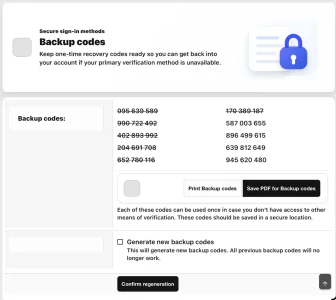
- Added CTA Buttons Print Backup codes and Save PDF for Backup codes
- Added phrase-backed labels Print Backup codes and Save PDF for Backup codes
- Added an XF-native JS handler using XF.Element.register; both buttons open the browser’s native print flow, where Save as PDF
- Added few new options that’s should improved user end + admin end
Change:
Bug Fixes:
- Switched the add-on API route from recently-used-devices to devices
- Updated API annotations and generated API docs to use devices/, devices/{id}/approval, and devices/{id}/recovery.
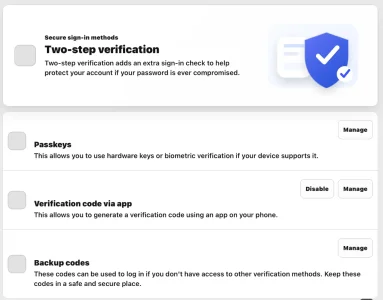
- Account security now inserts public templates for the password/security panel.
- Passkeys are wrapped in a modern security surface.
- Account security now inserts public templates for the password/security panel.
- adds the modern two-step layout/LESS and passkeys summary treatment.
- Passkeys are wrapped in a modern security surface.
- Backup-code pages keep using template modifications to inject the redesigned action area.
- Added modern public templates for account security assets, password rows, and denied state.
- Expanded backup-code public templates with a modern toolbar, responsive code grid styling, and native <xf:less> includes.
- Added BrowserToken.php (line 1) to centralize browser-token/remember-cookie handling through XF-native Request::getCookie() by explicit cookie name.
- Added/confirmed public + AdminCP TFA trust-day template mods so the login two-step checkbox uses nick97_rud_twoStepTrustDays instead of XF’s hardcoded 30 days
- Added the phrase for the configured trust-day label
- Added an upgrade/install repair for old nick97_rud_deviceApprovalRecoveryMethods defaults so upgraded sites get the other provider option without overwriting customized settings.
- Removed all duplicated getCookies() loops from the approval/login continuation paths.
- Removed the stale unused XF\Repository\UserTfaTrusted.php extension file. The active native XF 2.3 extension remains
- Updated public login, AdminCP login, /devices/approval-recovery, DeviceLogger, and the login plugin cookie-skip path to use the new helper.
- Removed localStorage / sessionStorage usage from devices.js; it now uses XF.Cookie, XF.ajax, and XF element handlers only.
- Now detects whether the pending user actually has passkeys and the passkey recovery method is enabled.
- Now passes XF’s native Passkey\ManagerService into the approval page.
- Now renders XF’s native webauthn form/button on approval-required pages when passkey recovery is available.
- Hardened public and AdminCP login approval/passkey handling so raw webauthn_payload cannot mark a login as passkey unless XenForo is actually in a two-step/passkey flow.
- Moved public device logging onto the native XF login completion path and removed unnecessary global listeners: app_setup, templater_setup, and controller_post_dispatch.
- Kept one controller_pre_dispatch listener only because all-page enforcement needs it for force logout, blocked devices, and pending approval on both user end and AdminCP.
- Bound approval fallback signatures to public/admin surface plus action: resend, recovery, cancel.
- Hardened GeoLite2/MaxMind/R2 download handling with size limits, temp-file validation, safe archive member extraction, and setup index checks.
- Public login now logs/updates the approved device before clearing pending approval state
- AdminCP login now does the same after parent::completeLogin
- Removed the remaining raw request body read from the device logger and replaced it with XF-filtered form containers:
- Fixed /devices/fingerprint/ so stale/expired XF tokens no longer create hard 403 noise; it now safely skips the optional cookie write and returns OK:
- Fixed only expected warning is actionApproveLogin, because it is token/CSRF guarded for approval-link login instead of permission-gated.
- Cleaned the approval auto-login continuation block in without changing behavior.
- Cleaned AdminCP device approval resend and TFA request parsing structure
- Cleaned device logging/update structure where recovery approval turns a verified TFA/passkey recovery into a trusted device
- Cleaned AccountSecurity option/permission exception handling used by native recovery-provider resolution
Important Note:
- Please take a backup before installing this version, that way if something goes wrong you can restore to a working point as this update is in beta
- Device approval and device limit features are currently undergoing beta testing. However, please expect that there will be known bugs that will need to be fixed in upcoming releases.
- This update requires XF 2.3.10 or later, as we’ve already resolved fatal crashes in previous versions.
Attachments
Thank you for your unwavering support and assistance in further enhancing this add-on. This version of the XF2 Add-on includes several bug fixes, changes.
Full Changelog(s):
New:
- Added request-level current-device lookup caching: User.php
Bug Fix:
- The ACP fallback approval page was stricter than the actual resend backend, so it could disable resend in cases the repository still supports.
- Removed the remaining custom-button-icon path from the approval flows by replacing XenForo icon= buttons with inline FA icons on both ACP and public approval pages
- Expanded rud_login_remember.js so remember-state sync also covers XenForo connected-account/social login buttons and provider links.
- Fixed connected-account auth detection in PHP for XenForo’s hyphenated register/connected-accounts/{provider} route and provider_id, so social logins are labeled and handled correctly.
- Retargeted broken XF 2.3 template modifications so admin login notice JS and register debug/maxlength features render again: template_modifications.xml
- Fixed defaultWith registration so currentVisitorLoggedDevice is actually appended instead of being skipped on non-empty numeric arrays: Listener.php
- Preserved the earlier staged fixes for connected-account remember sync/auth typing, MaxMind missing Last-Modified headers, and Composer metadata.
- Hardened MaxMind Last-Modified handling when the upstream response omits that header.
- Refreshed mobiledetect/mobiledetectlib to 4.9.0, the newest update that preserves the add-on’s declared PHP >=8.1 <9.0 support. I intentionally constrained below 4.10 because 4.10.0 requires PHP >=8.2.
- Hardened the add-on’s MobileDetect wrapper so Android/iOS/iPadOS/watch/TV checks work with MobileDetect’s magic is...() API.
- Preserved and staged the approval-schema hardening across API, public, ACP, repository, setup, and entity paths so stale/incomplete approval columns fail gracefully instead of breaking login/device flows.
- Fixed one user-facing new-device alert grammar issue without changing layout/design.
- Removed the automatic current-device preload from XF:User setup, so normal page loads no longer pay for unused device relation work: Listener.php (line 71)
- Deferred browser fingerprint work until after load/idle and skips recomputation when the fingerprint cookie was recently sent: rud_fp.js
- Reduced login-page MutationObserver CPU by only reacting to added login-notice nodes: rud_login_remember.js
- Cached MobileDetect per device entity and stopped logging normal GeoLite “address not found” misses: Device.php, DeviceLogger.php
- Removed persistent will-change compositor hints and added reduced-motion handling in the shipped LESS export: templates.xml
Thank you for your unwavering support and assistance in enhancing this add-on further. This version of the XF2 Add-on is compatible with XenForo 2.3.10 and above, and it includes several more bug fixes and changes.
Full Changelog(s):
- Compatible with XenForo 2.3.10+
- Added resend fallback when session pending data is missing:
- Preserved pending approval data across forced logout
- preserved n97RudPendingApproval in the new session
- Removed mixed logged-in UI state on public approval enforcement
- Ensured /login shows approval-required page when pending approval exists
- redirects to login (both public + AdminCP) instead of rendering approval UI in the same request.
- Added explicit CSRF validation to admin device-management POST actions and improved post-action redirect behavior.
- Added approval indexes for fast token/pending lookups (approval_token_hash, user_id + approval_requested_at) for fresh installs and repair path.
- Added missing table guard in auth-type upgrade step.
- Strengthened setup/migration safety and performance:
- Hardened ACP fallback approval rendering so resend only appears when pending device state is valid.
- Reworked pending-approval cookie fallback to a single batched DB query (public + ACP) to prevent timeout-class behavior.
- Added indexes for approval_token_hash and user_id + approval_requested_at
- Added stale-CSRF recovery for approval actions using signed payload fallback (so valid approval pages don’t fail with security errors after session/token rotation):
- Kept /devices/fingerprint strict CSRF-only (no fallback), so anti-CSRF posture remains intact:
- Fixed template-mod insertion points to avoid duplicate login notices and improve admin/public compatibility:
- Improved class-extension compatibility by making login action signatures variadic where needed:
- Replaced the theme-dependent label label--accent badge with a dedicated badge class so text is always visible.
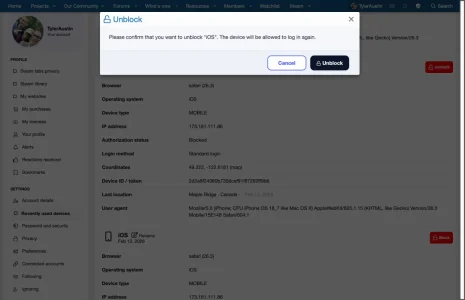
- Switched device row action buttons to explicit button icons and plain core phrases, so they no longer depend on icon tokens inside custom phrases.
- Hardened action-button layout so icon/text spacing and alignment stay consistent across themes.
- Block/Unblock/Logout icon sizing is now clamped smaller (13px)
- Resolved fatal crashes in previous versions when after updated to XF 2.3.10
- Fixed several more bugs compared to previous versions
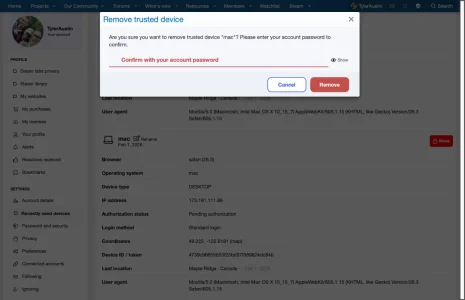
- A new option has been added that requires a password before unblocking own devices (only for the user’s end).
Important Note:
- Please take a backup before installing this version, that way if something goes wrong you can restore to a working point as this update is in beta
- Device approval and device limit features are currently undergoing beta testing. However, please expect that there will be known bugs that will need to be fixed in upcoming releases.
- This update requires XF 2.3.10 or later, as we’ve already resolved fatal crashes in previous versions.
Attachments
Thank you for your unwavering support and assistance in further enhancing this add-on. This version of the XF2 Add-on includes several bug fixes and a several new features and changes.
Full Changelog(s):
Note:
- Added “Push notifications” = XF Alerts (no external provider).
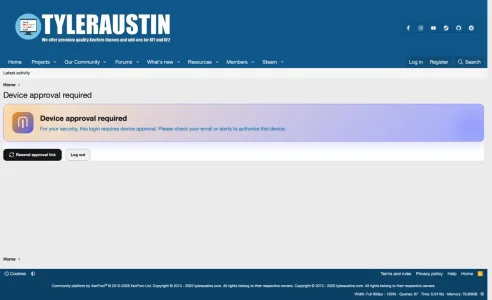
- Added Approval blocks login until approved.
- Added Approval replaces XF 2FA when enabled.
- Added Link Expired option = TTL in minutes (default 10).
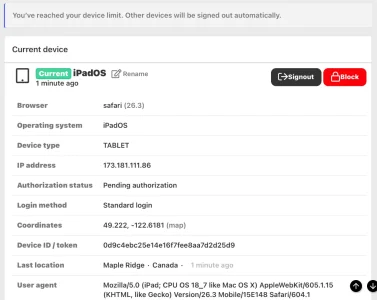
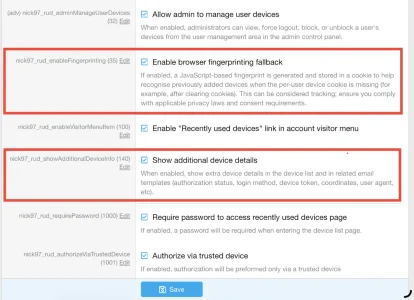
- Enable browser fingerprinting fallback
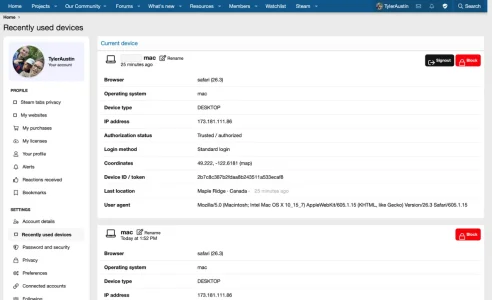
- Added Show additional device details option like
- show extra device details in the device list and in related email templates
- authorization status
- login method
- device token
- coordinates with link to Google maps
- user agent
- IP address
- Added New device alert permission is separate from email permission.
- Added other user groups permission like
- Bypass device approval requirement
- Bypass device limit
- Updated Update Mobile Detect from v3 => v4.8.06
- Added add-on options tabs like
- User
- Trusted Devices
- Notifications
- Debug
- Fixed the timeout loop in Admin login dispatch.
- Removed API tab in add-on option page
- Organized add-ons options to current tabs
- Added Debug device save validation errors option (Default: Off)
- Relax option login/registration maxlength validation (Default: Off)
- Fixed several bugs related to R2 presigned URL between GeoLite2 database option and Maxmind License Key options conflict
- Added option description for Add browser token cookie to necessary cookies for cookies consent
- Added resend validation + rate limiting (30s) for both public and ACP resend actions.
- Added hard server-side approval fallback enforcement for both public and ACP controller contexts.
- Added a one-time guard variable ($n97RudLoginNoticeShown) in both login notice template modifications (public and admin) so the message is not injected after every </xf:form>.
- Added n97_rud_login_notice_admin now injects before <div class="adminLogin-boardTitle"> instead of after </xf:form>.
- Added deduplicated registration logic so consent entries are normalized and not repeatedly added.
- Prevented blocked-device token revival and revoked approval fields when blocked.
- Change: logs an error if neither approval email nor approval alert could be dispatched.
- Change: sendDeviceApprovalRequest() now sends approval email with immediate dispatch (send) instead of queue-first behavior.
- Change: removed logDevices permission gate in shouldRequireApprovalForCurrentDevice().
- Change: removed hasPermission('nick97_rud', 'logDevices') gate from enforceDeviceApprovalBeforeLogin().
- Switched approval/notification emails to non-blocking dispatch (queue() when available, send() fallback, exception-safe).
- Fixed ACP login now always enforces approval server-side (no provider/passkey request bypass branch) in Login.php (line 83).
- Fixed Approval enforcement no longer skips based on client-influenced auth type markers in DeviceLogger.php (line 228).
- Fixed Enforced signed browser-token cookies with HMAC validation and strict rejection of unsigned/invalid cookie values in DeviceLogger.php (line 122) and DeviceLogger.php (line 170).
- Added the missing phrase for cookie_consent.cookie_description_n97_rud_fp
- Integrated cookie consent registration for the XF cookies you listed:
- xf___crossTab
- xf_csrf
- xf_consent
- xf_ls
- xf_session
- xf_tfa_trust
- xf_user
- Updated client JS to send fingerprint via POST with _xfToken instead of unauthenticated GET.
- Added a dedicated login remember-sync JS module
- Applied remembered state during AdminCP auto-login continuation after device approval:
- Added robust remember-state capture and fallback in server logic:
- Loaded that JS on both login templates (public + admin), with one-time template guards:
- Existing unsigned legacy fc_browser_token_* cookies will be rejected, so users may need one-time re-approval on first login after deploy.
- This add-on’s price will increase to $45.00/$35.00 from the current $35.00/$25.00, as it will include even more new features.
Attachments
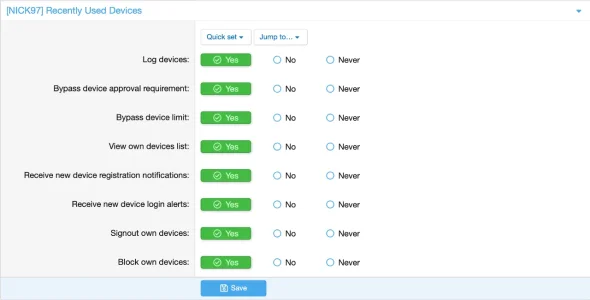
Thank you for your unwavering support and assistance in further enhancing this add-on. This version of the XF2 Add-on includes several bug fixes and a few new features and changes.
Full Changelog(s):
New:
Changes:
- Ability to rename own specific devices in my devices page
- Added Current Device banner in my devices page
- Added a code event listener for app_setup that executes nick97\recentlyuseddevices\Listener::appSetup()
- Added a dedicated Admin Permission: n97_devices_manage
- The Devices tab in Users > Edit user now only appears when:
- Option Allow admin to manage user devices is enabled, and
- The admin has the Manage user devices permission.
- Allow admin to manage user devices: This now works end-to-end (tab loads + actions no longer 404) when the option is enabled.
- Allow step-up verification when no trusted devices exist: No behavioral change was required for this request; the option remains functional and independent of this AdminCP routing fix.
Fix:
- Updated the Admin login hook so that when Check device logging in ACP is enabled:
- hardened “Logout all devices” by enforcing its existing permission (n97_devices_logout) at the controller level (not just via template visibility).
- Removed "composer_autoload": "vendor/composer" from addon.json so XenForo no longer tries to register composer maps for this add-on during app boot.
- Removed the unsupported template filter entirely.
- Fixed appSetup() does a simple, safe require_once(DIR . '/vendor/autoload.php') so GeoIP2 / MobileDetect still load without relying on XF’s composer registry.
- Fixed: Device rules are enforced before admin session establishment.
- Fixed: The device is then recorded after successful ACP login (mirrors public-side behavior, without breaking device-limit enforcement).
- Switched to a safe, XenForo-version-independent approach by using CSS text-transform: uppercase; around the value.
Attachments
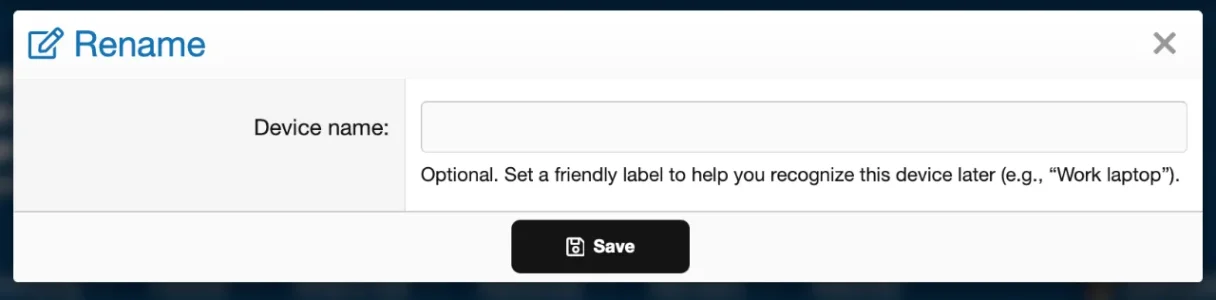
Thank you for your support and helping me to improve the add-ons even better than before. This version includes new features and changes in some areas of the XF2 Add-on!
Full Changelog:
New:
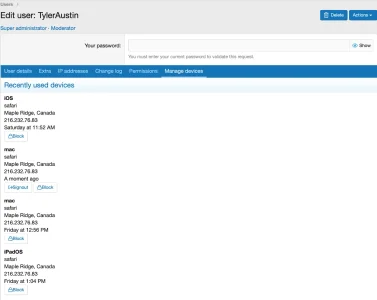
- Admin: “Manage devices” tab in user edit
- Shows all devices for that user with OS, browser, device type, location and IP.
- Includes actions per device:
- Sign out (force logout)
- Block / Unblock device
- New option: Require password before blocking a device.
- Exit other devices when limit is reached
- New option: Exit other devices when limit is reached when the device limit is reached:
- With this option enabled – the new login is allowed and older devices are logged out.
- With this option disabled – behaviour stays as before (new login may be denied).
- Cloudflare R2 / S3 presigned URL support for GeoIP
- New option to use a presigned R2/S3 URL for the GeoLite2 database.
- Allows you to host the .mmdb file yourself (e.g. Cloudflare R2) instead of relying only on the MaxMind API.
Changes:
- Improved device type detection (XF 2.3+)
- Better detection of mobile / tablet / desktop using updated browser info.
- Device type is stored in browser_info and can be displayed in public and admin templates (upper-cased label).
- Admin devices template
- Uses XenForo’s valid filter |toUpper instead of |upper.
- Uses the same field names as the public devices list for:
- Last seen time
- IP address
- Location
- This keeps the ACP view in sync with the already-working front-end behaviour.
- Device limit handling
- Login flow updated so device limits respect the new “Exit other devices” option and don’t unnecessarily block valid logins.
Fixes:
Know Issues:
- GeoIP “::1 is not in the database”
- Fixed AddressNotFoundException when the IP is ::1 or another address not present in the GeoIP database.
- “You are no longer logged in” loop
- Fixed a rare issue where devices left with a force_logout flag and mis-handled device cookies could cause repeated: This action could not be completed because you are no longer logged in.
- Device records and cookies are now updated correctly on login/logout.
- Admin template getter errors
- Fixed “unknown getter” errors like:
- last_seen
- ip_address
- location
- Admin template now uses only real entity properties / relations.
- Sign out / Block / Unblock buttons in the admin devices tab pointing to non-existent routes.
- Require password before blocking a device overlay is not displaying once you click block devices
- When enabled, users must confirm their password via XenForo’s overlay before a device can be blocked from the account > devices page.
Attachments

Thank you for your support and helping me to improve the add-ons even better than before. This version includes new features and changes in some areas of the XF2 Add-on!
Full Changelog:
- Fixed Font awesome icon is not displaying currently in XF 2.3
- Added Font awesome icon in buttons
Discount $35 off when you buying purchase this add-on license (From July 2 2024 to July 26 2024)
Note: last few weeks ago tyleraustins.com was down due to dns and url redirect issues. Anyway if you are still having redirect issue in your web browser I would highly recommend clearing your cache right away.
Hi Everyone
I wanted to let you known I can confirmed its is working with XF 2.3.0 beta 7 at this time
Note: Same font awesome icon is not displaying currently and it’s will be fixed in future versions!