
![[MAG] Doc&Guide](/community/data/resource_icons/10/10947.jpg?1792867396)
- Compatible XF 2.x versions
- 2.3
- License
- Commercial proprietary license — Single site use
- Visible branding
- No
DEVELOPMENT STATUS — NOT AVAILABLE FOR PURCHASE
[MAG] Doc&Guide is currently in active development and testing.
The add-on is not yet available for purchase or public download. Features and functionality are being refined and tested before the official release.
This resource page is intended to showcase the project and its development progress.
Availability will be announced here when the add-on is ready for release.
[MAG] Doc&Guide is a XenForo add-on that transforms your forum into a platform for creating, organizing, editing, publishing, and maintaining structured documentation.
Unlike solutions that rely on XenForo Resource Manager as the foundation for documentation storage, Doc&Guide provides its own document management system, editor, catalog, permissions, language versions, and publishing workflows.
XFRM is not required: Doc&Guide works as a standalone add-on.
Documentation Structure
Every document has its own permanent ID, canonical URL, metadata, and independent lifecycle.
Content is organized into three levels:
- Introduction — introductory content.
- Section — main section.
- Subsection — nested section.
Documents can also be organized into a hierarchy to create manuals, guides, knowledge bases, and technical documentation.
Editor and Workspace
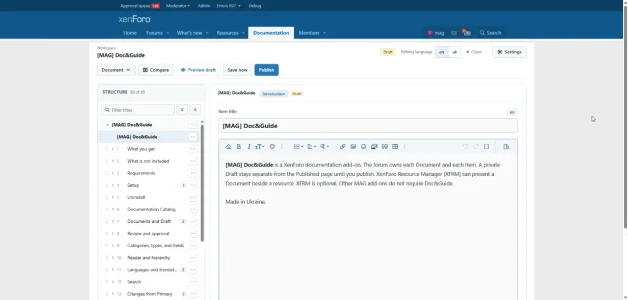
Doc&Guide provides a dedicated Workspace within the XenForo frontend.
Editor features include:
- Creating and editing documents and their structural elements.
- Navigating the document tree.
- Moving sections and subsections while preserving their hierarchy.
- Adding and removing structural elements.
- Separate Draft and Published versions.
- Manual saving and configurable autosave.
- Protection against accidentally overwriting changes.
- Document preview before publication.
Draft changes do not affect the already published document. Publishing is atomic, ensuring readers receive a complete document version rather than partially updated content.
Catalog, Navigation, and Search
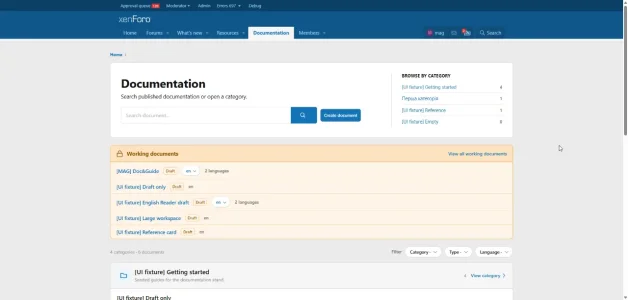
Doc&Guide includes a dedicated documentation catalog with categories, category pages, and filtering capabilities.
Supported features include:
- Documentation categories.
- Document types.
- Custom fields.
- Filtering by category, type, and language.
- Searching published documents.
- Grouping related language versions in search results.
- Hierarchical navigation between documents.
- Breadcrumbs and Previous / Next navigation.
The reading interface features a responsive layout for desktop and mobile devices, a documentation tree, heading navigation, and automatic highlighting of the current section while scrolling.
Multilingual Documentation
Doc&Guide supports independent language versions of the same material.
Each translation remains a separate document with its own ID, URL, draft, and published version.
Translation management features include:
- Documentation language registry.
- Linking documents into translation groups.
- Selecting a primary document (Primary).
- Switching between available language versions.
- Source and Target comparison within the Workspace.
- Tracking changes in the primary document.
- Marking changes as reviewed.
- Creating missing translation elements.
- Copying source content into a translation draft.
This makes it possible not only to publish documentation in multiple languages but also to monitor whether translations remain up to date with their primary source.
Publishing Control and Permissions
The system supports both direct publishing and publishing through an independent approval workflow.
Approval requests are linked to a specific draft revision. If the document changes, the previous approval cannot automatically be applied to the updated content.
Access to viewing, creating, editing, publishing, administration, importing, and exporting is controlled through dedicated Doc&Guide permissions and applicable XenForo restrictions.
Documentation Export, Import, and Migration
Doc&Guide supports portable ZIP documentation packages.
Key capabilities include:
- Exporting individual documents.
- Bulk exporting selected documents or filtered results.
- Preserving document structure and language relationships.
- Exporting supported documentation images and assets.
- Validating packages before import (Dry Run).
- Create New — creating new documents.
- Update Existing — updating documents using portable identifiers.
- Duplicate — creating independent copies.
Imports follow a Draft-first workflow: imported content is placed into a draft and does not replace the published document until explicitly published.
XenForo and XFRM Integration
Doc&Guide integrates with XenForo navigation, permissions, and search.
When XenForo Resource Manager is installed, documentation can be linked to resources and displayed directly within their context, including support for multiple language versions.
Doc&Guide remains the owner of the documentation. Disabling XFRM does not delete the documents.
SEO and Canonical URLs
Published documents support:
- Permanent canonical URLs.
- Document titles, descriptions, and SEO metadata.
- Language attributes for individual pages.
- hreflang alternate-language links for eligible translations.
- Integration with the XenForo XML sitemap.
Who Is Doc&Guide For?
Doc&Guide can be used for technical manuals, knowledge bases, software documentation, user guides, help centers, multilingual documentation, and XenForo product documentation.
[MAG] Doc&Guide is more than a page editor — it is an independent documentation management system built directly into XenForo.
Development status: The latest stable release is 1.0.2. The expanded features of version 1.1.0 are implemented in the Alpha 33 development build, which is not yet a stable release.
Add-on page:
[MAG] Doc&Guide — Magshifter
![[MAG] XF Unlocked](/community/data/resource_icons/10/10919.jpg?1792275241)
![[MAG] Beyond 3D Viewer](/community/data/resource_icons/10/10850.jpg?1790755241)
![[MAG] Global Links Favicons](/community/data/resource_icons/10/10843.jpg?1790672960)
![[MAG] ACP Enhancements](/community/data/resource_icons/10/10847.jpg?1790693321)
![[MAG] Tag Synchronizer](/community/data/resource_icons/10/10848.jpg?1790705957)