- Compatible XF 2.x versions
- 2.3
- License
- Free / Open Source
- Visible branding
- No
Hotlink Converter is an admin tool that batch-converts externally hotlinked images into locally-stored XenForo attachments, across your whole board. It scans
It is built for forums with legacy hotlinked content - especially boards imported from other software (phpBB, vBulletin, etc.), where 20 years of images can live in forum posts and slowly rot as the external hosts go offline. You choose which content types it touches, preview with a Dry Run, then convert.
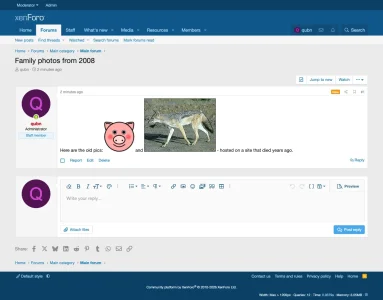
After:
The image is now stored locally as a proper XF attachment, embedded inline in the original content. It will survive even if the external host goes offline.
Addon ID: Qubn/HotlinkConverter
Vendor: Qubn
License: Free / Open Source
[IMG]https://external.com/pic.jpg[/IMG] BB code in forum posts, profile posts, conversation messages, and Resource Manager resource updates, downloads the images, creates proper XF attachments, and replaces the BB code with [ATTACH=full]id[/ATTACH] so it renders inline.It is built for forums with legacy hotlinked content - especially boards imported from other software (phpBB, vBulletin, etc.), where 20 years of images can live in forum posts and slowly rot as the external hosts go offline. You choose which content types it touches, preview with a Dry Run, then convert.
Key Features
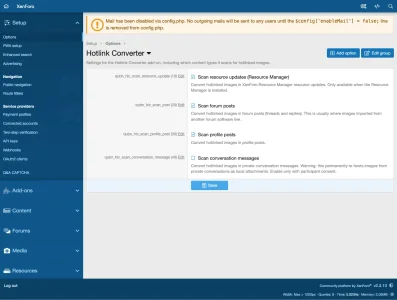
- Whole-board conversion - Converts hotlinked images in forum posts, profile posts, conversation messages, and XFRM resource updates. One toggle per content type lets you pick exactly what gets scanned.
- Resource Manager optional - Works on plain XenForo. The resource-update target only appears when the Resource Manager is installed.
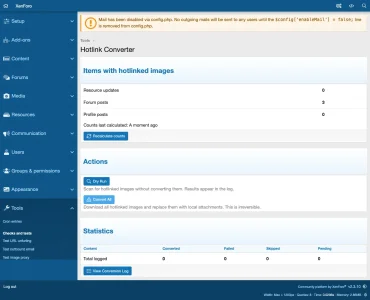
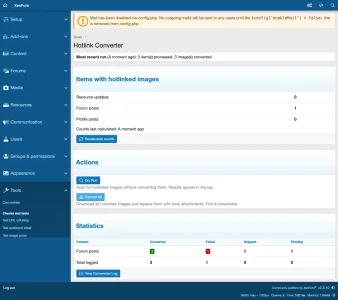
- Admin Dashboard - Shows a per-type count of how many items contain hotlinked images, plus conversion statistics (converted/failed/skipped/pending). Counts are calculated on demand (via a Recalculate button) and cached, so the page opens instantly even on a board with millions of posts.
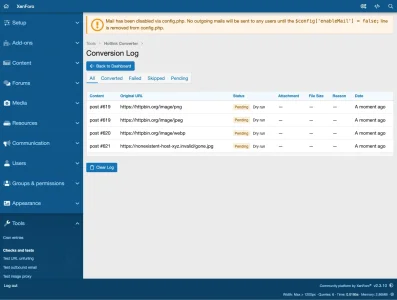
- Dry Run Mode - Preview what will be converted without downloading anything. Results appear in the conversion log as "pending" entries.
- Inline rendering - Converted images display inline as local attachments (using each content type's native editor), with no spurious "edited" stamp, no alert, and no activity bump on the migrated content. The original poster stays the author.
- Code/tutorial posts are never touched - Literal
[IMG]examples inside[CODE],[ICODE],[PLAIN],[NOPARSE],[PHP], or[HTML]are left exactly as-is, so tutorials demonstrating BB code never get corrupted. - Dedicated admin permission - A "Hotlink Converter" permission gates running conversions and clearing the log, so you can grant it to specific non-super administrators.
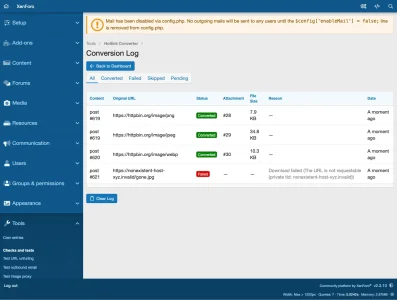
- Conversion Log - Paginated log of every URL processed, with status badges, the content type and ID, attachment links, file sizes, a translatable reason for failures/skips, and timestamps. Filterable by status.
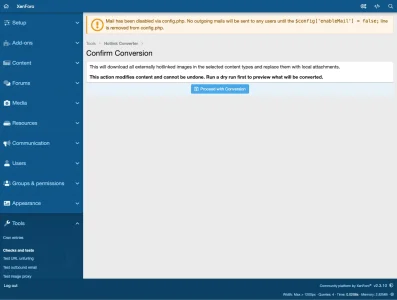
- Confirmation Overlay - Live conversion requires explicit confirmation since it modifies content irreversibly. If conversation scanning is enabled, the overlay adds a private-conversation privacy warning.
- Smart IMG handling - Handles
[IMG]tag variants ([IMG width="400" height="300"],[IMG alt="desc"]) and the phpBB[IMG=url]form. - URL deduplication - If the same external URL appears multiple times in one item, it is downloaded once and all instances share the same attachment.
- Local URL skipping - URLs that already point to your own board are skipped automatically.
- Idempotent - Safe to re-run. Already-converted URLs are skipped on later runs. No duplicate downloads or attachments.
- Failure resilience - Failed downloads (404s, timeouts, oversized files, invalid images) are logged with a specific reason. The job keeps processing the rest.
- Quiet on big runs - A bulk run suppresses the external IndexNow ping, so it will not flood the job queue or mass-notify search engines for cosmetic image changes (your local search index is still updated).
- Clean uninstall - Drops the conversion log table on uninstall.
How It Works
- Go to AdminCP > Tools > Hotlink Converter.
- Under AdminCP > Options > Hotlink Converter, choose which content types to scan. Forum posts are on by default; conversation scanning is off by default.
- Click Recalculate on the dashboard to see how many items of each type contain external
[IMG]tags. - Run a Dry Run to scan without converting. Check the log to see exactly what would be processed.
- Click Convert All, confirm in the overlay, and the resumable background job handles the rest - downloading each image, creating an XF attachment, and updating the content inline.
- Review the conversion log for any failures, filtering by status to focus on issues.
What Gets Converted
Before:
Code:
Check out this screenshot: [IMG]https://external-site.com/image.jpg[/IMG]After:
Code:
Check out this screenshot: [ATTACH=full]12345[/ATTACH]The image is now stored locally as a proper XF attachment, embedded inline in the original content. It will survive even if the external host goes offline.
Technical Details
- Architecture: A content-source abstraction over Service + Job + Repository, so every content type converts through the same pipeline. One database table (
xf_qubn_hlc_conversion_log) for audit logging. - Inline embedding: Each content type is edited through its native XF editor service, which sets both
attach_countand the embed metadata - the reason converted images render inline instead of as a detached attachment strip. - Downloads: Uses XF's built-in
getUntrusted()HTTP reader with SSRF protection, a 15-second timeout, and a 10MB file size limit per image. - Supported formats: JPG, JPEG, PNG, GIF, WebP, BMP.
- Job processing: Cursor-based resumable job. Processes 50 items per batch with time-limit checks, and can be cancelled from the AdminCP job queue.
- Compatibility: Requires XenForo 2.3.0+. The XF Resource Manager is optional and only enables the resource-update target.
- Code quality: PHPStan level 3 clean. No class extensions - completely self-contained.
Installation
- Download and extract the ZIP file.
- Upload the
Qubn/HotlinkConverter/folder tosrc/addons/. - Go to AdminCP > Add-ons > Install/upgrade from archive.
- Navigate to AdminCP > Tools > Hotlink Converter, and review your scan targets under Options.
Addon ID: Qubn/HotlinkConverter
Vendor: Qubn
License: Free / Open Source