- Compatible XF 2.x versions
- 2.2
- 2.3
[FX] Mail Filter is an outgoing email filtering and control add-on for XenForo 2.2+ and XenForo 2.3+. It prevents SMTP quota exhaustion, lowers third-party email provider bills, and protects your domain sender reputation by blocking non-essential background notifications while guaranteeing 100% reliable delivery for critical transactional emails (account activations, password resets, and two-factor authentication).
By default, XenForo generates massive volumes of outgoing automated emails:
1.
2.
3.
4.
Located at Admin CP > Communications > [FX] Mail Filter (admin.php?fx-mail-filter/):
5.
Navigate to Admin CP > Setup > Options > [FX] Mail Filter (admin.php?options/groups/fx_mailfilter/):
php cmd.php xf:addon-install FX/MailFilter
 Why [FX] Mail Filter?
By default, XenForo generates massive volumes of outgoing automated emails:- Replies to watched threads and new threads in watched forums.
- Personal conversation messages, replies, and participant invites.
- Periodic digests and activity summaries dispatched to inactive accounts.
- Moderation reports, approval queues, and routine password/email change notices.
- Quickly Exhausting Monthly SMTP Limits: Fast depletion of free and paid quotas on services like Gmail SMTP, SendGrid, Amazon SES, Resend, Mailgun, Postmark, and Brevo.
- Domain Sender Reputation Degradation: High bounce rates and unengaged recipients damage your domain's spam score, causing critical emails to land in spam folders.
- Database Bloat & Queue Overhead: Hundreds of thousands of deferred MailSend job records bog down your xf_job table and waste CPU cycles.
 Key Features
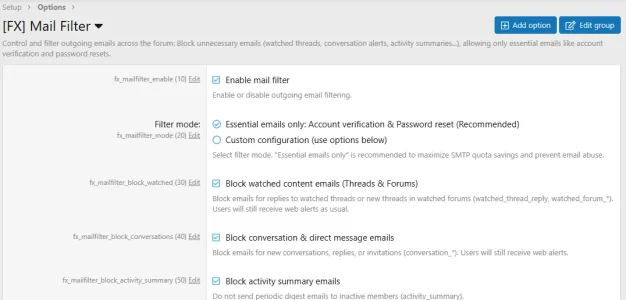
1.  Two Flexible Filter Modes
- Essential Emails Only (Recommended):
- Blocks all notification and digest emails automatically with zero configuration needed.
- Whitelists only essential security and transactional emails:
- user_email_confirmation — Account registration & email change confirmation.
- user_password_confirmation — Password reset link request.
- user_lost_password_reset — Successful password reset notice.
- user_security_lock_reset_confirmation — Security account unlock confirmation.
- two_step_login_email — Two-factor authentication (2FA) one-time login code.
- two_step_login_backup — Two-factor authentication backup code generation.
- Direct SMTP test emails sent from Admin CP > Tools > Test outbound email.
- Custom Configuration Mode:
- Granular toggle switches allowing you to selectively block or allow specific categories:
- Watched content emails: Block notifications for watched thread replies and watched forums. (Users still receive instant on-site web alerts!)
- Conversation emails: Block notifications for direct messages and conversations.
- Activity summary emails: Stop automated periodic newsletter digests.
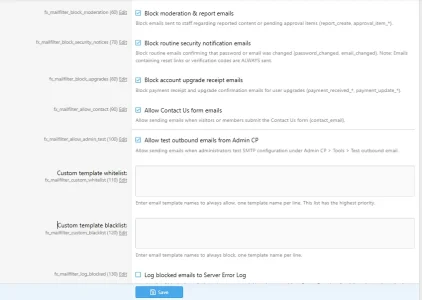
- Moderation & report emails: Prevent staff mailbox flooding from routine reports.
- Routine security change notices: Block informational notifications when an email or password was updated without affecting reset links.
- Account upgrade receipts: Block purchase receipts for user upgrades.
- Contact Us form messages: Keep public contact form submissions enabled for staff.
- Granular toggle switches allowing you to selectively block or allow specific categories:
2.  Multi-Layer Zero-Waste Architecture
- Layer 1 — Queue Interception (XF\Mail\Mail::queue()): Intercepts emails before they enter the deferred job queue, eliminating unnecessary MailSend records in xf_job.
- Layer 2 — Background Cron Optimization (XF\Job\ActivitySummaryEmail): Returns early ($this->complete()) when digests are disabled, saving 100% CPU overhead across thousands of member profiles.
- Layer 3 — Direct Send Guard (XF\Mail\Mailer::send()): Ensures direct mail dispatches from third-party add-ons are also evaluated against the filter rules before any SMTP connection is opened.
3.  Custom Whitelist & Blacklist
- Custom Template Whitelist: Enter specific template names (one per line) that should always be allowed regardless of active filter rules. Perfect for third-party commerce or ticket system add-ons.
- Custom Template Blacklist: Define custom templates that should always be blocked.
4.  Admin CP Dashboard & Analytics
Located at Admin CP > Communications > [FX] Mail Filter (admin.php?fx-mail-filter/):- Live Block Counter: Real-time counter of total emails prevented from hitting your SMTP provider, showing exact saved quota.
- Template Check Tool: Input any template name (e.g. watched_thread_reply, user_email_confirmation) to instantly preview whether it is allowed or blocked and why.
- Detected Templates Table: Comprehensive table of all XenForo email templates with color-coded badges ([Essential], [Allowed], [BLOCKED]) and plain-text rationales.
- 1-Click Member Preference Sync: Update existing members' preferences in xf_user_option in one click to stop email alerts at the source.
5.  Simulation / Test Mode
- Safely audit filter rules before going live. When enabled, emails send normally while simulated block entries are logged under Admin CP > Logs > Server error log.
 Configuration & Options Guide
Navigate to Admin CP > Setup > Options > [FX] Mail Filter (admin.php?options/groups/fx_mailfilter/):| Setting | Default | Description | Recommended |
|---|---|---|---|
| Filter Mode fx_mailfilter_mode | Essential only | Select between Essential emails only or Custom configuration. | Essential only |
| Custom template whitelist fx_mailfilter_whitelist | Empty | Template names to always permit (one per line). | As needed |
| Custom template blacklist fx_mailfilter_blacklist | Empty | Template names to always block (one per line). | As needed |
| Log blocked emails fx_mailfilter_log_blocked | Disabled | Record blocked attempts in Server Error Log for auditing. | As needed |
| Simulation / Test mode fx_mailfilter_simulation | Disabled | Log would-be blocks without actually stopping emails. | For initial testing |
System Requirements
- XenForo: 2.2.0 or higher (fully compatible with XenForo 2.2 SwiftMailer & XenForo 2.3+ Symfony Mailer).
- PHP: 7.4 to 8.4+.
- Database: MySQL 5.7+ / MariaDB 10.3+.
 Installation Guide
Method 1: Install via Admin CP (Recommended)
- Go to Admin CP > Add-ons.
- Click Install / upgrade from archive.
- Select the FX-MailFilter-1.0.0.zip package and click Upload.
- Confirm the installation prompts.
Method 2: Manual Installation via Directory
- Upload the FX/MailFilter directory to your web server at:
<web_root>/src/addons/FX/MailFilter - Navigate to Admin CP > Add-ons and click Install under [FX] Mail Filter.
Method 3: Command-Line Interface (CLI)
From your XenForo root directory, execute:php cmd.php xf:addon-install FX/MailFilter