- Compatible XF 2.x versions
- 2.2
- 2.3
[FX] Session Mod delivers high-performance automated recovery, table optimization, and zero-downtime session activity management for XenForo 2.2+ and 2.3+. It shields your community from database lockouts, memory overflow errors, and table crashes without requiring manual server intervention.
In XenForo, the xf_session_activity table logs active members, guests, and search robots browsing your forum in real time. This table is updated and queried on nearly every single HTTP request.
Due to this continuous high-throughput activity, XenForo administrators frequently face catastrophic database issues that knock their entire forum offline:
1.
2.
3.
4.
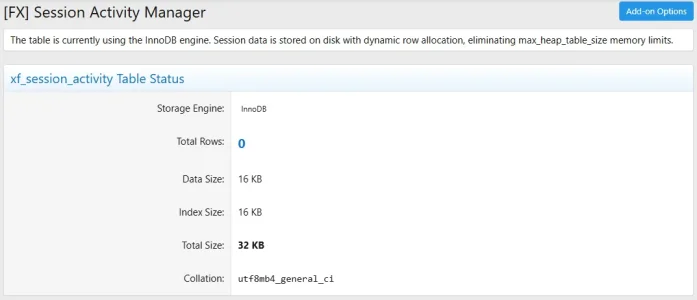
Located at Admin CP > Tools > [FX] Session Mod (admin.php?fx-session-mod/):
5.
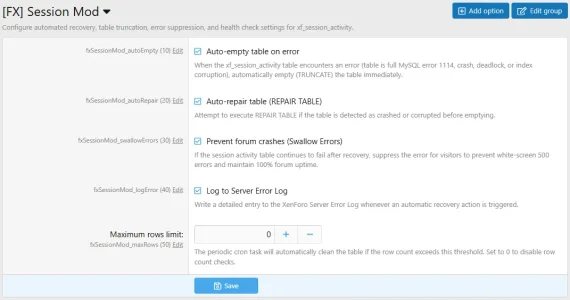
Navigate to Admin CP > Setup > Options > [FX] Session Mod (admin.php?options/groups/fxSessionMod/):
php cmd.php xf:addon-install FX/SessionMod
 Overview & Problem Solved
In XenForo, the xf_session_activity table logs active members, guests, and search robots browsing your forum in real time. This table is updated and queried on nearly every single HTTP request.Due to this continuous high-throughput activity, XenForo administrators frequently face catastrophic database issues that knock their entire forum offline:
- MySQL Error [1114]: The table 'xf_session_activity' is full:
- When configured with the MEMORY (HEAP) engine, the table size is strictly bounded by MySQL’s max_heap_table_size and tmp_table_size (typically 16MB or 32MB).
- During sudden traffic surges, aggressive search engine bot crawls (Google, Bing, Ahrefs, Yandex), or DDoS attacks, the table rapidly fills up.
- The Impact: Visitors and members receive an "An unexpected database error occurred" white screen. The entire community goes down, and administrators cannot even access the Admin Control Panel without SSH or phpMyAdmin to manually run TRUNCATE TABLE.
- Table Corruption & Crash Errors ([145] Table is marked as crashed and should be repaired):
- Server power cuts, unexpected MySQL restarts, or high-concurrency race conditions can corrupt MyISAM or MEMORY table index structures.
- Deadlocks & Lock Wait Timeouts ([1205], [1213]):
- Concurrent updates and routine pruning operations can deadlock rows under heavy concurrent write loads.
 Key Features
1.  Intelligent Automated Error Recovery
- Multi-Code Signature Detection:
- Automatically identifies database exceptions targeting xf_session_activity:
- 1114 - ER_RECORD_FILE_FULL (The table is full)
- 145, 1194, 1034, 1016, 1030, 126, 127 (Table is marked as crashed / corrupt)
- 1205, 1213 (Lock wait timeout / Deadlock)
- 1062 (Duplicate entry for key PRIMARY)
- Automatically identifies database exceptions targeting xf_session_activity:
- Multi-Stage Recovery Execution:
- Stage 1: Executes TRUNCATE TABLE xf_session_activity to instantly free in-memory RAM or disk storage.
- Stage 2: If the table is crashed or corrupt, automatically attempts REPAIR TABLE / OPTIMIZE TABLE before truncating.
- Stage 3: Falls back to DELETE FROM xf_session_activity if DDL truncate permissions are restricted.
- Transparent Auto-Retry: Automatically retries the original request immediately after recovery. Visitors never see an error page.
2.  100% Uptime Error Swallowing
- Session activity records represent temporary viewer state ("Who is viewing this thread"). They contain zero critical transactional data (user authentication is safely isolated in xf_session).
- If an underlying server hardware or disk failure persists, the Error Swallowing mechanism prevents the exception from bubbling up. Your forum remains 100% online without throwing fatal 500 errors to visitors.
3.  Anti-Flood / Throttle Protection
- Built-in registry time throttle (minimum 5-second window between automatic truncations). Prevents command storms from exhausting database connection pools if the database server has system-level disk or quota problems.
4.  Interactive Admin CP Management Dashboard
Located at Admin CP > Tools > [FX] Session Mod (admin.php?fx-session-mod/):- Live Table Health & Telemetry:
- Current Storage Engine (MEMORY or InnoDB).
- Total exact row count.
- Formatted Data Size, Index Size, and Combined Footprint.
- Table collation and row format.
- When using MEMORY: Displays max_heap_table_size limit alongside real-time memory utilization percentage and visual alert banners.
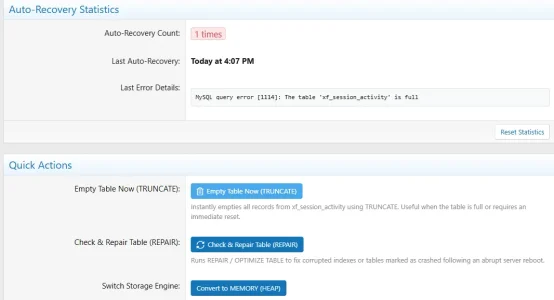
- Incident Recovery History:
- Lifetime count of automatic recovery interventions.
- Timestamp of the most recent auto-recovery.
- Formatted traceback and message of the latest recorded error.
- Reset stats action button.
- 1-Click Maintenance Tools:
- Empty Table Now (TRUNCATE): Manually reset session activity in 1 click.
- Check & Repair Table (REPAIR): Manually run MySQL table repair/optimization.
- Switch Storage Engine: Toggle seamlessly between MEMORY (fastest RAM performance) and InnoDB (safe, disk-backed with no heap memory limits) without touching SQL consoles.
5.  Proactive Cron Health Check (
- Runs automatically every hour to maintain table hygiene:
- Max Rows Pruning: Automatically clears records if row counts exceed your defined safety limit (fxSessionMod_maxRows).
- Proactive Memory Evacuation: If the table uses the MEMORY engine and memory usage reaches 90%, the add-on clears the table proactively before a MySQL 1114 error can occur.
 Configuration & Options Guide
Navigate to Admin CP > Setup > Options > [FX] Session Mod (admin.php?options/groups/fxSessionMod/):| Setting | Default | Description | Recommended |
|---|---|---|---|
| Auto-empty table on error fxSessionMod_autoEmpty | Enabled | Automatically truncates xf_session_activity when a database exception is caught. | Enabled |
| Auto-repair table fxSessionMod_autoRepair | Enabled | Attempts REPAIR TABLE before truncation if table corruption is detected. | Enabled |
| Prevent forum crashes (Swallow Errors) fxSessionMod_swallowErrors | Enabled | Suppresses unresolvable session activity errors from displaying error 500 pages to visitors. | Enabled |
| Log to Server Error Log fxSessionMod_logError | Enabled | Creates an administrative log entry in the Server Error Log with error details whenever recovery runs. | Enabled |
| Maximum rows limit fxSessionMod_maxRows | 0 | Triggers automatic truncation during cron if row count exceeds this number. Set 0 to disable. | 0 (or 50000 for high traffic) |
 MEMORY vs InnoDB: Which Should You Use?
| Comparison Factor | MEMORY Engine (HEAP) | InnoDB Engine |
|---|---|---|
| Storage Location | System RAM | Disk / Buffer Pool |
| Write Performance | Extremely Fast | Fast (with disk I/O) |
| Capacity Limit | Limited by max_heap_table_size | Virtually Unlimited |
| Failure Mode | Throws Error 1114 (Table is full) | Slower disk writes under high load |
| Recommendation | Ideal for high performance when paired with [FX] Session Mod | Ideal for set-it-and-forget stability without memory tuning |
 System Requirements
- XenForo: 2.2.0 or higher (compatible with XenForo 2.3.x).
- PHP: 7.4.0 or higher (PHP 8.0, 8.1, 8.2, 8.3 fully supported).
- Database: MySQL 5.7+ / MariaDB 10.3+.
 Installation Guide
Method 1: Install via Admin CP (Recommended)
- Go to Admin CP > Add-ons.
- Click Install / upgrade from archive.
- Select the FX-SessionMod-1.0.0.zip package and click Upload.
- Confirm the installation prompts.
Method 2: Manual Installation via Directory
- Upload the FX/SessionMod directory to your web server at:
<web_root>/src/addons/FX/SessionMod - Navigate to Admin CP > Add-ons and click Install under [FX] Session Mod.
Method 3: Command-Line Interface (CLI)
From your XenForo root directory, execute:php cmd.php xf:addon-install FX/SessionMod