- Compatible XF 2.x versions
- 2.3
- Additional requirements
- XenForo 2.3.12+
PHP 8.0+
HTTPS for production connected-account login
Developer/application account with each provider you wish to configure
Sign in with Apple additionally requires an Apple Developer Program account.
- License
- Commercial proprietary license — perpetual use
- Updates duration
- 12 months of updates included with the initial purchase. The licence remains valid permanently after the update period expires. Renewal is only required to receive newer releases and continued updates.
- Visible branding
- No
XenForo already supports connected-account login. Setting it up is the annoying part.
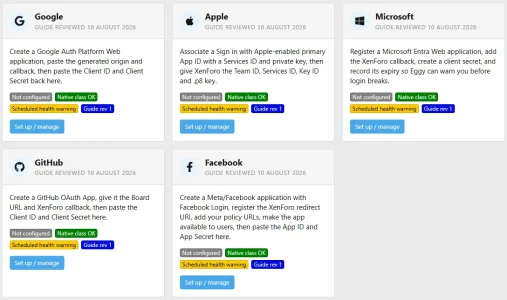
Eggy Connected Account Assistant turns the setup of Google, Apple, Microsoft, GitHub and Facebook login into a guided Admin CP process.
Instead of working through provider documentation, OAuth terminology and trying to figure out which callback URL belongs in which field, the assistant tells you exactly what to do, what each setting means and what value to paste.
Supported providers
- Apple
- Microsoft
- GitHub
Designed to make setup simple
For each provider, the assistant walks you through the external developer-console setup one step at a time.Where XenForo-specific values are required, they are generated automatically from your installation.
This includes values such as:
- Board URL
- Website origin
- Domain
- Authorized redirect URI
- XenForo connected_account.php callback
- Apple Return URL
- GitHub callback URL
- Facebook OAuth redirect URL
Copy buttons are provided where appropriate, with plain-English explanations of what each value is for.
No OAuth knowledge is required.
Uses XenForo's native Connected Accounts
The add-on does not replace XenForo's authentication system or implement its own social-login layer.
Provider credentials are passed into XenForo's existing Connected Account providers and XenForo continues to handle the actual authentication process.
This means your users continue using XenForo's normal connected-account registration, login, account linking and provider testing functionality.
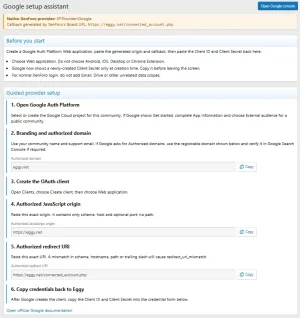
Google setup assistant
- Current Google Auth Platform workflow guidance
- Web Application client setup
- Authorized JavaScript Origin generation
- Authorized Redirect URI generation
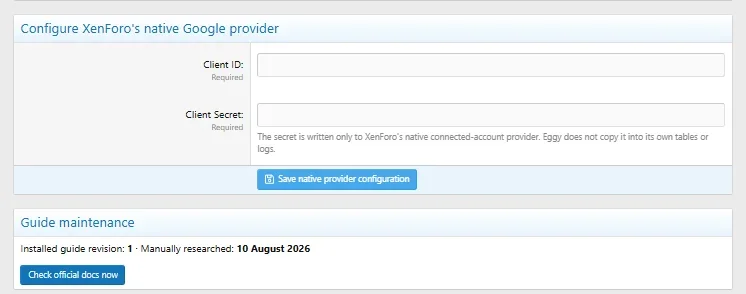
- Client ID and Client Secret guidance
- Domain checks
- Clear explanations of which Google values should be copied back into XenForo
Apple setup assistant
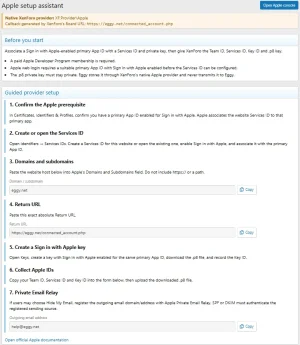
Apple is one of the more complicated connected-account providers to configure, so the assistant provides dedicated guidance for:
- Apple Developer prerequisites
- Sign in with Apple
- Primary App ID requirements
- Services ID configuration
- Domain configuration
- Return URL generation
- Team ID
- Services ID
- Key ID
- .p8 private-key upload
- Private-key validation
- Private Email Relay
- SPF/DKIM diagnostics
Private-key storage and Apple authentication remain handled by XenForo's native Apple provider.
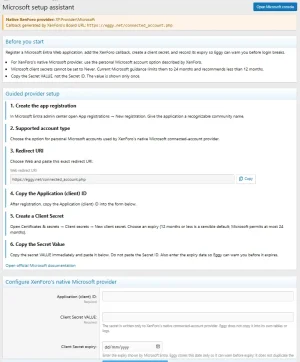
Microsoft setup assistant
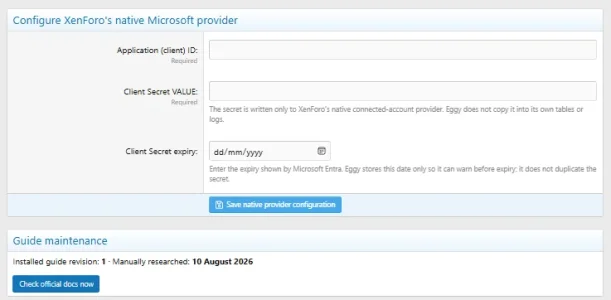
- Microsoft application registration guidance
- Exact XenForo redirect URI
- Application / Client ID guidance
- Client Secret Value guidance
- Clear Secret Value vs Secret ID warning
- Secret expiry monitoring
- Automated expiry alerts
- 60 / 30 / 14 / 7 / 1-day warning thresholds
GitHub setup assistant
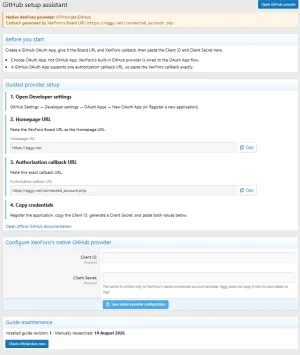
- OAuth App setup
- OAuth App vs GitHub App explanation
- Homepage URL generation
- Authorization callback URL generation
- Client ID and Client Secret configuration
Facebook setup assistant
- Meta/Facebook application guidance
- Facebook Login setup
- Website URL
- Valid OAuth Redirect URI
- Privacy Policy and Terms URL guidance
- App ID and App Secret
- Production availability reminders
Built-in diagnostics
A comprehensive diagnostics system is included directly in the Admin CP.
It checks:
- XenForo version
- Add-on installation state
- HTTPS
- Board URL
- connected_account.php
- Generated callback URLs
- OpenSSL
- Required PHP functionality
- Database tables
- Add-on file health
- ACP routes
- ACP navigation
- Permissions
- Scheduled tasks
- Native XenForo provider classes
- Provider configuration state
- Native redirect URIs
- Apple private-key health
- Microsoft secret expiry
- Provider infrastructure reachability
Diagnostic reports deliberately exclude OAuth secrets and private credentials.
Provider change monitoring
Google, Apple, Microsoft, GitHub and Meta occasionally change their developer consoles, documentation or requirements.
The assistant includes scheduled provider-documentation monitoring so changes can be identified and reviewed rather than leaving setup instructions to quietly become outdated.
Existing working connected-account configurations are never automatically disabled simply because provider documentation changes.
Privacy and security
- No replacement OAuth implementation
- No modification of existing user connected-account associations
- Provider credentials remain on your XenForo installation
- OAuth secrets are not sent to Eggy
- Secrets are not included in diagnostic reports
- Apple private-key storage remains under XenForo's native provider
- No remotely downloaded executable provider code
Requirements
- XenForo 2.3.12+
- PHP 8.0+
- HTTPS for normal production use
- Developer/application access for providers you wish to configure
- Apple Developer Program access when configuring Sign in with Apple
Support: https://support.eggy.net/
- Related resources
Does this add Google, Apple, Microsoft, GitHub and Facebook authentication to XenForo?
XenForo already includes native Connected Account providers for these services.
Eggy Connected Account Assistant makes configuring those native providers much easier. It guides you through the external provider setup, generates the exact XenForo-specific values you need and helps configure XenForo's existing provider.
Do I need to understand OAuth?
No.
The add-on is specifically designed to remove as much OAuth terminology and guesswork as possible. Each setup is broken into guided steps with plain-English explanations and copy-ready values.
Does the add-on create the Google, Apple, Microsoft, GitHub or Facebook application for me?
No.
The provider application must still be created inside your own developer account because it belongs to you and may require accepting provider terms or completing provider-specific verification.
The assistant tells you where to go, what to select, what each field means and exactly what XenForo value to paste.
Do I need an Apple Developer account?
Yes, if you want to configure Sign in with Apple.
Apple's own requirements still apply, including access to the Apple Developer Program and the required Sign in with Apple identifiers and private key.
Does the add-on store my provider passwords or send credentials to Eggy?
No.
Provider credentials remain on your XenForo installation. OAuth secrets, Apple private keys and provider tokens are not sent to Eggy and are not included in diagnostic reports.
Does this replace XenForo's Connected Account system?
No.
This is intentionally a setup, configuration, monitoring and diagnostics assistant around XenForo's native Connected Account system.
XenForo continues to handle the actual user authentication, registration, account association and provider communication.
Can I use only one provider?
Yes.
You can configure any combination of the supported providers. You do not need to configure all five.
What providers are supported?
- Apple
- Microsoft
- GitHub
Does it support existing Connected Account configurations?
Yes.
The assistant detects existing native XenForo provider configuration and is designed to preserve existing values rather than requiring you to start over.
What happens if Google, Apple or another provider changes its setup process?
The add-on includes provider documentation monitoring and health diagnostics.
Provider documentation changes can be flagged for review so setup guidance can be kept current. A documentation change does not automatically disable an existing working provider.
Does it monitor Microsoft Client Secret expiry?
Yes.
Microsoft Client Secret expiry can be recorded and monitored, with automated warning thresholds as the expiry date approaches.
Does it include diagnostics?
Yes.
The built-in diagnostics cover the add-on itself and the surrounding XenForo Connected Account environment, including routes, permissions, callback URLs, native provider classes, configuration state, file health, scheduled tasks and provider-specific checks.
Diagnostic output deliberately excludes OAuth secrets and private credentials.
Does a successful diagnostic guarantee my provider credentials are valid?
Local diagnostics can validate your XenForo configuration and provider integration environment, but only the external provider can confirm that a particular Client ID, Client Secret or developer application is valid.
XenForo's native Test provider functionality can be used for the final interactive authentication test.
Will this modify existing connected user accounts?
No.
The add-on does not rewrite or remove existing XenForo user Connected Account associations.
What are the requirements?
- XenForo 2.3.12+
- PHP 8.0+
- HTTPS for normal production connected-account use
- Access to the developer account for whichever provider you wish to configure
- Apple Developer Program access for Sign in with Apple
Where can I get support?
Support is available at:
https://support.eggy.net/