
![[DBTech] Error Log Analyser](/community/data/resource_icons/10/10820.jpg?1790349494)
- Compatible XF 2.x versions
- 2.3
- Additional requirements
- PHP 8.0.0+ (8.2+ recommended)
- Updates duration
- Free - Lifetime
- Visible branding
- No
Error Log Analyser helps administrators identify add-ons mentioned in a generated server error, and offers a quick and easy way to copy the information for support tickets.
Fully integrated with the server error log, both the overlay and the full page, the information can easily be accessed.
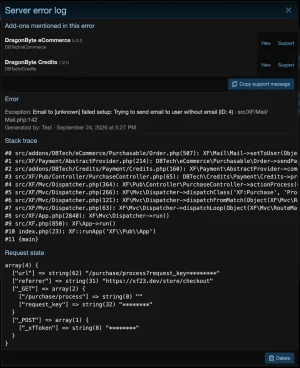
Error Log Analyser eliminates some of the guesswork involved with this process. When opening a server error log entry, a list appears above the error, showing a list of all add-ons mentioned in the stack trace, and their installed versions. Below this list, a handy button lets administrators copy a friendly message that can be directly pasted into a XenForo editor to display a neatly formatted, polite message asking for assistance.
Here's an example of what would be printed for the error shown in the screenshot:
Hi,
I’m experiencing the following error message and your addon was mentioned in the stack trace. Could you please look at the below message and let me know if it’s related to your addon, and if not, let me know the most likely culprit?
Error message:
Stack trace:
Request state:
Thank you!
This message can then be sent to all the developers whose addon is mentioned. With all the information readily available in your clipboard ready to be posted, developers can assist you much quicker!
Faster Support: Posting all relevant information can be challenging, because you might not know exactly what the developer wants to see. Formatting can also be destroyed depending on where you copy the information. With this product, the information will be copied to your clipboard instantly and pre-formatted, ready to be pasted into any XenForo editor.
Fully integrated with the server error log, both the overlay and the full page, the information can easily be accessed.
Uses
One of the most difficult things facing both developers and administrators is determining the culprit in a server error message. The stack trace can be difficult for a non-technical person to interpret, and this can often lead to the wrong addon getting the blame (or the administrator having no idea who to contact).Error Log Analyser eliminates some of the guesswork involved with this process. When opening a server error log entry, a list appears above the error, showing a list of all add-ons mentioned in the stack trace, and their installed versions. Below this list, a handy button lets administrators copy a friendly message that can be directly pasted into a XenForo editor to display a neatly formatted, polite message asking for assistance.
Here's an example of what would be printed for the error shown in the screenshot:
Hi,
I’m experiencing the following error message and your addon was mentioned in the stack trace. Could you please look at the below message and let me know if it’s related to your addon, and if not, let me know the most likely culprit?
Error message:
Code:
Exception: Email to [unknown] failed setup: Trying to send email to user without email (ID: 4)
src/XF/Mail/Mail.php:142
Stack trace:
Code:
#0 src/addons/DBTech/eCommerce/Purchasable/Order.php(507): XF\Mail\Mail->setToUser(Object(SV\XeroInvoiceSync\XF\Entity\User))
#1 src/XF/Payment/AbstractProvider.php(214): DBTech\eCommerce\Purchasable\Order->sendPaymentReceipt(Object(XF\Payment\CallbackState))
#2 src/addons/DBTech/Credits/Payment/Credits.php(160): XF\Payment\AbstractProvider->completeTransaction(Object(XF\Payment\CallbackState))
#3 src/XF/Pub/Controller/PurchaseController.php(65): DBTech\Credits\Payment\Credits->processPayment(Object(DBTech\UserUpgradeCoupon\XF\Pub\Controller\PurchaseController), Object(SV\XeroInvoiceSync\XF\Entity\PurchaseRequest), Object(DBTech\eCommerce\XF\Entity\PaymentProfile), Object(XF\Purchasable\Purchase))
#4 src/XF/Mvc/Dispatcher.php(364): XF\Pub\Controller\PurchaseController->actionProcess(Object(XF\Mvc\ParameterBag))
#5 src/XF/Mvc/Dispatcher.php(266): XF\Mvc\Dispatcher->dispatchClass('XF:Purchase', 'Process', Object(XF\Mvc\RouteMatch), Object(DBTech\UserUpgradeCoupon\XF\Pub\Controller\PurchaseController), NULL)
#6 src/XF/Mvc/Dispatcher.php(121): XF\Mvc\Dispatcher->dispatchFromMatch(Object(XF\Mvc\RouteMatch), Object(DBTech\UserUpgradeCoupon\XF\Pub\Controller\PurchaseController), NULL)
#7 src/XF/Mvc/Dispatcher.php(63): XF\Mvc\Dispatcher->dispatchLoop(Object(XF\Mvc\RouteMatch))
#8 src/XF/App.php(2840): XF\Mvc\Dispatcher->run()
#9 src/XF.php(850): XF\App->run()
#10 index.php(23): XF::runApp('XF\\Pub\\App')
#11 {main}
Request state:
Code:
array(4) {
  ["url"] => string(62) "/purchase/process?request_key=********"
  ["referrer"] => string(31) "https://xf23.dev/store/checkout"
  ["_GET"] => array(2) {
    ["/purchase/process"] => string(0) ""
    ["request_key"] => string(32) "********"
  }
  ["_POST"] => array(1) {
    ["_xfToken"] => string(8) "********"
  }
}
Thank you!
This message can then be sent to all the developers whose addon is mentioned. With all the information readily available in your clipboard ready to be posted, developers can assist you much quicker!
Extended Product Information
Guesswork Removed: Easily see the add-ons mentioned in the stack trace, showing their real title rather than just their folder structures. Your installed versions are also printed, in case the developer needs to know.Faster Support: Posting all relevant information can be challenging, because you might not know exactly what the developer wants to see. Formatting can also be destroyed depending on where you copy the information. With this product, the information will be copied to your clipboard instantly and pre-formatted, ready to be pasted into any XenForo editor.

![[DBTech] DragonByte Reviews](/community/data/resource_icons/10/10639.jpg?1786098717)
![[DBTech] DragonByte Tickets](/community/data/resource_icons/7/7077.jpg?1592168376)
![[DBTech] DragonByte Mail](/community/data/resource_icons/5/5867.jpg?1592168386)
![[DBTech] DragonByte eCommerce](/community/data/resource_icons/6/6387.jpg?1592168406)
![[DBTech] DragonByte Social Groups](/community/data/resource_icons/9/9176.jpg?1683030244)