
![[DBTech] DragonByte Tickets](/community/data/resource_icons/7/7077.jpg?1592168376)
- Compatible XF 2.x versions
- 2.1
- 2.2
- 2.3
- Additional requirements
- PHP 8.0.0+ (8.2+ recommended)
- Updates duration
- 1 Month - €19.95 (€14.95 renewal) / 1 Year - €47.50 (€34.95 renewal) / Branding Free Add-On - €70
- Visible branding
- Yes, but removable with payment
DragonByte Tickets is the perfect companion to DragonByte eCommerce, allowing you to easily deal with any support query your users might have.
Fully integrated with XenForo, Tickets uses nodes to house your support tickets, giving you the stability of the XenForo core along with advanced ticket controls such as ticket status and automated ticketing actions. If DragonByte eCommerce is installed, rich product and license information is also displayed.
Uses
DragonByte Tickets complements our eCommerce product by offering a comprehensive ticket interface with custom fields and ticket status options. All threads posted in forums using the "Support ticket" node type will be considered support tickets, and you will see rich ticket information when visiting the thread. If eCommerce is installed, additional product and license information will be displayed when your support ticket nodes have been associated with a product.
Additional fields are powered by the "Custom thread fields" feature built into XenForo. When users post a new ticket, any thread fields that have identical license fields will be automatically filled out when the customer selects a license.
You are also able to define automated actions that can occur either when the ticket is created, or automatically in the background. Users can be notified their ticket is being closed, or the ticket itself can be closed - the possibilities are nearly endless!
New! You can also allow users to attach secure data to their support tickets, which can be used to request things like FTP and AdminCP information or other sensitive data.
Feature List
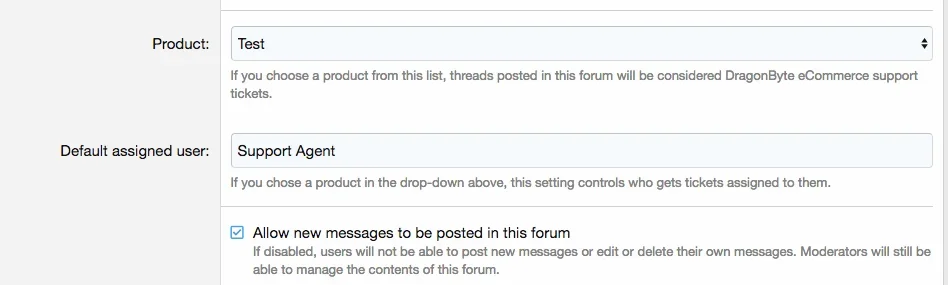
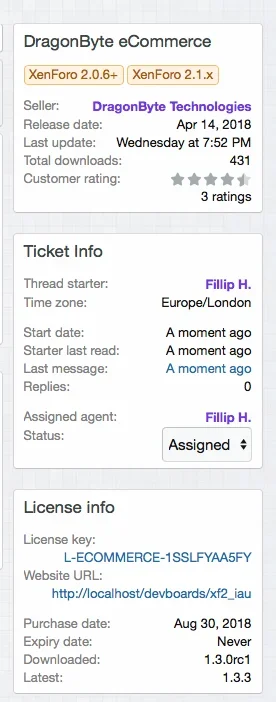
Tight DragonByte eCommerce Integration: If DragonByte eCommerce v5.3 or newer is installed, additional options will become available that will let you tailor your support ticket system to your eCommerce store. Associating your support ticket nodes with an eCommerce product displays rich product and license information in the sidebar alongside the normal ticket information.
Furthermore, if you use the "License fields" feature in eCommerce to ask for things such as the URL the product is installed on, creating custom thread fields with identical field IDs will auto-fill that information whenever your customers select a license.
Ticket States: Tickets have five different states:
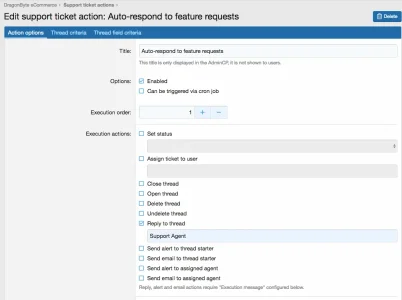
Powerful Automated Actions: You can define any number of automated actions to be taken on support tickets, and order these actions based on priority. You can also choose whether the action can be taken automatically via a cron job, or whether it only occurs when something happens (such as when the thread is created).
The following actions can be taken automatically:
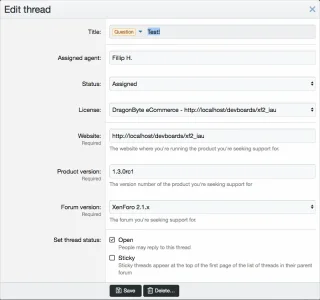
Easy Ticket Management: A ticket's state can be changed in multiple different locations, including the "Edit thread" interface, and the ticket's sidebar. Moving threads into a support ticket forum will create the associated ticket information, and moving it to another support ticket forum will update the information - you don't have to worry if people post in the wrong section!
Other advanced features such as copying a thread, and copying/moving posts are also supported.
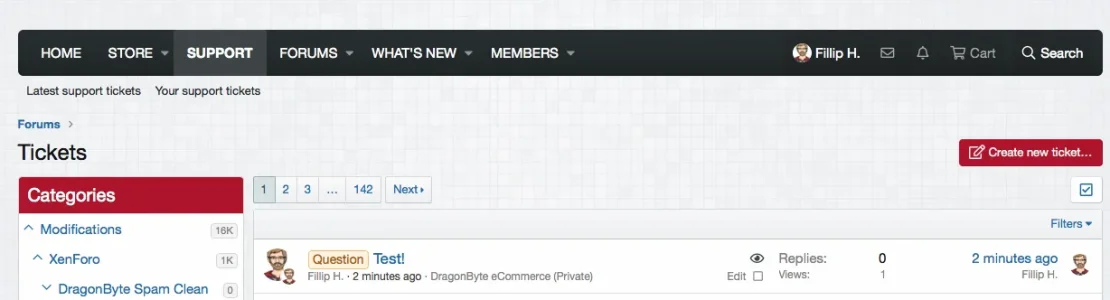
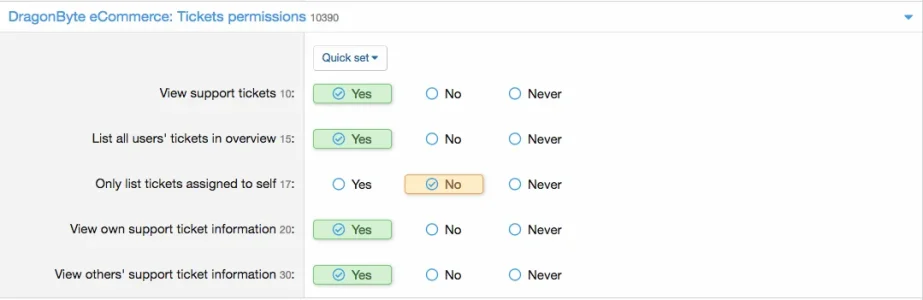
"Open Tickets" Widget: You can deploy a widget that lists currently open tickets, and by using user group permissions you can ensure that your support agents only see tickets that are assigned to them.
Powered By XenForo Threads & Forums: By using threads & forums as the back-end, basic features such as email alerts (via the "Watched threads" feature in XF) will continue to work, even if you choose to stop using this product or it stops working for whatever reason.
Notes
If you like this add-on, please consider leaving a Like and/or a review. We would really appreciate it!
Fully integrated with XenForo, Tickets uses nodes to house your support tickets, giving you the stability of the XenForo core along with advanced ticket controls such as ticket status and automated ticketing actions. If DragonByte eCommerce is installed, rich product and license information is also displayed.
Uses
DragonByte Tickets complements our eCommerce product by offering a comprehensive ticket interface with custom fields and ticket status options. All threads posted in forums using the "Support ticket" node type will be considered support tickets, and you will see rich ticket information when visiting the thread. If eCommerce is installed, additional product and license information will be displayed when your support ticket nodes have been associated with a product.
Additional fields are powered by the "Custom thread fields" feature built into XenForo. When users post a new ticket, any thread fields that have identical license fields will be automatically filled out when the customer selects a license.
You are also able to define automated actions that can occur either when the ticket is created, or automatically in the background. Users can be notified their ticket is being closed, or the ticket itself can be closed - the possibilities are nearly endless!
New! You can also allow users to attach secure data to their support tickets, which can be used to request things like FTP and AdminCP information or other sensitive data.
Feature List
Tight DragonByte eCommerce Integration: If DragonByte eCommerce v5.3 or newer is installed, additional options will become available that will let you tailor your support ticket system to your eCommerce store. Associating your support ticket nodes with an eCommerce product displays rich product and license information in the sidebar alongside the normal ticket information.
Furthermore, if you use the "License fields" feature in eCommerce to ask for things such as the URL the product is installed on, creating custom thread fields with identical field IDs will auto-fill that information whenever your customers select a license.
Ticket States: Tickets have five different states:
- Open - the ticket has not been assigned to a user
- Assigned - the ticket is open and assigned
- On hold - a "middle ground" between an open and a closed ticket, these tickets don't show in the "Open tickets" widget
- Answered - ready to be auto-closed by automated actions
- Closed - ticket is closed
Powerful Automated Actions: You can define any number of automated actions to be taken on support tickets, and order these actions based on priority. You can also choose whether the action can be taken automatically via a cron job, or whether it only occurs when something happens (such as when the thread is created).
The following actions can be taken automatically:
- Set status
- Assign ticket to user
- Close thread
- Open thread
- Delete thread
- Undelete thread
- Reply to thread
- User name of the person who should reply to the thread
- Send alert to thread starter
- Send email to thread starter
- Send alert to assigned agent
- Send email to assigned agent
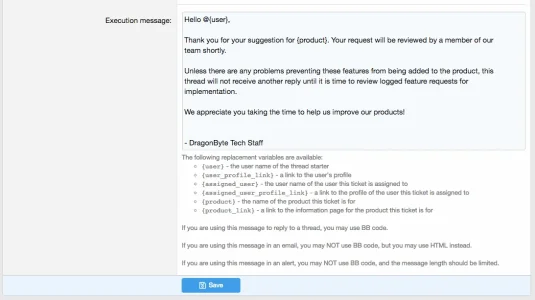
{user}- the user name of the thread starter{user_profile_link}- a link to the user's profile{assigned_user}- the user name of the user this ticket is assigned to{assigned_user_profile_link}- a link to the profile of the user this ticket is assigned to{product}- the name of the product this ticket is for (if DragonByte eCommerce is installed){product_link}- a link to the information page for the product this ticket is for (if DragonByte eCommerce is installed)
- Assigned user name is...
- Assigned user name contains...
- Ticket state is...
Easy Ticket Management: A ticket's state can be changed in multiple different locations, including the "Edit thread" interface, and the ticket's sidebar. Moving threads into a support ticket forum will create the associated ticket information, and moving it to another support ticket forum will update the information - you don't have to worry if people post in the wrong section!
Other advanced features such as copying a thread, and copying/moving posts are also supported.
"Open Tickets" Widget: You can deploy a widget that lists currently open tickets, and by using user group permissions you can ensure that your support agents only see tickets that are assigned to them.
Powered By XenForo Threads & Forums: By using threads & forums as the back-end, basic features such as email alerts (via the "Watched threads" feature in XF) will continue to work, even if you choose to stop using this product or it stops working for whatever reason.
Notes
If you like this add-on, please consider leaving a Like and/or a review. We would really appreciate it!
- Related resources
-
 Screenshot 2019-03-22 at 15.29.38.webp
 -
 Screenshot 2019-03-22 at 15.56.25.webp
 -
 Screenshot 2019-03-22 at 15.57.08.webp
 -
 Screenshot 2019-03-22 at 15.59.08.webp
 -
 Screenshot 2019-03-22 at 15.59.37.webp
 -
 Screenshot 2019-03-22 at 16.01.45.webp
 -
 Screenshot 2019-03-22 at 16.25.07.webp
 -
 Screenshot 2019-03-22 at 16.26.22.webp
 -
 Screenshot 2019-03-22 at 16.43.00.webp


![[DBTech] DragonByte Reviews](/community/data/resource_icons/10/10639.jpg?1786098717)
![[DBTech] DragonByte Mail](/community/data/resource_icons/5/5867.jpg?1592168386)
![[DBTech] DragonByte eCommerce](/community/data/resource_icons/6/6387.jpg?1592168406)
![[DBTech] DragonByte Social Groups](/community/data/resource_icons/9/9176.jpg?1683030244)
![[DBTech] DragonByte User Tagging](/community/data/resource_icons/6/6527.jpg?1592168396)