
You are using an out of date browser. It may not display this or other websites correctly.
You should upgrade or use an alternative browser.
You should upgrade or use an alternative browser.

DAMLA — Social auto-poster & scheduler for XF2 (Facebook, Instagram, Twitter, Reddit, Pinterest) 2.2.0
No permission to buy (€25.00)
- Author erkanshi
- Creation date
Damla 2.2.0
For forums whose server cannot reach Telegram directly: a Telegram account can now use its own Bot API server and a proxy. Both are optional, and there is no database change.
Telegram connection settings
- Bot API server. If you run your own Telegram Bot API server, enter its address (for example
http://localhost:8081) and Damla sends this bot's requests there instead of api.telegram.org.- Proxy. Damla can send this bot's requests through an HTTP, HTTPS or SOCKS proxy (
http://,https://,socks4://,socks4a://,socks5://orsocks5h://, with a port; a user name and password are allowed). The proxy is stored encrypted like the bot token and is never shown again. XenForo's own proxy setting inconfig.phpdoes not cover Damla's requests, so this is the way to route them.- Both settings belong to one Telegram account and apply to all of its requests: checking the connection, posting, and looking up a channel. Other accounts and other services are not affected.
- In the connect wizard and on the account's edit form they sit under "Connection settings". In the wizard it stays closed unless you open it, so connecting a normal bot still asks only for the token and the chat ID; on the edit form it opens by itself when something is saved. If the check cannot reach api.telegram.org, the error says where to find them.
- On the account's edit form, a saved Bot API server or proxy has a "Remove the saved …" box. Leaving the field empty keeps the saved value, as it does for the token. Running the wizard again for the same bot keeps them too, and the connection check uses them; if that check fails, the error names the saved settings it used and how to remove one.
- Damla does not follow redirects for Telegram requests. When a connection fails, the error says what went wrong: the proxy or your Bot API server did not answer, the proxy asked for a user name and password, the server redirected the request, or it answered with something that is not a Bot API reply. If something between your forum and api.telegram.org answers instead of Telegram (a firewall or a hosting block page), the connection check says so instead of claiming the token was rejected. The proxy is named without its user name and password.
- If the proxy refuses to pass a post on, the post is not marked "May already be live". A wrong proxy password stops the account until you fix it; other refusals are tried again like any failed post.
Upgrading
Upload the files and run the upgrade as usual. Requirements are unchanged: XenForo 2.3, PHP 8.0 and the sodium extension. If you use one of Damla's language packs, import it again with "Overwrite language" to get the new texts; the packs are in the zip underupload/src/addons/Erkan/Damla/translations/.
Damla 2.1.1
A small update: Russian joins the bundled languages, plus a few small fixes. Your rules, channels and queue are not touched, and there is no database change.
Russian
- A Russian language pack (Русский) for all of Damla: the admin pages, the help page, the queue's reasons and errors, what members and moderators see (the "Don't share this thread on social media" box and the "Share to channels" window), and the name of the new permission. It is in the zip as
upload/src/addons/Erkan/Damla/translations/language-Russkiy-Erkan-Damla.xml.- Import it under Appearance > Languages & phrases > Languages > Import: with "Overwrite language" into the Russian language your board already uses, or as "Child of language" to start a new one.
- Russian posts already worked: titles, tags turned into hashtags, excerpts and "Minimum word count" all handle Cyrillic text.
Fixes
- Instagram and Threads: when Damla held a post back after a publish request that got no answer, the row was saved twice: first as "Skipped", then as "May already be live". It is now saved once, so an interrupted run can no longer leave it as "Skipped".
- Help page, "Choosing who and where": the text about split and copied threads now says that a new thread takes over a "don't share" mark when its first post comes from a marked thread, and that the same applies when posts are moved or merged into an existing thread. Damla already worked this way; only the help text was too broad.
- LinkedIn: the connection steps and one error message told you to click "Connect". The button is called "Continue to LinkedIn", and the texts now say so.
- The other 10 language packs were missing the last sentence of the "Message format" explanation (how
{excerpt:200}and{tags:5}shorten a value). It is there now.
Upgrading
Upload the files and run the upgrade as usual. Requirements are unchanged: XenForo 2.3, PHP 8.0 and the sodium extension. If you use one of Damla's other language packs, import it again with "Overwrite language" to get the updated texts (the help page, the LinkedIn steps and the message format explanation); the packs are in the zip underupload/src/addons/Erkan/Damla/translations/.
Damla 2.1.0 "Who and where"
This release is about choosing whose content goes out and where, and about respecting a member's or an importer's "don't share". Your existing rules work as before: every new option starts empty or off.
Who: member filters on every rule
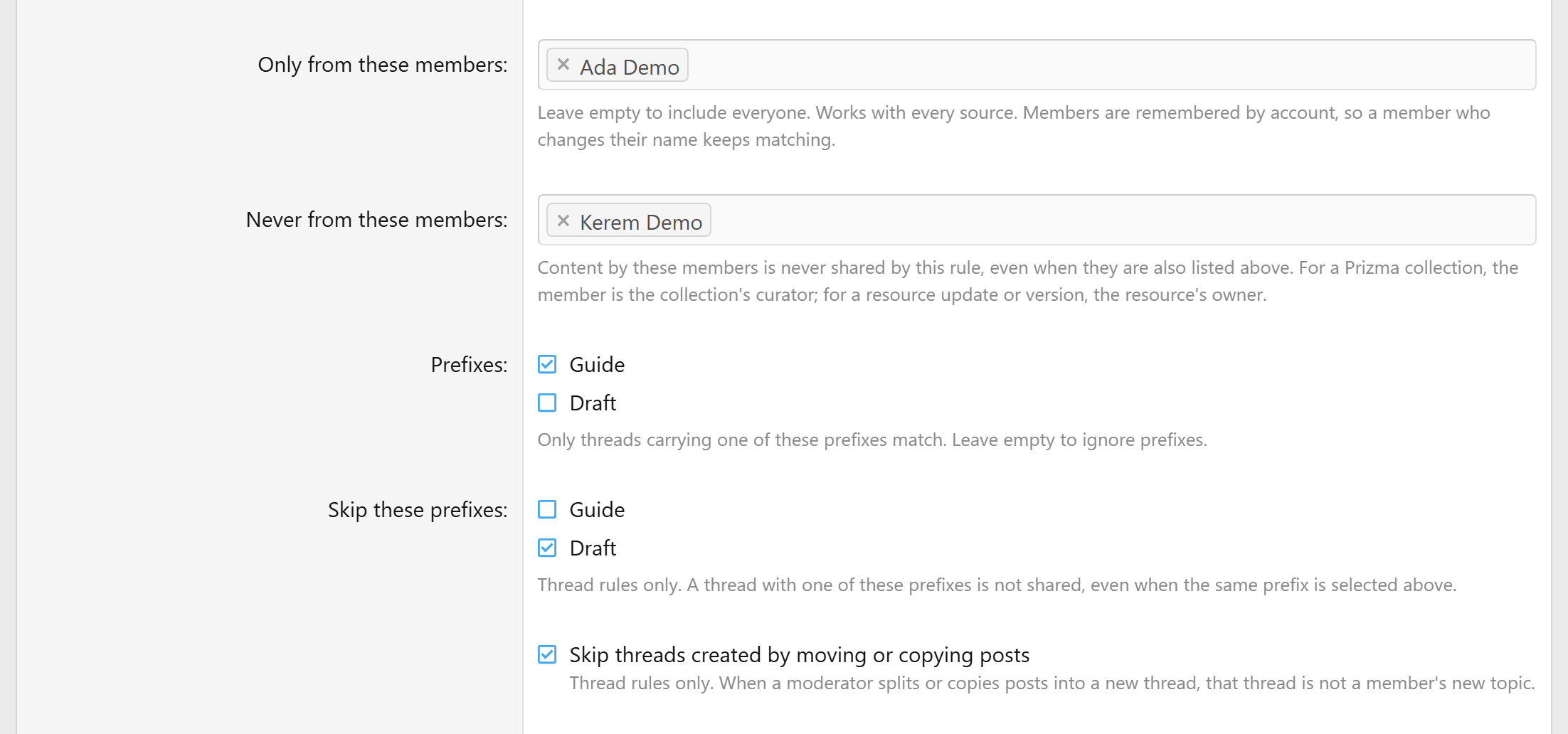
- "Only from these members" and "Never from these members". Type member names into a rule. They work with every source: threads, Prizma items and collections, XenForo Media Gallery and XenForo Resource Manager. For a Prizma collection the member is the collection's curator; for a resource update or version it is the resource's owner. When someone is on both lists, "Never" wins.
- Damla remembers members by account, so a member who changes their name keeps matching.
- A member whose account is deleted stays in the list until you tick "Forget deleted members in these lists". The rule form tells you when "Only from these members" holds deleted members; if nobody else is listed, the rule shares nothing.
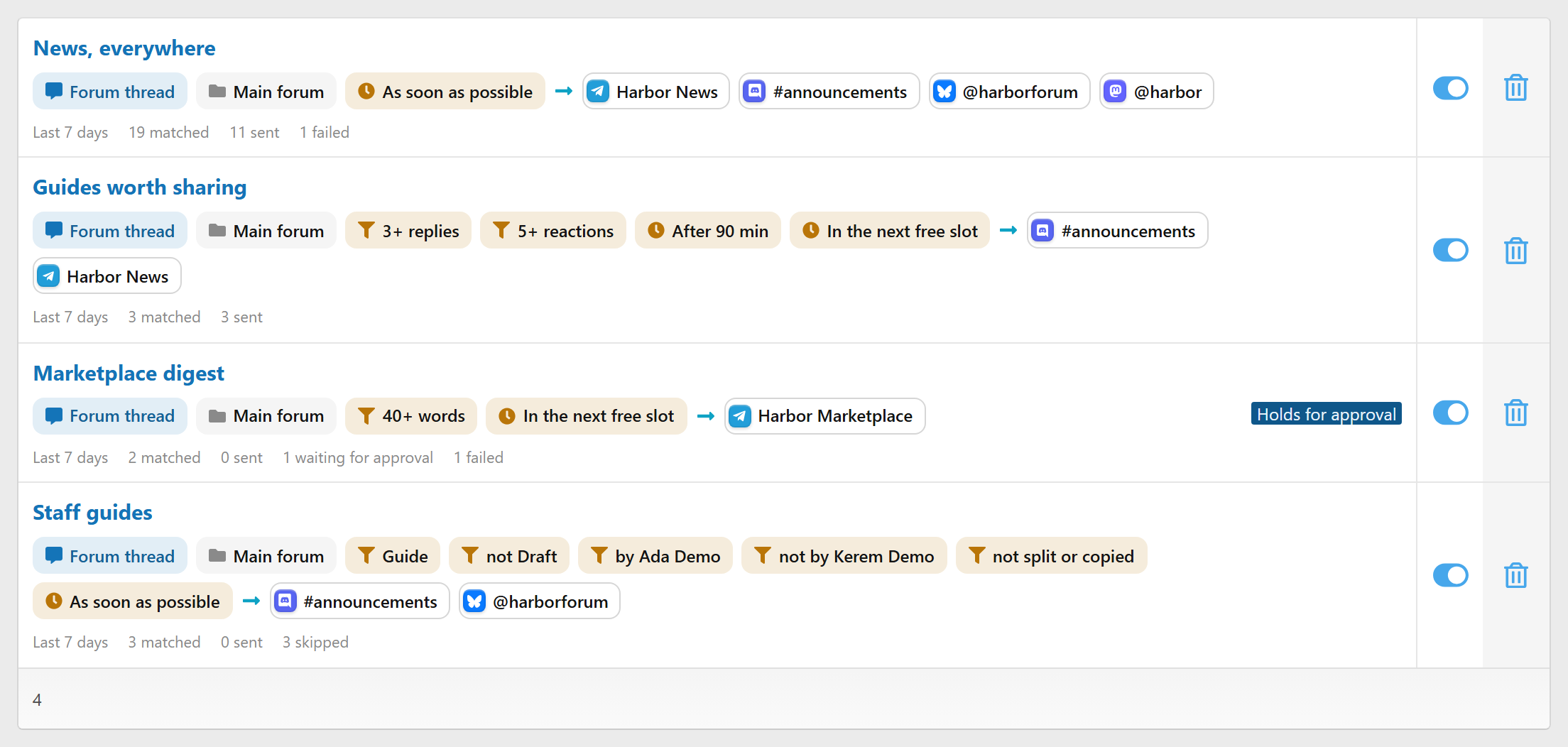
- The rule list shows the new conditions in each rule's row ("by …", "not by …").
Where: skip prefixes
- Thread rules get "Skip these prefixes". A thread with one of these prefixes is not shared, even when the same prefix is also selected under "Prefixes".
"Don't share this thread"
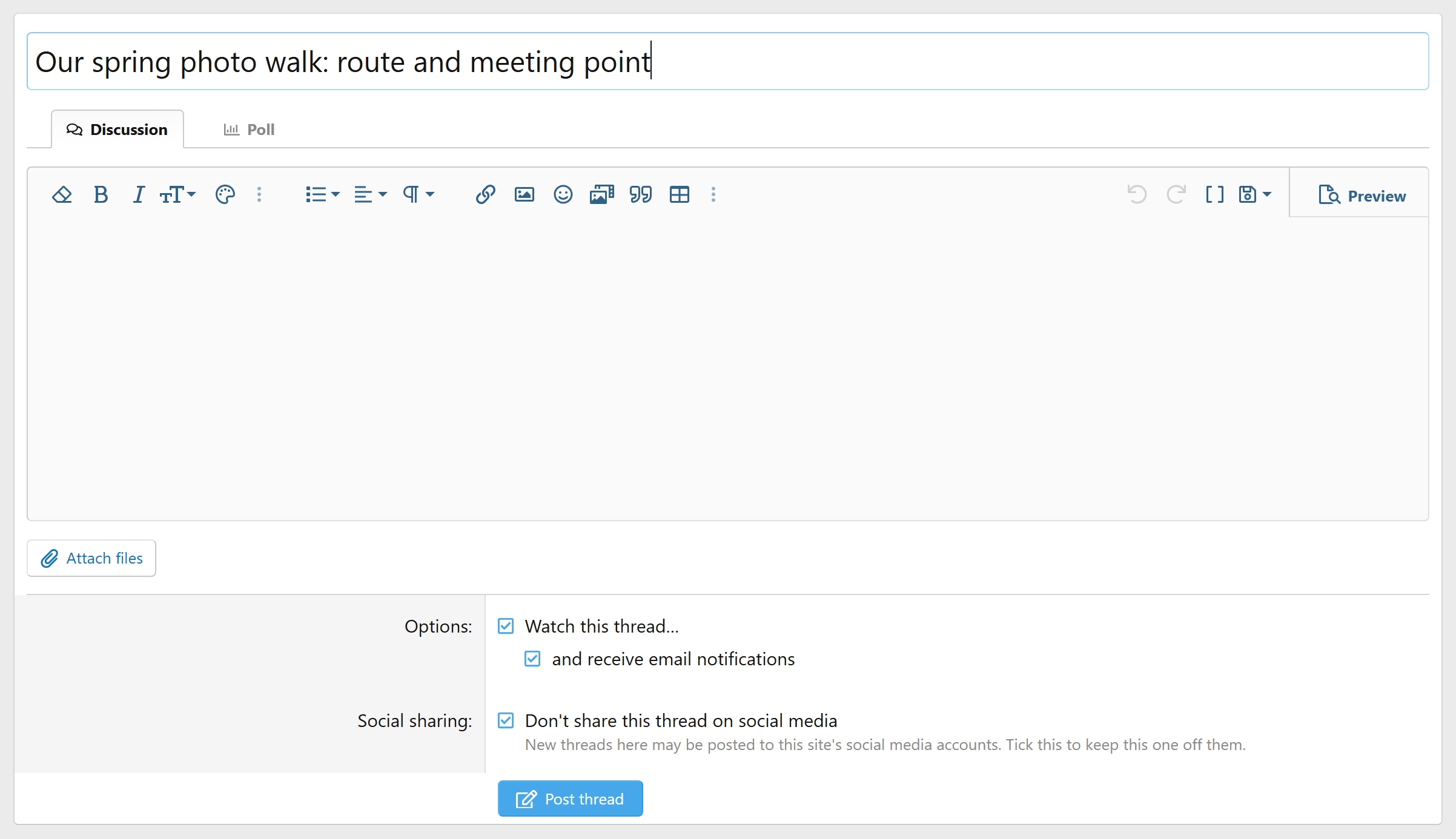
- A new user permission, "Opt a new thread out of social sharing". Nobody has it until you grant it in the user group permissions.
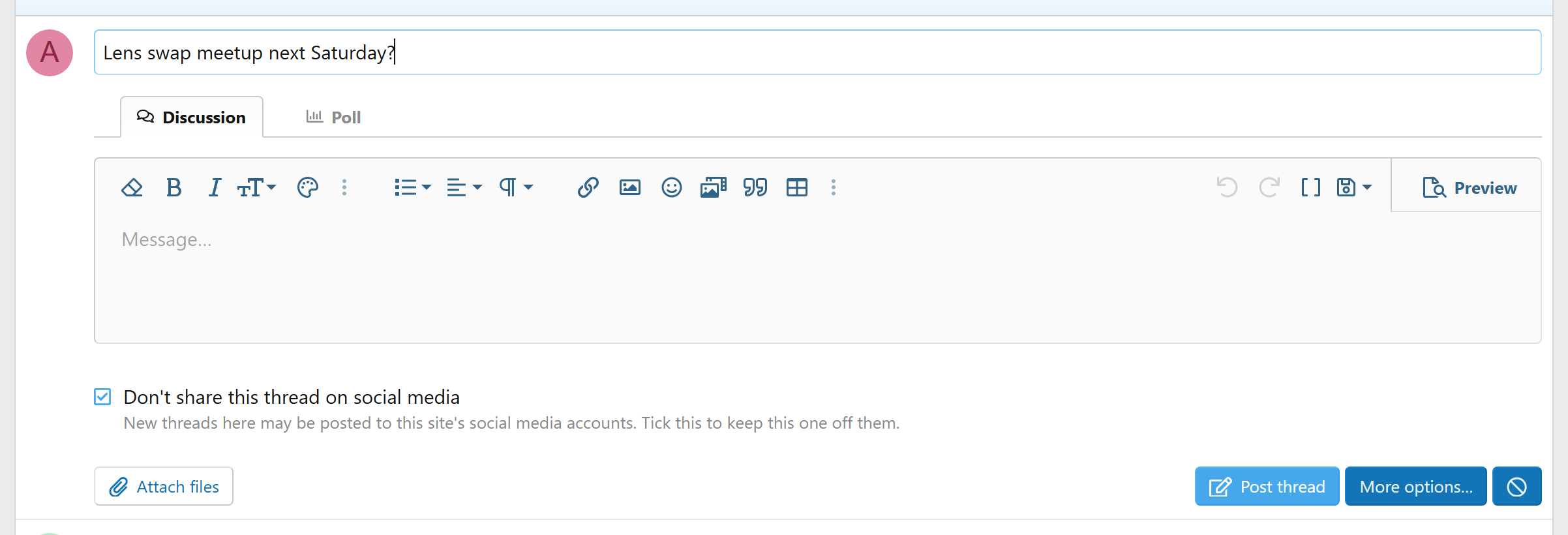
- Members with the permission see a "Don't share this thread on social media" box on the post-thread form and on XenForo's quick-thread form. It appears in public forums covered by an active thread rule that is not a dry run (on the free tier, only the one rule that runs counts).
- The choice stays with the thread. It is kept in the member's draft and when they switch to "More options", it still applies after the thread is approved from moderation, and "Share to channels" will not share such a thread. In the queue these rows say Marked "don't share".
- REST API: importers and bridges can send
damla_no_share=1when they create a thread. If the API user does not have the permission and the request does not bypass permissions, the thread is still created, the flag is ignored and a note goes to the server error log (once per user per 24 hours).
Threads created by moving, copying and merging
- Damla now remembers when a moderator splits or copies posts into a new thread. Thread rules have a new option, "Skip threads created by moving or copying posts".
- If the new thread's first post comes from a thread marked "don't share", the new thread keeps the mark. The same happens when a merge, move or copy makes a marked thread's post the first post of an existing thread.
Checked again just before sending
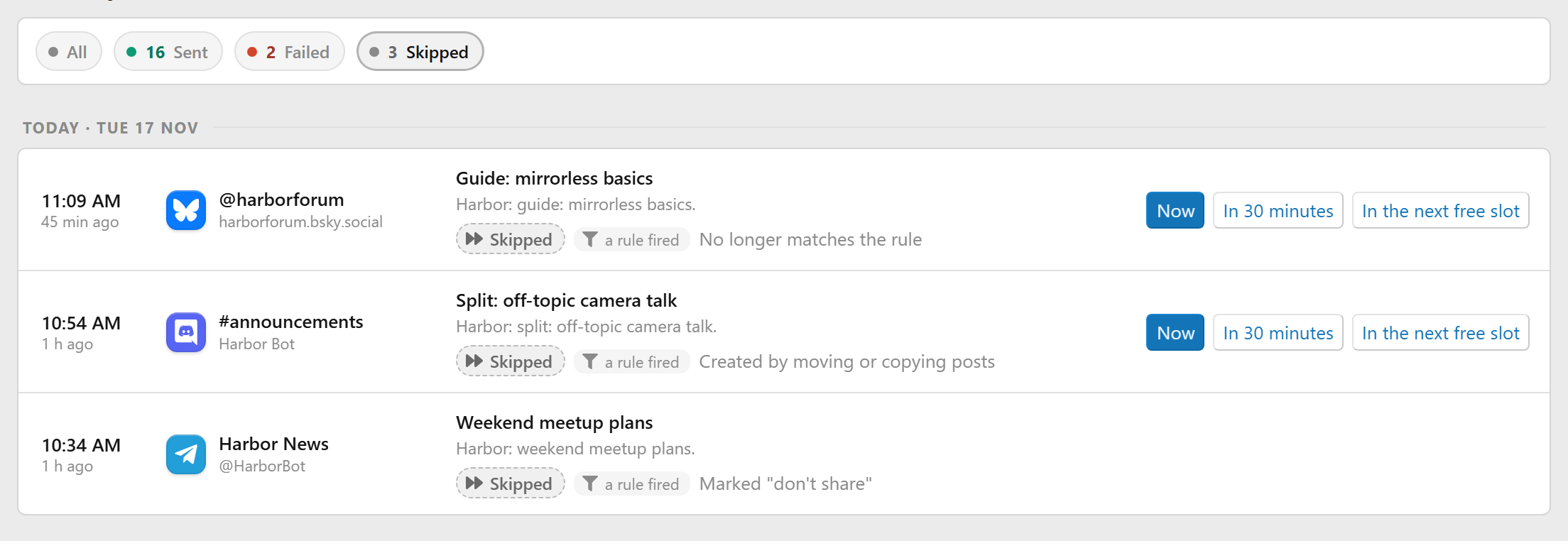
- A queued thread is compared with its rule's current settings right before it goes out. If it was moved to another forum, its prefix changed or you narrowed the rule, it is skipped with the reason "No longer matches the rule". For other sources the member lists are checked again.
- You can retry those rows once the rule fits again. Turning a rule off still does not cancel what is already queued, and rows whose rule was deleted are sent without this check.
Fixes
- "Minimum word count" only counted the first 400 characters of a thread (the excerpt that is posted), so a high minimum could never match. It now counts the whole first post.
- Instagram and Threads: when the service did not answer a publish request and Damla then held the post back on the next round (thread hidden, channel switched off, account problem and so on), the row was marked skipped, and "Try the failed ones again" could post it a second time. Such rows are now marked "delivery uncertain" and "Try the failed ones again" leaves them alone: check the account on the service before you retry one by hand. Rows like this left by 2.0.x are converted when you upgrade.
- Undoing "Cancel everything waiting" no longer starts such a post from scratch: Damla first asks the service whether it already went out.
Also
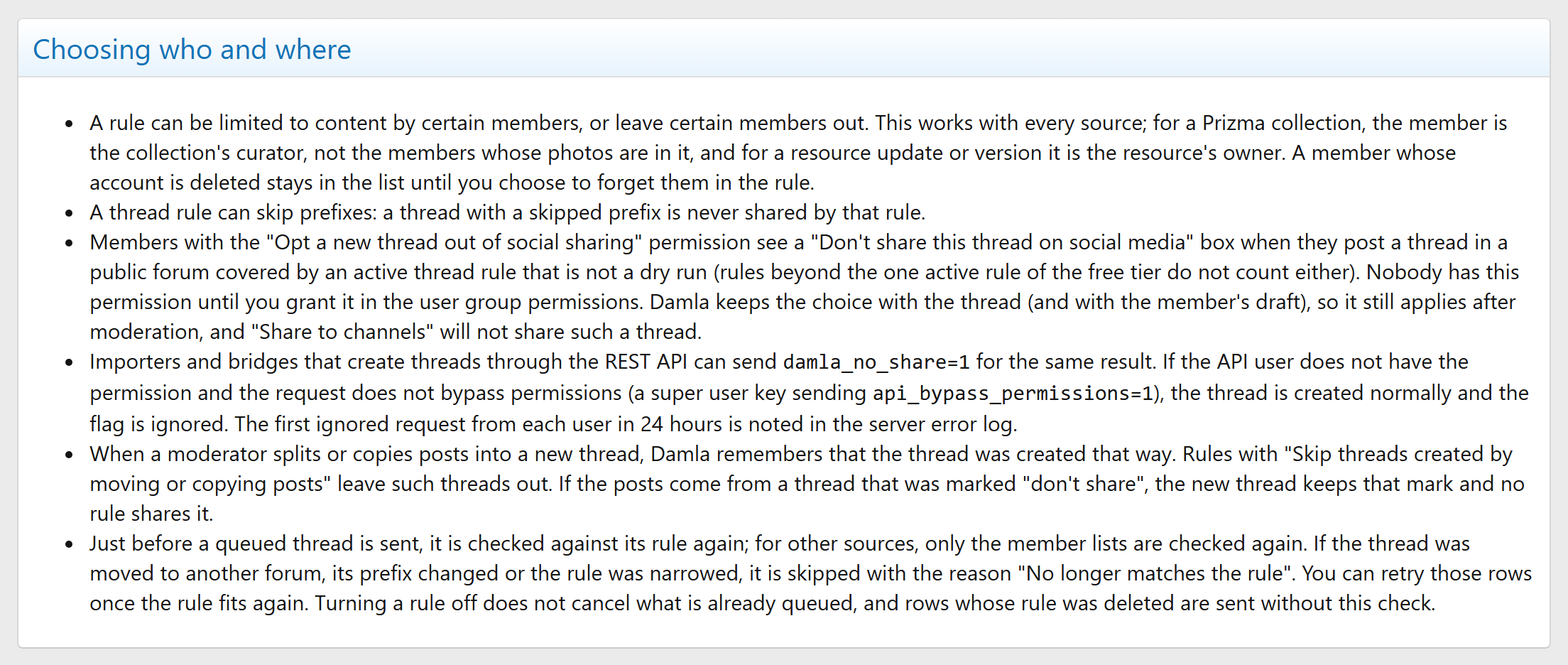
- The help page has a new section, "Choosing who and where".
- The new texts are translated into the 10 bundled languages.
Upgrading
Upload the files and run the upgrade as usual. Requirements are unchanged: XenForo 2.3, PHP 8.0 and the sodium extension. To offer the "Don't share this thread" box, grant "Opt a new thread out of social sharing" to the user groups you choose. If you use one of Damla's language packs, import it again with "Overwrite language" to get the new texts; the packs are in the zip underupload/src/addons/Erkan/Damla/translations/.
Damla 2.0.5 "Ripple"
A look-and-feel release. Damla's admin pages grew one table at a time; 2.0.5 redraws them so you can see what Damla is doing without opening row after row. How posts are matched, scheduled and sent has not changed, and none of your settings move.
Dashboard
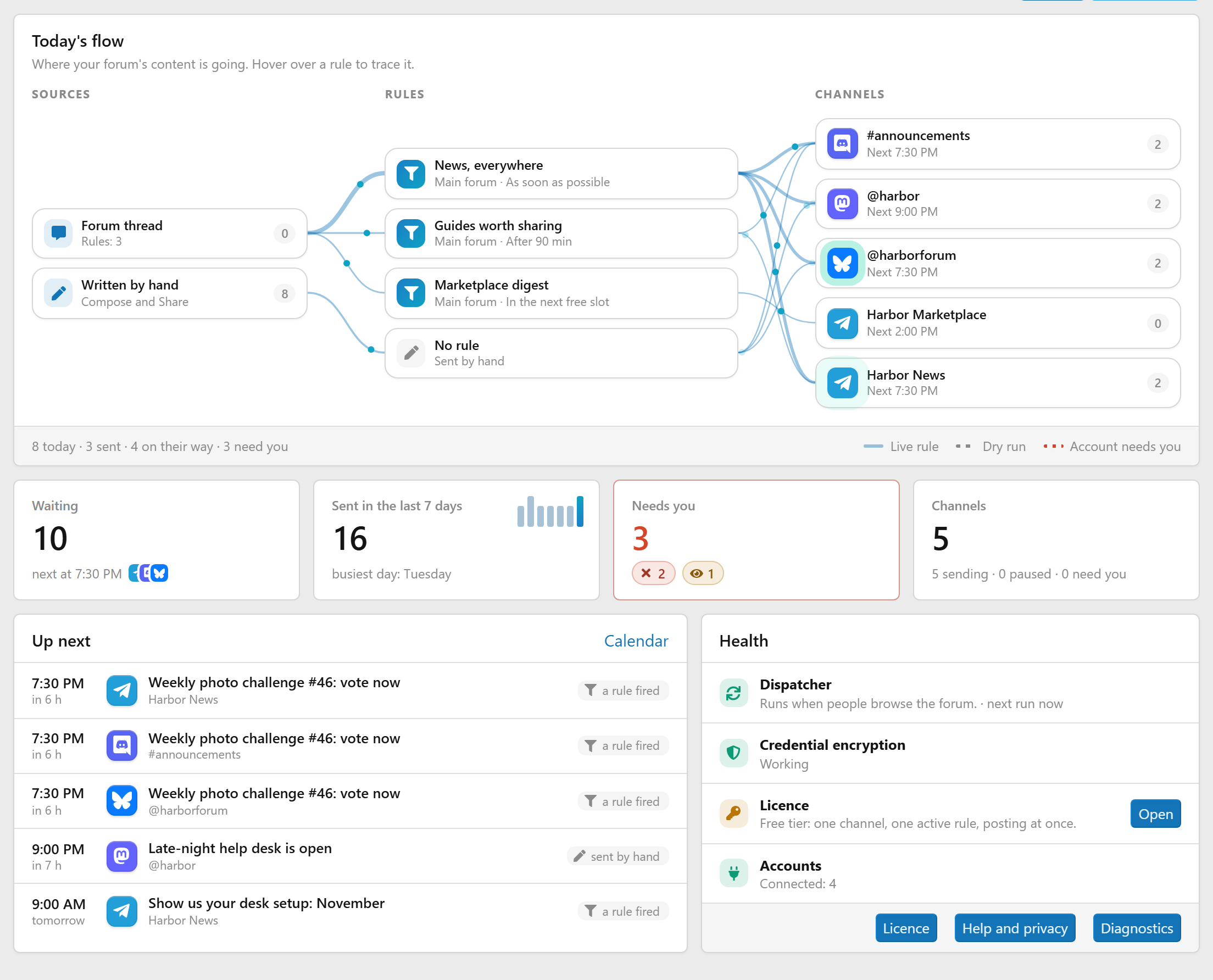
- Today's flow. A map shows where your forum's content is going: sources on the left, your active rules in the middle, channels on the right. Hover over a rule to trace it. Rules in dry run and channels whose account needs attention are marked. Up to 8 rules and 10 channels are drawn; further active rules are counted under the map.
- Four tiles: posts waiting and when the next one is due, posts sent in the last 7 days with a bar for each day, posts that need you, and how many channels are sending.
- "Up next" lists the next five posts and why each one has its time.
- A health card checks the dispatcher (and says when a due post is late), the encryption key, the licence and your accounts, and links to the fix when one of them needs attention.
- Until the first post has gone out, the dashboard shows the setup steps with the next one highlighted.
Queue and History
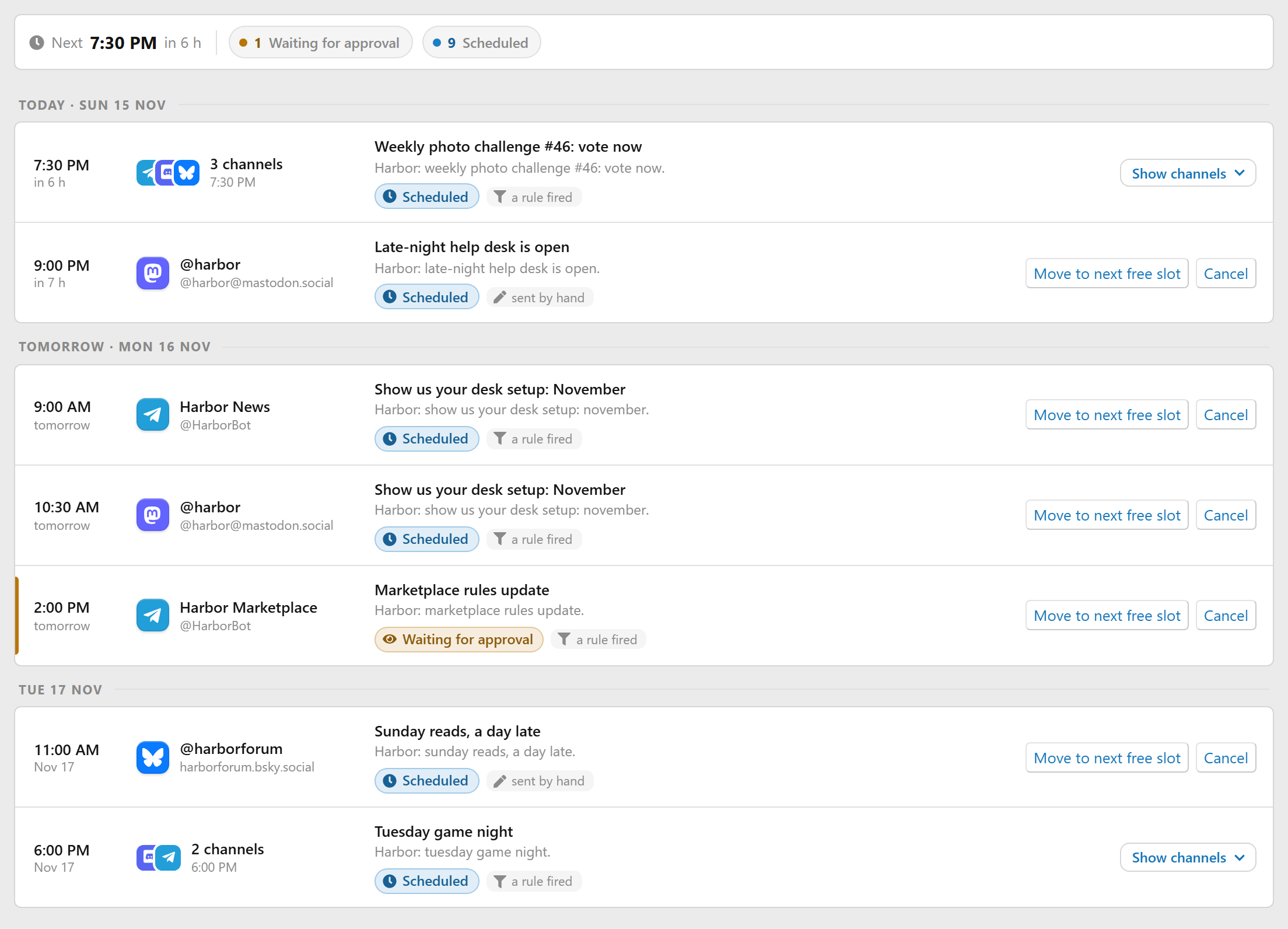
- Rows are grouped by day and read at a glance: the time and how far away it is ("in 14 min"), the channel with its service icon, the thread title with a short excerpt, the status, and why the post has that time.
- A strip at the top counts each status; click one to show only those rows. "Overdue" shows posts still waiting 15 minutes after they were due.
- When one thread goes to several channels, the queue shows it once; open it to see and manage each channel.
- A failed post says what kind of failure it was and offers the action that fixes it: reconnect the account, open Diagnostics or edit the channel. Retrying posts show which attempt comes next.
- The Undo button after "Cancel everything waiting" shows how much of its 24 hours is left.
Calendar
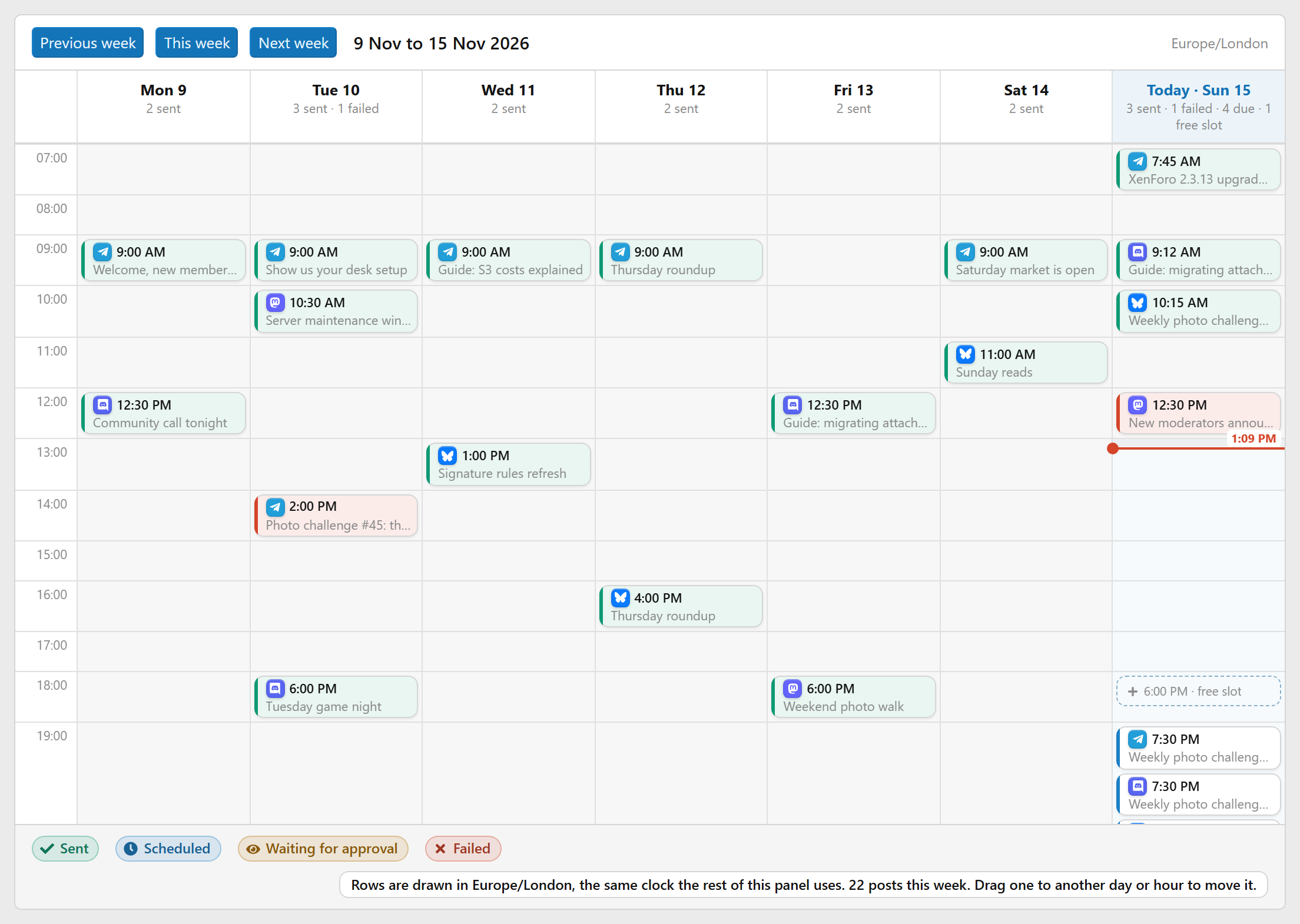
- Each post shows its time, service and thread title. Sent posts are green, failed ones red, posts waiting for approval striped.
- A line marks the current time and hours that have passed are shaded. While it is open, the calendar refreshes itself every five minutes.
- Free slots from your slot templates are drawn as dashed boxes, for channels that are switched on and connected. Drop a post on one and it moves to that slot's exact time; drop it anywhere else in an hour and it moves to the start of that hour.
- If Damla refuses a move (quiet hours, the daily cap, too close to another post, a time that has passed), the post goes back and the reason is written under the calendar.
- Hours stretch to fit their posts, so a busy afternoon stays readable.
Compose
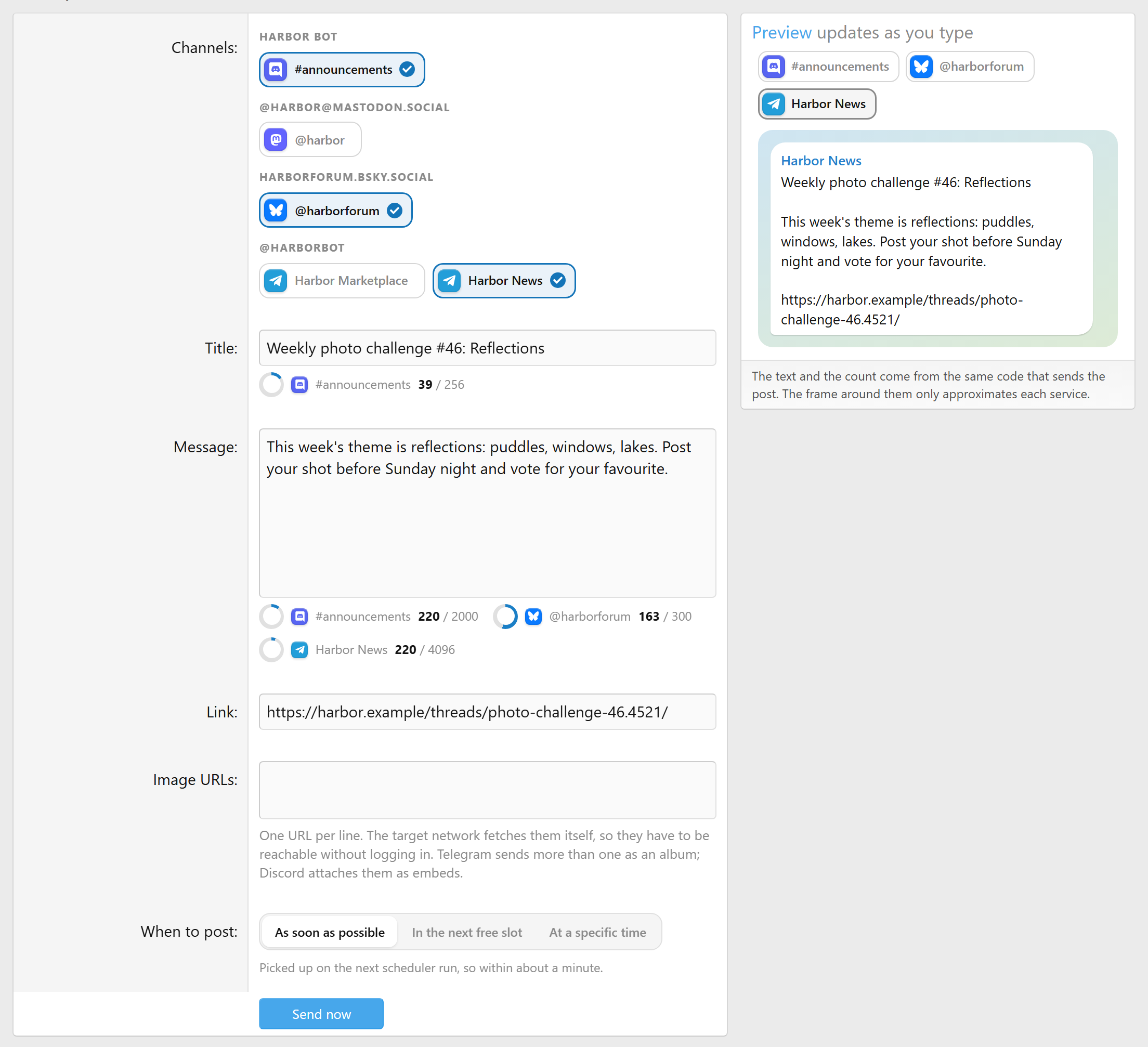
- A live preview next to the form shows the post as it will go out on each ticked channel, in a frame that resembles the service. The text comes from the same code that sends the post, so it matches exactly; the frame only approximates the service.
- Each channel gets its own ring counter. Past the limit the ring turns red and the preview says so: shorten the message or untick that channel. Damla still refuses a message that is too long rather than cutting it.
- Channels are picked from tiles grouped by account. A channel that cannot post right now is locked and says why.
- "In the next free slot" shows each ticked channel's next free slot.
- Errors such as "too long" now open over the form instead of on a new page, so nothing you typed is lost.
Connecting a service
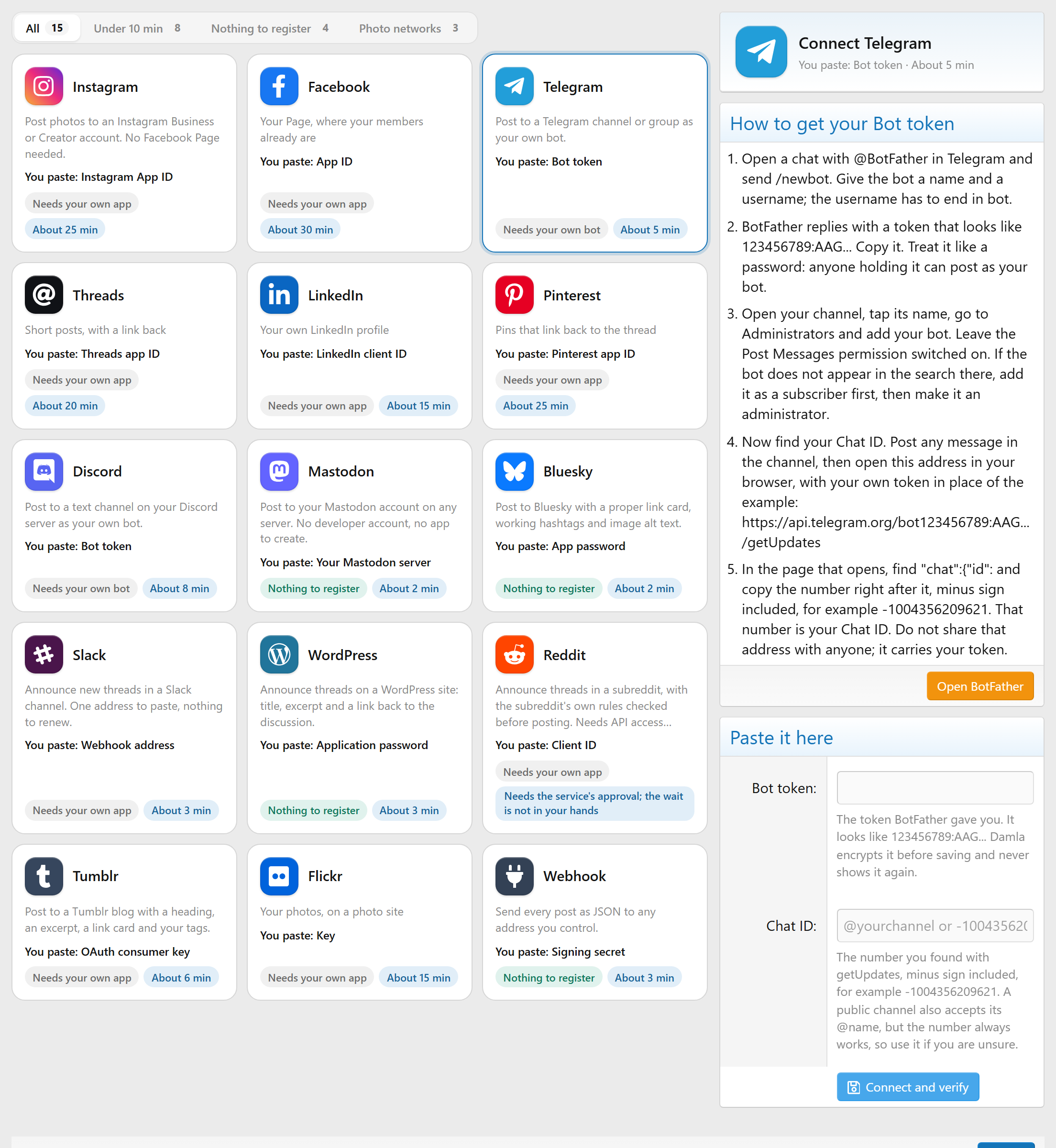
- Services are cards with their icon, what you will paste and roughly how long it takes. Filters show the quick ones (under 10 minutes), the ones with nothing to register, and the photo networks.
- Click a card and its guide and form open next to the list instead of on a new page.
- Fixed: every service said "Needs your own bot". Telegram and Discord need your own bot; the other services that need something registered now say "Needs your own app".
Channels and accounts
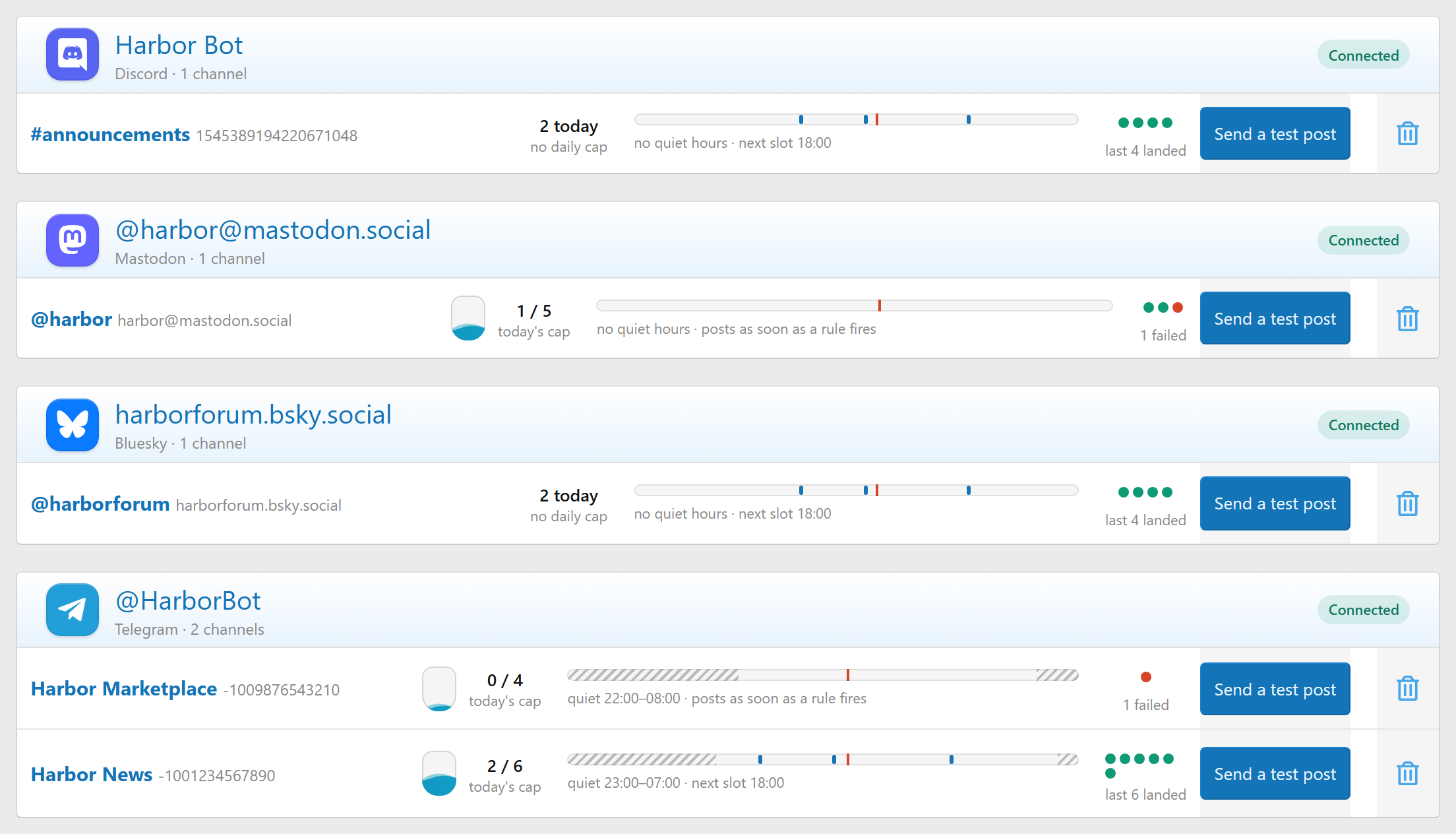
- Each channel shows today's posts against its daily cap (counted the same way the cap itself counts), a 24-hour strip with its quiet hours, today's slots and the current time, and its last ten deliveries as dots.
- An account that cannot post is marked in its header with the reason (it needs reconnecting, it is rate limited, its settings are wrong, and so on), how many posts are waiting and a Reconnect button.
- Services show their icons in the account list, the channel list, the help page and when you add a channel.
- A successful "Send a test post" now shows the first drop landing on the channel.
Rules
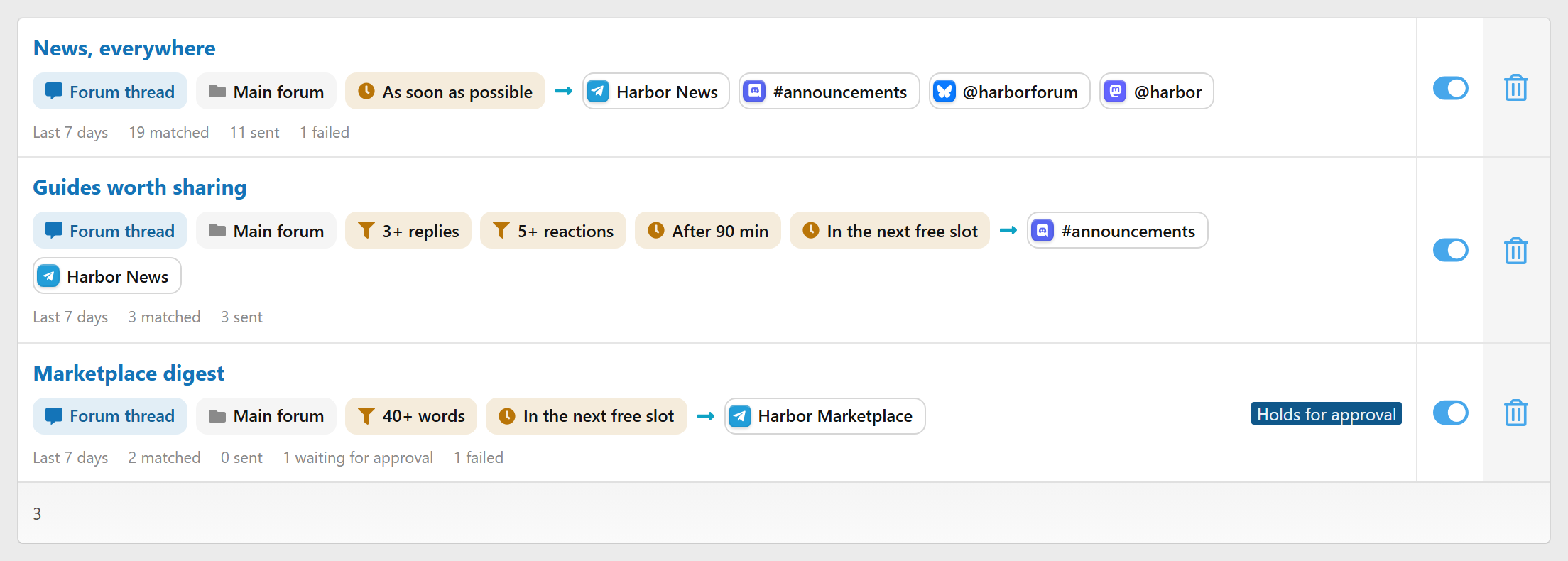
- Each rule reads as a row of parts: the source, where it looks, its conditions (prefixes, replies, reactions, views, words), when it sends, and its channels. Under it, the last 7 days: matched, sent, waiting for approval, skipped and failed.
- If a rule's forum has been deleted, the rule says so.
Share to channels
- The window on the forum side now takes its colours from your style, so it fits whatever theme you run. Channels are tiles with their service icon; channels that already have the thread stay in their own list, as in 2.0.1.
Also
- Every animation follows your device's "reduce motion" setting.
- The new texts are translated into the 10 bundled languages.
Upgrading
Upload the files and run the upgrade as usual. If you use one of Damla's language packs, import it again with "Overwrite language" to get the new texts; the packs are in the zip underupload/src/addons/Erkan/Damla/translations/. The new pages are built for current browsers: recent versions of Chrome, Edge, Firefox and Safari.
A fix release. Before announcing 2.0.0 we audited the package exactly as it was shipped and found problems that should not wait, so here they are, fixed. If you installed 2.0.0, please upgrade.
Secrets and privacy
- Secrets no longer end up in XenForo's logs. Bot tokens, webhook addresses, app secrets and the licence key you typed into Damla's admin pages were stored in plain text in XenForo's admin log (and in the error log when something failed), because XenForo only hides fields whose name contains "password". 1.0.3 did the same. They are now masked, and the upgrade masks the entries already there.
- Webhook addresses are treated as the secrets they are. For Zapier, Make, n8n and similar receivers the address itself is the password. It is now stored encrypted; admin screens, alerts and emails never show the full address, at most its server, and it is kept out of error details. The channel form no longer shows the saved address: leave the box empty to keep it, or paste a new one to replace it. Channels that were named after their address are renamed to the server name, and the upgrade also removes the address from earlier queue errors and alerts. (If the upgrade cannot use Damla's encryption key, because the key file is missing or is not the key your saved connections were encrypted with, the address is left unencrypted. XenForo's server error log gives that webhook channel's ID number; once Diagnostics shows the key working, open that channel and save it; the address box can stay empty.)
- Text sent back by a service (for example a Mastodon server's error message) is shown as plain text in the admin control panel, never as HTML. The queue links to a sent post only when the service returned a normal web address.
- An authorisation reply from a service is accepted only in the browser session that started the connection, so finish connecting a service in the same browser.
- Social posts now take text only from XenForo's own BB codes. Text inside any other BB code is left out: add-on codes such as hide or members-only, and also custom BB codes you created yourself. Quoted text no longer carries spoilers, @mentions or raw BB code.
- A webhook no longer follows a redirect to another server. If a webhook channel reports that it was redirected, paste the endpoint's current address into the channel.
- Prizma items marked NSFW are not posted, and NSFW pictures are left out of collections.
- Flickr's raw response in the queue no longer contains the app's API key, and the upgrade removes it from responses saved by 2.0.0. The message of an unexpected error, on any service, is now also cleaned before it is saved on a queue row: web addresses are cut back to their server and the account's saved secrets are removed.
Posts that never went out, or went out twice
- Threads and resources with a link on its own line are now posted. XenForo stores a link pasted on its own line as a rich preview (on by default), and Damla's text converter failed on it: the item was never posted (only XenForo's error log recorded why), and "Share to channels" showed an error page. Every earlier Damla version had this problem.
- New threads and gallery items with pictures now reach Instagram, Pinterest and Flickr. In 2.0.0 the rule ran before XenForo had attached the pictures, so these were skipped as "no image".
- No blind resend when the outcome is unknown. If a service does not answer after Damla's request has left, or answers with a server error such as 500, 502 or 504, the post may already be live. On services that cannot reliably recognise a repeat (Telegram, Discord, Slack, Facebook, Tumblr, Pinterest, and Mastodon, whose protection lasts only an hour) Damla no longer sends it again: the post is marked "may already be live", you get an alert (at most one per channel every six hours), and you decide. Where Damla can find the earlier copy (Bluesky, Flickr, Instagram, LinkedIn, Reddit, Threads, WordPress) it keeps retrying on its own; Bluesky posts now get a fixed record key, so a retry finds the first post instead of making a second one. Webhooks also keep retrying, with the same X-Damla-Delivery header on every attempt: your receiver has to ignore a delivery value it has already processed, or it can get the post twice.
- A post whose sending was interrupted (the server stopped the job mid-send) is no longer sent again automatically. It is marked "may already be live", with an alert. A post whose job kept stopping before it ever reached the service is closed with that reason and an alert, and can be retried like any other failed post.
- Uploading the new files before pressing Upgrade is safe. Damla sends nothing until the upgrade has run, so nothing goes out twice, and threads, gallery items and resources created in that time are picked up once the upgrade is done. Until then "Share to channels" and the queue's retry, undo and approve buttons ask you to finish the upgrade first.
- "Share to channels" now replaces an automatic post still waiting for the same thread and channel instead of adding a second one. Channels that already have the thread are listed separately; tick one there only if you want it posted again.
- Before an automatic post goes back out through Undo (after "Cancel everything waiting"), "Try the failed ones again", Retry or Approve, Damla checks whether its content has already reached that channel another way. If it has, the post is marked "already shared" instead of being sent.
- The channel's "Send a test post" can no longer go out twice.
- "Try the failed ones again" now leaves out posts that may already be live, tells you how many and links to them, so you can check each one on the service and retry it from its own row.
- A post that is already with the service (waiting to be published on Instagram or Threads, or a large photo Flickr is still processing) can no longer be cancelled from the queue.
- Visibility and opt-out are read fresh for every send, so content that becomes private during a long background run is no longer posted with an out-of-date answer.
- XFRM "new version" posts now say which version was released and link to it, and "update" posts use the update's own title, text and link (with the version number when a version was released together with the update), instead of repeating the original announcement. A new version and an update posted together from the same form become one post. New placeholder: {version}.
Things that did not work
- Prizma collections are now posted. In 2.0.0 a collection rule could be created but never fired. Public collections are now checked about every ten minutes. When a collection has been left unchanged for 30 minutes, holds at least the rule's minimum number of pictures (two by default) and was created after Damla's first check with the rule switched on, it goes to your approval queue: collection rules always wait for your approval. Switching a rule on never posts old collections, and a collection you rejected does not come back when it changes.
- "Cancel everything waiting" can now really be undone: an Undo button stays on the queue for 24 hours.
- "Retry in the next free slot" works.
- A retried Instagram, Threads or Flickr post gets a fresh wait for the service instead of timing out at once.
- Deleting a channel no longer leaves its held posts in the queue forever; posts that were already on their way are marked "may already be live".
- Without a licence key, only one rule runs in total: the first active rule in your rule list, matching the count on the Licence page. Before, one rule per content type ran, so after upgrading a second rule (for example a gallery rule next to a thread rule) stops posting until you add a licence. Rules that share a display order are now listed in the order they were created instead of by title, so the rule at the top is the one that runs.
Encryption key
- Damla no longer quietly creates a new encryption key when the old one is missing, for example after restoring a backup without the internal_data folder. Diagnostics now says the key is missing and how many saved credentials depend on it; you choose between restoring the file and creating a new key there. After a new key, services can be connected again as usual (Mastodon could not be).
- Diagnostics and the Damla dashboard also warn when some saved credentials were encrypted with a different key: restore the original key file or connect those services again. Keep internal_data/erkan_damla/key.php in your backups.
Uninstall
- Uninstalling Damla no longer recounts every tag and reaction on the board.
Upgrading
Upload the files and run the upgrade as usual. If you are still on 1.0.3, upgrade straight to 2.0.1: it includes everything in 2.0.0. The upgrade masks the Damla secrets already stored in XenForo's admin and error logs (the entries themselves stay); on a large log this step runs in several passes. Database backups taken before this upgrade still contain those entries: if such a backup may have been seen by others, replace the bot tokens, app secrets and webhook addresses it could contain. If you imported a Damla language pack with 1.0.3 or 2.0.0, import it again with "Overwrite language": the updated packs are in the zip underupload/src/addons/Erkan/Damla/translations/.