

- Compatible XF 2.x versions
- 2.2
- 2.3
- License
- MIT
This is a tool for developers who are styling their advert placements.
While working on styling programmatic banner adverts for my site, I got frustrated with external adverts (eg Adsense / DFP / etc) that wouldn't display consistently on my dev machine - so I built a tool which generates static advert images (of any size!) for me.

This tool is accessed via a template function where you specify the size of the advert and optionally, an id for the div, CSS classes to add to the div, and the colour (if you want to override the default).
For example, the following template code:
The
Permitted colour strings are:
The template function will automatically generate the banner image for you if it doesn't already exist. If you ask for a size below 1 pixel or a colour that doesn't exist, nothing is rendered and the reason is written to the server error log.
The template function is intended to be used in XenForo Advertising placements, but can also be used anywhere template syntax is allowed, including in a HTML widget.
This addon can also be useful for generating advert placeholders when taking screenshots for your advertising media kit!
Requirements:
XenForo 2.2.0 or later, and the PHP GD extension.
Usage:
To use, install the addon, then create a new advertisement (disable your other advertisement code for that placement temporarily while you work on the styling).
Use the banner function to generate the desired size advert and then add any other HTML you might use to style the advert. You can add custom CSS to your
For example:

Options:
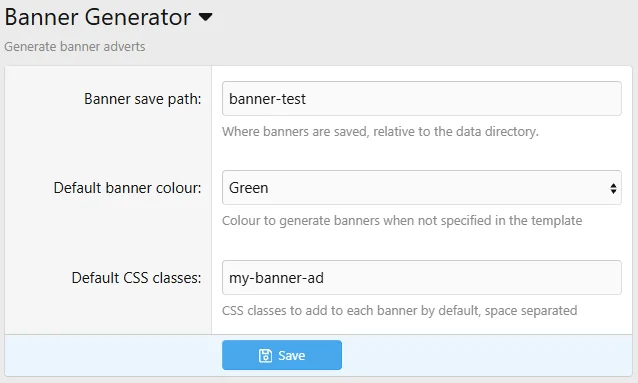
There are three options you can configure - the path the images are saved (relative to the
Command line:
Banners can also be generated from the command line, without rendering a template:
Upgrading from 1.0.0:
Version 1.1.0 added the CSS classes argument before the colour argument. If you have templates written for 1.0.0 which pass a colour as the fourth argument, that colour is now treated as a CSS class and the banner is generated in your default colour instead. Pass an empty string for the classes to fix it:
Note:
Uninstalling the addon will not remove the images that were created. Given this addon would typically only be used on a dev or test server and not in production, this should not be an issue. Either way, removing the directory and all images contained in it will cause no issues (provided that you did not specify a directory used by anything else!) - images will be automatically regenerated as required while the addon is in use.
Hint:
Because the banner is served as an image, and images are displayed inline by default, you may find a small padding (around 5px) added below the banner.
You can over-ride this by applying the
for example:
While working on styling programmatic banner adverts for my site, I got frustrated with external adverts (eg Adsense / DFP / etc) that wouldn't display consistently on my dev machine - so I built a tool which generates static advert images (of any size!) for me.
This tool is accessed via a template function where you specify the size of the advert and optionally, an id for the div, CSS classes to add to the div, and the colour (if you want to override the default).
{{ banner(<width>, <height>, <div id (optional)>, <css classes (optional)>, <colour (optional)>) }}For example, the following template code:
{{ banner(728, 90, 'advert-above-breadcrumb', '', 'blue') }} will generate the following HTML:
HTML:
<div id="advert-above-breadcrumb" class="banner-ad" style="width: 728px; height: 90px;">
    <img src="/community/data/banner-test/728x90-blue.png" alt="728x90 banner" />
</div>
The
banner-ad class comes from the default CSS classes option - anything you pass as the fourth argument is added after it.Permitted colour strings are:
'black', 'red', 'green', 'blue', 'yellow', 'cyan', 'magenta', 'grey', or 'white'The template function will automatically generate the banner image for you if it doesn't already exist. If you ask for a size below 1 pixel or a colour that doesn't exist, nothing is rendered and the reason is written to the server error log.
The template function is intended to be used in XenForo Advertising placements, but can also be used anywhere template syntax is allowed, including in a HTML widget.
This addon can also be useful for generating advert placeholders when taking screenshots for your advertising media kit!
Requirements:
XenForo 2.2.0 or later, and the PHP GD extension.
Usage:
To use, install the addon, then create a new advertisement (disable your other advertisement code for that placement temporarily while you work on the styling).
Use the banner function to generate the desired size advert and then add any other HTML you might use to style the advert. You can add custom CSS to your
extra.less template.For example:
Options:
There are three options you can configure - the path the images are saved (relative to the
data directory), the default colour to use when no colour is explicitly specified, and the CSS classes added to every banner.Command line:
Banners can also be generated from the command line, without rendering a template:
Code:
php cmd.php banner:create --width=728 --height=90 --colour=red
php cmd.php banner:create -x 728 -y 90 --force
--colour defaults to the default colour option, and --force regenerates a banner which already exists.Upgrading from 1.0.0:
Version 1.1.0 added the CSS classes argument before the colour argument. If you have templates written for 1.0.0 which pass a colour as the fourth argument, that colour is now treated as a CSS class and the banner is generated in your default colour instead. Pass an empty string for the classes to fix it:
Code:
{{ banner(300, 250, 'advert-above-breadcrumb', 'red') }}        1.0.0
{{ banner(300, 250, 'advert-above-breadcrumb', '', 'red') }}    1.1.0 and later
Note:
Uninstalling the addon will not remove the images that were created. Given this addon would typically only be used on a dev or test server and not in production, this should not be an issue. Either way, removing the directory and all images contained in it will cause no issues (provided that you did not specify a directory used by anything else!) - images will be automatically regenerated as required while the addon is in use.
Hint:
Because the banner is served as an image, and images are displayed inline by default, you may find a small padding (around 5px) added below the banner.
You can over-ride this by applying the
display: block; CSS to your banner styling for images served within your advert div.for example:
CSS:
#advert-above-breadcrumb  {

    margin: 10px auto 20px auto;

    img {
        display: block;
    }

}

