[XTR] IP Threat Monitor

[XTR] IP Threat Monitor [Paid] 1.0.30

No permission to buy ($30.00)
Not entirely sure, but I just did a quickie fix and made my own cron for it, which does work. Could this type of approach be implemented into options to auto delete every x? Obviously this will stop working the moment I upgrade otherwise, and I don't want to adjust your addon code, I am just testing a solution to my problem.

Hey there,

Thanks for trying to help out with a fix! I took a look at your

ClearAll code, and honestly, I have to strongly advise against using it.

The issue is that DELETE ... 1=1 wipes everything indiscriminately. So, if you've banned an attacker for 24 hours and your cron runs at hour 12, that attacker gets released early. Plus, it nukes your entire Whitelist and all your attack statistics. You’d be solving one problem but creating several new security holes.

Good News: We're about to release version 1.0.26, which fixes this performance bottleneck properly at the source. We've completely refactored the query logic, so it runs instantly even with millions of records. We've also built in the "Auto-Prune" (Retention) feature you were looking for—but ours is smart enough to clean up old junk without touching active bans.

So, please disable your custom cron job and hang tight for the official update. It’s safer and does exactly what you need.
 
Osman updated [XTR] IP Threat Monitor with a new update entry:

1.0.26

  • New: Completely rewrote the Blacklist query architecture to fix slowness on large databases (O(1) Optimization).
  • New: Added "Blacklisted IP Retention" (Auto-Prune) option to prevent database bloating.
  • Improvement: Integrated the new retention setting into Setup Wizard profiles.
  • Improvement: Added database retention check to the Test Configuration tool.
  • Fix: Added missing phrases.
This update contains a critical performance patch, especially for forums with high...

Read the rest of this update entry...
 
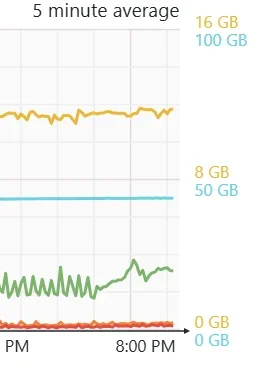
Already looks much better on the charts for CPU with about 70k new IP's already compared to the previous version and wiping the table for it to be minimal. CPU has significantly smoothed out processing in handling IP tables now. Thank you.

Screenshot 2026-02-17 212101.webp
 
@Osman After a bit over month I am really happy with this add on! I've moved my blocking criteria over from .htaccess to IP Thread Monitor almost completely weeks ago (apart from things that IP Thread Monitor is not able to do like RegEx based blocking) and it is a relief - blocking works automatically for the most part, maintenance is easy and there is not much need for manual adjustment any more now. Blocking works reliably and being able to block countries and ASNs within seconds is really helpful against resident proxies. The very high API usage I suffered from initially went down dramatically with the 1.0.25 update and is now absolutely fine. After many months of constantly dealing with bad traffic im am finally relieved thanks to IP Threat monitor.

I did have another issue with ASNs: Blocking ASNs did not seem to work well or at all - I barely found an entry blocked by ASN in the logs. I thought possibly my comments after the # could be too long and shortened them to a two digit country code - no difference. Only after I removed comments and # completely ASN blocking worked but now it works flawlessly. So possibly worth looking at that area if there is an issue with the comments option.

What I would love to see as a feature would be the option to directly block single IPs and networks. Basically it would be good to have the mechanism for whitelisting IPs and Networks reflected as well as a possiblity for blacklisting (inc. the possiblity to comment the entries if possible).

For testing and debugging purposes it could be interesting to be able to switch of the country blocking temporarily via a checkbox, at the moment one would have to delete all countries in the list for that which is very annoying and time consuming if you have blocked a lot of countries.

What would be nice would be more granular settings for blocking VPNs. A lot of the VPN hosts I see in the list clearly deserve a block, on the other hand it would be good to be able to let i.e. Opera's built in VPN pass or i.e. certain of the better VPN Provides like Proton.

Same goes for search engines: It is at the moment somewhat intransparent, which are blocked and which let through apart from Google, Bing and Quant. Would be good to have a bit of a choice here.

The area where I see a lot of future potential is analytics - it looks good, but lacks a lot of possibilities. I am still trying to figure out how to describe best what I am missing exactly w/o leading in the wrong direction or creating too much effort.
 
Would it be possible to implement 403 or "You must be logged-in to do that" pages as a specific counter for blocking? We have scraping bots that ignore the error codes and hit user profiles/restricted threads outside the existing thresholds for page counts. Counting the access denied pages over X time and allowing blocking could cut our false traffic by significant numbers.
 
Osman updated [XTR] IP Threat Monitor with a new update entry:

1.0.27

🔧 Bug Fixes

ASN Comment Parsing Bug Fixed

• Comment usage (#) in ASN lists now works properly
• "AS12345 # DigitalOcean" format is supported
• Comments are parsed during input, only clean ASN numbers are stored
• Implemented following XenForo CensorWords pattern

🆕 New Features

Error Page Rate Limiting

• Separate rate limiting for IPs repeatedly hitting 403/permission errors
• Addresses scraping bots that ignore error pages
• Separate thresholds and time windows
• Auto-ban...

Read the rest of this update entry...
 
Appreciate the fast addition to the request! Installed the latest update and enabled the 403/error detection (with low thresholds for testing), however I am unable to get it to block a client regardless of settings when loading multiple error pages. I can trip the 429 too many requests limit, but nothing appears to activate the error page limiter. Reinstalled, used the configuration manager on standard and lowered the threshold without success. Thanks!
 
Osman updated [XTR] IP Threat Monitor with a new update entry:

1.0.28

  • Expanded error detection (401, 403, 404 HTTP codes)
  • Login redirects now counted as errors (for guest users)
  • Added error template detection
  • Separate counter system working properly
This update fixes a critical bug in the error page rate limiting feature based on customer feedback. The feature now works as intended, providing better protection against scraping bots that ignore error responses!

Scraping bots often ignore error responses and continue hammering your...

Read the rest of this update entry...
 
Updated, tested, and working great now! Working in conjunction with our Cloudflare filters and it's knocked down several hundred active scrapers/bots/bad clients. Thanks for the fast response and updates!
 
Osman updated [XTR] IP Threat Monitor with a new update entry:

1.0.29

  • Fixed: Resolved the InvalidArgumentException: /internal_data/ip_threat_cache is not readable or not a directory error that occurred during uninstallation for users whose servers utilize Redis/APCu cache systems, or for installations that had not yet received any cache traffic.
  • Improved: Added extra safety and verification checks (directory existence) to the file/folder deletion methods triggered during the uninstallation process.
This exact release corrects...

Read the rest of this update entry...
 
Osman updated [XTR] IP Threat Monitor with a new update entry:

1.0.30

  • Fixed: Resolved the fatal authentication error (NOAUTH) that occasionally caused site crashes on forums utilizing strict password-protected Redis cache server architectures.
  • Improved: Increased overall system reliability by wrapping all internal Redis data operations inside strict fail-safe blocks within the cache manager. The add-on will no longer crash your site even if the server disconnects.
  • New Feature: Integrated an intelligent verification layer to...

Read the rest of this update entry...
 
@Osman Feature request: the ability to whitelist a country.

Right now I can block a country but I would also like to whitelist a country. 95% of my users come from my country so that would be handy.
 
Feature request: the ability to whitelist a country.
I has thought about that before but decided not to request it. B/c even within your country there are bad actors and resident proxies and with a whitelisting you'd let them slip through. If I remember correctly you are from the Netherlands and there are loads of bad actors that come from datacenters in the NL alone. In fact, datacenters in North Holland seem to be a preferred location for many bad actors.

Basically if you don't blacklist a country requests from there will go through apart from if proxycheck.io does identify a bad ip (haven't had a false positive from them yet) or you blocked an ASN which has IPs within your country. So I decided that (at least for me) there's no need for whitelisting a country as it could and probably would lower the protection that this add on offers considerably w/o any gain.
 
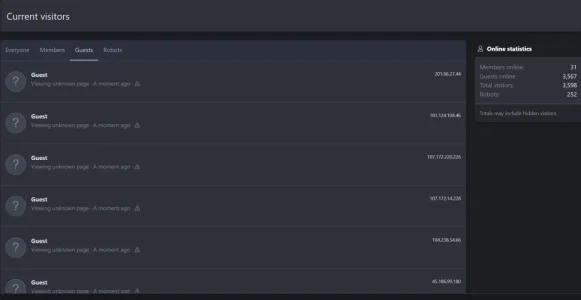
Noticed something strange tonight - not sure if it is related or relavent here.

My error log was complaining about there being far too many connections to the DB. I wondered why... and then realised that i had the following...

Members online 32
Guests online 3,034
Total visitors 3,066
Robots 221

Something very wrong there... we have never previously had over 3k guests... more like a few hundred (only a small forum!).

Digging in a little more...

1778795739402.webp
multiple guests who were "viewing an error".

Anyone any thoughts??
 
Noticed something strange tonight - not sure if it is related or relavent here.

My error log was complaining about there being far too many connections to the DB. I wondered why... and then realised that i had the following...

Members online 32
Guests online 3,034
Total visitors 3,066
Robots 221

Something very wrong there... we have never previously had over 3k guests... more like a few hundred (only a small forum!).

Digging in a little more...

View attachment 337676
multiple guests who were "viewing an error".

Anyone any thoughts??
This is AI scrapers and bots. I’ve been battling them for months. They will keep hitting your site and eventually take it down from resource consumption, I found throwing more resource at the server just attracted more bots and was consumed.

This system helps somewhat but it compounds the problem because they still use the website resources.

In the end the best thing is to put cloudflare on it and put it in under attack mode, that way the traffic is verified before hitting your actual site and consuming ram and disk IO. It’s a bit of a pain with your users having to click the link to verify they are human but you can manage how often a user is challenged.

Putting this in place took me from 7000-10,000 guests constantly down to about 200 max which is normal.

Just be careful as that setting can also block other things like google crawlers

Anyway this will mitigate it significantly and won’t cause extra resource constraints but you may have to do some tweaking in cloudflare to allow legit crawlers through
 
In the end the best thing is to put cloudflare on it and put it in under attack mode
Why? Just create a rule with the worst offending countries and place them into managed challenge. Why complicate legitimate bots and countries accessing your site? Even then, the first rule should be for known bots to skip all other rules and CF features.
Just be careful as that setting can also block other things like google crawlers
It will block them, not "can", as you're placing all traffic into managed challenge.
 
Why? Just create a rule with the worst offending countries and place them into managed challenge. Why complicate legitimate bots and countries accessing your site? Even then, the first rule should be for known bots to skip all other rules and CF features.
I’ve tried that but it’s just too difficult to manage. The countries change almost daily as soon as I start blocking a country this way it just rolls to another and another. 99% of my users come from the same country and that’s also one of the worst offending so the results the same. It’s a momentary challenge and my users are happier to have that than the site be down. They don’t have to do anything as it automatically checks the human box for them most of the time
 
Mate, you're in Australia, manage challenging every continent except Oceania is one WAF rule, and I doubt very much Australia is a primary spam source. Its not... I live in Melbourne and my hosting is in Melbourne for a 1.9M forum plus about 12 WP websites. I have Oz business sites done that way, no issue on their traffic at all.
 
Back
Top Bottom