[XTR] IP Threat Monitor

[XTR] IP Threat Monitor [Paid] 1.0.24

No permission to buy ($30.00)
  • Fixed an issue where saving settings (Blocked ASNs, Countries, etc.) would fail with invalid input. Invalid entries are now gracefully stripped.

The Problem ist that every comment input in the ASN-List is stripped. Even the exact example from the settings page:

You can add comments with #: AS12345 # DigitalOcean

If you put this into the ASN List "AS12345" will be saved, "# Digital Ocean" will be cut
 
@Osman: A question regarding ASN and country blocks:

• below the ASN list there is stated "Items in this list will be permanently blacklisted upon first violation." I had expected that ASNs listed here would be permanently blocked - seems way more useful to me. The more as with the actual distributed scraping via resident proxies barely any IP will ever hit the violation limit, thus the ASN block it it's current state as I understand it does not deliver value to me. Could you make "permantent blocking" of ASNs as standard make at least an optional setting / checkbox?

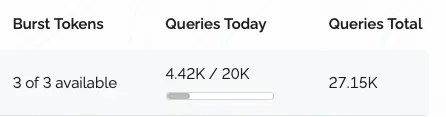
• with country blocks the settings page states "Traffic from these locations will be permanently blocked. Requires: VPN/Proxy detection must be enabled to resolve country codes." So from my understanding countries in the list will be blocked permanently, independent from a violation. This does not seem to be the case - I see loads of visitors from countries that have been blocked in the country list. Also, despite having enabled VPN-Check and added the Proxy.io API Key as required it seems there are no country checks made as the API Dashboard at proxy.io states no queries:

Bildschirm­foto 2026-01-29 um 09.46.59.webp

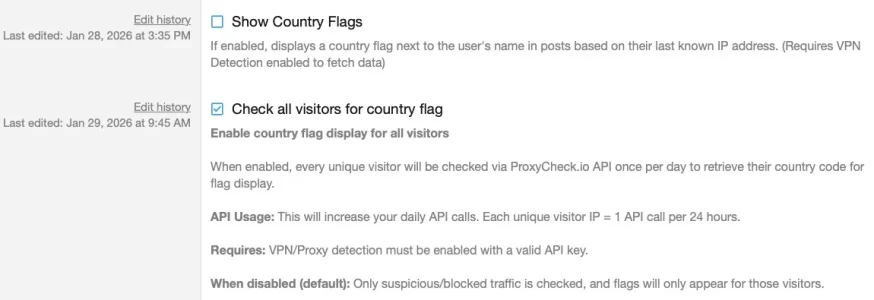
The key ist however functional: To test I turned on the "Check all visitors for country flag" in general settings and see some queries coming in.

Is there a reason to go for proxychec.io for the country check instead of using i.e. the free maxmind database that could be saved locally and frequently updated as other add ons do it?
 
Since I've checked this box:
Bildschirm­foto 2026-01-29 um 10.15.27.webp
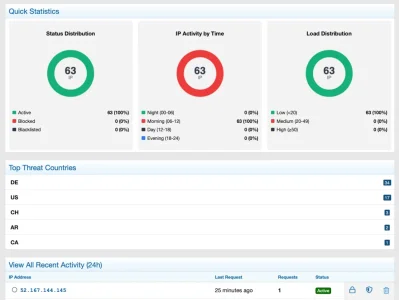
.. the Dashboard has stated to populate, before that it was empty. However, this will probably eat up my free queries pretty quickly. But where would this country flag then be displayed? I'd have expected it in the Dasboard/IP-List, but it isn't there.

Bildschirm­foto 2026-01-29 um 10.21.48.webp

Also the "top threat countries" are rather "top visitor countries", the more as nothing has been blocked... AR is in my list of blocked country codes, yet it isn't blocked. Could you explain how this is intended to work?
 
Osman updated [XTR] IP Threat Monitor with a new update entry:

1.0.23

  • Feature:Added Force API Check for Block Lists option. Ensure immediate blocking of visitors from banned Countries/ASNs by forcing an API lookup on their first visit, regardless of the VPN check mode.
  • Bug Fix: Addressed a logical issue in "Top Threat Countries" dashboard stats where legitimate visitors were incorrectly included in the count. It now strictly reflects Blocked and Blacklisted IPs.
  • Bug Fix: Fixed a critical "Call to a member function...

Read the rest of this update entry...
 
Did this update fix this issue I'm getting? I have about 1300+ of them in the past few hours. I unchecked the apple private relay, saved, checked it again, saved, and then all good, it started blocking VPN's again.

Code:
Server error log
ErrorException: Fatal Error: Allowed memory size of 268435456 bytes exhausted (tried to allocate 4096 bytes) src/addons/XENTR/IPThreatMonitor/Service/ApplePrivateRelayIPs.php:82
Generated by: Unknown account Feb 2, 2026 at 8:25 PM
Stack trace
#0 [internal function]: XF::handleFatalError()
#1 {main}
Request state
array(4) {
  ["url"] => string(24) "/posts/1766173/reactions"
  ["referrer"] => bool(false)
  ["_GET"] => array(0) {
  }
  ["_POST"] => array(0) {
  }
}
 
Did this update fix this issue I'm getting? I have about 1300+ of them in the past few hours. I unchecked the apple private relay, saved, checked it again, saved, and then all good, it started blocking VPN's again.

Code:
Server error log
ErrorException: Fatal Error: Allowed memory size of 268435456 bytes exhausted (tried to allocate 4096 bytes) src/addons/XENTR/IPThreatMonitor/Service/ApplePrivateRelayIPs.php:82
Generated by: Unknown account Feb 2, 2026 at 8:25 PM
Stack trace
#0 [internal function]: XF::handleFatalError()
#1 {main}
Request state
array(4) {
  ["url"] => string(24) "/posts/1766173/reactions"
  ["referrer"] => bool(false)
  ["_GET"] => array(0) {
  }
  ["_POST"] => array(0) {
  }
}
Hi,
Yes, this issue has been fixed in version 1.0.24 which is now available.

What happened: Apple's Private Relay IP list has grown to ~287,000 entries. The previous code loaded this entire list into memory at once, causing the "memory exhausted" error you experienced.

What we fixed:
  • Implemented stream-based parsing (reads in small chunks instead of all at once)
  • Added IPv6 prefix deduplication (reduced from 245K to ~25K entries)
  • Added lock mechanism to prevent concurrent API calls
Result: Memory usage reduced from 32+ MB to virtually 0 MB.

Action required:
  1. Update to version 1.0.24
  2. After updating, toggle the "Allow iCloud Private Relay" option off and on again to regenerate the cache
The error should not occur anymore. Thank you for reporting this issue!
 
Osman updated [XTR] IP Threat Monitor with a new update entry:

1.0.24

Bug Fixes
  • Fixed Apple Private Relay memory exhaustion error
    Apple's iCloud Private Relay IP list has grown to ~287,000 entries, causing "Allowed memory size exhausted" errors on high-traffic sites.
  • Implemented stream-based CSV parsing
    Instead of loading the entire IP list into memory at once, the file is now read line-by-line in 4KB chunks.
  • Added IPv6 prefix deduplication
    245,000+ IPv6 /64 entries are now aggregated into ~25,000 unique /48...

Read the rest of this update entry...
 
@Osman After using this addon for a week I have to say I am very pleased with it once the initial hickups have been solved very quickly. I've migrated my exiting setup from .htaccess to Threat Monitor for the most part as it enables better logging and debugging along with way better options for the parts that I migrated. Maintainance is quick and easy, I've managed to lock out scrapers and resident proxies for the most part and I love the fact, that logg in users stay untouched. Brillant! I think however I found some bugs, have a bunch of questions and some suggestions for improvements.

Bugs / strange behavior first:

🐞 1. Threat monitor misses a beat from time to time​


I do use country blocking (currently ~75 countries) along with ASN blocking (currently ~320 ASNs) and the general settings. Rate limiting has never been hit until now, most blocks result from country blocking and work nicely most of the time. Not using Cloudflare. However: I do use the Access Log add on from AndyB which gives me conveniently the option to check if someone is slipping through that I'd rather block and enables me to adjust my settings in Thrreat Monitor. It turned out that every now and then IPs that have been blocked by either country or ASN get through unnoticed. These affects a lot of ASNs from the us (no country block there) but also some IPs from China. As an example I found this in the access log of Andy's add on:

Bildschirmfoto 2026-02-06 um 08.24.40.webp

The IP is from China (which is country blocked in the settings of Thread Monitor) and belongs to an ASN that is blocked via ASN blocking. The whole ASN is well known for scraping and other malicious activities:
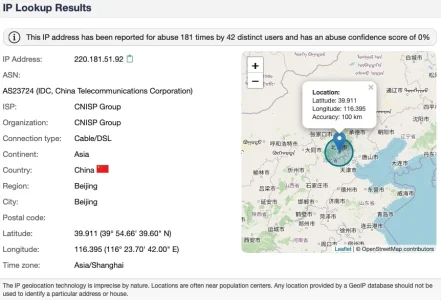
Bildschirmfoto 2026-02-06 um 07.01.23.webp

If one asks proxycheck.io they also state that this is malicious:
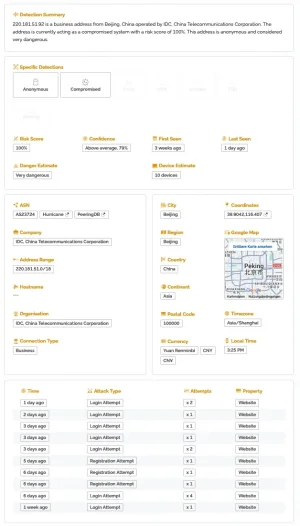
Bildschirmfoto 2026-02-06 um 08.25.52.webp

However: Not only is it not blocked by Threat Monitor, it even doesn't show up in the logs at all:
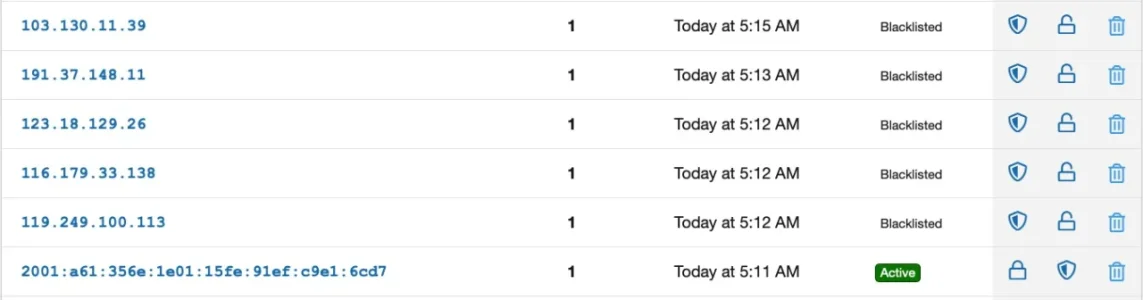
Bildschirmfoto 2026-02-06 um 07.03.39.webp
In opposite to that it shows up in my apache access logs quite frequently. This week alone:


grep 220.181.51.92 web.log | wc -l
68

grep 220.181.51.92 web.log | grep " 200" | wc -l
30

grep 220.181.51.92 web.log | grep " 301" | wc -l
31

grep 220.181.51.92 web.log | grep " 403" | wc -l
1


The request in question at 5:12 this morning went to scrape a thread and was followed by two others to other threads shortly after. All got a response "200" where they shout have got a "403":

220.181.51.92 - - [06/Feb/2026:05:12:05 +0100] "GET /threads/(...) HTTP/1.1" 200 20977 "-" "Mozilla/5.0 (Windows NT 10.0; WOW64) AppleWebKit/537.36 (KHTML, like Gecko) Chrome/48.0.2564.116 Safari/537.36" 960 25337
220.181.51.92 - - [06/Feb/2026:05:26:11 +0100] "GET /threads/(...) HTTP/1.1" 200 16713 "-" "Mozilla/5.0 (Windows NT 10.0; WOW64) AppleWebKit/537.36 (KHTML, like Gecko) Chrome/48.0.2564.116 Safari/537.36" 965 21072
220.181.51.92 - - [06/Feb/2026:06:44:12 +0100] "GET /threads/(...) HTTP/1.1" 200 16988 "-" "Mozilla/5.0 (Windows NT 10.0; WOW64) AppleWebKit/537.36 (KHTML, like Gecko) Chrome/48.0.2564.116 Safari/537.36" 990 21347


So there would have been at least two if not three rules that should have stopped this IP accessing my forum - yet it came through and the logs show that it could grab content. Other well known nasty IPs from this block show the same pattern. Same goes for various IPs from other countries and other ASNs that have been blocked by either country or ASN or both but are not detected als malicious by proxycheck.io as they are resident proxies.

Any idea what the root cause my be? The only idea that came to my mnd is that my forum is reachable via both, IP v4 and IP v6 - but I've no idea if this has anything to do with it.

🐞 2. Dealing with VPNs does not work as assumed​


While logged in users that come over an VPN stay unharmed guest visits via VPN don't behave like the settings say. These are the settings:
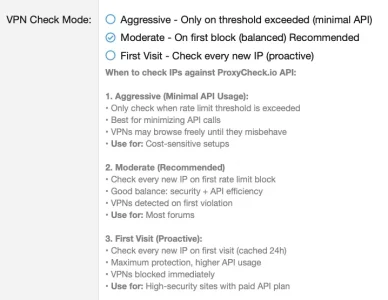
Bildschirmfoto 2026-02-06 um 10.58.32.webp

So, as I understand it, if no rate limits have been hit a visit via VPN should be possible. However: A check of guest access using Windscribe VPN resulted in an instant block:
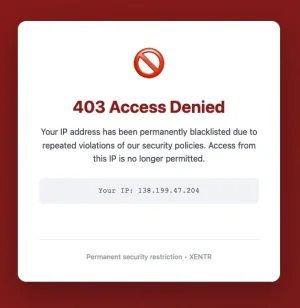
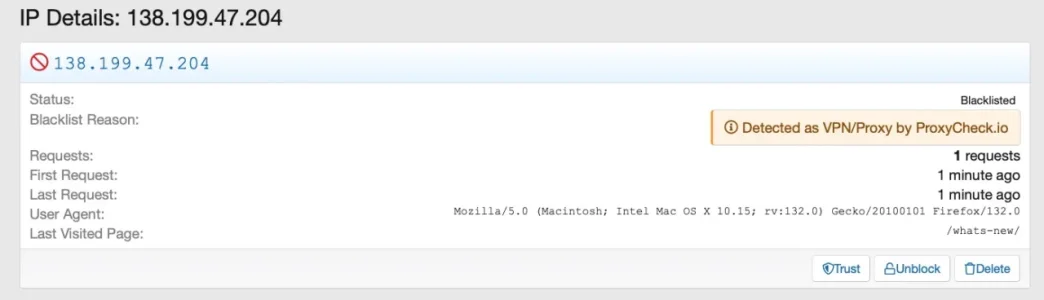
Bildschirmfoto 2026-02-06 um 09.06.21.webp
Bildschirmfoto 2026-02-06 um 08.59.08.webp

The same happened when testing via Opera Browser, using it's built in VPN-option from Opera themselves:
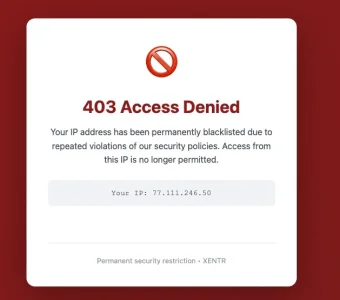
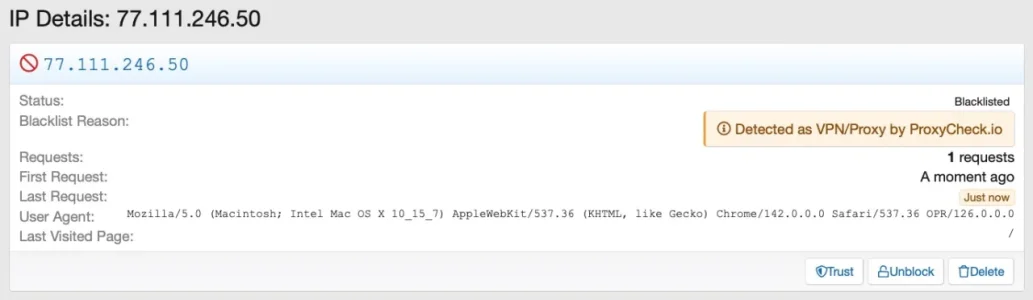
Bildschirmfoto 2026-02-06 um 09.06.10.webp

Bildschirmfoto 2026-02-06 um 09.06.56.webp

Regarding my understanding these requests should have com through.

🐞 3. Consumption of API calls seems quite excessive​


As I am using the country flag and ASN detection one call per IP per 24h is to be expected. However: I consume typically 1,5 - 2,0 times the amount of API calls than IPs are listed on the dashboard. I.e. over the last 24h:
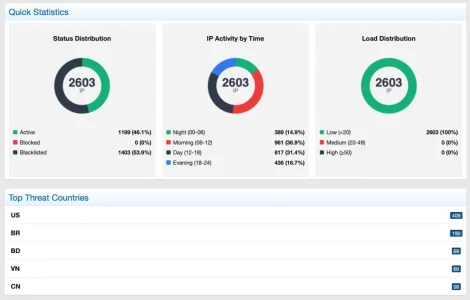
Bildschirmfoto 2026-02-06 um 08.38.06.webp

Those resulted in ~4.900 API calls consumed, according to the dashboard at proxycheck.io which seems a bit over the top. Is this normal or is something wrong here?

possible 🐞 4. Number of requests in the log is always 1​


After a week of use I've accumulated 256 pages of IP-Log and in total short of 13.000 IPS:

Bildschirmfoto 2026-02-06 um 11.59.10.webp
However: Not a single one does show more than one request which seems hard to believe. How are those counted

Questinons and suggestions will follow in the next post.

 
Hello,

We have analyzed your feedback in detail. Here are the technical explanations for the points you raised:

1. High API Usage: XenForo core does not include a native built-in GeoIP database service that we can utilize directly. Therefore, checking a visitor's country requires an API call to ProxyCheck. Implementing a local, self-hosted GeoIP system (like MaxMind) involves downloading, maintaining, and integrating external libraries into the add-on. This is a complex feature development, not a simple bug fix. However, we are planning an optimization for Cloudflare users in future updates to detect countries via server headers without using API credits.

2. Request Logs Showing "1": Seeing "Requests: 1" in the logs is NOT a bug; it confirms the protection is active. Since the add-on operates in "First Visit" mode, a threat (VPN or blocked country) is detected and blocked on their very first request. They do not get a chance to request a second page. Therefore, the log correctly records "1 request made -> Blocked". This is the intended behavior.

3. Country Blocking Not Working: If you blocked a country but still see activity from it, it is likely because your API limit is exhausted. When the daily limit is reached, the API cannot return country data. In such cases, the system defaults to "Allow" to prevent blocking legitimate users due to API errors.

4. Statistical Discrepancies: Differences between the add-on panel stats and ProxyCheck dashboard are normal. Our add-on uses a caching system to improve performance. If an IP was checked recently, we serve the cached result without querying the API again. The add-on panel shows total inspected traffic (including cache hits), while ProxyCheck only counts real fresh API calls.

Thank you for your feedback.
 
1. High API Usage: XenForo core does not include a native built-in GeoIP database service that we can utilize directly. Therefore, checking a visitor's country requires an API call to ProxyCheck. Implementing a local, self-hosted GeoIP system (like MaxMind) involves downloading, maintaining, and integrating external libraries into the add-on. This is a complex feature development, not a simple bug fix. However, we are planning an optimization for Cloudflare users in future updates to detect countries via server headers without using API credits.

I was wondering why there are 1,2 - 2 times as many API-calls as there are IPs checked - I had assumed that one API call would deliver the complete info about an IP. Or am I missing something?

Integration of the free Maxmind DB is a good idea in my opinion, as it saves on API cals and also gives safety as a fallback. But, as you say surely more than a bug fix. Have in mind that it is also used by other add ons such as i.e. Xon's Signup and Mulitaccount and there seems to be a de facto location for it (/internal_data/maxmind) wich you could also use. So you could in a first step use the db w/o having to download it in case another add on has put it there already and in a second step build the downloader, however with the option to untoggle it to avoid that two addons download the same db independently.
2. Request Logs Showing "1": Seeing "Requests: 1" in the logs is NOT a bug; it confirms the protection is active. Since the add-on operates in "First Visit" mode, a threat (VPN or blocked country) is detected and blocked on their very first request. They do not get a chance to request a second page. Therefore, the log correctly records "1 request made -> Blocked". This is the intended behavior.
The ting is: VPN is set do "moderate" as you can see from the screenshot, so it should not block on first visit. At least that's what the settings state. Does this mean as soon as country or ASN block is active that VPN is blocked on the very first request as well? This could become an issue during travel season as some forum members will travel to countries that have been blocked in general and could not log on (in case they have been not logged in on the device they use) via a VPN.
Still I get the idea of the "1", a bit confusing that it is also displayed with tolerated connections of members wo clearly do more than one request over time, which is not reflected there. However: I can live with the latter, but it would be good to have clarification about the first (VPN-topic).

3. Country Blocking Not Working: If you blocked a country but still see activity from it, it is likely because your API limit is exhausted. When the daily limit is reached, the API cannot return country data. In such cases, the system defaults to "Allow" to prevent blocking legitimate users due to API errors.
API credits are definitively not the issue in my case: I realized direct after installation of the add on that I would hit the free barrier as I ran into burst mode only after a couple of hours and therefor upgraded to 20k/day. I've never been above 5k yet, but the amount is on the riese due to the massive amount of resident proxies. However: Not the issue here.

Bildschirm­foto 2026-02-06 um 06.57.35.webp

As you can see from the IP-list excerpt I posted thiese requests do not show up in the IP-logs - which tehy should in my opinion if they get "green light".


Other than that they do appear a couple of times over the day, for different Countries and ASNs. I only recogenized the issuedue to the crosschecking with the access log add on and the apache log proved theat there's indeed an issue. Sometimes these are clustered, four to ten calls from different IPs while others are blocked shrtoly before and after. The Chinese ASN is affected pretty often with a bunch of difefferent IPs. I have no idea what the root cause may be.
4. Statistical Discrepancies: Differences between the add-on panel stats and ProxyCheck dashboard are normal. Our add-on uses a caching system to improve performance. If an IP was checked recently, we serve the cached result without querying the API again. The add-on panel shows total inspected traffic (including cache hits), while ProxyCheck only counts real fresh API calls.
In this case I would expect way fewer API calls on the dashboard of proxycheck.io than in Thread Monitor, not dramatically more....
 
This looks like exactly what I need for my forums.

Hopefully MAXMIND support is in the future. I have about 6 other add ons that directly use that database, locally, and another that updates the database every morning to grab the newest version. (from Andy)
 
@Osman : Another somewhat strange happening: I had my first rate-limit block today:

violation.webp

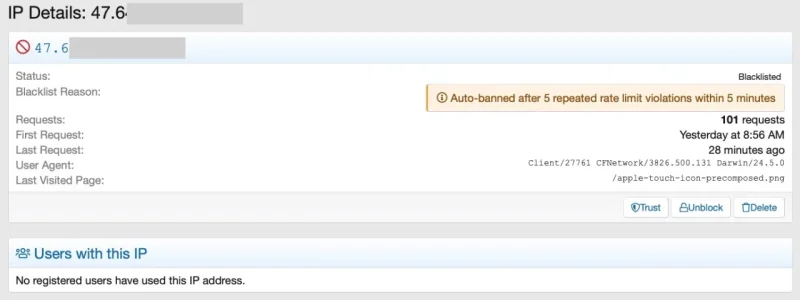
Possibly it did fit the criteria, so that's not the problem. The user was freshly registered and did explore the forum heavily, upon other things fast browsing through Media Gallery albums with loads of pictures in them. So he produced a huge amount of requests for thumbnails on each page probably leading to the violation. Bad luck.

The issue is that IP Thread Monitor states "no registered users have used this address" - which was true when it first showed up (as the user was not yet registered by then) but directly after the first request he registered and browsed the forum, still using the same IP. So the statement is clearly false at the time when the block happened. Possibly the IP statement has not been updated after the first sighting.

A bit of an edge case, still it would be good if one could safely trust in the information given by IP Thread Monitor.
 
Back
Top Bottom