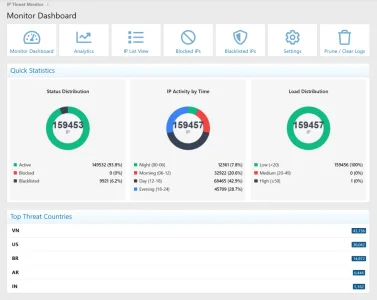
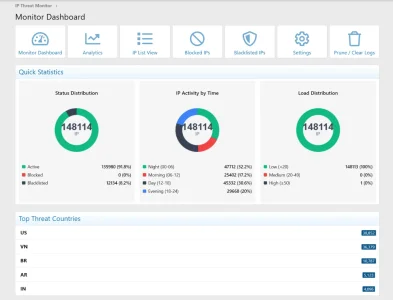
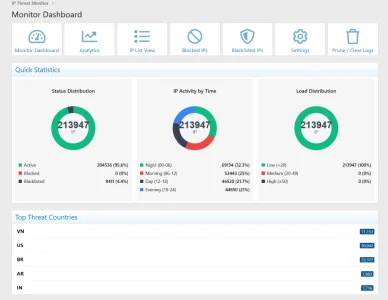
[XTR] IP Threat Monitor

[XTR] IP Threat Monitor [Paid] 1.0.21

No permission to buy ($30.00)
  1. What is the exact IP address of the callback server? As on the linked page - 135.181.76.30 and 2a01:4f9:4b:1421::2/64
  2. Is that IP showing as "Blacklisted" in your Monitor Dashboard? No
  3. Did you add it to Trusted IPs in Options → IP Threat Monitor → Trusted IPs? Yes. Have folowed your suggestions as above and pruned/cleared logs.
 
  1. What is the exact IP address of the callback server? As on the linked page - 135.181.76.30 and 2a01:4f9:4b:1421::2/64
  2. Is that IP showing as "Blacklisted" in your Monitor Dashboard? No
  3. Did you add it to Trusted IPs in Options → IP Threat Monitor → Trusted IPs? Yes. Have folowed your suggestions as above and pruned/cleared logs.
Hi,

Thank you for providing those details. Based on what you've described:

  • The callback IPs are NOT blacklisted in our add-on
  • The callback IPs ARE in your Trusted IPs list
  • You've cleared the cache

This means our add-on is NOT blocking these callbacks.

When an IP is in the Trusted IPs list, it completely bypasses ALL of our checks - no rate limiting, no VPN detection, no blocking of any kind. The request goes through as if our add-on wasn't installed.

The issue may be elsewhere:

To verify our add-on isn't involved:
1. Go to Monitor Dashboard
2. Search for 135.181.76.30
3. If no results found, it means our add-on has never even seen this IP (requests aren't reaching XenForo at all)
 
Osman updated [XTR] IP Threat Monitor with a new update entry:

1.0.16

NEW FEATURE:
  • Allow Cloudflare WARP Users - New option to exempt Cloudflare WARP VPN users from being blocked. WARP is a popular free privacy service used by millions of users. This option is enabled by default.
BUG FIXES:
  • Fixed: VPN Cache Clearing Incomplete - The "Clear VPN Check Cache" option was only clearing API result cache but not the first-visit status cache. This caused IPs to not be re-checked after cache clearing. Both cache...

Read the rest of this update entry...
 
Hello,

This MIGHT be a good solution for my use case.

Question though.

I currently use DigitalPoint's Cloudflare app.

Will this at all interfere or cause any conflict with your add-on?

Thank you in advance!
 
Hello,

This MIGHT be a good solution for my use case.

Question though.

I currently use DigitalPoint's Cloudflare app.

Will this at all interfere or cause any conflict with your add-on?

Thank you in advance!
Hello,
At this time, I cannot make a definitive comment on compatibility, as the add-on has not been tested together with DigitalPoint’s Cloudflare add-on. There is no known conflict, but compatibility cannot be guaranteed without testing.

Thank you for your understanding.
 
Osman updated [XTR] IP Threat Monitor with a new update entry:

1.0.17

  • Fixed: Database column not created on upgrade - Fixed an issue where the xentr_ipt_country column was not being added to the user table when upgrading from older versions. This caused "Accessed unknown getter 'xentr_ipt_country'" errors.
This is a hotfix release that resolves a database upgrade issue introduced in v1.0.16.

What was fixed:
Users upgrading from older versions to v1.0.16 experienced "Accessed unknown getter 'xentr_ipt_country'"...

Read the rest of this update entry...
 
Osman updated [XTR] IP Threat Monitor with a new update entry:

1.0.18

Added ProxyCheck.io API "burst mode" support
  • API responses with "warning" status are now accepted
  • Added handling for "denied" status when burst tokens are exhausted
  • Added proper handling for HTTP 401/403 error codes
  • Added error message detection for "burst" and "exhausted" keywords
Technical Detail
ProxyCheck.io returns status: "warning" when the daily limit is exceeded and a burst token is consumed. Previous...

Read the rest of this update entry...
 
Osman updated [XTR] IP Threat Monitor with a new update entry:

1.0.19

  • Fixed "Allowed memory size exhausted" error when accessing Dashboard and Analytics pages on databases with large amounts of records.
  • Chart and statistics data processing has been switched to SQL-based aggregation to prevent PHP memory exhaustion.
  • Performance improvements made to statistical queries.
This update includes a critical performance patch, especially for forums with high traffic and tens of thousands of IP log records stored in the database.

In previous...

Read the rest of this update entry...
 
Osman updated [XTR] IP Threat Monitor with a new update entry:

1.0.20

  • ixed "Data too long for column 'data_value'" database error occurring when caching the Cloudflare IP list.
  • Migrated Cloudflare IP caching mechanism from database (SimpleCache) to file-based system (File System).
  • Fixed "Accessed unknown getter 'xentr_ipt_country'" error when updating user country information.
This update resolves two critical issues frequently appearing in Server Error Logs.

1. SimpleCache Size Limit Issue: XenForo's default caching mechanism...

Read the rest of this update entry...
 
Osman updated [XTR] IP Threat Monitor with a new update entry:

1.0.21

  • Fixed: Resolved the critical "MySQL Data too long" error caused by large IP lists exceeding database capacity.
  • Fixed: Database performance issues caused by frequent updates from the Rate Limiter and IP services.
  • Changed: The caching system has been completely rebuilt to use file-based storage instead of the database, ensuring zero database load for large datasets.
  • Improvement: Optimized cache cleaning processes for better stability.
...

Read the rest of this update entry...
 
Bought this add on after having upgraded to XF 2.3.8 and after some hickups in the checkout process (no Option for Paypal, not every Credit Card works) downloaded and installed 1.0.21 (the latest version).

Options that I changed reset themselves randomly back to their (unwanted) default values (i.e. "addon on/or off - turned itself on all the time, if country flags should be shown aside users postings - hell no, still switched itself on again, etc.) for most, but not all defailts that I changed and most of the time but not always - completely random behavior. ANS that I inserted to the list of blocked ASNs would not save at all. Suddenly a small set saved if enterered w/o leading "AS" (in opposite to the description) but in every case comments (that are supposed to be made with a leading #) were cut off. After switching to another tab in the option list and back to the ASN tab the previously saved ASNs were gone again.

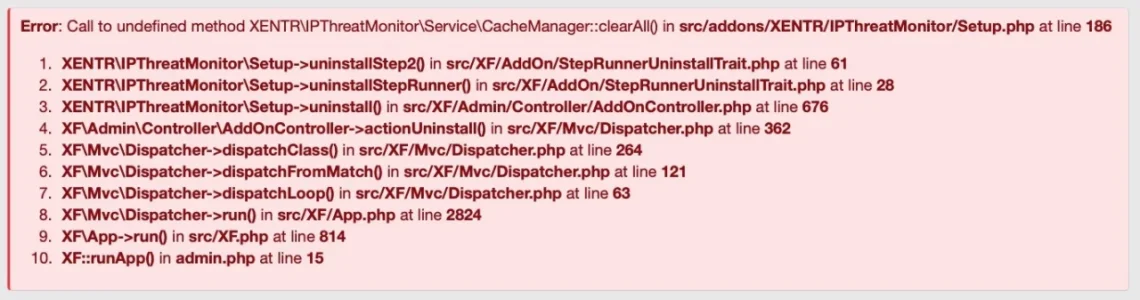
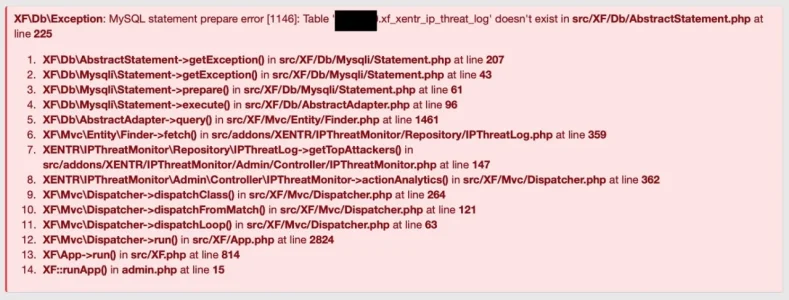
As there was a huge refactoring in 1.0.21 I decided to try an older version and therefor to unstall the latest one. Huge mistake. The uninstaller crashed heavily with this notice:

Bildschirm­foto 2026-01-28 um 16.13.30.webp

After that ACP "greeted" me with a red notice that there were jobs outstanding and my forum would be in an inconsistent state now. If that would persist I should contact the developer of the add on.

rebuilt the add on. Same behavior regarding not saving ASNs as before. Decided to check the dashboard and other parts outside the option list. Was greeted with this message:
Bildschirm­foto 2026-01-28 um 16.10.43.webp

Tried again rebuilding the add on - no mercy. Disabled the add on and tried again to uninstall - same issues as before.

@Osman : Please help.
 
Back
Top Bottom