[XTR] IP Threat Monitor

[XTR] IP Threat Monitor [Paid] 1.0.10

No permission to buy ($30.00)
I would also like the same or to at least share my Cloudflare data with you to see if this will help in anyway. I added rate limiting via Cloudflare hower this was overly aggressive as it appears cloudflare looks at internal page requests as requests as well and I need to really look at the initial request only and not all of the libraries etc that need to be pulled in
Hi,

You've hit the exact problem that our add-on is designed to solve!

The Cloudflare Problem: Cloudflare's rate limiting counts every HTTP request including CSS, JS, images, fonts, etc. A single page load can trigger 30-50+ requests, which quickly hits the limit and blocks legitimate users.

How IP Threat Monitor Handles This: Our add-on is specifically built for XenForo and understands the difference between:
  • Real page requests(index.php) → Counted
  • Static assets(css.php, js.php, data.php) → NOT counted
  • Background scripts(job.php, admin.php) → NOT counted
This means a user browsing normally will only trigger 1-3 "requests" per page, not 30-50+.

Additionally, our add-on:
  • Works with Cloudflare (we auto-whitelist Cloudflare IPs and detect the real visitor IP behind CF)
  • Protects registered members and search engine bots automatically
  • Offers Captcha challenges instead of hard blocks (user-friendly)
I've sent you a private message with real-world data from a live site to demonstrate how this works in practice.
 
I am going to roll the dice on this, its a much needed bit of kit and I am at a loss to how long it would take me to build the same
 
Actually one question, I have cloudflare pretty heavily embedded with my site. Are there going to be conflicts here and am I going ot have to peel some of that back?
 
Actually one question, I have cloudflare pretty heavily embedded with my site. Are there going to be conflicts here and am I going ot have to peel some of that back?
No conflicts! IP Threat Monitor is built to work with Cloudflare.
  • We detect the real visitor IP behind CF automatically
  • Cloudflare IPs are whitelisted by default
  • No need to change your Cloudflare setup
Just install, enable "Whitelist Cloudflare IPs", and you're good to go. ;)
 
@Osman: Is is possible to block on a ASN basis as well? The featurelist is somewhat unclear here:

  • Manual IP Management: Whitelist, blacklist, unblock operations with one click
  • CIDR Support: Easily manage IP ranges (192.168.1.0/24)

Would come in very handy in defense against AI bots and scrapers.

What would also be useful was, if the list of current visitors would be enriched with country flags (when viewed with admin rights) like cloudlfare seems do offer it currently - would be helpful for those that do not use Cloudflare.

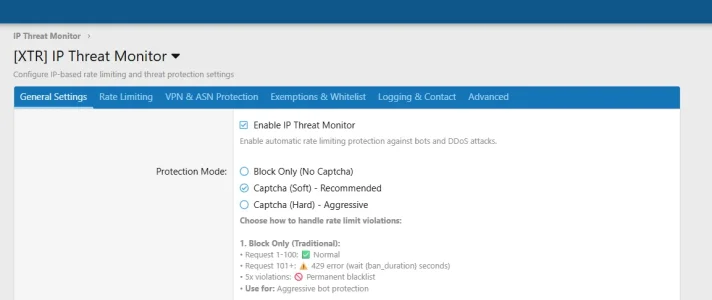
PS: The pic of the settings in the add on description is unreadable as to much i shown for the resolution.
 
Osman updated [XTR] IP Threat Monitor with a new update entry:

1.0.7

  • Refactored options page into a tabbed layout (General, Rate Limit, VPN & ASN, Exemptions).
  • Added ASN (Autonomous System Number) based blocking system.
  • Added Country Flags display in user postbit information.
  • Added xentr_ipt_country column to xf_user table.
  • Added option to white-list Apple iCloud Private Relay traffic.
  • Fixed array/string conversion error in Blocked ASN list input.
  • Refactored Setup.php structure (Install/Upgrade/Uninstall) for better...

Read the rest of this update entry...
 
@Osman: Is is possible to block on a ASN basis as well? The featurelist is somewhat unclear here:


Would come in very handy in defense against AI bots and scrapers.

What would also be useful was, if the list of current visitors would be enriched with country flags (when viewed with admin rights) like cloudlfare seems do offer it currently - would be helpful for those that do not use Cloudflare.

PS: The pic of the settings in the add on description is unreadable as to much i shown for the resolution.
Hello! You have impeccable timing. We have just released Version 1.0.7, which addresses exactly your requests:
  1. ASN Blocking: Yes, implemented! We added a dedicated "Blocked ASN List"option. You can now define specific ASNs (e.g.,
    AS14061 for DigitalOcean or AS16509for Amazon) to permanently block AI bots, scrapers, or specific networks.
  2. Country Flags: We implemented a Country Flag system in this update. It currently displays flags next to usernames in discussion threads (postbits) based on their detected IP country.
  3. Readable Settings: We heard you regarding the screenshot. In v1.0.7, we completely refactored the options page into a modern Tabbed Interface (General, Rate Limit, VPN, etc.). It is now much cleaner, organized, and easier to navigate.
Thank you for the great suggestions that helped shape this update!

1765562835247.webp
 
Trying to make the purchase but I notice a USD 10 sales tax.

I am trying to figure what this tax is about, for what country and should that not only apply for business purchasers?
 
Trying to make the purchase but I notice a USD 10 sales tax.

I am trying to figure what this tax is about, for what country and should that not only apply for business purchasers?
Hello,

Thank you for your message.

The tax you previously saw was caused by a default system setting. This has now been corrected.
No sales tax is applied to purchases from Australia, and you should now be able to complete the checkout without any additional tax.

Please let us know if you encounter any further issues.

Kind regards,
 
@Osman - i have a few users who continue to have issues - However i have since changed settings. Is there any way, short of uninstalling and re-installing, of wiping the data in the background that has been built up (for example - blacklisting). I am wondering if their issues are because they were previously blacklisted, settings have now been changed, but they are still part of the lists.

P.S. Country flags doesnt seem to work for me..

Thanks!
 
Country Flags: We implemented a Country Flag system in this update. It currently displays flags next to usernames in discussion threads (postbits) based on their detected IP country.
Is this configurable? While it does not hurt I don't need it there (and would prefer to not have it there for reasons of privacy). Where I really would like to have it on the other hand would be in the list of current visitors, namely with the guest visitors, as this would help me to support unusual patterns and potentially bad bots. If one uses Cloudflare along with the according cloudflare add on it seems to be there and looks like that:

1758123152860-webp.327207


(Pic sourced from this thread: https://xenforo.com/community/threads/massive-increase-in-guest-users-online.233206/post-1759107)

It would be gread if your add on would deliver the same functionality w/o having to use Cloudflare. Would safe me a ton of time.
 
Osman updated [XTR] IP Threat Monitor with a new update entry:

1.0.8

  • [New] Added "Prune / Clear Logs" tool to Admin Dashboard for easy database cleanup.
  • [New] Added "Top Threat Countries" widget to the main Dashboard.
  • [New] Added "Allow Legitimate Network Types" option to prevent blocking Wireless, Residential, and Business IPs.
  • [Update] Added country flags to Blocked, Blacklisted, and Log List views for better visual identification.
  • [Update] Dashboard navigation now includes a shortcut for the Prune...

Read the rest of this update entry...
 
@Osman - i have a few users who continue to have issues - However i have since changed settings. Is there any way, short of uninstalling and re-installing, of wiping the data in the background that has been built up (for example - blacklisting). I am wondering if their issues are because they were previously blacklisted, settings have now been changed, but they are still part of the lists.

P.S. Country flags doesnt seem to work for me..

Thanks!
We just released version 1.0.8 specifically to address these points. It includes a new "Prune / Clear Logs" tool to wipe data without reinstalling, fixes the country flag issues, and adds a setting to prevent false positives for mobile users. Please update and check the release notes for details.
 
Is this configurable? While it does not hurt I don't need it there (and would prefer to not have it there for reasons of privacy). Where I really would like to have it on the other hand would be in the list of current visitors, namely with the guest visitors, as this would help me to support unusual patterns and potentially bad bots. If one uses Cloudflare along with the according cloudflare add on it seems to be there and looks like that:
For the postbit flags, good news! This option already exists. You can disable it by navigating to: Options > [XTR] IP Threat Monitor > Show country flags in postbit. Unchecking this will hide the flags from the postbit as requested.

Regarding the 'Current Visitors' list for guests: While technically possible, implementing this would require core session modifications which are outside the scope of this add-on to ensure optimal performance.
 
Osman updated [XTR] IP Threat Monitor with a new update entry:

1.0.9

  • [Fix] Resolved an issue where the xentr_ipt_country column was not being created in the xf_user table during fresh installations (Fixed step ordering in Setup.php).
  • [Fix] Fixed the Cache Logic in "Test Configuration" page where "Direct DB Mode" (when Redis/APCu is unavailable) was incorrectly reported as a failure. It is now recognized as a valid passing state.
  • [Fix] Corrected a layout alignment issue with status icons in the admin test results...

Read the rest of this update entry...
 
Hi,

You've hit the exact problem that our add-on is designed to solve!

The Cloudflare Problem: Cloudflare's rate limiting counts every HTTP request including CSS, JS, images, fonts, etc. A single page load can trigger 30-50+ requests, which quickly hits the limit and blocks legitimate users.

How IP Threat Monitor Handles This: Our add-on is specifically built for XenForo and understands the difference between:
  • Real page requests(index.php) → Counted
  • Static assets(css.php, js.php, data.php) → NOT counted
  • Background scripts(job.php, admin.php) → NOT counted
This means a user browsing normally will only trigger 1-3 "requests" per page, not 30-50+.

Additionally, our add-on:
  • Works with Cloudflare (we auto-whitelist Cloudflare IPs and detect the real visitor IP behind CF)
  • Protects registered members and search engine bots automatically
  • Offers Captcha challenges instead of hard blocks (user-friendly)
I've sent you a private message with real-world data from a live site to demonstrate how this works in practice.
Hi,

In the plugins settings you state the following:

"Example: 100 requests / 120 seconds = Normal user can browse ~3 pages per 2 minutes (1 page = ~30-40 requests including CSS, JS, images)"

So I'm confused now, does "1 page = ~30-40 requests" like it says in the plugin settings, or does "1 page = 1-3 requests" like you stated above?
 
Thank you for your attention to detail.

Short Answer: The information in our support post (1 page = 1-3 requests) is the correct one. Our add-on strictly counts PHP executions (real page loads/actions) and explicitly ignores static assets like CSS, JS, and images.

Correction: The text in the settings mentioning "30-40 requests" was a generic example referring to raw server logs, which was indeed misleading for this add-on's specific logic. We have corrected this explanation in the latest update (the one you are installing now/v1.0.9).

You can safely configure your limits based on the "1 page ≈ 1 request" logic.
 
Osman updated [XTR] IP Threat Monitor with a new update entry:

1.0.10

  • [New] Check All Visitors: Added "Check all visitors for country flag" option. It is now possible to display country flags for all visitors regardless of the protection mode (Moderate/Aggressive).
  • [New] Geo-Blocking: Added the "Blocked Countries" setting to permanently block all traffic from specified countries (e.g., CN, RU).
  • [New] Integrated Diagnostics Tool (Revamped): Added a completely redesigned diagnostics tool with visual charts and Vanilla JS...

Read the rest of this update entry...
 
Back
Top Bottom