

You are using an out of date browser. It may not display this or other websites correctly.
You should upgrade or use an alternative browser.
You should upgrade or use an alternative browser.
![[XTR] AI Assistant](/community/data/resource_icons/10/10205.jpg?1766866402)
[XTR] AI Assistant [Paid] 1.0.17
No permission to buy ($45.00)
- Thread starter Osman
- Start date

I apologize for the inconvenience! Our spam filter can sometimes be overly aggressive. 3 hits from the same IP in 1 hoursI'm having this problem with my account. I can access yerterday, but today my IP address is showing as banned:
I apologize for the inconvenience! Our spam filter can sometimes be overly aggressive. 3 hits from the same IP in 1 hours
I keep appearing as banned

Hi,@Osman a request:
The system have Forum Permissions, thats control which forums each bot can operate in. It´s possible to hide the actionBar "Generate Image" and "Ask IA" in the forums without avaiable bots?
It makes no sense to have visible functions when they cannot be used.
Thanks
Great suggestion! This feature is now included in version 1.0.6.
What's New:
The action bar buttons (Generate Image, Ask AI, Translate, Summarize, and Reply Suggest) will now automatically hide in forums where no active bot is available to operate.
How It Works:
The system checks the bot's "Reply forums" setting (Access tab) to determine which forums the bot can operate in:
- If "Reply forums" is empty → The bot works in ALL forums (buttons visible everywhere)
- If "Reply forums" has specific forums selected → The bot only works in those forums (buttons only visible there)
- Go to Admin Panel → AI Assistant → Bots
- Click Edit on your bot
- Navigate to the Access tab
- In the Reply forums field, select the forums where this bot should be active
- Click Save
Additional Capability Checks:
- Generate Image button: Only appears if the bot has Image Generation enabled (Capabilities tab)
- Ask AI (Mention) button: Only appears if "Mention" is selected in Post Triggers (Activation tab)
Best regards
Hi,Another question: for some reason the "Summarize with AI" function somethimes give me the response in English, when my community it's in another language. It's possible to have it in the user selected language?
Thank you for reporting this! The "Summarize with AI" language issue has been fixed in version 1.0.6.
What Was the Problem:
The AI was sometimes responding in English because the instruction was vague ("summarize in the user's language"). The AI couldn't always determine which language to use.
What's Fixed:
The system now explicitly tells the AI which language to use based on your XenForo language settings.
For example:
- If your language is set to Spanish → AI is instructed: "Write your summary in Spanish language"
- If your language is set to Turkish → AI is instructed: "Write your summary in Turkish language"
- And so on for any language...
The system automatically detects the user's selected XenForo language and includes the language name directly in the AI prompt. No configuration needed - it works automatically.
Note:
The summary language will match the user's XenForo interface language (the language they selected in their account settings), not necessarily the language of the thread content.
If a user has their interface set to Spanish but reads a thread in English, the summary will be generated in Spanish.
Osman updated [XTR] AI Assistant with a new update entry:
1.0.6
Read the rest of this update entry...
1.0.6
New Features
Improvements
- Smart Button Visibility - AI action buttons now automatically hide in forums where no bot is available
- Generate Image, Ask AI, Translate, Summarize, and Reply Suggest buttons respect forum permissions
- Buttons only appear if the bot is configured to operate in that specific forum
- New template function
xentr_has_bot()for forum-based visibility checks
- Summarize Language Fix - AI now uses...
Read the rest of this update entry...
Hi,I'm still banned and unable to purchase the add-on...
I can't send you a private message. That's why I'm writing to you here.
Your account is being temporarily blocked because you're trying to log in with the wrong username.
The Problem:
You're entering: PhineasD
Your actual username is: phineas137
Our security system detects login attempts with non-existent usernames and temporarily blocks the IP address to protect against unauthorized access attempts.
Solution:
- Use your correct username: phineas137
- If your browser has saved the wrong username, please clear it or update it
- If you use a password manager, update the saved credentials
If you have any trouble, let me know.
Best regards

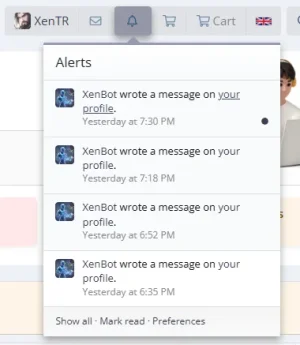
the profile message is not leaving any alert

Hi, does support multiple language?
Like post in serbian, croatian, bosnian etc?
Like post in serbian, croatian, bosnian etc?
Are you sure that your schedule settings are configured correctly? If you wish, you can open a support ticket on our website so that we can review the situation in detail. In my tests, the related feature appears to be working as expected.the profile message is not leaving any alert
Hi,Hi, does support multiple language?
Like post in serbian, croatian, bosnian etc?
Yes, AI Assistant supports multiple languages! The language capabilities depend on the AI provider/model you choose.
Language Support by Provider:
- OpenAI (GPT-4, GPT-4o, GPT-3.5) - Supports 100+ languages including Serbian, Croatian, Bosnian
- Google Gemini - Supports 40+ languages including Slavic languages
- Anthropic Claude - Excellent multilingual support
- Groq, Mistral, DeepSeek - Good multilingual support
The bot automatically responds in the same language as the user's message. If someone posts in Serbian, the bot will respond in Serbian. If someone posts in Croatian, it responds in Croatian.
Serbian/Croatian/Bosnian Specific:
These languages are well-supported by modern AI models. The bot can:
- Understand and respond in Serbian (Cyrillic or Latin script)
- Understand and respond in Croatian
- Understand and respond in Bosnian
- Distinguish between these languages
For best results with Slavic languages, I recommend:
- Provider: OpenAI (GPT-4o) or Google Gemini Pro
- Temperature: 0.7 (balanced)
- Personality prompt: You can specify the language in the bot's personality if you want to force a specific language
Code:
You are a helpful forum assistant. Always respond in Serbian language using Latin script.Let me know if you have any other questions!

Osman updated [XTR] AI Assistant with a new update entry:
1.0.7
Read the rest of this update entry...
1.0.7
Bug Fixes
- Fixed "All" User Group Selection - Selecting "All" in the bot's user group access settings now works correctly. Previously, you had to manually select each user group.
- Fixed Bot Self-Reply Issue - Bots no longer reply to their own previous messages in scheduled/auto-reply scenarios. Added proper checks to prevent bot-to-bot loops in scheduled content.
- Fixed AI Self-Quoting - Resolved an issue where AI would mimic the context message...
Read the rest of this update entry...
Osman updated [XTR] AI Assistant with a new update entry:
1.0.8
Read the rest of this update entry...
1.0.8
New Features
- Skip Response Feature - AI can now skip responding when conditions aren't met. When AI responds with
[SKIP],[NO RESPONSE],[NO TRANSLATION NEEDED],[SILENT], or similar patterns, the bot will silently skip that post. Perfect for translation bots and conditional responders.- Thread Context Limit Explanation - Added a clear explanation for the "Thread context limit" setting, clarifying...
Read the rest of this update entry...

Hi, would this be able to add a thread summary to the top of long threads, that will automatically show above the thread container, shown to all member groups?
Hi,Hi, would this be able to add a thread summary to the top of long threads, that will automatically show above the thread container, shown to all member groups?
Thank you for the suggestion! While it sounds like a nice feature, there are significant practical limitations that make it unfeasible:
The Problem:
A 20-page thread could have 400+ posts. Sending all that content to an AI for summarization would:
- Consume a massive amount of tokens (very expensive)
- Hit rate limits on most AI providers
- Take too long to generate (30-60+ seconds)
- Need to be regenerated every time new replies are added
Current Solution:
The add-on offers an "on-demand" Summarize Thread feature. Users can click a button to generate a summary when needed. This approach:
- Only runs when requested (no wasted resources)
- Summarizes a manageable portion of the thread
- Shows results instantly in a popup
Thanks for understanding!
Thanks for the reply.Hi,
Thank you for the suggestion! While it sounds like a nice feature, there are significant practical limitations that make it unfeasible:
The Problem:
A 20-page thread could have 400+ posts. Sending all that content to an AI for summarization would:
For these reasons, automatic persistent summaries for all long threads would be impractical and costly.
- Consume a massive amount of tokens (very expensive)
- Hit rate limits on most AI providers
- Take too long to generate (30-60+ seconds)
- Need to be regenerated every time new replies are added
Current Solution:
The add-on offers an "on-demand" Summarize Thread feature. Users can click a button to generate a summary when needed. This approach:
This is the most practical approach for thread summarization given the current AI technology and cost constraints.
- Only runs when requested (no wasted resources)
- Summarizes a manageable portion of the thread
- Shows results instantly in a popup
Thanks for understanding!
What I’m looking for isn’t a full re-summarisation of 20 pages on every update, but rather an incremental summary that sits at the top of the thread and is visible to all users (a lot of people browse my site without registering and just want the distilled information, which is totally fine).
To clarify, I wouldn’t want this on normal threads at all. I’m only interested in longer discussions – for example, threads over ~10 pages.
It could be handled with a throttled refresh:
- update every 20–30 replies
- or once per day,
- or via a moderator action, rather than on every post.
That keeps token usage bounded and generation time much lower.
I completely understand why on demand summaries in a popup are the most practical default. My use case is just a very specific one: long, information-dense threads where a pinned summary helps new readers get up to speed.
I just wanted to clarify that I’m not proposing full-thread reprocessing or universal automation.
Could even have some kind of classifier that could be run, and adds threads to a list of "ready to be summarised" for mods to select which ones could be sent to Anthropic / Open AI to process.
Thanks for the detailed clarification. Your logic regarding selective input and throttled updates is sound, but there are deeper reasons why I am hesitant to add this to the core add-on right now:
1. Complexity vs. Value:
Developing algorithm to "select the best/most reacted posts" and managing "smart update intervals" is logically complex. It requires significant development time for a feature that is quite niche (mostly for very large forums).
2. Data Management & Settings:
To do this right, we'd need to store persistent summaries in the database, handle cleaning them up, and add complex settings (Update frequency? Minimum thread length? Which user groups see it?). This bloats the add-on significantly.
3. The "Hallucination" Risk:
AI is not perfect. In a popup (on-demand), if a summary is slightly wrong or hallucinates, the user just closes it. But if we pin an AI-generated summary at the top of a thread permanently, any error or hallucination becomes a major visibility issue for your site. It implies "official" content.
4. Support Scope:
Adding this would increase the support load significantly ("Why didn't my summary update?", "Why did it miss this post?", "The summary is misleading").
Conclusion:
I believe this feature is too specific and complex to be a core function of the AI Assistant at this stage. It feels more like a separate "Content Curation" add-on rather than a general assistant feature.
I appreciate your understanding! I will still keep your ideas in mind, but for now, the focus is on stability and core features.
1. Complexity vs. Value:
Developing algorithm to "select the best/most reacted posts" and managing "smart update intervals" is logically complex. It requires significant development time for a feature that is quite niche (mostly for very large forums).
2. Data Management & Settings:
To do this right, we'd need to store persistent summaries in the database, handle cleaning them up, and add complex settings (Update frequency? Minimum thread length? Which user groups see it?). This bloats the add-on significantly.
3. The "Hallucination" Risk:
AI is not perfect. In a popup (on-demand), if a summary is slightly wrong or hallucinates, the user just closes it. But if we pin an AI-generated summary at the top of a thread permanently, any error or hallucination becomes a major visibility issue for your site. It implies "official" content.
4. Support Scope:
Adding this would increase the support load significantly ("Why didn't my summary update?", "Why did it miss this post?", "The summary is misleading").
Conclusion:
I believe this feature is too specific and complex to be a core function of the AI Assistant at this stage. It feels more like a separate "Content Curation" add-on rather than a general assistant feature.
I appreciate your understanding! I will still keep your ideas in mind, but for now, the focus is on stability and core features.