[XTR] AI Assistant

[XTR] AI Assistant [Paid] 1.0.5

No permission to buy ($45.00)
@Osman About the "Thread Summarization". Question: it's possible to ask in one thread to one bot to summarize another thread? To get a summary of a thread but not in the original thread?
Hi,

Currently, the "Summarize Thread" feature is designed to work exclusively on the current thread you are viewing via the dedicated button.

Regarding your request to summarize external threads via chat: We do not plan to implement this feature. Processing external thread links dynamically would require fetching and analyzing massive amounts of data (potentially hundreds of pages) in real-time. This would lead to:
1. Extremely specific and high token usage/costs for you
2. Potential performance issues and timeouts
3. Privacy/permission complexities (e.g., checking if the user has access to view that linked thread)

To keep the system efficient and cost-effective, summarization is strictly limited to the active thread context where the user initiates the action.

Best regards
 
Osman updated [XTR] AI Assistant with a new update entry:

1.0.4

Bug Fixes
  • UTF-8 Compatibility - Fixed "Incorrect string value" error during installation caused by emoji characters on some hosting environments.
  • Profile Post Notifications - Fixed notification system for scheduled profile posts. Users will now receive alerts when a bot posts on their profile.
  • Activity Log Links - Content link was missing for "Create profile post" actions. You can now click the link icon to go directly to the profile post...

Read the rest of this update entry...
 
@Osman Are the Friendly, Professional, Humorous, and Sarcastic modes of the AI Suggestion button predefined? Or can they be created at the administrator's discretion? For example, creating new modes such as "Agree Message", "Disagree Message," and "Asking Message" to encourage discussion, etc.

Thx.
 
@Osman Are the Friendly, Professional, Humorous, and Sarcastic modes of the AI Suggestion button predefined? Or can they be created at the administrator's discretion? For example, creating new modes such as "Agree Message", "Disagree Message," and "Asking Message" to encourage discussion, etc.

Thx.

Hi,

Currently, the tone options for the AI Suggestion button are predefined and not configurable through the admin panel. The available tones are:
  • Friendly
  • Professional
  • Humorous
  • Sarcastic

These are hard-coded in the template and cannot be customized or extended by administrators at this time.

Adding custom tones like "Agree Message", "Disagree Message", and "Asking Message" would indeed encourage more diverse discussions. I've noted this as a feature request for a future update.

I'll consider adding a configurable tone system in a future version where administrators can define custom tones with their own prompt instructions.

Thank you for the suggestion!

Best regards
 
All I want is this: Members create very few or meaningless topics when starting threads. My only concern is that an AI-generated question title suitable for the question in the first message, deleting the old title and replacing it with the newly generated one. This should be possible for both members and administrators via a button called "Update Question Title with AI".
 
All I want is this: Members create very few or meaningless topics when starting threads. My only concern is that an AI-generated question title suitable for the question in the first message, deleting the old title and replacing it with the newly generated one. This should be possible for both members and administrators via a button called "Update Question Title with AI".
I sent you a private message about the matter.
 
I am using xenforo cloud. I would like to use this addon to have the ai bot (using RAG) capable of answering difficult queries on aviation regulations. Will I have any issues using the addon for this?

I also cannot register to purchase… it keeps suspecting spam.
 
Will this work on xenforo 2.2? I'd just like to use the summarization feature (nothing else) to help with particularly long threads ☺️
 
I am using xenforo cloud. I would like to use this addon to have the ai bot (using RAG) capable of answering difficult queries on aviation regulations. Will I have any issues using the addon for this?

I also cannot register to purchase… it keeps suspecting spam.
Thank you for your interest in our AI Assistant add-on!

Our AI Assistant add-on would be perfect for your aviation regulations use case! Here's what you can do:

Create a Knowledge Base with all your aviation regulation documents
Assign it to an AI bot that will answer questions using RAG (Retrieval-Augmented Generation)
Configure prompts specifically for technical/regulatory content
The bot will reference your documents when answering complex queries
Important considerations:

Make sure your AI provider API key is properly configured
You'll need to upload your aviation regulation documents to the Knowledge Base
The bot can be trained to cite specific regulations in its responses

Regarding registration:
I apologize for the inconvenience! Our spam filter can sometimes be overly aggressive. Could you try registering again now?
 
Will this work on xenforo 2.2? I'd just like to use the summarization feature (nothing else) to help with particularly long threads ☺️
This add-on has been developed specifically for XenForo 2.3.x. Unfortunately, it has not been tested on XenForo 2.2.x, so compatibility with that version cannot be guaranteed.
 
@PhineasD
Version 1.0.5 introduces Suggestion Tones - a powerful new feature that lets administrators create and manage custom AI response styles directly from the admin panel!

What's New:
  • 📝 Fully Customizable Tones - Create unlimited custom tones with your own prompt instructions
  • 🎯 Pre-built Options - Comes with ready-to-use tones: Friendly, Professional, Humorous, Sarcastic, Agree, Disagree, and Asking Message
  • ⚡ Easy Management - Enable/disable, sort, and set default tones with just a click
  • 🔧 Admin Control - Full CRUD interface under AI Assistant > Suggestion Tones
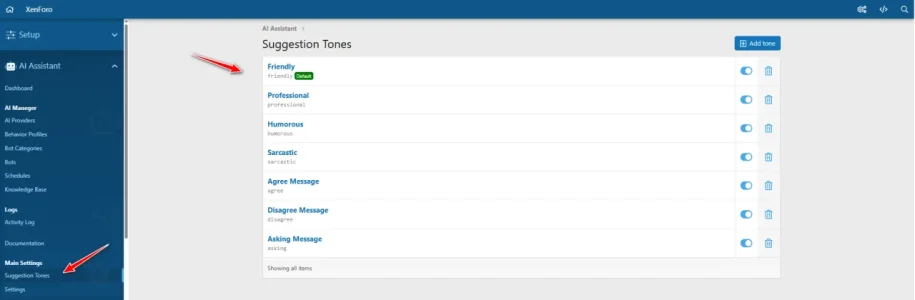
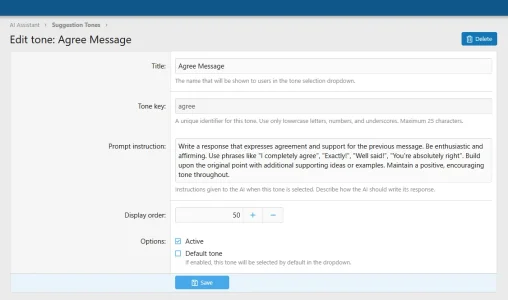
Users can now select their preferred tone when generating AI-powered reply suggestions, making responses more contextual and personalized to each conversation!

Navigate to: Admin Panel → AI Assistant → Suggestion Tones
1767809660968.webp
1767809702174.webp

1767809755996.webp
 
All I want is this: Members create very few or meaningless topics when starting threads. My only concern is that an AI-generated question title suitable for the question in the first message, deleting the old title and replacing it with the newly generated one. This should be possible for both members and administrators via a button called "Update Question Title with AI".
Yer, the title suggestion is a handy feature, unfortunately it only works when creating a new thread from the full page, it doesn't show for quick thread or edit. It would be handy if that was available for both situations, rounding out its overall use to correct / suggest appropriate titles. I think all forums have the same issue... people write a single word title or such, then they write a short story, and vice versa.
 
Osman updated [XTR] AI Assistant with a new update entry:

1.0.5

New Features
  • Customizable Suggestion Tones - New admin panel section for managing AI response styles
  • Create unlimited custom tones with personalized prompt instructions
  • Enable/disable tones with a single click toggle
  • Set any tone as the default selection
  • Pre-installed default tones: Friendly, Professional, Humorous, Sarcastic
Improvements
  • AI suggestion system now uses dynamic tone instructions from database
  • Added tone...

Read the rest of this update entry...
 
@PhineasD
Version 1.0.5 introduces Suggestion Tones - a powerful new feature that lets administrators create and manage custom AI response styles directly from the admin panel!

What's New:
  • 📝 Fully Customizable Tones - Create unlimited custom tones with your own prompt instructions
  • 🎯 Pre-built Options - Comes with ready-to-use tones: Friendly, Professional, Humorous, Sarcastic, Agree, Disagree, and Asking Message
  • ⚡ Easy Management - Enable/disable, sort, and set default tones with just a click
  • 🔧 Admin Control - Full CRUD interface under AI Assistant > Suggestion Tones
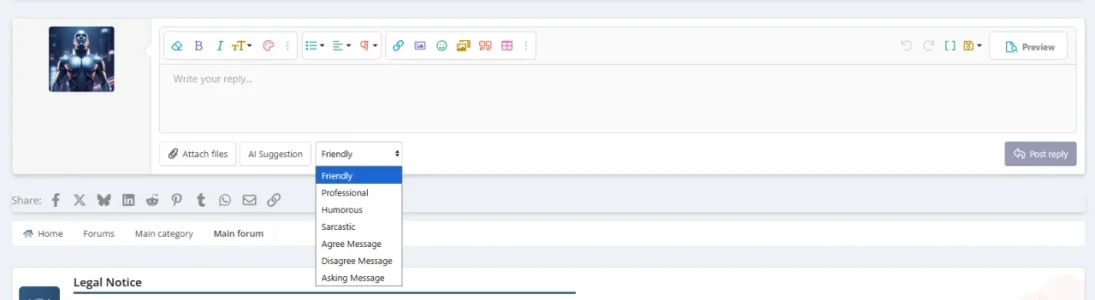
Users can now select their preferred tone when generating AI-powered reply suggestions, making responses more contextual and personalized to each conversation!

Navigate to: Admin Panel → AI Assistant → Suggestion Tones
View attachment 332223
View attachment 332224

View attachment 332225

Thx!!

I'll purchase in the following days.
 
@Osman I've seen this:

2. Smart Editor Assistant
The "AI Suggestion" button is now smarter! If you have typed a draft in the editor, the AI will act as a professional editor; refining your text, fixing grammar, and adjusting the tone (Friendly, Professional, etc.) while strictly maintaining your original language.

When you click on the AI suggestion button, does it only rewrite the draft text? Or is it also possible to create a completely new message?
 
When you click on the AI suggestion button, does it only rewrite the draft text? Or is it also possible to create a completely new message?
The AI Suggestion button works in TWO different modes:

MODE 1: Reply Suggestion (Empty Editor)
If the editor is empty, the AI will analyze the thread/conversation context and generate a completely NEW reply for you. It reads the discussion and suggests a fresh message based on the selected tone.

MODE 2: Draft Refinement (Text in Editor)
If you have already typed some text in the editor, the AI acts as a professional editor. It will refine, improve grammar, and adjust the tone of YOUR draft while preserving your original meaning and language.

How it works:
  • Empty editor → AI creates a new message from scratch
  • Text in editor → AI refines/improves your existing draft
So yes, both options are available! Just leave the editor empty if you want a completely new message, or type your draft first if you want it refined.
 
The AI Suggestion button works in TWO different modes:

MODE 1: Reply Suggestion (Empty Editor)
If the editor is empty, the AI will analyze the thread/conversation context and generate a completely NEW reply for you. It reads the discussion and suggests a fresh message based on the selected tone.

MODE 2: Draft Refinement (Text in Editor)
If you have already typed some text in the editor, the AI acts as a professional editor. It will refine, improve grammar, and adjust the tone of YOUR draft while preserving your original meaning and language.

How it works:
  • Empty editor → AI creates a new message from scratch
  • Text in editor → AI refines/improves your existing draft
So yes, both options are available! Just leave the editor empty if you want a completely new message, or type your draft first if you want it refined.

Great, thanks! :D
 
Back
Top Bottom