[XTR] AI Assistant

[XTR] AI Assistant [Paid] 1.0.11

No permission to buy ($45.00)

Osman

Well-known member
Osman submitted a new resource:

[XTR] AI Assistant - Upgrade your forum with AI automation: multi-provider support smart bots, auto replies, content hub.

View attachment 331637

AI Assistant for XenForo
The Most Comprehensive AI Integration for Your Forum


🌟 Introduction

AI Assistant transforms your XenForo forum into an intelligent, self-managing community platform. Deploy AI-powered bots that can engage with your members, create content automatically, answer questions using your knowledge base, analyze images, and much more.

Whether you want to...

Read more about this resource...
 
This looks interesting. Will have to try it out. I had one from another dev here, but it only used OpenAI, which ended up cancelling my subscription because someone talked about suicide, so OpenAI terminated me because the addon didn't have their moderation system incorporated. Nice to be able to use alternative AI's with ease.

I have a rough idea of what this can do, reading the info you have provided, but what I want it to do is pretty simple overall. Can this just respond within a specific forum to members posts. For example, I had an AI forum where only a member can post within their own thread, and the bot responds to them ongoing with each post they make. Can this addon do that in its simplest form?
 
Last edited:
This looks interesting. Will have to try it out. I had one from another dev here, but it only used OpenAI, which ended up cancelling my subscription because someone talked about suicide, so OpenAI terminated me because the addon didn't have their moderation system incorporated. Nice to be able to use alternative AI's with ease.

I have a rough idea of what this can do, reading the info you have provided, but what I want it to do is pretty simple overall. Can this just respond within a specific forum to members posts. For example, I had an AI forum where only a member can post within their own thread, and the bot responds to them ongoing with each post they make. Can this addon do that in its simplest form?
Hello,

Thank you for your interest! What you described regarding OpenAI is exactly why we designed this add-on to be "Provider Agnostic".
  1. Alternative AIs: You are not locked into OpenAI. Our add-on allows you to switch seamlessly between Anthropic (Claude), Google Gemini, Grok, Mistral, or heavily uncensored open-source models via OpenRouter/Groq. If one provider suspends you, you can switch to another in seconds. Providers like Claude or local models often have different moderation policies, giving you much more control and peace of mind.
  2. Forum-Specific Bot Logic:Yes, what you are asking for is a core feature of the add-on.
    • You can create a specific Bot and assign it only to that specific "AI Forum" (node).
    • With the "Conversation Context" feature enabled, the bot "remembers" the previous posts in the thread.
    • This creates exactly the experience you want: A member posts in their private thread, and the bot responds back and forth continuously, engaging in a fluid conversation without losing track of what was said previously.
In short; allowing you to escape OpenAI's strict lock-in and setting up a dedicated "companion bot" for a specific forum is exactly what this add-on is built to do.
 
Osman updated [XTR] AI Assistant with a new update entry:

1.0.1

  • Feature: Added "Thread Auto-Reply" system, allowing bots to automatically reply to posts in specific forums without requiring @mentions.
  • Improvement: Enhanced "AI Suggestion" functionality. It now detects draft text in the editor and refines/rewrites it in the selected tone while preserving the original language.
  • Fix: Resolved an issue where quoting a bot resulted in nested quotes of the bot's previous message in its reply.
  • Fix: Fixed an issue...

Read the rest of this update entry...
 
Osman updated [XTR] AI Assistant with a new update entry:

1.0.2

  • Moved the Personality field to the Intelligence tab in the bot edit page for better workflow.
  • Refactored the Personality and Context-Specific Prompts (Thread, DM, Profile) logic. Personality and context instructions are now correctly merged in bot responses.
  • Added a new option for selecting a Utility Bot. You can now designate a specific bot for tasks like title suggestions, summarization, and translation, or leave it on "Auto" to use the first available...

Read the rest of this update entry...
 
This looks fantastic, and I'm likely to purchase shortly.

Just a question if you can please @Osman, I have an external CMS (PHP/MySQL) storing all the data I want to reference for RAG - a mix of support pages, product and company listings.

Will there be a way to add reference material beyond the scope of the thread, and the knowledge base?
 
This looks fantastic, and I'm likely to purchase shortly.

Just a question if you can please @Osman, I have an external CMS (PHP/MySQL) storing all the data I want to reference for RAG - a mix of support pages, product and company listings.

Will there be a way to add reference material beyond the scope of the thread, and the knowledge base?
Hello,

Thank you for your interest and kind words.

To answer your question directly: To ensure optimal performance and stability, the add-on is designed to use only internal XenForo data (Threads, Posts, and its built-in Knowledge Base) as RAG sources.

Connecting directly to an external database or CMS for live data retrieval is not supported out-of-the-box, as it introduces latency and potential stability issues.

However, the recommended workflow is to import your external CMS content (support pages, product listings) into the add-on's built-in "Knowledge Base." Once the data is within the system, the AI can reference and utilize it seamlessly. This approach ensures the fastest response times and arguably the best accuracy for your users.

Best regards.
 
Thank you @Osman, the ability to sync reference material with our main CMS system is important - as that contains all the source information referenced across the forum.

For our circumstance, latency or instability should not be an issue - both platforms sit alongside one another on a top-end dedicated server with low resource usage, and are already interlinked in various ways.

Because our CMS content is updated consistently, and any AI agent would need to reference that, populating the knowledge base wouldn't work unless I introduce something like programmatically updating the KB from the CMS.

If there is the scope for custom development (as an extension to the main add-on for external content, so it stays updated over-time), we'd likely be willing to invest in the development.
 
Thank you @Osman, the ability to sync reference material with our main CMS system is important - as that contains all the source information referenced across the forum.

For our circumstance, latency or instability should not be an issue - both platforms sit alongside one another on a top-end dedicated server with low resource usage, and are already interlinked in various ways.

Because our CMS content is updated consistently, and any AI agent would need to reference that, populating the knowledge base wouldn't work unless I introduce something like programmatically updating the KB from the CMS.

If there is the scope for custom development (as an extension to the main add-on for external content, so it stays updated over-time), we'd likely be willing to invest in the development.
Thank you for your interest. Currently, this type of custom external integration is outside the scope of the core add-on roadmap. However, I may consider it as a separate premium module in the future.
 
Osman updated [XTR] AI Assistant with a new update entry:

1.0.3

New Features
  • Profile Post Creation - Scheduled tasks can now automatically post messages to user profiles
  • User Criteria System - Target user selection for profile posts (specific users, user groups, registration date, etc.)
  • New action type: "Create profile post" scheduling option
  • Custom icon and label for profile posts in Activity Log
Improvements
  • Thread tools menu "Enable/Disable AI Bots" toggle now updates dynamically...

Read the rest of this update entry...
 
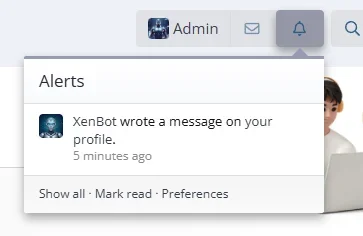
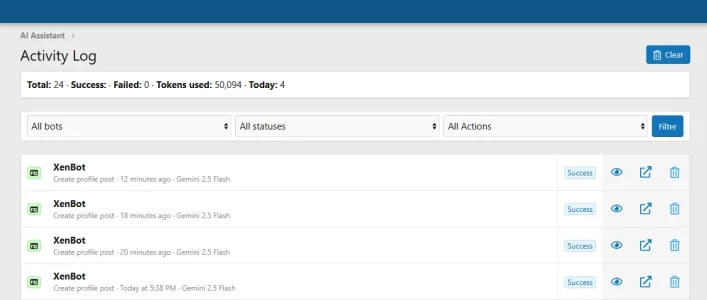
I have a few comments and requests. Would it be possible to set up alerts when the bot comments on a profile? For me, at least, it's not working. Also, I don't know if it's too much to ask, but could you make it so that when the bot responds to something, you can see the last action? For example, viewing the topic, a private message or the bot's profile.
 
I have a few comments and requests. Would it be possible to set up alerts when the bot comments on a profile? For me, at least, it's not working. Also, I don't know if it's too much to ask, but could you make it so that when the bot responds to something, you can see the last action? For example, viewing the topic, a private message or the bot's profile.
I've identified both issues and implemented the fixes:

1. Profile Post Alerts: The notification system wasn't being triggered for scheduled profile posts. This has been fixed - users will now receive alerts when the bot posts on their profile, just like with regular profile posts.

2. Content Links in Activity Log: The external link for "Create profile post" actions was missing. This has been added - you can now click the link icon to go directly to the profile post.

These fixes will be included in the upcoming version 1.0.4.

Best regards

1767550241285.webp 1767550269900.webp
 
Is the idea for the bot posts to look like human posting or its specifically only for AI to show info.
That's entirely up to you and how you want to use the bot.

You have full flexibility:

Option 1: Transparent AI Bot
  • Create a user account with a clear bot name (e.g., "ForumHelper", "AIAssistant")
  • Users know it's an AI providing automated responses
  • Great for support, FAQs, and information delivery

Option 2: Natural Community Member
  • Create a user account with a regular-looking name and avatar
  • Configure the bot's personality to write in a more conversational, human-like style
  • The posts will appear like any other community member's contributions

The bot's behavior, tone, and writing style are all controlled by the system prompts and behavior profiles you configure. You can make it as formal/robotic or casual/human-like as you prefer.

Most forum owners prefer transparency and use clearly named bot accounts, but the choice is yours based on your community's needs.

Best regards
 
Is the idea for the bot posts to look like human posting or its specifically only for AI to show info.
The best way to make your bot prompts is with the AI in your browser. Tell it you want it to help you create a prompt, tell it what you want, but then tell it that it needs to question you back and forth to develop the best prompt. Then you want it to take all that prompt and say exactly the same thing in one paragraph. It will then cut it down, maybe two paragraphs, then tell it to shorten it again without losing any of its instructions. Then you input the shortest, best prompt, into the AI.
 
@Osman About the "Thread Summarization". Question: it's possible to ask in one thread to one bot to summarize another thread? To get a summary of a thread but not in the original thread?
 
Back
Top Bottom