XF Bot Guard

XF Bot Guard 1.4.1

No permission to download
Nice! By the way, if you edit the phrases and just save empty strings (delete the content) it will show the guest count without bots included, and collapse the bots count outright. So, it looks like "normal" but without bots in the tally.

Like this:

Screenshot 2026-06-17 at 10.17.59 pm.webp

Nothing wrong with it if you want to keep what you have. Just making sure you know the option exists :)
 
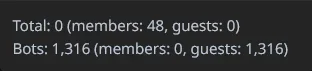
Running 1.3.1 today and I just noticed my member count briefly appeared to be confused about how math works. Showing a total of 0 people online but with 48 members and suspiciously 0 guests:

1781732968966.webp

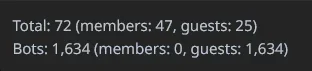
But a few minutes later, it appears to be back to normal:

1781733252607.webp

And not sure if this is related, but the bot guard dashboard is currently returning a 500 error again and threw a "memory size exhausted" server error the first time I tried opening it. I upgraded to 1.3.1 last night from 1.3.0 using the normal upgrade procedure.
 
Running 1.3.1 today and I just noticed my member count briefly appeared to be confused about how math works. Showing a total of 0 people online but with 48 members and suspiciously 0 guests:

Thanks for the report, I will look into it.

And not sure if this is related, but the bot guard dashboard is currently returning a 500 error again and threw a "memory size exhausted" server error the first time I tried opening it. I upgraded to 1.3.1 last night from 1.3.0 using the normal upgrade procedure.

I will look into trying to slim down the data it grabs from the DB so your PHP memory limit isn't exhausted. I am currently pulling data and scaffolding it within PHP, to save the DB server doing extra work, but the trade-off is this outcome. I will find a happy medium.
 
But a few minutes later, it appears to be back to normal:

This is the clue right here. Turns out, during a heavy lot of bots hitting at once - between the query XenForo initially runs to get visitor data, and the query Bot Guard subsequently runs to get its own bot data, the bots appeared. So then Bot Guard over subtracts. Easy fix, and will be out in the next version release.
 
I will look into trying to slim down the data it grabs from the DB so your PHP memory limit isn't exhausted. I am currently pulling data and scaffolding it within PHP, to save the DB server doing extra work, but the trade-off is this outcome. I will find a happy medium.

If you can use iterators/generators then you can go through that data without blowing PHP's memory consumption up.
We had to do this with our image processor ( 512k image records! ).
 
And not sure if this is related, but the bot guard dashboard is currently returning a 500 error again and threw a "memory size exhausted" server error the first time I tried opening it. I upgraded to 1.3.1 last night from 1.3.0 using the normal upgrade procedure.

Can you please DM me with the full error log including stack trace? I have my eye on two possible hotspots, but I don't want to unnecessarily change behaviours / risk introducing other side effects.
 
If you can use iterators/generators then you can go through that data without blowing PHP's memory consumption up.
We had to do this with our image processor ( 512k image records! ).

Thanks for sharing and your suggestion!

The dashboard already uses hourly aggregate snapshots, so it is not meant to scan raw Bot Guard logs on page load. The remaining problem is that some snapshot metrics keep high-cardinality report dimensions in JSON fields, such as route/path groups and exact timing values. Those details are not needed by the public request hot path, but the admin dashboard reads, groups, decodes, sorts, and trims them when building reports. On busy sites or wide date ranges, that can still create a large PHP result set and exhaust memory.

The idea is that I am going to page/aggregate where I can what it currently goes through in PHP code, so that memory limits are not a concerning factor.
 
zeeb0t updated XF Bot Guard with a new update entry:

Minor Release: v1.3.2

XF Bot Guard 1.3.2

Release type:
minor

XF Bot Guard 1.3.2 focuses on lower server load, smarter forum-specific bot detection, and better stability on larger sites. It expands cache-backed reads across more protection hot-paths, adds new Link Chronology and dwell-time behavioural signals, improves dashboard reliability, and adds a new health check for Board URL origin issues.

Faster protection with cheaper hot-path reads

XF Bot Guard already used XenForo’s...

Read the rest of this update entry...
 
Got nginx error after the update to 1.32. With deactivated no error occurs!

Can you please share the error? Either here or in DM. Thank you. The health check support bundle would be great also, if you can get that.
 
Last edited:
After Bot Guard is re-activated and I logged off this screen was displayed

502 Bad Gateway is shown and under the line is nginx written!

If I've reloaded the page with the browser, I back in my forum. And the cycle goes in the next round.

If I do a clean call https://..... of my forum I get this screen, too. So I think Forum isn't reachable...
 
After Bot Guard is re-activated and I logged off this screen was displayed

502 Bad Gateway is shown and under the line is nginx written!

If I've reloaded the page with the browser, I back in my forum. And the cycle goes in the next round.

If I do a clean call https://..... of my forum I get this screen, too. So I think Forum isn't reachable...

Thanks for sending the bundle via DM.

Bot Guard should not itself generate an nginx 502 Bad Gateway page. Its own emergency response would be a 503, and the bundle shows that origin survival mode is disabled, so I need to match the browser error against the nginx/PHP-FPM side.

Could you please send these two things via DM?

  1. The exact URL that showed the 502, plus the exact time it happened, including timezone.
  2. The matching nginx error log and PHP-FPM/PHP error log lines for about 2 minutes around that time.

I only need the relevant lines, especially anything mentioning:

  • upstream
  • PHP Fatal error
  • timeout
  • connection refused
  • connection reset
  • prematurely closed connection
  • PHP-FPM worker crashes or restarts

No need to send the full logs. Feel free to redact anything sensitive, as long as the timestamps, URL/path, status code, and upstream/PHP error details remain visible.
 
After Bot Guard is re-activated and I logged off this screen was displayed

502 Bad Gateway is shown and under the line is nginx written!

If I've reloaded the page with the browser, I back in my forum. And the cycle goes in the next round.

If I do a clean call https://..... of my forum I get this screen, too. So I think Forum isn't reachable...

For those running ModSecurity, please see the note below (which is being added to the documentation upon the next release).

ModSecurity / Comodo CWAF blocks Bot Guard cookies​

XF Bot Guard is generally compatible with ModSecurity-based WAFs, including Comodo/CWAF-style rulesets. Some generic WAF rules can false-positive when they inspect Bot Guard-owned cookie values, especially signed or opaque browser state. The most common known trigger is the Link Chronology fallback cookie zee_bg_lc, which is used when XenForo application cache is unavailable or cannot persist the short-lived chronology state. Because browser cookies are sent with normal forum and admin requests, symptoms can appear on public pages as well as Admin Control Panel pages.

Symptoms can include intermittent frontend errors, logout or clean guest-visit failures, 403, 406, 500 or 502 Bad Gateway responses, errors that stop after clearing site cookies, errors that stop when Link Chronology is disabled, or ModSecurity audit entries mentioning CWAF, OtherApps, REQUEST_COOKIES, REQUEST_HEADERS:Cookie or a zee_bg_* cookie name.

Do not disable ModSecurity globally, do not allow the whole request just because a Bot Guard cookie exists, and do not disable the WAF for the whole forum unless there is no other option. The safer approach is to exclude only Bot Guard-owned cookie values from the relevant WAF inspection target list while continuing to inspect the request URI, query string, POST fields, request body, headers, uploaded files and non-Bot Guard cookies.

For Comodo/CWAF-tagged rulesets, a server administrator can usually add a configure-time target exclusion such as:

# Bot Guard cookie compatibility exclusion for Comodo/CWAF.
# Excludes only Bot Guard-owned cookie values from CWAF inspection.

SecRuleUpdateTargetByTag "CWAF" "!REQUEST_COOKIES:/^zee_bg_(vid|sid|js|vmk|recollect|return|lc|lc_rfo)$/"
If audit logs confirm the relevant rule is tagged OtherApps rather than, or in addition to, CWAF, add the same exclusion for that tag only as needed:

SecRuleUpdateTargetByTag "OtherApps" "!REQUEST_COOKIES:/^zee_bg_(vid|sid|js|vmk|recollect|return|lc|lc_rfo)$/"
For stricter environments, server administrators may instead apply the same target exclusion only to the exact rule IDs shown in the ModSecurity audit log:

# Stricter alternative when the exact offending rule ID is known.

SecRuleUpdateTargetById 123456 "!REQUEST_COOKIES:/^zee_bg_(vid|sid|js|vmk|recollect|return|lc|lc_rfo)$/"
Most false positives should be resolved by excluding REQUEST_COOKIES. If the audit entry confirms the match is against the full Cookie header, such as REQUEST_HEADERS:Cookie, the host may need a broader target exclusion for the relevant tag or rule:

# Last resort only. Prefer REQUEST_COOKIES exclusions where possible.

SecRuleUpdateTargetByTag "CWAF" "!REQUEST_HEADERS:Cookie"
Add configure-time exclusions after the vendor/CWAF rules have been loaded. Place them in server-level or custom ModSecurity configuration, or in the hosting control panel, not in XenForo and usually not in .htaccess. Do not edit vendor rule files directly because vendor updates may overwrite those changes. After changing WAF configuration, reload the web server or WAF service as required, then clear the browser's site cookies for the forum because an old zee_bg_lc cookie may continue to be sent.

If the host cannot add a ModSecurity/CWAF cookie target exclusion, run Bot Guard with Link Chronology disabled: temporarily disable Bot Guard if needed for access, save, disable Link Chronology, save, re-enable Bot Guard, save and clear site cookies. The acceptable final state is Bot Guard enabled with Link Chronology disabled. Bot Guard can continue operating without Link Chronology; it is an additional behavioural signal and should be disabled on servers where ModSecurity/CWAF cannot be tuned to ignore Bot Guard-owned state cookies.

 
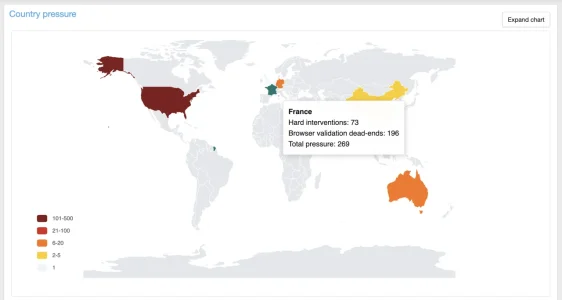
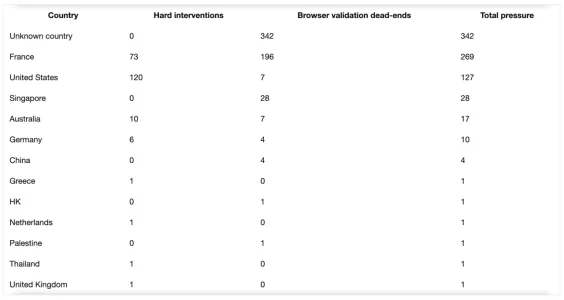
It would be nice to add a graph with countries as well. So we could see from which country we have the most bots.
 
my feature request would be to set the times when the database pruning happens. for me for instance server is rather free past midnight. i know the addon already has a lot of features to ensure that database pruning does not take down the server but this seems like a nice option to have maybe?
 
so ahrefs bots all over the bots page on my board right now. i found the asn (16276) and put it in Forced challenge IPs/CIDRs/ASNs section but that does not seem to do anything and they are still having a free for all buffet? what could i be doing wrong here!
 
Back
Top Bottom