XF Bot Guard

XF Bot Guard 1.4.1

No permission to download
When you check it again, can you please try a hard refresh first? A message should appear on the dashboard explaining this. Whether that message appears or not is the main thing I need to know.
Where would I find it? The dashboard is so huge, hard to find anything specific. Neither the word "hard" nor the word "refresh" shows up in conjunction with a button. ;) Btw until now no life back in there.
 
Sounds good! If you need anything else, let me know.
Last night I did the 3 table truncates and that did help improve, CPU went down from ~25% to ~21% and server was stable.

Claude had found some MyISAM tables that hadn't been converted to InnoDB likely from the past 1.x to 2.x XenForo upgrade. Updating those may have helped also.

I updated to BotGuard 1.3.1 a couple hours ago and see some more improvements, CPU went down to ~15%, similar to before installing Bot Guard and now I see CPU credits trending up.

Thanks for all the fixes and updates. I also re-enabled Contextual link canaries and so far not seeing the previous issue.
 
Finally:It has repaired itself, the dashboard is again populated. Took a couple of hours of waiting. In other words: You typically put out a new release faster than the dashboard takes to recover from the last one. :D:p

Hopefully no more dashboard work in a while. I love looking at the dashboard - I dislike working on it lol
 
Where would I find it? The dashboard is so huge, hard to find anything specific. Neither the word "hard" nor the word "refresh" shows up in conjunction with a button. ;) Btw until now no life back in there.

It would be gone now, since your Dashboard is populated. But I added a new larger panel between the filter and the overview section which advises when the dasboard is "behind" due to snapshots being generated.
 
Last night I did the 3 table truncates and that did help improve, CPU went down from ~25% to ~21% and server was stable.

Claude had found some MyISAM tables that hadn't been converted to InnoDB likely from the past 1.x to 2.x XenForo upgrade. Updating those may have helped also.

I updated to BotGuard 1.3.1 a couple hours ago and see some more improvements, CPU went down to ~15%, similar to before installing Bot Guard and now I see CPU credits trending up.

Thanks for all the fixes and updates. I also re-enabled Contextual link canaries and so far not seeing the previous issue.

That’s great, thanks for the detailed update.

This is a big part of why 1.3.1 removes pre-1.2.9 compatibility support. Keeping those older compatibility paths in place had become a bit of a minefield internally, and some of that defensive handling also meant extra queries in places where they likely were not needed for most installs.

In 1.3.1 I also tightened up a number of queries to better leverage the indexes that were added, along with a few per-session caching improvements that @pegasus had pointed out. Thanks again, @pegasus.

The next release, 1.3.2, will mostly be another hardening/performance release. In particular, I’m looking at making further use of XenForo’s available cache layer, such as Redis or Memcached where configured, in the hot path to reduce ongoing read pressure further where possible.

Glad to hear Contextual link canaries are behaving again as well.
 
Open question: do any of you actually use the test files I’ve started packaging with the releases?

I included them in case anyone wanted to run their own test verification before uploading a release. They’re ignored by XenForo, so there’s no issue there, but they do add extra bloat to the overall package size.

I’m happy to keep shipping them, or exclude them going forward. Just wanted to check what everyone thinks before changing anything.
 
Just quietly… XenForo throwing Cloudflare “challenge everyone” in front of regular users every few page requests is… certainly one approach.

I’m having to tick the Turnstile box so often I’m starting to feel like I’m applying for citizenship just to read a thread.

Feels like they don’t need a bigger CAPTCHA hammer - they need XF Bot Guard. You know, something a bit more “CAPTCHA the bots” and a bit less “CAPTCHA everyone”. 😅

Screenshot 2026-06-17 at 7.50.55 am.webp

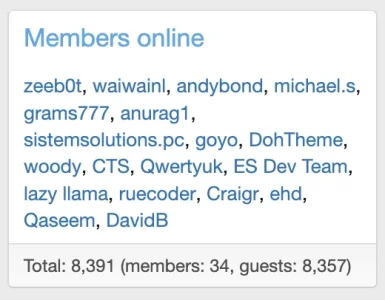
And yet, for all the trouble, they still have loads of bots:

Screenshot 2026-06-17 at 7.55.27 am.webp
 
Hey I noticed there's a "docs" directory on the "uploads" content, is that necessary? I rather not upload that if not.
 
I'm not sure what this last update did, but my site is running smoother than it has in weeks!
 
I'm not sure what this last update did, but my site is running smoother than it has in weeks!

That is great to hear, and honestly, that lines up with what 1.3.1 was intended to do.

This release was mostly under-the-hood improvement work rather than big visible feature changes. A lot of the focus was on making XF Bot Guard lighter, cleaner and less weighed down by older upgrade paths that most current installs no longer need.

In simple terms, 1.3.1 removed some old compatibility work the add-on was still carrying around, cleaned up a few areas that were doing more work than necessary, and improved some of the checks that run regularly in the background.

So while the update may not look hugely different on the surface, it should feel smoother on some sites because XF Bot Guard is doing its job with less unnecessary overhead.

Some of this was originally planned for 1.3.0, but I pushed it back to 1.3.1 so it could be handled more carefully and not mixed in with other changes that needed attention first.

1.3.2 will continue in the same direction. The next step is to make better use of XenForo’s cache where available, so XF Bot Guard can avoid repeating the same work as often during busy periods. That should help make things even lighter again on sites that have caching set up.
 
Hey I noticed there's a "docs" directory on the "uploads" content, is that necessary? I rather not upload that if not.

Yes, please upload the docs directory as part of the add-on files.

XF Bot Guard does not use those files for the actual runtime bot protection, so they are not involved in normal request handling. However, they are still part of the add-on package and XenForo expects them to be present.

If the docs directory is missing, the local documentation link will not work, XenForo’s file health check may report missing files, and some install or upgrade checks may complain (or in some cases, even block) until the expected files are restored.

After the add-on has been installed or upgraded, you can technically remove the docs directory if you really want to, but I would not recommend it due to the complaints XenForo will raise when it conducts file checks. The safest and cleanest option is to upload the package as provided.
 
I'm not sure what this last update did, but my site is running smoother than it has in weeks!

I had a quick look at your install out of curiosity and I believe I’ve found an issue.

In your ACP, please go to:

admin.php?options/groups/basicBoard/#boardUrl

Then check the Board URL setting. It looks like it is currently set to http://... instead of https://....

Because your site itself is loading over HTTPS, the browser is blocking Bot Guard’s JavaScript when XenForo outputs it using the HTTP Board URL. This would be causing the Bot Guard interstitial/collector to fail on your install.

Please update the Board URL to the correct HTTPS version of your site, then let me know and I can verify for you.
 
I put in a .htaccess to deny all.

Fair enough. I did throw in an index.php to prevent directory listing, but did not consider the documentation itself to be a risk, as it is available for download by anyone here.

I can implement password protection over the file itself. I will put it in my backlog for a thing to add in upcoming releases.
 
Fair enough. I did throw in an index.php to prevent directory listing, but did not consider the documentation itself to be a risk, as it is available for download by anyone here.

I can implement password protection over the file itself. I will put it in my backlog for a thing to add in upcoming releases.

Just an update on this - implementing a challenge key feels a bit over the top, more moving parts to manage, that kind of thing. I have decided instead to add the following headers to the HTML doc by default:

HTML:
<meta name="robots" content="noindex,nofollow,noarchive,nosnippet,noimageindex">
<meta name="googlebot" content="noindex,nofollow,noarchive,nosnippet,noimageindex">
<meta name="bingbot" content="noindex,nofollow,noarchive,nosnippet,noimageindex">
<meta name="referrer" content="no-referrer">
 
Coming up in v1.3.2…

This next update is focused on making XF Bot Guard smarter, faster, and harder for bots to game.

A few things on the way:

  • New page-to-page chronology checks
    Bots will no longer be able to jump around your forum from a big pre-known list of URLs without consequence. They’ll be expected to move through the site more like a real person would, by following links from pages they have actually visited.

  • New “time on page” behaviour checks
    Bot Guard will begin learning roughly how long real registered users spend on different types of pages of your forum, then use that as another signal when bot behaviour looks unnaturally fast, slow, or odd.

  • Faster protection on busy forums
    Bot Guard will significantly expand its use of XenForo’s built-in caching where available, so high-traffic pages can be checked more efficiently. This should help reduce load, particularly evident during heavy bot activity.

  • Safer setup checks
    The system will now detect when your forum’s configured board URL does not line up properly with the actual site origin. If something looks wrong, Bot Guard will flag it clearly and the health checks, and before allowing recommended/quick settings to apply.

  • Better documentation privacy
    Shipped HTML documentation will include extra signals telling search engines not to index or store those pages under your domain.
 
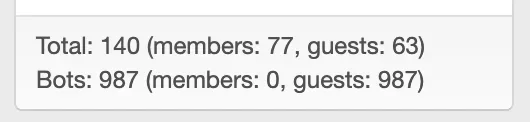
For the first time in a long time, my members now outnumber guests.

The chronology and time on page behaviour checks knocked a couple dozen sophisticated bots right on the head.

Screenshot 2026-06-17 at 8.31.14 pm.webp
 
Back
Top Bottom