XF Bot Guard

XF Bot Guard 1.4.1

No permission to download
Thanks, Claude stands corrected :ROFLMAO: It also suggested sending you:
+-----------------+-------+
| Variable_name | Value |
+-----------------+-------+
| max_connections | 425 |
+-----------------+-------+
+-----------------------------------+-------+
| Variable_name | Value |
+-----------------------------------+-------+
| Aborted_connects | 17 |
| Connection_errors_max_connections | 0 |
| Max_used_connections | 413 |
| Threads_connected | 54 |
| Threads_running | 1 |
+-----------------------------------+-------+
+-------------------------+-----------+
| Variable_name | Value |
+-------------------------+-----------+
| innodb_buffer_pool_size | 805306368 |
+-------------------------+-----------+

And asking "what's the minimum instance spec he'd recommend for a site at your traffic level?"

Before Bot Guard the db size has been ok, average connections would be lower, around 30 or so, avg CPU also lower around 15%. I was considering the move to db.t4g.medium which is twice the cost (3 year commitment) but would give a bit more breathing space.

Just hold one moment on upgrade. I am on the way back to my laptop and I'll run numbers. Its not always just "need more ram" or "need more cpu" specifically. Don't want you to switch to anything inappropriate or over compensated either.
 
Just hold one moment on upgrade. I am on the way back to my laptop and I'll run numbers. Its not always just "need more ram" or "need more cpu" specifically. Don't want you to switch to anything inappropriate or over compensated either.
No worries, any data helps.. My RI expires in about 40 days so no rush.
 
Thanks, Claude stands corrected :ROFLMAO: It also suggested sending you:
+-----------------+-------+
| Variable_name | Value |
+-----------------+-------+
| max_connections | 425 |
+-----------------+-------+
+-----------------------------------+-------+
| Variable_name | Value |
+-----------------------------------+-------+
| Aborted_connects | 17 |
| Connection_errors_max_connections | 0 |
| Max_used_connections | 413 |
| Threads_connected | 54 |
| Threads_running | 1 |
+-----------------------------------+-------+
+-------------------------+-----------+
| Variable_name | Value |
+-------------------------+-----------+
| innodb_buffer_pool_size | 805306368 |
+-------------------------+-----------+

And asking "what's the minimum instance spec he'd recommend for a site at your traffic level?"

Before Bot Guard the db size has been ok, average connections would be lower, around 30 or so, avg CPU also lower around 15%. I was considering the move to db.t4g.medium which is twice the cost (3 year commitment) but would give a bit more breathing space.

Thanks, this gives us a much clearer picture.

I do not think this is a Bot Guard cleanup failure. Cleanup is making progress, and moving XenForo jobs to server-based cron was the right change. The CloudWatch data, though, points very strongly to database capacity pressure.

The current RDS instance is a db.t3.small, which is a small burstable instance with only 2 GB RAM. The database is showing:

  • very low free memory;
  • persistent swap usage;
  • elevated disk queue depth;
  • elevated read/write latency;
  • CPU running above the sustainable baseline often enough that credits are declining;
  • max_used_connections very close to max_connections;
  • only about 768 MiB of InnoDB buffer pool.

In plain English, MySQL is being asked to serve live forum traffic, write Bot Guard event/detail/reason rows, maintain indexes, and prune old rows at the same time, while already short on memory and I/O headroom.

That is why cleanup is slow. It is trying to serve a buffet with a teaspoon.

Moving to db.t3.medium should help, especially because it doubles memory from 2 GB to 4 GB. That may allow a larger InnoDB buffer pool, reduce swap, and reduce disk churn/read latency if the current instance is constantly being forced back to disk. So yes, I do think it is a worthwhile improvement over db.t3.small.

However, I would treat db.t3.medium as a short-term relief step, not the final target. Especially if the bots never give up. It is still a burstable 2 vCPU instance. In the same anecdote, this is more like upgrading from a teaspoon to a tablespoon, not moving to a properly sized kitchen.

Given the current write volume and cleanup backlog, my stronger recommendation would be a non-burstable general-purpose or memory-optimised class, ideally:

  • db.r7g.large / db.r8g.large, if available for your engine and region;
  • otherwise db.r6g.large, db.r7i.large, or db.r6i.large;
  • at minimum, a db.m7g.large, db.m8g.large, or db.m6g.large class.

The reason I lean toward R-class is that this workload is clearly memory-sensitive. More RAM means a much larger InnoDB buffer pool and less reliance on slow disk reads while cleanup and live traffic are competing.

If you do move to db.t3.medium first, I would avoid committing to a long reservation until it has proven itself under this workload. After the resize, I would watch these metrics for 24–48 hours:

  • CPUCreditBalance / surplus credits;
  • FreeableMemory;
  • SwapUsage;
  • DiskQueueDepth;
  • ReadLatency / WriteLatency;
  • DatabaseConnections;
  • Bot Guard health/status, especially “Last cleanup run”.

If swap remains non-trivial, CPU credits keep falling, disk queue depth stays elevated, or cleanup still barely advances, then the instance is still undersized.

Once the instance is resized, it is also worth reviewing the MySQL/RDS parameter group. RDS defaults are generic; they are not tuned specifically for XenForo plus a high-volume Bot Guard audit workload. In particular, the InnoDB buffer pool, max connections, and PHP/web concurrency should be reviewed together so the new resources are actually used well.

That tuning probably cannot rescue the current db.t3.small, but it can make a meaningful difference once the database is on an instance with enough headroom.

 
Thanks, this gives us a much clearer picture.

I do not think this is a Bot Guard cleanup failure. Cleanup is making progress, and moving XenForo jobs to server-based cron was the right change. The CloudWatch data, though, points very strongly to database capacity pressure.

The current RDS instance is a db.t3.small, which is a small burstable instance with only 2 GB RAM. The database is showing:

  • very low free memory;
  • persistent swap usage;
  • elevated disk queue depth;
  • elevated read/write latency;
  • CPU running above the sustainable baseline often enough that credits are declining;
  • max_used_connections very close to max_connections;
  • only about 768 MiB of InnoDB buffer pool.

In plain English, MySQL is being asked to serve live forum traffic, write Bot Guard event/detail/reason rows, maintain indexes, and prune old rows at the same time, while already short on memory and I/O headroom.

That is why cleanup is slow. It is trying to serve a buffet with a teaspoon.

Moving to db.t3.medium should help, especially because it doubles memory from 2 GB to 4 GB. That may allow a larger InnoDB buffer pool, reduce swap, and reduce disk churn/read latency if the current instance is constantly being forced back to disk. So yes, I do think it is a worthwhile improvement over db.t3.small.

However, I would treat db.t3.medium as a short-term relief step, not the final target. Especially if the bots never give up. It is still a burstable 2 vCPU instance. In the same anecdote, this is more like upgrading from a teaspoon to a tablespoon, not moving to a properly sized kitchen.

Given the current write volume and cleanup backlog, my stronger recommendation would be a non-burstable general-purpose or memory-optimised class, ideally:

  • db.r7g.large / db.r8g.large, if available for your engine and region;
  • otherwise db.r6g.large, db.r7i.large, or db.r6i.large;
  • at minimum, a db.m7g.large, db.m8g.large, or db.m6g.large class.

The reason I lean toward R-class is that this workload is clearly memory-sensitive. More RAM means a much larger InnoDB buffer pool and less reliance on slow disk reads while cleanup and live traffic are competing.

If you do move to db.t3.medium first, I would avoid committing to a long reservation until it has proven itself under this workload. After the resize, I would watch these metrics for 24–48 hours:

  • CPUCreditBalance / surplus credits;
  • FreeableMemory;
  • SwapUsage;
  • DiskQueueDepth;
  • ReadLatency / WriteLatency;
  • DatabaseConnections;
  • Bot Guard health/status, especially “Last cleanup run”.

If swap remains non-trivial, CPU credits keep falling, disk queue depth stays elevated, or cleanup still barely advances, then the instance is still undersized.

Once the instance is resized, it is also worth reviewing the MySQL/RDS parameter group. RDS defaults are generic; they are not tuned specifically for XenForo plus a high-volume Bot Guard audit workload. In particular, the InnoDB buffer pool, max connections, and PHP/web concurrency should be reviewed together so the new resources are actually used well.

That tuning probably cannot rescue the current db.t3.small, but it can make a meaningful difference once the database is on an instance with enough headroom.
Thanks for such a detailed response. I'll take this all into consideration, I'll plan to experiment with the larger/different instance types before making a long-term commitment. In the last few days the number of guests has not gone over 1000 so Bot Guard appears to be effective!
 
@azzurro

One practical option, if you do not need to preserve the current Bot Guard raw event history, is to clear the raw Bot Guard log tables directly.

This is less disruptive than uninstalling/reinstalling the add-on because it preserves the add-on configuration and the current Bot Guard state tables. It would remove the multi-million-row raw event backlog that cleanup is currently trying to drain.

Important warning: this permanently deletes the current Bot Guard raw event log/history. The event log will start fresh immediately afterwards. Already generated dashboard snapshots should remain as long as the snapshot tables are not truncated, but raw log views, event details and reason-code filtering for the deleted rows will no longer be available.

If you want to do this, take an RDS snapshot/backup first, then run during a quiet period:

SQL:
TRUNCATE TABLE xf_zee_botguard_event_reason;
TRUNCATE TABLE xf_zee_botguard_event_detail;
TRUNCATE TABLE xf_zee_botguard_event;

Please only truncate those three tables unless you are intentionally trying to reset more Bot Guard state.

Do not truncate these unless you accept losing live/reputation/config/integration state:

SQL:
xf_zee_botguard_visitor
xf_zee_botguard_ip
xf_zee_botguard_session
xf_zee_botguard_fp_ip
xf_zee_botguard_counter
xf_zee_botguard_online_challenge
xf_zee_botguard_edge_ip
xf_zee_botguard_cf_*
xf_zee_botguard_report_snapshot*

After truncating the three raw log tables, Bot Guard will continue writing new events normally. This should remove the current cleanup backlog immediately, but it does not solve the underlying database capacity issue. The CloudWatch graphs still show memory pressure, swap usage, disk queueing and elevated read/write latency on the current db.t3.small.

So my recommendation would be:

  1. Take an RDS snapshot.
  2. If historical Bot Guard event data is not needed, truncate the three raw log tables above.
  3. Keep XenForo jobs on server-based cron.
  4. Resize the RDS instance as soon as practical.
  5. After resizing, monitor CPU credits, free memory, swap, disk queue depth, read/write latency, connections and Bot Guard health/status cleanup summaries.
 
@azzurro

One practical option, if you do not need to preserve the current Bot Guard raw event history, is to clear the raw Bot Guard log tables directly.

This is less disruptive than uninstalling/reinstalling the add-on because it preserves the add-on configuration and the current Bot Guard state tables. It would remove the multi-million-row raw event backlog that cleanup is currently trying to drain.

Important warning: this permanently deletes the current Bot Guard raw event log/history. The event log will start fresh immediately afterwards. Already generated dashboard snapshots should remain as long as the snapshot tables are not truncated, but raw log views, event details and reason-code filtering for the deleted rows will no longer be available.

If you want to do this, take an RDS snapshot/backup first, then run during a quiet period:

SQL:
TRUNCATE TABLE xf_zee_botguard_event_reason;
TRUNCATE TABLE xf_zee_botguard_event_detail;
TRUNCATE TABLE xf_zee_botguard_event;

Please only truncate those three tables unless you are intentionally trying to reset more Bot Guard state.

Do not truncate these unless you accept losing live/reputation/config/integration state:

SQL:
xf_zee_botguard_visitor
xf_zee_botguard_ip
xf_zee_botguard_session
xf_zee_botguard_fp_ip
xf_zee_botguard_counter
xf_zee_botguard_online_challenge
xf_zee_botguard_edge_ip
xf_zee_botguard_cf_*
xf_zee_botguard_report_snapshot*

After truncating the three raw log tables, Bot Guard will continue writing new events normally. This should remove the current cleanup backlog immediately, but it does not solve the underlying database capacity issue. The CloudWatch graphs still show memory pressure, swap usage, disk queueing and elevated read/write latency on the current db.t3.small.

So my recommendation would be:

  1. Take an RDS snapshot.
  2. If historical Bot Guard event data is not needed, truncate the three raw log tables above.
  3. Keep XenForo jobs on server-based cron.
  4. Resize the RDS instance as soon as practical.
  5. After resizing, monitor CPU credits, free memory, swap, disk queue depth, read/write latency, connections and Bot Guard health/status cleanup summaries.
Thanks for the good suggestions! I'll be stepping away for a few hours but will plan for maintenance tonight or tomorrow night (pacific time) where site activity is lower.

I don't think I need too much historical data - mainly just enough to keep recent bots away.
 
Thanks for the good suggestions! I'll be stepping away for a few hours but will plan for maintenance tonight or tomorrow night (pacific time) where site activity is lower.

Sounds good! If you need anything else, let me know.
 
The immediate blunt Bot Guard settings I’d try are:

I've implemented your suggested settings and reenabled Bot Guard, but I noticed this error in the server error log shortly after re-enabling the addon and then again an hour later:

Code:
XF\Db\Exception: XF Bot Guard dashboard snapshot build failed: MySQL query error [1406]: Data too long for column 'metric_key' at row 1

This happened while running v1.2.7 but I've now upgraded to 1.3.0.
 
I've implemented your suggested settings and reenabled Bot Guard, but I noticed this error in the server error log shortly after re-enabling the addon and then again an hour later:

Code:
XF\Db\Exception: XF Bot Guard dashboard snapshot build failed: MySQL query error [1406]: Data too long for column 'metric_key' at row 1

This happened while running v1.2.7 but I've now upgraded to 1.3.0.

Can I clarify if this is an issue on 1.3.0?
 
Can I clarify if this is an issue on 1.3.0?

If it does, I recommend uninstall / install 1.3.0. The upgrade for 1.2.7 may have failed previously. Just make sure to open your options page before hand on a new tab, and copy over any needed customisations into a new options page after reinstall.
 
First time I've seen this happen. I tried to check the bot guard dashboard about an hour ago and it hung for about 10 seconds and then returned a 500 error and logged this error:

Code:
ErrorException: Fatal Error: Allowed memory size of 134217728 bytes exhausted (tried to allocate 20480 bytes)

Request state

array(4) {
  ["url"] => string(31) "/admin.php?bot-guard-dashboard/"
  ["referrer"] => string(37) "https://boards.theforce.net/admin.php"
  ["_GET"] => array(1) {
    ["bot-guard-dashboard/"] => string(0) ""
  }
  ["_POST"] => array(0) {
  }
}

I waited a while and tried to open the dashboard a couple more times but I kept getting 500 errors. No additional server errors were logged though, just the initial one above.

In the options I've had observe-only turned on since the upgrade to 1.3.0, so I turned it off and now the dashboard works again.
 
First time I've seen this happen. I tried to check the bot guard dashboard about an hour ago and it hung for about 10 seconds and then returned a 500 error and logged this error:

Code:
ErrorException: Fatal Error: Allowed memory size of 134217728 bytes exhausted (tried to allocate 20480 bytes)

Request state

array(4) {
  ["url"] => string(31) "/admin.php?bot-guard-dashboard/"
  ["referrer"] => string(37) "https://boards.theforce.net/admin.php"
  ["_GET"] => array(1) {
    ["bot-guard-dashboard/"] => string(0) ""
  }
  ["_POST"] => array(0) {
  }
}

I waited a while and tried to open the dashboard a couple more times but I kept getting 500 errors. No additional server errors were logged though, just the initial one above.

In the options I've had observe-only turned on since the upgrade to 1.3.0, so I turned it off and now the dashboard works again.

Thanks for reporting this. I see the issue and will resolve it in next release.
 
Last edited:
zeeb0t updated XF Bot Guard with a new update entry:

Minor Release: v1.3.1

XF Bot Guard 1.3.1

Important upgrade notes for existing customers:


Direct upgrades to XF Bot Guard 1.3.1 require XF Bot Guard 1.2.9 (1020970) or newer to already be installed. If your site is running an older XF Bot Guard version, upgrade through a bridge release that still contains the older legacy migrations first, confirm that upgrade completes successfully, then install 1.3.1. Customers already on 1.2.9, 1.3.0 or newer can upgrade normally.

Release type:...

Read the rest of this update entry...
 
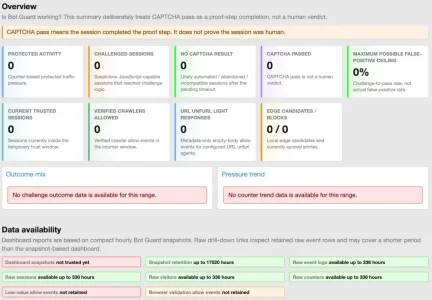
After upgrading from 1.2.9 to 1.3.1 my dashboard is now empty:

View attachment 339945

Before the upgrade it was populated. Health check says everything would be ok. Will check in one or two hours if it repairs itself.

This release bumps the reporting version, so the dashboard stats will need to regenerate.

When you check it again, can you please try a hard refresh first? A message should appear on the dashboard explaining this. Whether that message appears or not is the main thing I need to know.

If the message still does not show, it may be that the add-on needs to be uninstalled and installed again.

Version 2.3.1 removed an old compatibility mode, so it is possible a previous upgrade did not apply properly on your install. I have seen this happen on a few installs so far, especially where some incremental versions may have been skipped, even though the upgrade paths were included in each release.

If that is the case with your install, uninstalling and reinstalling the add-on should fix it permanently.

Just remember to keep a copy of your options open so you can reference them on the fresh option page after install.
 
The stats DO appear, but be patient. It took over 2 hours on both of my forums. (One has Cloudflare, one does not)

The dashboards are both fully populated now.
 
Back
Top Bottom