XF Bot Guard

XF Bot Guard 1.4.1

No permission to download
So not sure it is the same issue. I temporarily moved to a different host low spec server two three days ago and was suddenly destroyed by 500 errors. I moved back and it continued for a day. And has calmed down.

I checked at all places but couldn't find any log explaining the 500 problem. There were also a lot of defaultAjaxError @ core-compiled.js issues.

The defaultAjaxError @ core-compiled.js entries are usually just XenForo telling you that an AJAX request failed. They are rarely the root cause by themselves.

Because this started immediately after a host move and then settled down after moving back, I’d first suspect a hosting/config/resource issue: PHP-FPM limits, MySQL connection limits, missing PHP extensions, file permissions, opcode/cache path issues, bad temp/internal_data permissions, DNS/proxy/cache mismatch, or the server simply running out of memory/workers under normal traffic.

To narrow it down, please check or send:

  1. XenForo Admin CP -> Tools -> Server error log entries from that window.
  2. Web server and PHP-FPM error logs from that window.
  3. MySQL/MariaDB error log from that window.
  4. Access-log examples of the failed requests: URL/path, status code, response size.
  5. Whether the failed requests were mostly normal XenForo AJAX endpoints, /bot-guard/collect, or something else.
  6. Any host graphs for CPU, RAM, swap, disk IO, PHP workers, and MySQL connections.

If the host says there are no logs, ask them specifically to check PHP-FPM worker exhaustion, memory kills/OOM, MySQL “too many connections”, slow queries, and web server upstream timeout errors.

Bot Guard may show symptoms if the server is unhealthy because it runs on public requests, but a generic defaultAjaxError does not identify Bot Guard as the cause. The useful next step is finding which request actually returned the 500 and what PHP/server log line matches it.
 
Last edited:
An inexpensive way to do the information_schema check is as follows:

First, reading the code comments, I see the reason for no caching is concern over existing 1.2.2 or lower installations while uploading the 1.2.3 files, but before pressing upgrade (clicking upgrade temporarily disables an add-on, mooting the concern).

I also see in Setup that part of the 1.2.3 upgrade is permanently making the schema "binary".

So we can do a really simple check. 1.2.3 and earlier do not have an in-database key that specifies the version number, but the version number can still be inferred. 1.2.3 changed XF::options()->zeeBotGuardVisitorRetentionDays to ->zeeBotGuardVisitorRetentionHours. Therefore we can just check if the zeeBotGuardVisitorRetentionHours key exists. If it does, we can assume "binary". If the key does not exist, do the previous behavior of information_schema lookups.

By the way, thanks for this. It was directionally aligned with what I will patch between now and when I remove the jump upgrade support. I am going to use \XF::app()->container('addon.cache')['Zee/BotGuard'] >= 1020370 and assume the binary result is correct.
 
Please run this again in an hour or so, and hopefully we see further reduction.
Latest about 1 hr later:

+--------------+---------------------+---------------------+
| total_events | oldest_event | newest_event |
+--------------+---------------------+---------------------+
| 2524673 | 2026-06-10 22:46:45 | 2026-06-15 07:37:44 |
+--------------+---------------------+---------------------+
+-------------------+
| event_reason_rows |
+-------------------+
| 1907841 |
+-------------------+
+-------------------+
| event_detail_rows |
+-------------------+
| 2524689 |
+-------------------+
 
@zeeb0t : Maybe a naive question, but could it be beneficial to write the logs to a different, dedicated database, different from the one used by XF? As there are a lot of writing operations and data accumulates quickly it could maybe profit from that in terms of db performance and db size and the idea of a dedicated log host is not uncommon.
 
Latest about 1 hr later:

+--------------+---------------------+---------------------+
| total_events | oldest_event | newest_event |
+--------------+---------------------+---------------------+
| 2524673 | 2026-06-10 22:46:45 | 2026-06-15 07:37:44 |
+--------------+---------------------+---------------------+
+-------------------+
| event_reason_rows |
+-------------------+
| 1907841 |
+-------------------+
+-------------------+
| event_detail_rows |
+-------------------+
| 2524689 |
+-------------------+

Well, good news is - it will eventually catch up. But, it will take a long while.

Can you check Admin CP > Setup > Options > System and performance > Job run trigger?

If it is set to “Activity based trigger”, cleanup is being driven by web requests. For this backlog, I’d strongly recommend using the server-based trigger instead and adding the XenForo cron command to crontab:

php /path/to/xf/cmd.php xf:run-jobs

XenForo recommends running that once per minute when using server-based jobs.

If it is on the “Activity based trigger”, the timeout you mentioned earlier may be cutting the cron well short of finishing what it could do, if it were otherwise invoked using the crontab approach.
 
Maybe a naive question, but could it be beneficial to write the logs to a different, dedicated database, different from the one used by XF? As there are a lot of writing operations and data accumulates quickly it could maybe profit from that in terms of db performance and db size and the idea of a dedicated log host is not uncommon.

That is a fair question.

XF Bot Guard has already had a major read-path audit which reduced per-page database reads from 60+ to around 10 or fewer in most cases, and this will be in the next release. The remaining pressure point is writes, and those are harder to remove wholesale.

The reason is that most live writes are not just passive logs. They are part of the next-hit threat model. A request may update counters, visitor/session/IP reputation, challenge/CAPTCHA state, fingerprint/IP relationships or enforcement candidates that can affect later requests. In other words, the current request becomes evidence for the next one.

Supplementary artifact/event-detail data can already be written immediately or buffered depending on configuration, and that area will continue to be audited. Where data can safely be shed, sampled, buffered, aggregated or retained for less time, I will keep doing that.

But moving the data to a separate database is not automatically a performance win. If it is just another database/schema on the same MySQL server, it still uses the same server resources. If it is remote, it may offload storage but adds network latency and another failure point to page rendering. For many shared-hosting or smaller VPS installs, that could easily make things worse rather than better.

So the safer direction is not “move everything elsewhere”, but “keep live protection state local and authoritative, keep writes as lean as possible, buffer non-critical detail, and use sensible retention/snapshotting so the tables do not grow forever.”

My commitment is to keep revisiting this. As the add-on matures, I’ll continue looking for places where write pressure can be reduced without weakening the protection model.

A possible future option may be a much lower-write mode where, if XenForo cache is configured and suitable, more short-lived decisioning is handled through the cache layer and less is written as full audit data. The trade-off is visibility. That kind of mode would likely reduce reporting down to counters and summaries rather than detailed evidence trails. That may suit some sites, but for now I think most admins still want to see why XF Bot Guard made the decisions it made.
 
Well, good news is - it will eventually catch up. But, it will take a long while.

Can you check Admin CP > Setup > Options > System and performance > Job run trigger?

If it is set to “Activity based trigger”, cleanup is being driven by web requests. For this backlog, I’d strongly recommend using the server-based trigger instead and adding the XenForo cron command to crontab:

php /path/to/xf/cmd.php xf:run-jobs

XenForo recommends running that once per minute when using server-based jobs.

If it is on the “Activity based trigger”, the timeout you mentioned earlier may be cutting the cron well short of finishing what it could do, if it were otherwise invoked using the crontab approach.
Thanks, I just switched to server-based trigger and set up the cron, will monitor.

Current results from the query:
+--------------+---------------------+---------------------+
| total_events | oldest_event | newest_event |
+--------------+---------------------+---------------------+
| 2548271 | 2026-06-11 00:59:18 | 2026-06-15 14:24:58 |
+--------------+---------------------+---------------------+
+-------------------+
| event_reason_rows |
+-------------------+
| 1913596 |
+-------------------+
+-------------------+
| event_detail_rows |
+-------------------+
| 2547299 |
+-------------------+

On a separate note, a couple reports from users on an issue I haven't seen before. Looking to see what may be causing but the main changes on the site have been the Bot Guard updates in the last few days.

---
Guest user 1 reported:
I've tried accessing this site on both mobile and computers in various places and browsers, and for the past couple of days all the forum posts are now displaying as one letter per line -
L
i
k
e
T
h
i
s

Is it just me? How do I get it back to normal?
---
A registered user responded:

It’s not just you. I was thinking it was just me, until I noticed it happening on separate devices. It doesn’t happen too often on my Safari browser, but it happens frequently on Microsoft Edge. I downloaded the forum’s app on my laptop, but it still happened there too.

What seems to fix it (temporarily) on MS Edge is to reduce the browser window from full size to partial size.


Edit:

I was able to replicate the display issue using Brave Incognito and also Edge.


After some testing, I found that disabling:

Contextual link canaries

Which I turned on recently fixed the issue. Will leave that disabled for now.
 
Last edited:
Thanks, I just switched to server-based trigger and set up the cron, will monitor.

Current results from the query:
+--------------+---------------------+---------------------+
| total_events | oldest_event | newest_event |
+--------------+---------------------+---------------------+
| 2548271 | 2026-06-11 00:59:18 | 2026-06-15 14:24:58 |
+--------------+---------------------+---------------------+
+-------------------+
| event_reason_rows |
+-------------------+
| 1913596 |
+-------------------+
+-------------------+
| event_detail_rows |
+-------------------+
| 2547299 |
+-------------------+

On a separate note, a couple reports from users on an issue I haven't seen before. Looking to see what may be causing but the main changes on the site have been the Bot Guard updates in the last few days.

---
Guest user 1 reported:
I've tried accessing this site on both mobile and computers in various places and browsers, and for the past couple of days all the forum posts are now displaying as one letter per line -
L
i
k
e
T
h
i
s

Is it just me? How do I get it back to normal?
---
A registered user responded:

It’s not just you. I was thinking it was just me, until I noticed it happening on separate devices. It doesn’t happen too often on my Safari browser, but it happens frequently on Microsoft Edge. I downloaded the forum’s app on my laptop, but it still happened there too.

What seems to fix it (temporarily) on MS Edge is to reduce the browser window from full size to partial size.


Edit:

I was able to replicate the display issue using Brave Incognito and also Edge.


After some testing, I found that disabling:

Contextual link canaries

Which I turned on recently fixed the issue. Will leave that disabled for now.

Thanks for the report. I have not been able to reproduce this on my end. Are you running a custom theme? Meanwhile I am investigating possible causes.

Also, is there any meaningful jump backward in row count now?

Thanks!
 
How is it going for you? If you need any assistance, let me know :)

A little better. They're definitely getting the challenge now but my site is still slow. I'm on a shared box so I'd have to venture a guess other sites are getting inundated which is still hitting us.
 
A little better. They're definitely getting the challenge now but my site is still slow. I'm on a shared box so I'd have to venture a guess other sites are getting inundated which is still hitting us.

Give it some time, the bots typically begin to slow it down as they do not queue retries or new scrape targets as the prior ones failed. Either way, sounds like they aren't getting what they want.

p.s., a new version coming out soon will help with speed somewhat due to reduced queries for Bot Guard.
 
Thanks for the report. I have not been able to reproduce this on my end. Are you running a custom theme? Meanwhile I am investigating possible causes.

Also, is there any meaningful jump backward in row count now?

Thanks!
Theme is pretty standard with some style changes. I thought maybe a conflict with another add-on but just speculation.

Claude summary on row count:

On row count — no meaningful jump backward. Since my last report (~6h45m ago):
  • total_events: 2,548,271 → 2,672,587 (+124,316, still growing)
  • oldest event: 2026-06-11 00:59:18 → 2026-06-11 02:23:55 (oldest advanced only 84 minutes in 6h45m real time)
  • event_detail_rows: 2,672,728 (roughly matching events)
Pruning is clearing about 12 minutes of backlog per real hour — far short of keeping pace with incoming growth. The oldest record is still ~4.5 days old vs the target 24-hour retention.
 
Theme is pretty standard with some style changes. I thought maybe a conflict with another add-on but just speculation.

Claude summary on row count:

On row count — no meaningful jump backward. Since my last report (~6h45m ago):
  • total_events: 2,548,271 → 2,672,587 (+124,316, still growing)
  • oldest event: 2026-06-11 00:59:18 → 2026-06-11 02:23:55 (oldest advanced only 84 minutes in 6h45m real time)
  • event_detail_rows: 2,672,728 (roughly matching events)
Pruning is clearing about 12 minutes of backlog per real hour — far short of keeping pace with incoming growth. The oldest record is still ~4.5 days old vs the target 24-hour retention.

Its not short of keeping pace, otherwise the data would be growing - not slowly reducing.

I say that as earlier results showed that. So it is probably fluctuating based on your daily traffic trends.

That said, its not where we need it. I will review the process again, but I am wondering if your DB server is being pushed to its resource limit - no gas left in the tank, so to speak. Do you have resource usage data for that? Eg. Cpu, load, ram, etc
 
Its not short of keeping pace, otherwise the data would be growing - not slowly reducing.

I say that as earlier results showed that. So it is probably fluctuating based on your daily traffic trends.

That said, its not where we need it. I will review the process again, but I am wondering if your DB server is being pushed to its resource limit - no gas left in the tank, so to speak. Do you have resource usage data for that? Eg. Cpu, load, ram, etc
Resources on RDS db.t3.small (2 vCPU burstable, 2GB RAM, 20% CPU baseline), currently running ~24% CPU with credits slowly declining since around the install of Bot Guard. The reserved instance is expiring in about 40 days so I was considering for this and general db performance improvements move to a larger instance with 4GB.

Currently:
=== MySQL connections ===
+----------------------+-------+
| Variable_name | Value |
+----------------------+-------+
| Max_used_connections | 413 |
| Threads_connected | 53 |
| Threads_running | 1 |
+----------------------+-------+
 
Resources on RDS db.t3.small (2 vCPU burstable, 2GB RAM, 20% CPU baseline), currently running ~24% CPU with credits slowly declining since around the install of Bot Guard. The reserved instance is expiring in about 40 days so I was considering for this and general db performance improvements move to a larger instance with 4GB.

Currently:
=== MySQL connections ===
+----------------------+-------+
| Variable_name | Value |
+----------------------+-------+
| Max_used_connections | 413 |
| Threads_connected | 53 |
| Threads_running | 1 |
+----------------------+-------+

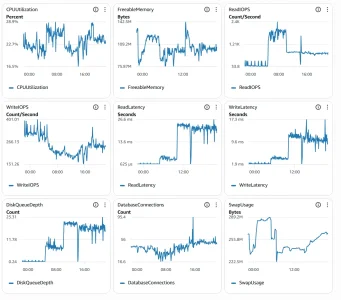
From RDS Cloudwatch, can you please share:
  • CPUUtilization
  • FreeableMemory
  • ReadIOPS, WriteIOPS
  • ReadLatency, WriteLatency
  • DiskQueueDepth
  • FreeStorageSpace
  • SwapUsage
 
Last edited:
Currently seeing some load issues on the site, possibly related to the cron changes. Claude:
  1. This orphan-cleanup DELETE is running repeatedly and takes 100-200+ seconds every time. With xf:run-jobs firing every minute, you may be getting overlapping instances during peak load.
  2. The query is scanning the full 2.6M-row xf_zee_botguard_event_detail table on every run to find orphans (LEFT JOIN WHERE e.event_id IS NULL). Check whether event_id has an index on that table:

    +------------------------------+------------+----------+--------------+-------------+-----------+-------------+----------+--------+------+------------+---------+---------------+---------+
    | Table | Non_unique | Key_name | Seq_in_index | Column_name | Collation | Cardinality | Sub_part | Packed | Null | Index_type | Comment | Index_comment | Ignored |
    +------------------------------+------------+----------+--------------+-------------+-----------+-------------+----------+--------+------+------------+---------+---------------+---------+
    | xf_zee_botguard_event_detail | 0 | PRIMARY | 1 | event_id | A | 2501883 | NULL | NULL | | BTREE | | | NO |
    +------------------------------+------------+----------+--------------+-------------+-----------+-------------+----------+--------+------+------------+---------+---------------+---------+

If there's no index on event_id in xf_zee_botguard_event_detail, that's the core of the problem — the developer should add one. Even with an index it's a complex join, but an unindexed full table scan on 2.6M rows at this frequency will always be expensive on a db.t3.small.

---
RDS cloudwatch over 1 day:
rds_1d_2.webp
 
Last edited:
Currently seeing some load issues on the site, possibly related to the cron changes. Claude:
  1. This orphan-cleanup DELETE is running repeatedly and takes 100-200+ seconds every time. With xf:run-jobs firing every minute, you may be getting overlapping instances during peak load.
  2. The query is scanning the full 2.6M-row xf_zee_botguard_event_detail table on every run to find orphans (LEFT JOIN WHERE e.event_id IS NULL). Check whether event_id has an index on that table:

    +------------------------------+------------+----------+--------------+-------------+-----------+-------------+----------+--------+------+------------+---------+---------------+---------+
    | Table | Non_unique | Key_name | Seq_in_index | Column_name | Collation | Cardinality | Sub_part | Packed | Null | Index_type | Comment | Index_comment | Ignored |
    +------------------------------+------------+----------+--------------+-------------+-----------+-------------+----------+--------+------+------------+---------+---------------+---------+
    | xf_zee_botguard_event_detail | 0 | PRIMARY | 1 | event_id | A | 2501883 | NULL | NULL | | BTREE | | | NO |
    +------------------------------+------------+----------+--------------+-------------+-----------+-------------+----------+--------+------+------------+---------+---------------+---------+

If there's no index on event_id in xf_zee_botguard_event_detail, that's the core of the problem — the developer should add one. Even with an index it's a complex join, but an unindexed full table scan on 2.6M rows at this frequency will always be expensive on a db.t3.small.

---
RDS cloudwatch over 1 day:
View attachment 339921

The job runs a lock file, so they can't double-up or overlap. The table also uses indexes appropriately. Claudes assumptions are probably being made without a copy of the code? Or it missed it. Anyway: one thing is becoming clearer - it seems the small instance on AWS is running out of gas. To he honest - the max connections especially, and current connections even, is a lot of work for a small sized instance.
 
Currently seeing some load issues on the site, possibly related to the cron changes. Claude:
  1. This orphan-cleanup DELETE is running repeatedly and takes 100-200+ seconds every time. With xf:run-jobs firing every minute, you may be getting overlapping instances during peak load.
  2. The query is scanning the full 2.6M-row xf_zee_botguard_event_detail table on every run to find orphans (LEFT JOIN WHERE e.event_id IS NULL). Check whether event_id has an index on that table:

    +------------------------------+------------+----------+--------------+-------------+-----------+-------------+----------+--------+------+------------+---------+---------------+---------+
    | Table | Non_unique | Key_name | Seq_in_index | Column_name | Collation | Cardinality | Sub_part | Packed | Null | Index_type | Comment | Index_comment | Ignored |
    +------------------------------+------------+----------+--------------+-------------+-----------+-------------+----------+--------+------+------------+---------+---------------+---------+
    | xf_zee_botguard_event_detail | 0 | PRIMARY | 1 | event_id | A | 2501883 | NULL | NULL | | BTREE | | | NO |
    +------------------------------+------------+----------+--------------+-------------+-----------+-------------+----------+--------+------+------------+---------+---------------+---------+

If there's no index on event_id in xf_zee_botguard_event_detail, that's the core of the problem — the developer should add one. Even with an index it's a complex join, but an unindexed full table scan on 2.6M rows at this frequency will always be expensive on a db.t3.small.

---
RDS cloudwatch over 1 day:
View attachment 339922

I'll write back shortly with a recommendation.
 
Thanks, Claude stands corrected :ROFLMAO: It also suggested sending you:
+-----------------+-------+
| Variable_name | Value |
+-----------------+-------+
| max_connections | 425 |
+-----------------+-------+
+-----------------------------------+-------+
| Variable_name | Value |
+-----------------------------------+-------+
| Aborted_connects | 17 |
| Connection_errors_max_connections | 0 |
| Max_used_connections | 413 |
| Threads_connected | 54 |
| Threads_running | 1 |
+-----------------------------------+-------+
+-------------------------+-----------+
| Variable_name | Value |
+-------------------------+-----------+
| innodb_buffer_pool_size | 805306368 |
+-------------------------+-----------+

And asking "what's the minimum instance spec he'd recommend for a site at your traffic level?"

Before Bot Guard the db size has been ok, average connections would be lower, around 30 or so, avg CPU also lower around 15%. I was considering the move to db.t4g.medium which is twice the cost (3 year commitment) but would give a bit more breathing space.
 
Back
Top Bottom