XF Bot Guard

XF Bot Guard 1.4.1

No permission to download
Thanks for the reply.

I'm not questioning whether Googlebot may request /bot-guard/collect – I understand that it can.

My concern is that Google Search Console classifies the responses as Server Errors (5XX) and marks the site's Host Status as unhealthy because of them.

If /bot-guard/collect intentionally returns HTTP 500 for non-AJAX or invalid requests, wouldn't that be interpreted by crawlers as an actual server failure? Wouldn't a 400, 403, 405 or 204 response be more appropriate instead?

I'm simply trying to understand whether the HTTP status code itself could be causing the Search Console warnings.
 
Hello, "completely wrecked SEO" is perhaps a bit of an over-statement... Have you validated this? Or are you guessing?
I'm not guessing.

Since installing XF Bot Guard:
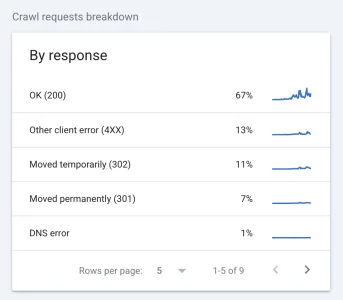
  • Google Crawl Stats show a dramatic spike in crawl activity.
  • Server connectivity errors have increased dramatically.
  • The majority of the reported errors point to /bot-guard/collect.
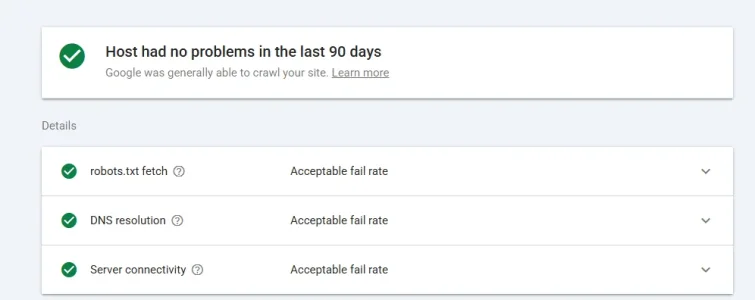
  • At the same time, Search Console reports the site's Host Status as unhealthy.
I'm not saying this proves XF Bot Guard is the cause of all SEO changes. I'm saying there is a very clear correlation that started immediately after installing the add-on, and Search Console is specifically identifying the Bot Guard collector endpoint.
 
I'm not guessing.

Since installing XF Bot Guard:
  • Google Crawl Stats show a dramatic spike in crawl activity.
  • Server connectivity errors have increased dramatically.
  • The majority of the reported errors point to /bot-guard/collect.
  • At the same time, Search Console reports the site's Host Status as unhealthy.
I'm not saying this proves XF Bot Guard is the cause of all SEO changes. I'm saying there is a very clear correlation that started immediately after installing the add-on, and Search Console is specifically identifying the Bot Guard collector endpoint.

I am asking, are you guessing that this means your "SEO is wrecked" - since it is a warning for a collect URL which is not the URLs your content is published on. If you were suddenly delisted or suddenly had a huge drop in Google referral traffic, maybe I'd understand. There is a difference between reporting Googlebot treating this AJAX URL as problematic when it tries to crawl it (expected) vs. "SEO is wrecked".

Also, you were messaging me over the weekend and today I had to work and had a fire incident to attend to as a first responder. I am just saying, it's a free add-on and because I didn't give you some reply between Sunday and Monday afternoon (my local time) you are on here trying to warn everyone away?

Seems a bit unfair TBH.
 
Fair enough, let's put the SEO discussion aside for a moment.

My primary concern is the technical issue.

Google Search Console is reporting a high Server Connectivity failure rate and repeatedly identifies /bot-guard/collect as the affected endpoint.

Regardless of whether this ultimately affects rankings, is that expected behaviour?

If yes, can you explain why Search Console reports it as a server connectivity problem?

If no, are you willing to investigate whether Bot Guard is contributing to these reports?
 
I'm not guessing.

Since installing XF Bot Guard:
  • Google Crawl Stats show a dramatic spike in crawl activity.
  • Server connectivity errors have increased dramatically.
  • The majority of the reported errors point to /bot-guard/collect.
  • At the same time, Search Console reports the site's Host Status as unhealthy.
I'm not saying this proves XF Bot Guard is the cause of all SEO changes. I'm saying there is a very clear correlation that started immediately after installing the add-on, and Search Console is specifically identifying the Bot Guard collector endpoint.

Now, on the topic of the actual issue - Bot Guard should be returning a 405 rather than 5xx. So this is something we could try to reproduce on your forum. As I understand, you are a XenForo cloud customer. Please go back into DM and send me your support bundle and screenshots from the search console, and I will do what I can to help diagnose from my end.
 
Thanks Anthony.

That's exactly what I was trying to determine. If it should return 405 rather than 5XX, then something definitely isn't behaving as expected on my installation.

I'll send you the support bundle and all the Search Console screenshots via DM.
 
Thanks Anthony.

That's exactly what I was trying to determine. If it should return 405 rather than 5XX, then something definitely isn't behaving as expected on my installation.

I'll send you the support bundle and all the Search Console screenshots via DM.

Thank you
 
Thanks Anthony.

That's exactly what I was trying to determine. If it should return 405 rather than 5XX, then something definitely isn't behaving as expected on my installation.

I'll send you the support bundle and all the Search Console screenshots via DM.

Btw, cursory glance says it is sending the 405, not a 5xx.

You can check by visiting /bot-guard/collect on your forum, I checked yours and my own, it is still sending 405 if not being executed as a POST/AJAX request. So, Google bot is doing something weird. Might be hard to diagnose as a XenForo cloud customer, but I will do what I can.

From your site (visiting it directly to create the expected bad response):

Screenshot 2026-08-03 at 4.53.26 pm.webp
 
I understand that manually requesting the endpoint returns 405, and I see the same in my browser. My concern is that Google Search Console consistently reports /bot-guard/collect as 5XX over several consecutive days, so something appears to behave differently when Google crawls it.
 
I understand that manually requesting the endpoint returns 405, and I see the same in my browser. My concern is that Google Search Console consistently reports /bot-guard/collect as 5XX over several consecutive days, so something appears to behave differently when Google crawls it.

Ok. Let's continue in DM - as this may be environment specific to Xenforo cloud or their cloudflare setup... either way, I have sent you details of what we can ask them. Because application-side, it is looking correct.
 
I understand that manually requesting the endpoint returns 405, and I see the same in my browser. My concern is that Google Search Console consistently reports /bot-guard/collect as 5XX over several consecutive days, so something appears to behave differently when Google crawls it.
Well, obviously this is Google, doing Google things and creating Google problems. Maybe/possibly related or caused by XF Cloud specifics. But with all respect: This has come a long way from your very bold statement:

I can only advise everyone to be cautious with this add-on. It has completely wrecked my SEO.
when in fact you see totally expectable, foreseeable and documented errors that are simply normal due to how bot detection works. To agitate in the way you did against a developer who provided you with a free (!) add on, released countless versions, responds and fixes bugs in no time almost around the clock and provides an amount of support for free that has yet to be seen with any other add on developer (including those of paid add ons) while you seem to expect free problem solving within minutes on a weekend for a free add on seems a bit over the top. Quite a bit.

The more as in fact this does not seem to have impacted your actual Google ranking yet (at least you did not answer the question if there was a drop in ranking or visits via Google), until now no one else complained facing this issue and it seems that it is not a general issue anyway.

So once more a big shootout and thank you to @zeeb0t for his work and all the time he invests and the tremendous support he delivers. Given situations like this I can totally understand if someone does rather not release an add on publicly, let alone for free.

Other than that, on a more general basis: Don't make you dependent from Google. It is Googles job to properly index pages and it is their deepest interest. They should be able to deal with whatever a website has to offer instead of you trying to serve Google with all their weirdnesses.

The more as Google search is losing relevance through AI anyway constantly and - as a high percentage of webpages have integrated some protection against bots and scrapers - Google has to learn to deal with that anyway if they want to survive. The days of arrogance where Google could solely dictate how your website has to work and bluntly ignoring all given exclusions from indexing and then punishing you for it are coming to an end, thankfully. So I would recommend to stay a bit more grounded instead of becoming a drama queen just b/c Google do not get their job done and expecting s/o else to fix that for you for free and even falsely damaging his reputation.
 
when in fact you see totally expectable, foreseeable and documented errors that are simply normal due to how bot detection works.

Appreciate your defence of me. Thank you.

In defence of fionix, I am sure fionix is likely just anxious about seeing the errors. It is easy to arrive at "Bot Guard must be responsible because I recently installed it".

However, the hosting environment and Cloudflare setups could easily just as much be to blame - in this case, I have a feeling it may be.

For future reference for all - if you are concerned, disable Bot Guard and then await my reply. I try to be responsive. But sometimes, life happens, and I may not reply 24/7... weekends in particular, as a parent, I try to give my kiddos my time.

p.s.,

My own search console also does not report some large volume of 5xx. That's why I do believe it is not a Bot Guard fault exactly. I have been running Bot Guard for some time, obviously. The 4xx and 302 is all expected stuff. No volume of 5xx.

It's looking more and more like a host-specific issue. As I understand, a support request with XenForo cloud is now submitted and we will see if it creates some further clarity around with XenForo cloud, it's Cloudflare setup, or maybe some host-specific thing is doing - because it does not appear to be an issue outside of this, so far as I am aware.

Also, this is the last I will publicly discuss the issue, until it is resolved. The reason is, even though I believe this is not a Bot Guard application/add-on root-cause, it was pretty frankly labeled an SEO destroyer of worlds, unfairly, I believe - so I have this feeling like I have to defend my work. But, I have said my piece now, and will update the thread further only if there is anything pertinent to share.

Here is my search console - I have my own server (cPanel/WHM) and Cloudflare - that I set up myself.


Screenshot 2026-08-03 at 6.39.17 pm.webp
 
Last edited:
Just bumping this question back into the conversation.

My forum is currently under a major bot attack. I've installed Cloudfare. And that knocked it down A BIT when I have activated the "I'm under attack" mode. Of course, in that mode my regular users are challenged every 15 minutes to verify they're human. A bit of an inconvenience. If I turn that "under attack" mode off, the number of "guests" (bots) shoots right back up.

And Bot Guard add-on seems to be helping, too, by successfully challenging the bots. . But I have not been able to sync the two implementations via the Cloudfare Edge Enforcement. Whenever I try to add the Cloudflare API token, it just refreshes the page and fails to store the token.

I am unable to store a Cloudflare API Token. I've tried it in Firefox and Edge browsers. It simply will not store the API Token.

Help, please.

Thanks!
 
Just bumping this question back into the conversation.

My forum is currently under a major bot attack. I've installed Cloudfare. And that knocked it down A BIT when I have activated the "I'm under attack" mode. Of course, in that mode my regular users are challenged every 15 minutes to verify they're human. A bit of an inconvenience. If I turn that "under attack" mode off, the number of "guests" (bots) shoots right back up.

And Bot Guard add-on seems to be helping, too, by successfully challenging the bots. . But I have not been able to sync the two implementations via the Cloudfare Edge Enforcement. Whenever I try to add the Cloudflare API token, it just refreshes the page and fails to store the token.


Thanks!

Hey there, please send me a DM with the support bundle (available from the health check page) and I will see if it provides a clue around why it won't save :)
 
Appreciate your defence of me. Thank you.

In defence of fionix, I am sure fionix is likely just anxious about seeing the errors. It is easy to arrive at "Bot Guard must be responsible because I recently installed it".

However, the hosting environment and Cloudflare setups could easily just as much be to blame - in this case, I have a feeling it may be.

For future reference for all - if you are concerned, disable Bot Guard and then await my reply. I try to be responsive. But sometimes, life happens, and I may not reply 24/7... weekends in particular, as a parent, I try to give my kiddos my time.

p.s.,

My own search console also does not report some large volume of 5xx. That's why I do believe it is not a Bot Guard fault exactly. I have been running Bot Guard for some time, obviously. The 4xx and 302 is all expected stuff. No volume of 5xx.

It's looking more and more like a host-specific issue. As I understand, a support request with XenForo cloud is now submitted and we will see if it creates some further clarity around with XenForo cloud, it's Cloudflare setup, or maybe some host-specific thing is doing - because it does not appear to be an issue outside of this, so far as I am aware.

Also, this is the last I will publicly discuss the issue, until it is resolved. The reason is, even though I believe this is not a Bot Guard application/add-on root-cause, it was pretty frankly labeled an SEO destroyer of worlds, unfairly, I believe - so I have this feeling like I have to defend my work. But, I have said my piece now, and will update the thread further only if there is anything pertinent to share.

Here is my search console - I have my own server (cPanel/WHM) and Cloudflare - that I set up myself.


View attachment 342195

No SEO issues here.
 
Did you check GWT and HOST STATUS as well as the error messages there ? or don't you use Google Webmaster Tools?

I use Search Console, and as I already shared, this is not a problem that is evident in any report provided to me prior to yours. My own Search Console does not indicate any Bot Guard-related crawl issue either.

I also replied to your DM, but as a follow-up here for others:

fionix provided the additional log analysis I requested. The important finding is that his origin logs show 0 HTTP 5XX responses for /bot-guard/collect.

They do show a large number of HTTP 429 responses. Google can treat repeated 429 responses as an overload/rate-limit signal, similar to 5XX/503 responses for crawl-rate and host-availability purposes, so those responses are absolutely worth investigating.

However:

This does not appear to be a Bot Guard collector response.

The Bot Guard collector endpoint does not intentionally return HTTP 429. Valid collector submissions return 200, invalid collector submissions generally return 400, direct wrong-method requests return 405, and the rare hash-unavailable failure path would return 503 (of which there were none).

So the next question is where those 429 responses are being generated: XenForo Cloud, the web-server/proxy layer, Cloudflare, Precursor/Bot Management/rate limiting, or some other platform rule.

Given that this has not been reported on non-XenForo Cloud installs, and my own Search Console does not show the issue, this currently looks like an environment/platform-specific interaction rather than Bot Guard itself returning server errors.

That does not mean I am dismissing the report. I am still looking at whether Bot Guard can reduce unnecessary collector activity for already verified search crawlers. But based on the logs provided so far, the immediate issue appears to be that something in the hosting/Cloudflare path is returning 429s for /bot-guard/collect (on his environment, not on everybodies), not that Bot Guard is generating 5XX responses.

And that something may well be specific to fionix's own configuration of Cloudflare, or something XenForo cloud has configured. As I have no access to be able to determine this myself, it is not really something I can help further on - aside from considering the product change mentioned before.

This however treats a symptom, not the cause. So it remains: Bot Guard does not appear at fault, the prior claim it was responsible for SEO issues is essentially disproven.

fionix - respectfully - please disable Bot Guard in the meantime if you are concerned. Whatever the root cause is, will likely go away, if it is even still present. Again, respectfully, the add-on is free, it seems specific to your hosting arrangements, and perhaps in a new version or two I will introduce a change that treats the symptom you experience as it seems difficult without access to be able to do much more than that from my end at this present point in time.
 
Last edited:
Back
Top Bottom