
OK. Thank you
You're welcome!


OK. Thank you

THANK YOUYour rule shouldn't really match anything on your end, so you can remove it. It was directed toward myself.
I checked the Cloudflare rule, and this is my fault. It was working to skip all rules etc. but I had matched on the XF-Bot-Guard user agent from prior to the latest release, which changed the user-agent value. Doh!
I just updated the rule and all requests are now serving 200 responses again. All installs will automatically repair / catch up... there will be nothing more to do but give it a couple hours
Still ok to run these truncations after switching to light-db?For those enabling Light-DB on existing installations - you may wish to safely truncate the following tables to immediately reclaim data storage used by normal DB mode that are not populated in Light-DB mode.
SQL:TRUNCATE TABLE xf_zee_botguard_event_reason; TRUNCATE TABLE xf_zee_botguard_event_detail; TRUNCATE TABLE xf_zee_botguard_event; TRUNCATE TABLE xf_zee_botguard_counter; TRUNCATE TABLE xf_zee_botguard_fp_ip; TRUNCATE TABLE xf_zee_botguard_ip; TRUNCATE TABLE xf_zee_botguard_session; TRUNCATE TABLE xf_zee_botguard_visitor;
THANK YOU
For me it is working now as well. Great add-on.
https://xenforo.com/community/resources/xf-bot-guard.10508/rate
Still ok to run these truncations after switching to light-db?

XF\Db\Exception: MySQL query error [1264]: Out of range value for column 'reputation_score' at row 1 src/XF/Db/AbstractStatement.php:230
Generated by: Unknown account Jul 23, 2026 at 12:24 PM
Stack trace
UPDATE xf_zee_botguard_visitor SET captcha_fail_count = captcha_fail_count + 1, reputation_score = reputation_score + 20, last_decision = 'fail' WHERE visitor_hash = ?
------------

#0 src/XF/Db/Mysqli/Statement.php(198): XF\Db\AbstractStatement->getException('MySQL query err...', 1264, '22003')
#1 src/XF/Db/Mysqli/Statement.php(78): XF\Db\Mysqli\Statement->getException('MySQL query err...', 1264, '22003')
#2 src/XF/Db/AbstractAdapter.php(96): XF\Db\Mysqli\Statement->execute()
#3 src/addons/Zee/BotGuard/Repository/BotGuard/Challenge.php(187): XF\Db\AbstractAdapter->query('UPDATE xf_zee_b...', Array)
#4 src/addons/Zee/BotGuard/Repository/BotGuard.php(63): Zee\BotGuard\Repository\BotGuard\Challenge->markFail(Array)
#5 src/addons/Zee/BotGuard/Pub/Controller/Challenge.php(243): Zee\BotGuard\Repository\BotGuard->markFail(Array)
#6 src/XF/Mvc/Dispatcher.php(352): Zee\BotGuard\Pub\Controller\Challenge->actionSolve(Object(XF\Mvc\ParameterBag))
#7 src/XF/Mvc/Dispatcher.php(258): XF\Mvc\Dispatcher->dispatchClass('Zee\\BotGuard:Ch...', 'Solve', Object(XF\Mvc\RouteMatch), Object(Zee\BotGuard\Pub\Controller\Challenge), NULL)
#8 src/XF/Mvc/Dispatcher.php(115): XF\Mvc\Dispatcher->dispatchFromMatch(Object(XF\Mvc\RouteMatch), Object(Zee\BotGuard\Pub\Controller\Challenge), NULL)
#9 src/XF/Mvc/Dispatcher.php(57): XF\Mvc\Dispatcher->dispatchLoop(Object(XF\Mvc\RouteMatch))
#10 src/XF/App.php(2513): XF\Mvc\Dispatcher->run()
#11 src/XF.php(524): XF\App->run()
#12 index.php(20): XF::runApp('XF\\Pub\\App')
#13 {main}Have started getting thousands of these in the error log for a client's site:
Code:XF\Db\Exception: MySQL query error [1264]: Out of range value for column 'reputation_score' at row 1 src/XF/Db/AbstractStatement.php:230 Generated by: Unknown account Jul 23, 2026 at 12:24 PM Stack trace UPDATE xf_zee_botguard_visitor SET captcha_fail_count = captcha_fail_count + 1, reputation_score = reputation_score + 20, last_decision = 'fail' WHERE visitor_hash = ? ------------ #0 src/XF/Db/Mysqli/Statement.php(198): XF\Db\AbstractStatement->getException('MySQL query err...', 1264, '22003') #1 src/XF/Db/Mysqli/Statement.php(78): XF\Db\Mysqli\Statement->getException('MySQL query err...', 1264, '22003') #2 src/XF/Db/AbstractAdapter.php(96): XF\Db\Mysqli\Statement->execute() #3 src/addons/Zee/BotGuard/Repository/BotGuard/Challenge.php(187): XF\Db\AbstractAdapter->query('UPDATE xf_zee_b...', Array) #4 src/addons/Zee/BotGuard/Repository/BotGuard.php(63): Zee\BotGuard\Repository\BotGuard\Challenge->markFail(Array) #5 src/addons/Zee/BotGuard/Pub/Controller/Challenge.php(243): Zee\BotGuard\Repository\BotGuard->markFail(Array) #6 src/XF/Mvc/Dispatcher.php(352): Zee\BotGuard\Pub\Controller\Challenge->actionSolve(Object(XF\Mvc\ParameterBag)) #7 src/XF/Mvc/Dispatcher.php(258): XF\Mvc\Dispatcher->dispatchClass('Zee\\BotGuard:Ch...', 'Solve', Object(XF\Mvc\RouteMatch), Object(Zee\BotGuard\Pub\Controller\Challenge), NULL) #8 src/XF/Mvc/Dispatcher.php(115): XF\Mvc\Dispatcher->dispatchFromMatch(Object(XF\Mvc\RouteMatch), Object(Zee\BotGuard\Pub\Controller\Challenge), NULL) #9 src/XF/Mvc/Dispatcher.php(57): XF\Mvc\Dispatcher->dispatchLoop(Object(XF\Mvc\RouteMatch)) #10 src/XF/App.php(2513): XF\Mvc\Dispatcher->run() #11 src/XF.php(524): XF\App->run() #12 index.php(20): XF::runApp('XF\\Pub\\App') #13 {main}
Seems like it's just increasing the reputation_score by 20, but ends up hitting the max integer value for that column. Not sure if something somewhere is getting stuck in a loop triggering this?
 hence exceeding the column data type.
ALTER TABLE xf_zee_botguard_visitor
MODIFY reputation_score INT NOT NULL DEFAULT 0;
Keep going bro ^_^
 of course! The next release is well under way
Interesting - seems you have bots who are sitting there, trying infinitely to get in - but are being stopped. It means their risk score is over 32748 in value
at least it's doing its job
As a side question - is there additional configuration needed to allow Google's special case crawlers? From what I've seen it's supposed to be doing the RDNS lookups to verify them, but have had reports of AdsBot being blocked and causing issues with adsense. I can probably just whitelist the IPs if needed since they give a url with all of them, but if there's something else I missed within the add-on to get it to work natively that'd probably be even better
special-crawlers.json source, which contains the Google-published IP ranges for special-case crawlers such as AdsBot and the AdSense crawler, Mediapartners-Google.AdsBot-Google is used for Google Ads landing-page checks, whereas the crawler associated with AdSense identifies as Mediapartners-Google. Both should be handled through the same native special-case crawler verification path.special-crawlers.json ranges rather than performing a live DNS lookup on every request.verified_crawler_allow. An event showing crawler_claim_google_adsbot_unverified or crawler_claim_google_adsense_unverified means the user agent claimed to be that Google crawler, but the source IP did not match the verified ranges.
If you can send me the blocked event details (including the timestamp, source IP, user agent and recorded reason/outcome) and the support bundle (send via DM) - I can help determine whether this is a crawler-source refresh issue, incorrect proxy/IP detection, an upstream block, or a forced-rule conflict.
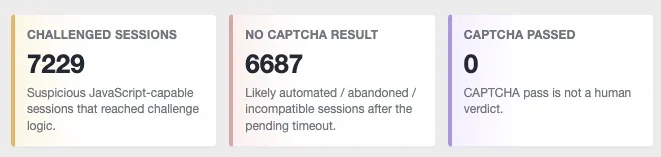
Thanks! waiting on feedback from this to confirm if it's still an issue, or if it came up at some point with under attack mode enabled temporarily
View attachment 341796
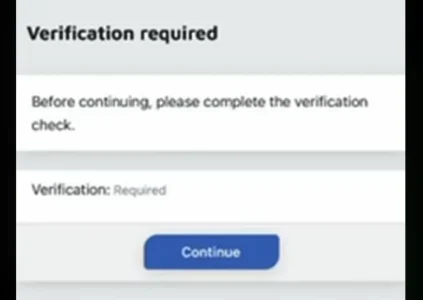
On that same forum, I'm seeing no captchas being passed, which I assumed initially was just bots and haven't been able to get the captcha to show for me to debug/confirm the issue, but have gotten a report of someone unable to pass it, they get the challenge page with a button to continue, but it just loops them. It's using Turnstile so I'm not sure if that's just not compatible? I'm assuming it's rendering the invisible version that doesn't have user interaction, but haven't been able to get it to flag me to test it and confirm what exactly is going on, sorry for the bad quality screenshot, it's a screenshot from a screen recording that was compressed, but they're just hitting this page and getting sent back to it as soon as they click Continue
View attachment 341797
It looks to me like yoru CAPTCHA is not configured correctly. This is something XenForo itself renders here. I recommend sending me the info requested, but also send me the URL for the forum. I will see if I can debug the CAPTCHA issue from the outside.

Uncaught TurnstileError: [Cloudflare Turnstile] Invalid type for parameter "theme", expected dark|light|auto, got "" string.View attachment 341807
It does work and display properly on the register form, and everywhere else, it seems like it's only on the bot guard challenge page. Currently have bot guard disabled (through the option to enable / disable it), but I did find the challenge page direct URL and it seems to work so I'll send you the DM, but the error in the console on this page is:
no issues on other pages with the captcha thoughCode:Uncaught TurnstileError: [Cloudflare Turnstile] Invalid type for parameter "theme", expected dark|light|auto, got "" string.
For some reason it seems like it's not properly resolving style properties within the captcha_turnstile template, but only when embedded on the bot-guard endpoint
Why allow bots to reach your server and consume its resources when using Cloudflare could be a better option?
That error is very likely caused by XenForo 2.3’s Turnstile JavaScript receiving an empty style theme, not by bad Turnstile keys.
Bot Guard does not hardcode or pass theme="". It resolves the configured XenForo CAPTCHA provider, creates XenForo’s CAPTCHA object, and renders that object into the Bot Guard challenge page. So this particular error is a XenForo-side issue, but, I don't think its the actual issue here. I will check your DM and go from there.
<xf:js src="xf/captcha.js" min="1" />

<div data-xf-init="turnstile" data-sitekey="{$siteKey}" data-action="{$context}" data-theme="{{ property('styleType') }}"></div>xf:captcharow or xf:captcha template tag, but on this bot guard page it's rendering the captcha within the controller using $captchaHtml = (string)$captcha->render($app->templater()); and then renders $captchaHtml inside the template, without that style property being resolved
XenForo does this within the captcha_turnstile template:
Code:<xf:js src="xf/captcha.js" min="1" /> <div data-xf-init="turnstile" data-sitekey="{$siteKey}" data-action="{$context}" data-theme="{{ property('styleType') }}"></div>
The issue seems to be with the way this template is being rendered. Everything in XenForo that renders the captcha uses thexf:captcharoworxf:captchatemplate tag, but on this bot guard page it's rendering the captcha within the controller using$captchaHtml = (string)$captcha->render($app->templater());and then renders$captchaHtmlinside the template, without that style property being resolved
Also - this is on XF 2.2, I'll have to check it on 2.3 to see if this is unique to 2.2 or not
light or dark.captcha_turnstile<div data-xf-init="turnstile" data-sitekey="{$siteKey}" data-action="{$context}" data-theme="{{ property('styleType') }}"></div><div data-xf-init="turnstile" data-sitekey="{$siteKey}" data-action="{$context}" data-theme="light"></div>dark instead of light if the active guest style uses a dark theme.document.querySelector('[data-xf-init="turnstile"]')?.getAttribute('data-theme')lightdark
- Go to Admin CP → Appearance → Templates.
- In the template search/filter box, search for:
captcha_turnstile- Open the public template named captcha_turnstile for the style being used by guests.
- Find this line:
<div data-xf-init="turnstile" data-sitekey="{$siteKey}" data-action="{$context}" data-theme="{{ property('styleType') }}"></div>- Change it to:
<div data-xf-init="turnstile" data-sitekey="{$siteKey}" data-action="{$context}" data-theme="light"></div>
Usedarkinstead oflightif the active guest style uses a dark theme.
Go to Admin CP → Tools → Rebuild caches and rebuild the style/template caches, if that option is available.
xf:captcha template tag, or in the worst case through a View class which should have access to the correct templater object for the style being usedWe use essential cookies to make this site work, and optional cookies to enhance your experience.

