[XB] User Upgrade Custom Cost Amount

[XB] User Upgrade Custom Cost Amount [Paid] 2.0.1 Patch Level 1

No permission to buy ($15.00)

Painbaker

Well-known member
@Painbaker does this not work if you only have one payment method? On my site, I only use Paypal, so when you click upgrade, it immediately opens up a new tab for paypal. I have this set up but there is no option to change the amount.
 
@Painbaker does this not work if you only have one payment method? On my site, I only use Paypal, so when you click upgrade, it immediately opens up a new tab for paypal. I have this set up but there is no option to change the amount.
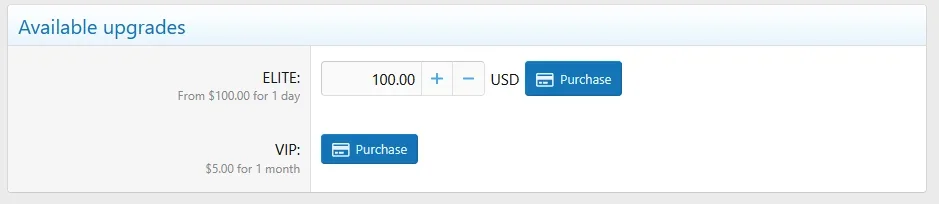
This addon adds an input to the purchase confirmation window for the Paid Registrations add-on only. In the standard account upgrade page, it looks like this:

1737720840693.webp

Make sure the template modification applies to your style by clicking on the numbers on the side:

1737720939515.webp

Let me know what is showing for you and what style and version of XF you are using
 
Ok so it appears to only apply to the master style...

View attachment 317961
This is ok if your style has not changed this template.
Other possible reasons why it's not working for you:
  • Overlapping template modifications for "account_upgrades" with other addons.
  • Custom addon that completely replaces the account upgrades page

Please send me a PM with the login details for your site (with admin access to template modifications) and I'll check what's causing the problem.

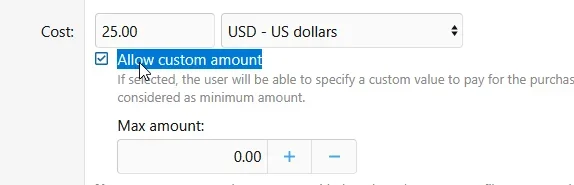
PS: Are you sure you checked this box for user upgrades?
1737838387220.webp
 
Is there a minimum amount that can be set? I don't see it in the screenshots.

Would also be nice to have set amounts as well, so an input box where we put 5,15,20,30,50,100...
and they show as quick buttons like [$5] [$10] [$15]... and you could allow custom amount as well in combo, or have either.

Thanks!
 
This works with recurring billing and doesn't create some kind of mismatched product error? Asking because recently had PP gateway issues with a mismatch (XF bug). And works with Stripe recurring?
 
Is there a minimum amount that can be set? I don't see it in the screenshots.
The specified upgrade price acts as the minimum amount

Would also be nice to have set amounts as well, so an input box where we put 5,15,20,30,50,100...
and they show as quick buttons like [$5] [$10] [$15]... and you could allow custom amount as well in combo, or have either.
I will include this in the next update

This works with recurring billing and doesn't create some kind of mismatched product error? Asking because recently had PP gateway issues with a mismatch (XF bug). And works with Stripe recurring?
This should work with recurring payments. But keep in mind that the price cannot be changed without canceling the subscription
 
I will include this in the next update
Do you know when this would be? I plan to buy it for sure but I may not want to introduce it until it has this. If it will be a long time I will just get it and use it now. If a week or so I will wait. Thanks!
 
This has 2 bugs:

1. When you toggle the on/off button on the upgrades page for a particular upgrade you get a warning.
1766107136956.webp
"Oops! We ran into some problems.
Please enter a number that is at least 5.00."

But, the price is set to $5 and the preset starts at $5.

It can be turned on/off inside the upgrade without the error. I believe this is caused when Presets is enabled and the last line is 0. You cannot remove the line that says 0. All fields are set correctly and happens on all the upgrades.

2. When trying to disable Presets by unchecking the box after you set some presets, you get this error:

ValueError: max(): Argument #1 ($value) must contain at least one element in src/addons/OzzModz/UserUpgradeCustomAmount/XF/Admin/Controller/UserUpgrade.php at line 17
max() in src/addons/OzzModz/UserUpgradeCustomAmount/XF/Admin/Controller/UserUpgrade.php at line 17
OzzModz\UserUpgradeCustomAmount\XF\Admin\Controller\UserUpgrade->upgradeSaveProcess() in src/XF/Admin/Controller/UserUpgradeController.php at line 131
XF\Admin\Controller\UserUpgradeController->actionSave() in src/XF/Mvc/Dispatcher.php at line 362
XF\Mvc\Dispatcher->dispatchClass() in src/XF/Mvc/Dispatcher.php at line 264
XF\Mvc\Dispatcher->dispatchFromMatch() in src/XF/Mvc/Dispatcher.php at line 121
XF\Mvc\Dispatcher->dispatchLoop() in src/XF/Mvc/Dispatcher.php at line 63
XF\Mvc\Dispatcher->run() in src/XF/App.php at line 2824
XF\App->run() in src/XF.php at line 806
XF::runApp() in admin.php at line 15

Even if I make every field 0 and click to save to try to remove, still, the error.

Suggestions:

Can you please have the USD display the decimal amount with two digits? For example if I set the price to $2.50 it displays as $2.5 which looks odd. Also better if $5 says $5.00, because it does on the XF portion of the upgrade on the same page.

The other suggestion is can the presets auto-arrange in order? This isn't a huge deal really, but, let's say I have 3,4,5,6,7,8 dollars. Now I want add 2 dollars. I have to add it to the bottom. When I save, and look at the upgrades page, it is still at the bottom, so I have to redo all the presets in order.

Thanks! I really like this.

 
Last edited:
I forgot to post Bug #3:

3. If I am using .50 increments in presets like $2.50, $300, $3.50, $4.00, $4.50 and in custom amount I want to give $10, it says:
"Please enter a valid value. The two nearest valid values are 9.5 and 10.5."
Why can't $10.00 be entered?
It also happens if I use whole amounts for presets like 5,6,7,8 and enter 10.50... or 7.50. Custom amount should allow any amount under the maximum. I should be able to enter $5.42 for example.

4. If you uncheck Maximum Amount is stays checked, just at 0.00. Not a bug that affects anything I don't think but you can't uncheck it.

Still, great add-on, using it. 😁
 
Last edited:
ValueError: max(): Argument #1 ($value) must contain at least one element in src/addons/OzzModz/UserUpgradeCustomAmount/XF/Admin/Controller/UserUpgrade.php at line 17
max() in src/addons/OzzModz/UserUpgradeCustomAmount/XF/Admin/Controller/UserUpgrade.php at line 17
OzzModz\UserUpgradeCustomAmount\XF\Admin\Controller\UserUpgrade->upgradeSaveProcess() in src/XF/Admin/Controller/UserUpgradeController.php at line 131
XF\Admin\Controller\UserUpgradeController->actionSave() in src/XF/Mvc/Dispatcher.php at line 362
XF\Mvc\Dispatcher->dispatchClass() in src/XF/Mvc/Dispatcher.php at line 264
XF\Mvc\Dispatcher->dispatchFromMatch() in src/XF/Mvc/Dispatcher.php at line 121
XF\Mvc\Dispatcher->dispatchLoop() in src/XF/Mvc/Dispatcher.php at line 63
XF\Mvc\Dispatcher->run() in src/XF/App.php at line 2824
XF\App->run() in src/XF.php at line 806
XF::runApp() in admin.php at line 15
I'm actually getting this error when saving an upgrade that is not using your add-on (custom pricing is unchecked, but cannot save other changes).
 
This has 2 bugs:

1. When you toggle the on/off button on the upgrades page for a particular upgrade you get a warning.
View attachment 331299
"Oops! We ran into some problems.
Please enter a number that is at least 5.00."

But, the price is set to $5 and the preset starts at $5.

It can be turned on/off inside the upgrade without the error. I believe this is caused when Presets is enabled and the last line is 0. You cannot remove the line that says 0. All fields are set correctly and happens on all the upgrades.

2. When trying to disable Presets by unchecking the box after you set some presets, you get this error:

ValueError: max(): Argument #1 ($value) must contain at least one element in src/addons/OzzModz/UserUpgradeCustomAmount/XF/Admin/Controller/UserUpgrade.php at line 17
max() in src/addons/OzzModz/UserUpgradeCustomAmount/XF/Admin/Controller/UserUpgrade.php at line 17
OzzModz\UserUpgradeCustomAmount\XF\Admin\Controller\UserUpgrade->upgradeSaveProcess() in src/XF/Admin/Controller/UserUpgradeController.php at line 131
XF\Admin\Controller\UserUpgradeController->actionSave() in src/XF/Mvc/Dispatcher.php at line 362
XF\Mvc\Dispatcher->dispatchClass() in src/XF/Mvc/Dispatcher.php at line 264
XF\Mvc\Dispatcher->dispatchFromMatch() in src/XF/Mvc/Dispatcher.php at line 121
XF\Mvc\Dispatcher->dispatchLoop() in src/XF/Mvc/Dispatcher.php at line 63
XF\Mvc\Dispatcher->run() in src/XF/App.php at line 2824
XF\App->run() in src/XF.php at line 806
XF::runApp() in admin.php at line 15

Even if I make every field 0 and click to save to try to remove, still, the error.

Suggestions:

Can you please have the USD display the decimal amount with two digits? For example if I set the price to $2.50 it displays as $2.5 which looks odd. Also better if $5 says $5.00, because it does on the XF portion of the upgrade on the same page.

The other suggestion is can the presets auto-arrange in order? This isn't a huge deal really, but, let's say I have 3,4,5,6,7,8 dollars. Now I want add 2 dollars. I have to add it to the bottom. When I save, and look at the upgrades page, it is still at the bottom, so I have to redo all the presets in order.

Thanks! I really like this.
Fixed in last update


3. If I am using .50 increments in presets like $2.50, $300, $3.50, $4.00, $4.50 and in custom amount I want to give $10, it says:
"Please enter a valid value. The two nearest valid values are 9.5 and 10.5."
Why can't $10.00 be entered?
It also happens if I use whole amounts for presets like 5,6,7,8 and enter 10.50... or 7.50. Custom amount should allow any amount under the maximum. I should be able to enter $5.42 for example.
The minimum value you can enter depends on the price you set for the upgrade in the "Cost" field
 
Back
Top Bottom