WordPress Posts + Category Widget

WordPress Posts + Category Widget 1.1.2

No permission to download

kolakube

Well-known member
Licensed customer
kolakube submitted a new resource:

WordPress Latest Posts + Category Widget - Show latest posts by lists, feature articles by IDs, and more WP content with this simple XF widget.

Show the latest posts feed from your connected WordPress blog to a clean and flexible XenForo widget.

Use the simple widget settings to feature hand-picked posts and pages, show latest posts from specific categories, and link to WooCommerce store products across as many widgets as you'd like.

The design of this widget adapts to the position you set it to in the widget settings. The layout narrows down into a simple list when featured in the sidebar, and expands to a wider grid format when...

Read more about this resource...
 
I'm using this in conjunction with Siropu's Ad Manager to display 30 different widgets randomly and have the widget cycle products within each of the categories each widget is set to.

So far this has worked out well to increase the visibility of merchandise we sell.
 
I'm using this in conjunction with Siropu's Ad Manager to display 30 different widgets randomly and have the widget cycle products within each of the categories each widget is set to.

So far this has worked out well to increase the visibility of merchandise we sell.
Great idea, mapping products to related forums is a valuable use case and glad to see the widget works well in the ad manager.

I linked your post and added a couple of other user cases to the addon description. Curious to see other ways the widget can be used. :unsure:
 
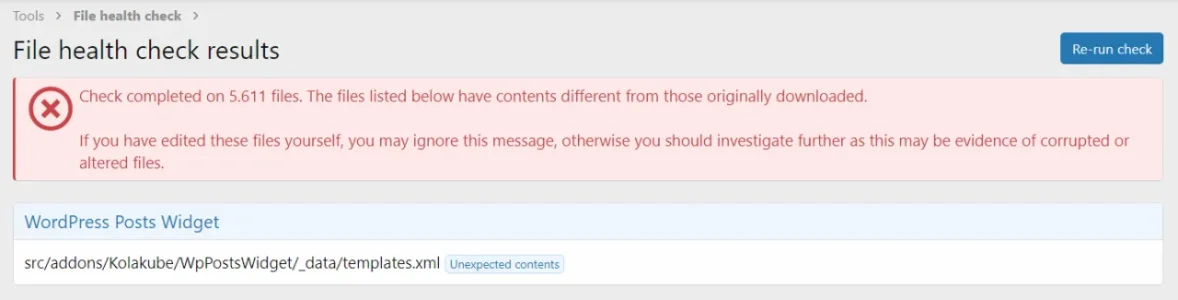
Hello, i get this with a fresh install on a local server:

1676109235027.webp

I just re-downloaded the add-on files but it doesn't solve the problem.
 
kolakube updated WordPress Posts + Category Widget with a new update entry:

New features, quality of life, and code cleanup

Version 1.1 adds some much-needed cleanup and new quality of life features to the WP Posts Widget.


New widget options
  1. Image size option: You can now choose the image size instead of just being restricted to the thumbnail. New sizes: Thumbnail, Medium Large, Large, Full. Medium is still the default, so no visual changes after upgrade
  2. Hide images: Maybe you just want a compact list of posts, you can now remove the image from...

Read the rest of this update entry...
 
@kolakube
adds lazy loading attribute
With lazy loading in the new update and several wordpress post widgets with images on the forum index page, the page doesn't scroll down to the bottom when you click the down arrow.

page scroll.webp
 
@kolakube

With lazy loading in the new update and several wordpress post widgets with images on the forum index page, the page doesn't scroll down to the bottom when you click the down arrow.

View attachment 346780
Nice find, I had the widget at the top of the sidebar so it didn't occur to me.

The fix was to simply add a width and height parameter to the post image, which WP calculates, and is a best practice anyway.
 
Back
Top Bottom