XF 2.1 Widget height css?

sbj

Well-known member
Hello,

I have a widget displayed above forum list. I want to change the height of it via css in extra.less template to fit it for my needs. How can I do that?

I tried

CSS:
[data-widget-key="widget_key"] .block-body{
    max-height: 20px;
}

But I see no results. Tried also block-container or message-body, same thing.
 
Thanks. From my side right idea but poor execution it seems.

Can you also test if it works when you have a new threads widget which is displayed as "expanded" and has a Youtube video as first post?

The given css doesn't work for me in my case.
 
Maybe tell why you're trying to increase height? Is the text being cut-off?

Actually the opposite. I am trying to decrease the height.
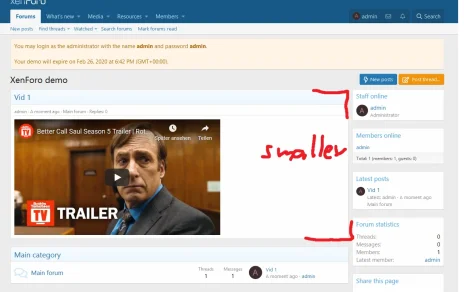
I just want to display youtube vids on frontpage above the node list and the default display is too big (height). So I want to decrease the height of this widget.

I want to do a "vid of the day" type of thing.
 
So something like thread preview?
Yes? Not sure what you mean.

I want to display Youtube videos above forum list which can be clickable, so people can click on the youtube vid.

How can I do that? With widgets.
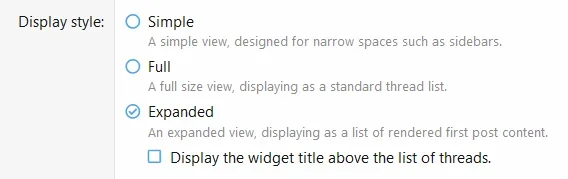
What widget? The "new threads" widget.
But with what condition? Expanded.
1582483189218.webp

As the other options don't render the first post in order for me to display them on front page.


But the problem is this widget is too big, it covers too much height and space. I want to reduce the size (height).


Example:

1582483630543.webp
 
@sbj You would need to apply the template change I provided here and then use this
Less:
[data-widget-key="above_forum_list"][data-widget-definition="new_threads"]
{
    .block-container
    {
        width: 350px;

        .message-userContent
        {
            max-height: 425px;
            overflow: hidden;
        }
    }
}
in extra.less
 
@TickTackk

Thanks for taking your time and helping out, much appreciated. So it seems I found a bug in the system, right?

On which template do I need to make that template edit? You haven't mentioned it.

Also thanks for this semi-complicated css.

Not sure how am I supposed to know to target 4 css values in order to change the height of the widget... I thought this task would be easy to do but as you see it is not that easy. But thanks for the support, it's not your fault!

Btw. why did you use a fixed number for the width? I only wanted to change the height and wanted it to be responsive, so wanted to use max-height only.
 
Last edited:
So it seems I found a bug in the system, right?
Just the template specified below.

On which template do I need to make that template edit? You haven't mentioned it.
widget_new_threads

Btw. why did you use a fixed number for the width? I only wanted to change the height and wanted it to be responsive, so wanted to use max-width only.
This is just a basic example of what needs to be done to increase height. I'm sure there are other ways to make this responsive and stuff like that. :p
 
Back
Top Bottom